1. Introduction
Thank you for purchasing the Panasonic WX-ST200 DECT Handheld Microphone System. This microphone is designed for clear vocal delivery in educational and corporate presentation environments, such as lectures, training sessions, and video conferences. It features 1.9 GHz DECT wireless technology for reliable connectivity and is optimized for vocal clarity. This manual provides essential information for the safe and effective use of your WX-ST200 microphone.
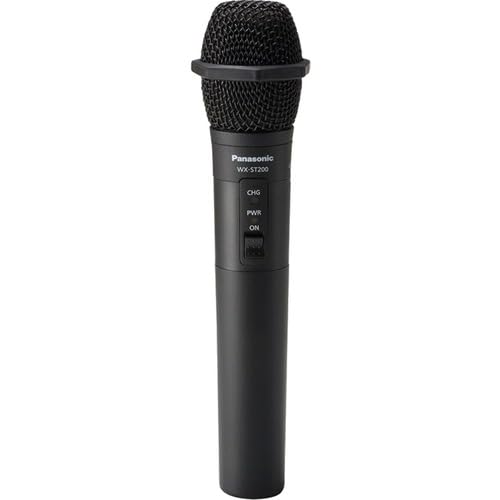
Figure 1: Panasonic WX-ST200 DECT Handheld Microphone. This image shows the microphone from a slight angle, highlighting its ergonomic design and the main body.
2. Safety Information
Please read and understand all safety instructions before using this product. Keep this manual for future reference.
- Battery Safety: Use only specified AA alkaline or rechargeable batteries. Do not mix old and new batteries, or different types of batteries. Dispose of batteries according to local regulations.
- Water and Moisture: Do not expose the microphone to water, rain, or excessive moisture. This product is not waterproof.
- Heat Sources: Keep the microphone away from heat sources such as radiators, heat registers, stoves, or other apparatus (including amplifiers) that produce heat.
- Cleaning: Clean only with a dry cloth. Do not use liquid cleaners or aerosol cleaners.
- Servicing: Do not attempt to service this product yourself. Refer all servicing to qualified service personnel.
- Usage Environment: Avoid using the microphone in extremely dusty, humid, or high-temperature environments.
3. Package Contents
Verify that all items listed below are included in your package. If any items are missing or damaged, contact your dealer immediately.
- WX-ST200 Handheld Microphone
- AA Battery (1)
- Octogen Color Rings (4)
- User Manual (this document)
Note: The contactless desktop charger (WX-SZ200) is sold separately and is not included in this package.
4. Setup
4.1. Battery Installation
- Unscrew the bottom cap of the microphone by turning it counter-clockwise.
- Insert one AA battery into the battery compartment, ensuring the correct polarity (+/-) as indicated inside the compartment.
- Screw the bottom cap back onto the microphone by turning it clockwise until secure.
Figure 2: Illustration of battery insertion. (Image not available, refer to physical product for visual guide.) This conceptual image would show the bottom cap removed and a single AA battery being inserted into the microphone body, with clear polarity markings.
4.2. Pairing with a Receiver (Sold Separately)
The WX-ST200 uses 1.9 GHz DECT wireless technology for automatic channel assignment and easy setup. Refer to the receiver's user manual for specific pairing instructions. Generally, the process involves:
- Ensure both the WX-ST200 microphone and the compatible Panasonic DECT receiver are powered on.
- Initiate the pairing mode on the receiver (consult receiver manual for exact steps).
- Press and hold the pairing button on the WX-ST200 microphone (location typically near the battery compartment or power button) until the indicator light flashes, signifying pairing mode.
- Once successfully paired, the indicator light on both devices will show a steady illumination.
4.3. Attaching Color Rings
The included octogen color rings can be used for easy identification of multiple microphones. Simply slide the desired color ring onto the microphone body, typically above the power button or near the base of the microphone head, until it sits securely.
5. Operating Instructions
5.1. Powering On/Off
- To Power On: Press and hold the power button (usually located on the microphone body) for approximately 2 seconds until the power indicator light illuminates.
- To Power Off: Press and hold the power button for approximately 3 seconds until the power indicator light turns off.
5.2. Microphone Usage for Speech
Hold the microphone approximately 2-6 inches (5-15 cm) from your mouth for optimal vocal clarity. The WX-ST200 is designed with a unidirectional polar pattern, meaning it primarily picks up sound from the front, reducing background noise. Speak directly into the top of the microphone.
5.3. Using the 3.5mm Audio Input Jack
The WX-ST200 features a 3.5mm audio input jack, allowing you to stream audio from a local source, such as a laptop or smartphone, through the microphone system. This is useful for playing background music or audio clips during a presentation.
- Connect a standard 3.5mm audio cable from your audio source (e.g., laptop headphone jack) to the 3.5mm input jack on the WX-ST200 microphone.
- Ensure the audio source is playing and its volume is adjusted appropriately. The audio will be transmitted wirelessly via the microphone system.
Figure 3: Connecting an external audio source. (Image not available, refer to physical product for visual guide.) This conceptual image would show a 3.5mm audio cable plugged into the microphone's input jack, with the other end connected to a laptop.
6. Maintenance
6.1. Cleaning
To maintain the appearance and functionality of your microphone:
- Wipe the exterior of the microphone with a soft, dry cloth.
- Do not use abrasive cleaners, solvents, or strong chemicals, as these can damage the finish or internal components.
- For the microphone grille, gently brush away any dust or debris using a soft brush.
6.2. Battery Care and Storage
- Remove the battery if the microphone will not be used for an extended period to prevent leakage.
- Store the microphone in a cool, dry place, away from direct sunlight and extreme temperatures.
- If using rechargeable batteries, follow the manufacturer's guidelines for charging and maintenance.
7. Troubleshooting
If you experience issues with your WX-ST200 microphone, refer to the following common problems and solutions:
| Problem | Possible Cause | Solution |
|---|---|---|
| No sound from microphone. |
|
|
| Poor sound quality or dropouts. |
|
|
| 3.5mm audio input not working. |
|
|
If the problem persists after trying these solutions, please contact Panasonic customer support.
8. Specifications
| Feature | Description |
|---|---|
| Model | WX-ST200 |
| Brand | Panasonic |
| Connectivity Technology | Wireless (DECT 1.9 GHz), Auxiliary (3.5 mm Jack) |
| Microphone Form Factor | Handheld Microphone System |
| Polar Pattern | Unidirectional |
| Power Source | Battery Powered (1x AA battery) |
| Weight | Approximately 0.4 lbs (with battery) |
| Recommended Uses | Speech, Video Conference, Karaoke |
| Included Components | Battery, Octogen Color Rings |
| Manufacturer | PANASONIC SOLUTIONS COMPANY |
| UPC | 885170366206 |
| ASIN | B0CBSTGS43 |
9. Warranty and Support
9.1. Warranty Information
This Panasonic product is covered by a limited warranty. For detailed information regarding warranty terms, conditions, and duration, please refer to the warranty card included with your product or visit the official Panasonic website. Keep your purchase receipt as proof of purchase for warranty claims.
9.2. Customer Support
If you have any questions, require technical assistance, or need to report a problem that cannot be resolved using the troubleshooting guide, please contact Panasonic customer support:
- Online Support: Visit the official Panasonic support website for FAQs, drivers, and contact options.
- Telephone Support: Refer to your product packaging or the Panasonic website for regional customer service telephone numbers.
Please have your product model number (WX-ST200) and serial number (if applicable) ready when contacting support.


