
Introduction
This manual provides essential instructions for the safe operation, setup, maintenance, and troubleshooting of your BLACK+DECKER BCD003C1 18V Cordless Variable Speed Hammer Drill Machine. Please read this manual thoroughly before using the tool to ensure proper and safe usage. Keep this manual for future reference.
General Safety Information
WARNING: Read all safety warnings, instructions, illustrations, and specifications provided with this power tool. Failure to follow all instructions listed below may result in electric shock, fire, and/or serious injury.
- Always wear eye protection and hearing protection when operating power tools.
- Keep your work area clean and well-lit. Cluttered or dark areas invite accidents.
- Do not operate power tools in explosive atmospheres, such as in the presence of flammable liquids, gases, or dust.
- Keep children and bystanders away while operating a power tool.
- Dress properly. Do not wear loose clothing or jewelry. Keep your hair and clothing away from moving parts.
- Avoid accidental starting. Ensure the switch is in the off-position before connecting to battery pack, picking up or carrying the tool.
- Use the correct power tool for your application.
- Disconnect the battery pack from the power tool before making any adjustments, changing accessories, or storing power tools.
- Maintain power tools and accessories. Check for misalignment or binding of moving parts, breakage of parts, and any other condition that may affect the power tool’s operation.
- Use the power tool, accessories, and tool bits in accordance with these instructions, taking into account the working conditions and the work to be performed.
Product Overview
Familiarize yourself with the components of your BLACK+DECKER BCD003C1 Cordless Hammer Drill.

Figure 1: Front view of the BLACK+DECKER BCD003C1 Cordless Hammer Drill, showing the chuck, clutch, and battery attached.
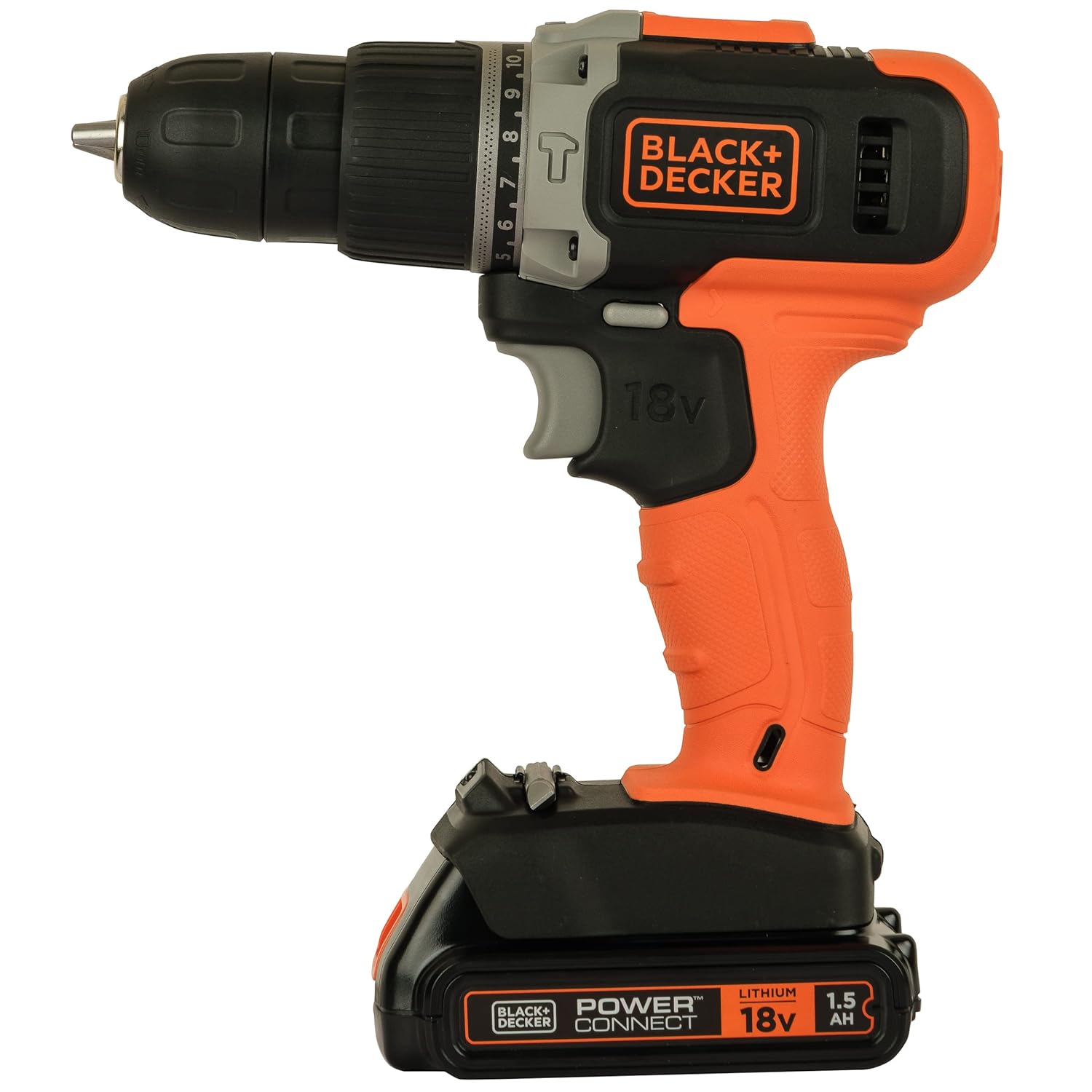
Figure 2: Side view of the BLACK+DECKER BCD003C1 Cordless Hammer Drill, highlighting the variable speed trigger and forward/reverse switch.

Figure 3: A user demonstrating the ergonomic grip of the BLACK+DECKER BCD003C1 Cordless Hammer Drill.
Key Components:
- Chuck: Holds drill bits and screwdriver bits.
- Clutch Collar: Adjusts torque settings for screwdriving and selects drill/hammer drill mode.
- Variable Speed Trigger: Controls the rotational speed of the chuck.
- Forward/Reverse Switch: Changes the direction of rotation.
- Battery Pack: Provides power to the drill.
- Anti-slip Soft Grip: Enhances user comfort and control.
Setup
1. Charging the Battery
Before first use, fully charge the 18V Li-Ion battery pack. Refer to the separate battery charger manual for detailed charging instructions. Ensure the charger is compatible with the 1.5Ah Li-Ion battery.
2. Installing and Removing the Battery Pack
- To Install: Align the battery pack with the receptacle on the bottom of the drill handle. Slide the battery pack into the handle until it clicks securely into place.
- To Remove: Press the battery release button (usually located on the front or sides of the battery pack) and slide the battery pack out of the handle.
3. Installing and Removing Drill Bits/Accessories
- To Install: Rotate the chuck collar counter-clockwise until the chuck jaws are open wide enough to insert the bit. Insert the bit fully into the chuck. Rotate the chuck collar clockwise to tighten the jaws firmly around the bit. For best results, hand-tighten the chuck, then use the drill's power to give it a final tighten by briefly pressing the trigger.
- To Remove: Rotate the chuck collar counter-clockwise to loosen the jaws and remove the bit.
Operating Instructions
1. Powering On/Off and Variable Speed Control
The drill is equipped with a variable speed trigger. To start the drill, press the trigger. To stop, release the trigger. The speed of rotation is controlled by the amount of pressure applied to the trigger; pressing harder increases the speed (0-650 RPM).
2. Forward/Reverse Switch
The forward/reverse switch is located above the trigger. Push the switch to the left for forward rotation (drilling/screwing in) and to the right for reverse rotation (removing screws). Ensure the switch is in the center position to lock the trigger and prevent accidental starting when not in use.
3. Clutch Settings and Modes
The clutch collar allows you to select the appropriate torque setting for screwdriving or switch to drilling/hammer drilling modes. The 10-position clutch provides precise control.
- Screwdriving: Rotate the clutch collar to one of the numbered settings (1-10). Lower numbers are for smaller screws and softer materials, higher numbers for larger screws and harder materials. This prevents over-driving screws and stripping screw heads.
- Drilling: Rotate the clutch collar to the drill symbol. This bypasses the clutch for continuous power, ideal for drilling into wood or metal.
- Hammer Drilling: Rotate the clutch collar to the hammer drill symbol. This mode combines rotary action with a hammering action, suitable for drilling into masonry or concrete.
Maximum Drilling Capacity:
- Wood: 25mm
- Steel: 10mm
Maximum Torque: 30 Nm.
Maintenance
Regular maintenance ensures the longevity and optimal performance of your drill.
1. Cleaning
- Keep the ventilation slots of the tool clean to prevent overheating.
- Use a soft brush or dry cloth to remove dust and debris from the tool. Do not use water or chemical cleaners.
- Clean the chuck jaws regularly to ensure proper grip on bits.
2. Battery Care
- Store battery packs in a cool, dry place away from direct sunlight and extreme temperatures.
- Do not store battery packs in a discharged state for extended periods. Charge them periodically.
- Do not attempt to open or modify the battery pack.
3. Storage
When not in use, store the drill and its accessories in a secure, dry place, out of reach of children. Ensure the forward/reverse switch is in the center (locked) position.
Troubleshooting
If you encounter issues with your drill, refer to the following common problems and solutions:
| Problem | Possible Cause | Solution |
|---|---|---|
| Drill does not start. | Battery is not charged or not properly installed. Forward/reverse switch is in the center (locked) position. | Ensure battery is fully charged and securely installed. Move the forward/reverse switch to the left or right. |
| Reduced power or performance. | Battery charge is low. Bit is dull or incorrect for the material. | Recharge the battery. Replace or sharpen the bit. Ensure the correct clutch setting or mode is selected. |
| Chuck not holding bit securely. | Chuck jaws are dirty or worn. Bit shank is damaged. | Clean chuck jaws. Replace damaged bits. Ensure chuck is tightened properly. |
| Overheating during use. | Ventilation slots are blocked. Excessive load on the motor. | Clear ventilation slots. Reduce pressure on the drill. Allow the tool to cool down. |
If you experience issues that cannot be resolved with the above steps, or if you require replacement parts, please contact BLACK+DECKER customer service. Note that availability of spare parts, such as chargers, may vary by region and product model. It is advisable to check with authorized service centers for specific part availability.
Specifications
| Feature | Detail |
|---|---|
| Brand | BLACK+DECKER |
| Model | BCD003C1 |
| Power Source | Battery Powered |
| Voltage | 18 Volts |
| Amperage | 1.5 Amps |
| Maximum Rotational Speed | 650 RPM |
| Maximum Chuck Size | 10 Millimeters |
| Special Feature | Variable Speed |
| Material (Grip) | Plastic |
| Maximum Torque | 30 Newton Meters |
| Number of Speeds | 1 |
| Drill Type | Hammer Drill |
| Drilling Capacity (Wood) | 25 Millimetres |
| Drilling Capacity (Metal) | 10 Millimetres |
Warranty and Support
Warranty Information
BLACK+DECKER products are manufactured to high-quality standards and are guaranteed against manufacturing defects. For specific warranty terms and conditions applicable to your region and product, please refer to the warranty card included with your purchase or visit the official BLACK+DECKER website. Keep your proof of purchase for warranty claims.
Customer Support
For technical assistance, service, or to locate an authorized service center, please visit the official BLACK+DECKER website or contact their customer service department. Contact details can typically be found on the product packaging or the official website.
Official BLACK+DECKER Website: www.blackanddecker.com


