
1. Introduction
Thank you for choosing the EXTRALINK Smart Life HomeEye Indoor Surveillance Camera. This camera is designed to provide reliable indoor monitoring with advanced features such as 4MP 2.5K resolution, 360° pan and tilt capabilities, two-way audio, motion detection, and night vision. This manual will guide you through the setup, operation, and maintenance of your device to ensure optimal performance and security.

Image 1.1: EXTRALINK Smart Life HomeEye Camera overview.
2. Safety Information
- Ensure the camera is installed in a stable location to prevent falling.
- Use only the provided power cable and adapter.
- Do not expose the camera to extreme temperatures, humidity, or direct sunlight.
- Keep the device away from water or other liquids.
- Do not attempt to disassemble or repair the camera yourself. Contact customer support for assistance.
- This camera is designed for indoor use only.
3. Package Contents
Please check the package for the following items:
- EXTRALINK Smart Life HomeEye Camera (1 unit)
- USB Power Cable (1 unit)
- User Manual (This document)
- Mounting Accessories (Screws, wall plugs, mounting bracket)
4. Product Overview
The HomeEye camera features a high-resolution lens, infrared LEDs for night vision, a microphone, a speaker for two-way audio, and a microSD card slot for local storage. It offers a 360° panoramic view with pan and tilt functions.
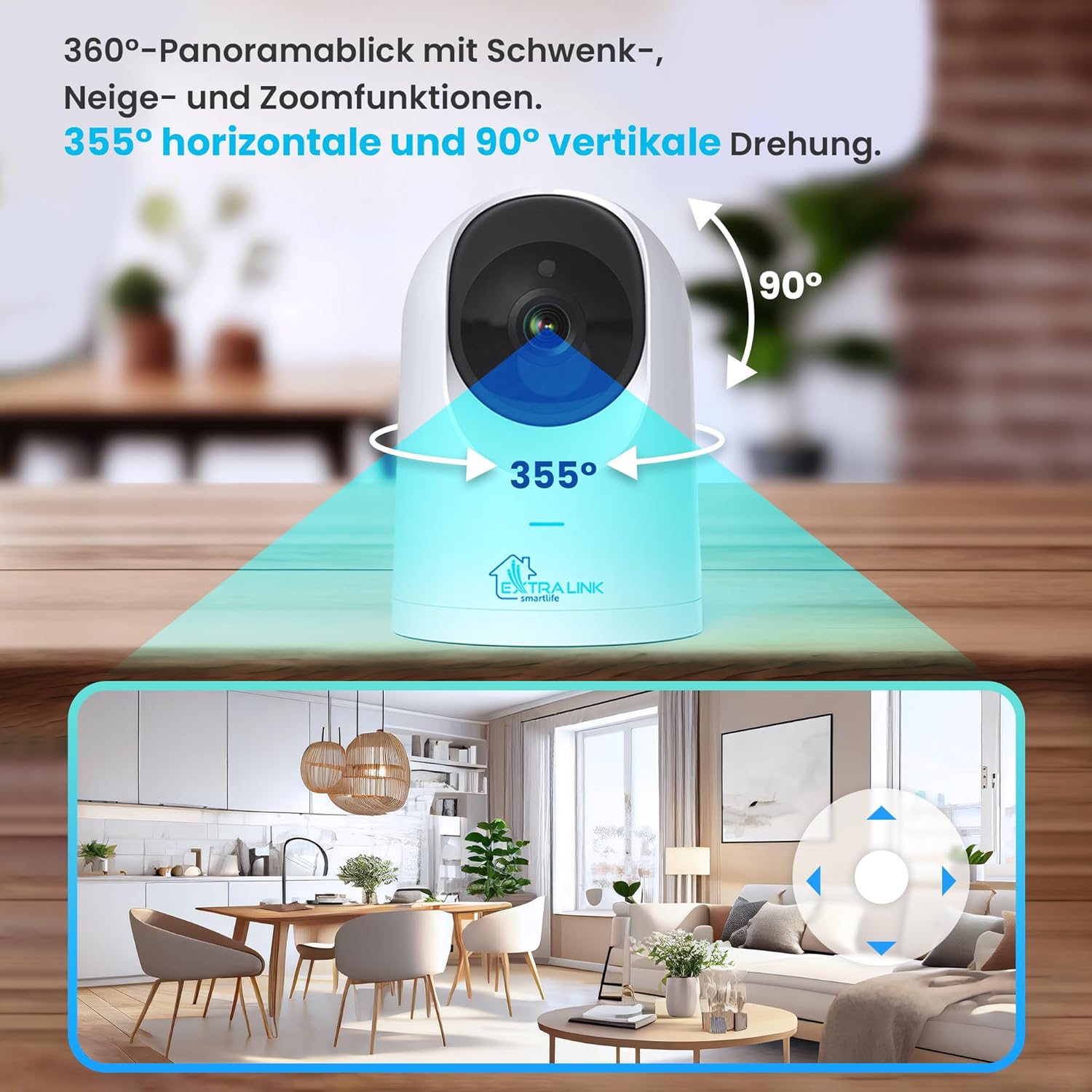
Image 4.1: Key features of the Extralink Smart Life HomeEye camera, including 2.5K resolution, F1.4 aperture, two-way talk, motion detection, 360° view, baby cry detection, 10m night vision, and automatic Wi-Fi reconnection.
5. Setup
5.1 Physical Installation
The camera offers flexible installation options. You can place it on a flat surface, mount it on a wall, or attach it to the ceiling. Choose a location that provides the best viewing angle for your monitoring needs.

Image 5.1: The camera can be installed on a wall, ceiling, or placed on a flat surface.
- Power On: Connect the camera to a power source using the provided USB cable and power adapter. The camera will power on and initiate its startup sequence.
- Indicator Light: Wait for the indicator light to flash, indicating it's ready for pairing.
5.2 App Installation and Pairing
The EXTRALINK Smart Life HomeEye camera uses the Tuya Smart Life app for control and monitoring.
- Download App: Download the "Smart Life" app from your smartphone's app store (iOS App Store or Google Play Store).
- Register/Login: Open the app and register for a new account or log in if you already have one.
- Add Device: Tap the "+" icon in the top right corner of the app to add a new device. Select "Security & Video Surveillance" and then "Smart Camera (Wi-Fi)".
- Network Configuration: Follow the on-screen instructions to connect the camera to your Wi-Fi network. Ensure your Wi-Fi is 2.4GHz.
- Scan QR Code: The app will display a QR code. Hold your camera towards the QR code on your phone screen until you hear a prompt.
- Connection Complete: Once connected, the camera will be added to your app. You can then rename the device and start monitoring.
6. Operating Instructions
6.1 Live View and Pan/Tilt Control
Open the Smart Life app and select your camera to access the live view. Use the on-screen controls to pan (355° horizontal) and tilt (90° vertical) the camera lens to adjust your viewing angle.

Image 6.1: The camera offers 355° horizontal and 90° vertical rotation for a comprehensive 360° panoramic view.
6.2 Two-Way Audio
Tap the microphone icon in the app's live view to enable two-way audio. You can speak through your phone, and your voice will be heard through the camera's speaker. Similarly, you can hear audio from the camera's environment through your phone.

Image 6.2: Real-time two-way voice communication allows interaction through the camera.
6.3 Motion Detection and Tracking
The camera features advanced motion detection and tracking. When motion is detected, the camera can automatically track the moving object and send notifications to your smartphone.

Image 6.3: The camera detects and tracks movement, sending instant alerts to your smartphone.
6.4 Baby Cry Detection
The HomeEye camera includes a baby cry detection feature, which can alert you when a baby's cry is detected, making it suitable for use as a baby monitor.
6.5 Night Vision
Equipped with infrared LEDs, the camera provides clear black-and-white video even in low-light conditions, with a night vision range of up to 10 meters.
6.6 Recording and Storage
The camera supports local storage via a microSD card (up to 128GB, not included). You can also opt for cloud storage services through the Tuya app (service available at an additional cost).

Image 6.4: The camera supports Micro-SD cards up to 128 GB for local storage and offers secure cloud storage via the Tuya app (subscription required).
7. Maintenance
- Cleaning: Gently wipe the camera lens and body with a soft, dry cloth. Do not use harsh chemicals or abrasive cleaners.
- Storage: If not in use for an extended period, store the camera in a cool, dry place away from direct sunlight.
- Firmware Updates: Regularly check the Smart Life app for firmware updates to ensure optimal performance and security.
8. Troubleshooting
| Problem | Possible Cause | Solution |
|---|---|---|
| Camera fails to connect to Wi-Fi. | Incorrect Wi-Fi password; 5GHz Wi-Fi network; camera too far from router. | Ensure correct 2.4GHz Wi-Fi password. Move camera closer to router. Restart router and camera. |
| No image in live view. | Camera offline; poor network connection. | Check camera power and Wi-Fi connection. Restart camera. Check internet connection. |
| Motion detection alerts not received. | Notifications disabled in app or phone settings; motion detection sensitivity too low. | Enable notifications in the Smart Life app and your phone settings. Adjust motion detection sensitivity in app. |
| MicroSD card not recording. | Card full or corrupted; incorrect format; card not inserted properly. | Format the microSD card in the app. Ensure card is inserted correctly. Replace card if corrupted. |
9. Specifications
| Feature | Detail |
|---|---|
| Brand | EXTRALINK |
| Model Name | EX.32992 |
| Effective Video Resolution | 4 MP (2592x1520px) |
| Video Recording Resolution | 1080p (for general recording, 2.5K for effective resolution) |
| Connectivity Technology | Wireless (Wi-Fi) |
| Pan/Tilt Rotation | 355° Horizontal, 90° Vertical |
| Viewing Angle | 90 Degrees |
| Night Vision Range | 10 Meters |
| Special Features | Two-way talk, Motion detection & tracking, Baby cry detection, Remote monitoring via app, Data encryption |
| Storage Support | microSD card up to 128 GB, Cloud storage (optional) |
| Power Source | Electric Cable (USB powered, 5 Volts, 8 Watts) |
| Material | Metal |
| Dimensions (L x W x H) | 9.5 x 9.5 x 14.5 cm |
| Weight | 350 grams |
| Usage Environment | Indoor |
10. Warranty and Support
10.1 Warranty Information
The EXTRALINK Smart Life HomeEye camera comes with a 36-month warranty from the date of purchase, ensuring product quality and reliability.
10.2 Customer Support
For any technical issues, questions, or support needs, please refer to the help section within the Smart Life application. You can also visit the official EXTRALINK website for further assistance and contact information.
Online Resources: For the latest FAQs and troubleshooting guides, please check the support section of the Smart Life app or the EXTRALINK official website.


