
Introduction
Thank you for choosing the ERYUE S-288 Mini 4.1 Channel Digital Audio Power Amplifier. This compact and versatile amplifier is designed to enhance your home audio experience, offering multiple input options including Bluetooth 5.0, AUX, and U-disk playback. With a powerful 50W*4 output, it can drive two pairs of speakers, delivering clear and crisp sound. This manual provides detailed instructions for setup, operation, maintenance, and troubleshooting to ensure optimal performance and longevity of your device.

Image: The ERYUE S-288 Mini 4.1 Channel Digital Audio Power Amplifier shown with its accompanying remote control.
Safety Information
Please read all safety warnings and instructions carefully before using this product to prevent injury or damage to the device.
- Do not expose the amplifier to rain, moisture, or extreme temperatures.
- Ensure proper ventilation around the unit to prevent overheating.
- Use only the provided power adapter and cable.
- Do not open the casing; there are no user-serviceable parts inside. Refer all servicing to qualified personnel.
- Keep out of reach of children.
- Disconnect power before cleaning or moving the unit.
Package Contents
Verify that all items are present in the package:
- 1 x ERYUE S-288 Audio Amplifier
- 1 x Remote Control
- 1 x AC Power Adapter
- 1 x AC Cable
- 1 x FM Antenna Cable
- 1 x User Manual (this document)
Product Overview
Familiarize yourself with the various components and controls of your ERYUE S-288 amplifier.
Front Panel

Image: Detailed view of the amplifier's front panel, indicating the USB socket, digital display, microphone socket, microphone volume adjustment, rhythm lamp, bass/treble adjustment, master volume, mode button, previous track, play/pause, and next track buttons.
- USB Socket: For U-disk playback.
- Digital Display: Shows current mode and playback information.
- MIC1 Socket: Microphone input.
- MIC.VOL: Microphone volume adjustment knob.
- Rhythm Lamp: Visual indicator for audio rhythm.
- TONE (Bass/Treble): Adjusts bass and treble levels.
- VOLUME: Master volume control knob.
- MODE: Switches between input modes (Bluetooth, AUX, U-disk).
- Previous Track / Play/Pause / Next Track: Control buttons for media playback.
Rear Panel

Image: Detailed view of the amplifier's rear panel, showing the 3.5 audio input port, signal input port (RCA), right and left channel speaker outputs, FM antenna socket, and 12V power input.
- AUDIO INPUT (RCA): Left and Right channel audio input.
- 3.5 Audio Input Port: Auxiliary audio input.
- Speaker Outputs (FR, FL, SR, SL): Connect your speakers here. Supports 4-8 ohms impedance.
- FM ANT: FM antenna connection.
- POWER INPUT (DC 12V): Connect the power adapter here.
Setup
Follow these steps to set up your amplifier for the first time.
1. Speaker Connection
Connect your passive speakers to the speaker output terminals on the rear panel. Ensure correct polarity (+ to + and - to -) for each channel (FR: Front Right, FL: Front Left, SR: Surround Right, SL: Surround Left). The amplifier supports speakers with an impedance of 4-8 ohms.
2. Audio Input Connection
Choose your preferred audio input method:
- RCA Input: Connect your audio source (e.g., DVD player, CD player) to the RCA "AUDIO INPUT" ports using an RCA cable.
- 3.5mm AUX Input: Connect your audio source (e.g., smartphone, laptop) to the 3.5mm AUX input port using a 3.5mm audio cable.
- FM Antenna: Connect the provided FM antenna cable to the "FM ANT" port for radio reception.

Image: The rear panel of the amplifier demonstrating connections to an external device, such as a television, via audio cables.
3. Power Connection
Connect the AC power adapter to the "POWER INPUT (DC 12V)" port on the rear panel, then plug the AC cable into a wall outlet. The amplifier will power on automatically or can be turned on using the power button on the front panel or remote.
Operating Instructions
Learn how to operate your ERYUE S-288 amplifier and utilize its various features.
Power On/Off
Press the power button on the front panel or the remote control to turn the amplifier on or off.
Selecting Input Mode
Press the "MODE" button on the front panel or remote control to cycle through available input sources: Bluetooth (BT), AUX, and U-disk.
Bluetooth Connection (BT5.0)
- Switch the amplifier to Bluetooth mode using the "MODE" button. The digital display will show "BLUE" or a similar indicator.
- On your mobile device (smartphone, tablet, laptop), enable Bluetooth and search for available devices.
- Select "S-288" or a similar name from the list of found devices to pair.
- Once paired, you can play audio from your device through the amplifier.

Image: A smartphone displaying a music player interface, with a Bluetooth signal icon indicating connection to the amplifier, which is shown with its "BLUE" display.
U-Disk Playback
- Insert a USB flash drive (U-disk) containing audio files into the USB socket on the front panel.
- The amplifier should automatically switch to U-disk mode and begin playback. If not, press the "MODE" button to select U-disk mode.
- Use the Previous Track, Play/Pause, and Next Track buttons on the front panel or remote control to manage playback.
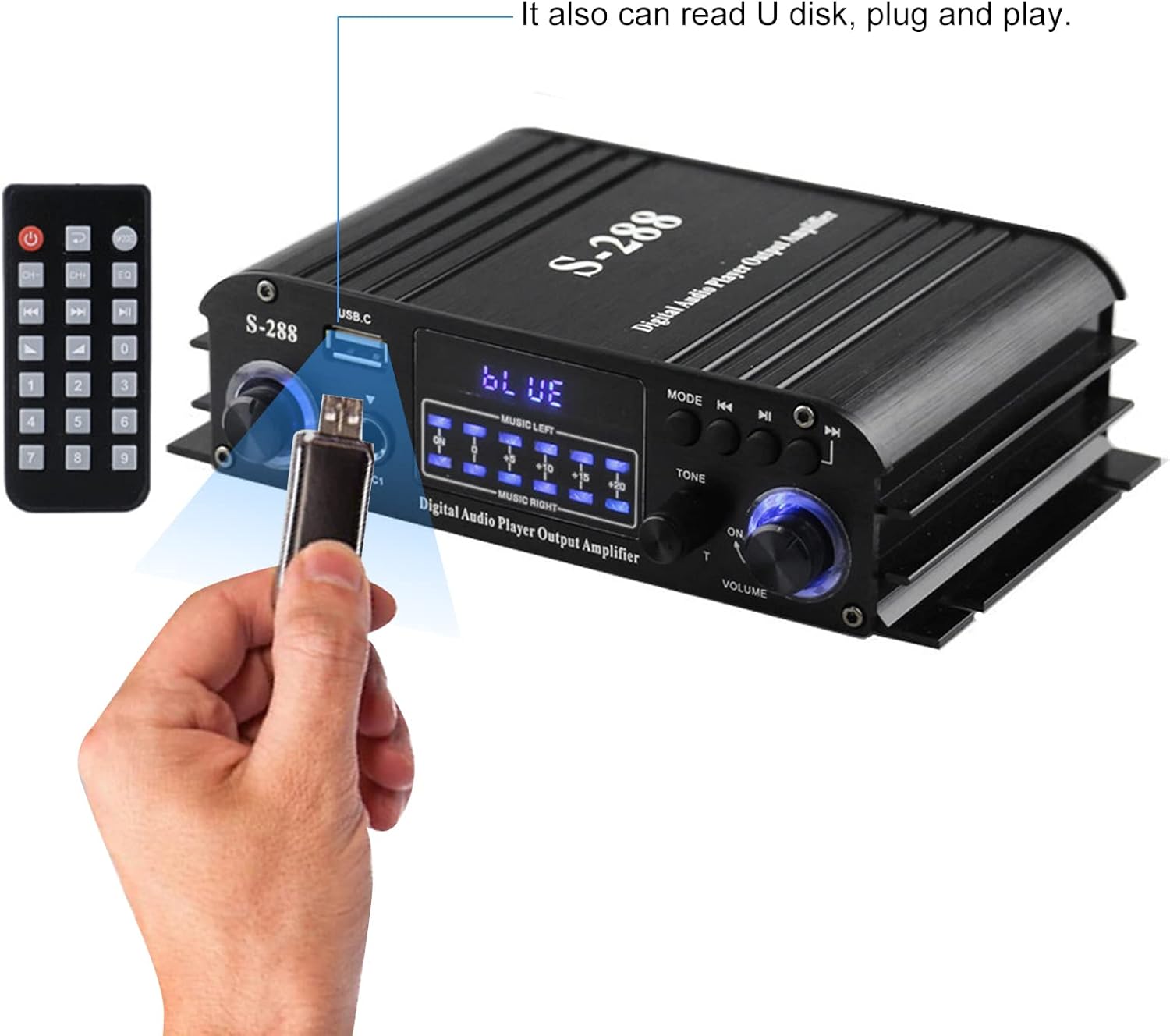
Image: A hand inserting a USB flash drive into the USB socket on the front panel of the amplifier, illustrating the U-disk playback feature.
Remote Control Usage
The included remote control allows convenient operation from a distance.

Image: A hand holding the remote control, pointing towards the amplifier, with speakers and a television in the background, demonstrating remote operation.
- Power Button: Turns the amplifier on/off.
- Mode Button: Cycles through input sources.
- Volume +/-: Adjusts master volume.
- EQ/Tone Buttons: Adjusts bass and treble (if available on remote).
- Numeric Buttons: For direct track selection or FM station tuning (if applicable).
- Playback Controls: Play/Pause, Previous/Next Track.
Adjusting Audio
- Master Volume: Rotate the "VOLUME" knob on the front panel or use the Volume +/- buttons on the remote.
- Bass/Treble: Use the "TONE" knob on the front panel to adjust bass and treble levels to your preference.
- Microphone Volume: Adjust the "MIC.VOL" knob for microphone input level.
Maintenance
Proper care will ensure the longevity of your amplifier.
- Cleaning: Use a soft, dry cloth to wipe the exterior of the unit. Do not use liquid cleaners or aerosols.
- Ventilation: Ensure the ventilation openings are not blocked.
- Storage: When not in use for extended periods, store the amplifier in a cool, dry place away from direct sunlight and dust.
Troubleshooting
If you encounter any issues, refer to the following table for common problems and solutions.
| Problem | Possible Cause | Solution |
|---|---|---|
| No power | Power cable not connected; Power outlet faulty; Amplifier off. | Check power connections; Try a different outlet; Press power button on unit/remote. |
| No sound output | Incorrect input mode selected; Speaker cables loose/incorrectly connected; Volume too low; Audio source issue. | Press MODE button to select correct input; Reconnect speaker cables, ensuring polarity; Increase volume; Check audio source device. |
| Bluetooth not pairing | Amplifier not in Bluetooth mode; Device too far; Bluetooth disabled on source device. | Switch amplifier to BT mode; Move device closer; Enable Bluetooth on your device and rescan. |
| Distorted sound | Volume too high; Speaker impedance mismatch; Poor audio source quality. | Reduce volume; Ensure speakers are 4-8 ohms; Try a different audio source. |
| U-disk not playing | U-disk not inserted correctly; Unsupported file format; Amplifier not in U-disk mode. | Re-insert U-disk; Ensure audio files are common formats (e.g., MP3); Switch amplifier to U-disk mode. |
Specifications
Detailed technical specifications for the ERYUE S-288 amplifier.
| Feature | Specification |
|---|---|
| Input Power | AC 100-240V 50/60Hz, 1.7A; DC 12V 3A-5A |
| Rated Frequency | 20-20KHz |
| Output Power | 50W x 4 Channels |
| Distortion Rate | <0.4% |
| Signal-to-Noise Ratio | >80dB |
| Speaker Impedance | 4-8 ohms |
| Material | Aluminum Alloy |
| Color | Black |
| Product Dimensions | 17.5 x 10.5 x 4.5 cm (6.89 x 4.13 x 1.77 in) |
| Product Weight | 469g (16.5 oz) |
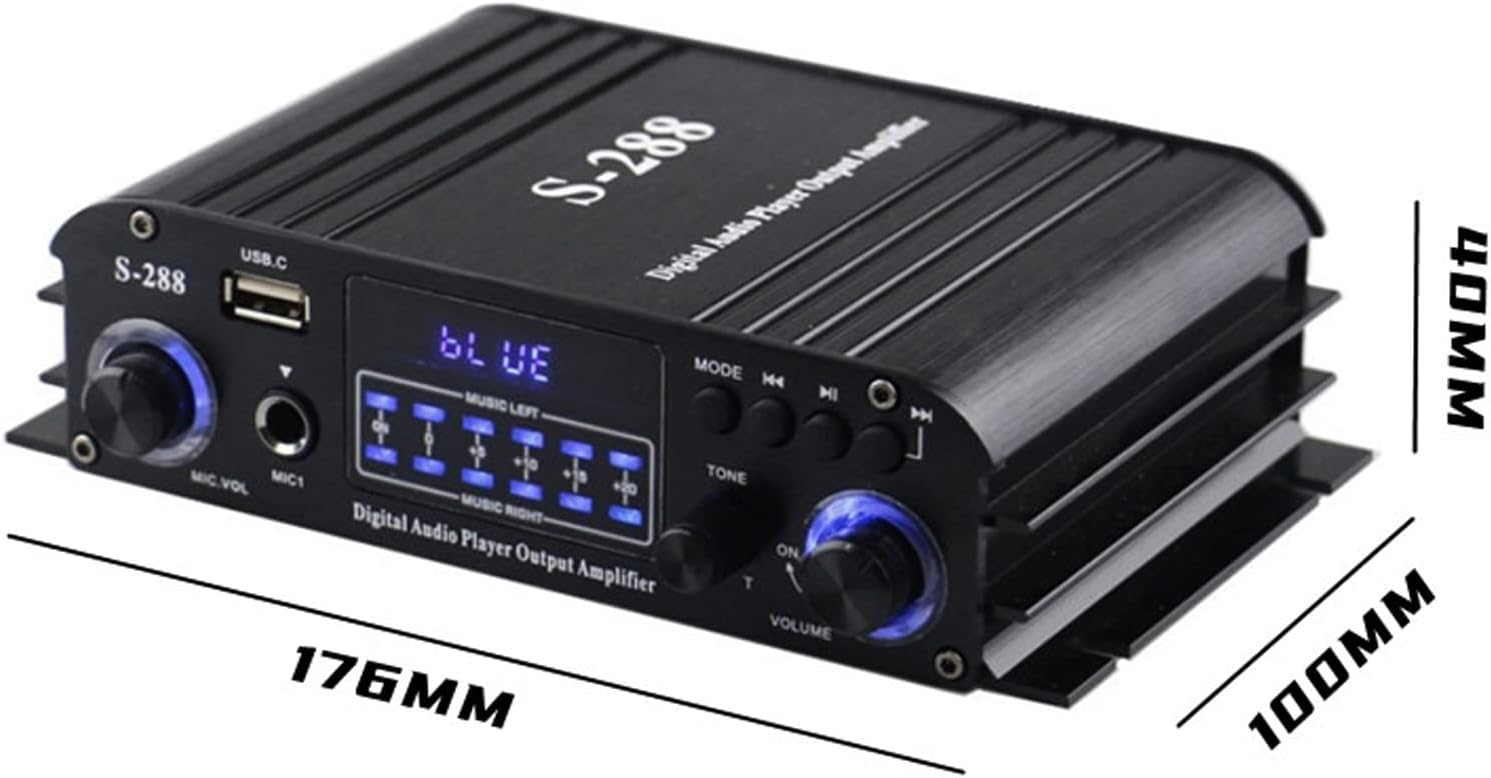
Image: The ERYUE S-288 amplifier with its key dimensions (length, width, height) indicated in millimeters.
Warranty and Support
This product comes with a standard manufacturer's warranty. For specific warranty terms and conditions, please refer to the warranty card included in your package or contact your retailer. For technical support or service inquiries, please reach out to the ERYUE customer service team through the contact information provided with your purchase or on the official ERYUE website.
Please retain your proof of purchase for warranty claims.