
TOMPROAD A52-CA
TOMPROAD A52-CA Bluetooth Speaker User Manual
Model: A52-CA | Brand: TOMPROAD
Introduction
Thank you for purchasing the TOMPROAD A52-CA Portable Bluetooth Speaker. This powerful and versatile speaker is designed to deliver high-quality audio with deep bass, vibrant LED lights, and convenient features like FM radio and karaoke functionality. Please read this manual carefully to ensure proper use and maintenance of your device.
What's in the Box
Upon unpacking, please verify that all the following items are included:
- 1 x A52 Bluetooth speaker
- 1 x Wireless microphone
- 1 x Remote control
- 1 x USB charger cable
- 1 x AUX cable
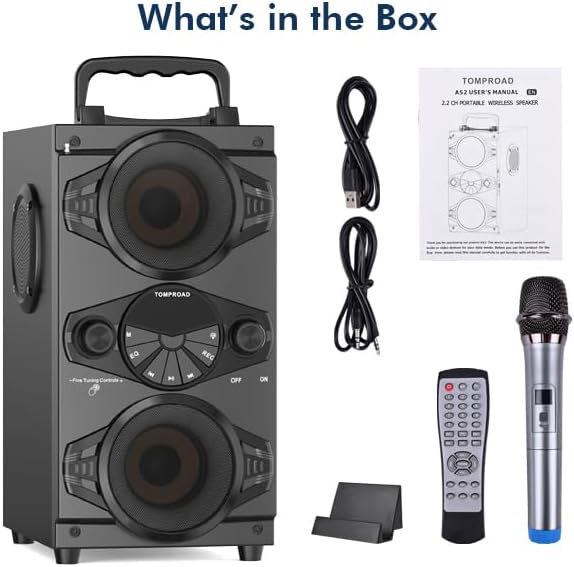
Image: The TOMPROAD A52-CA speaker, wireless microphone, remote control, USB charging cable, and AUX cable as packaged in the box.
Product Overview
The TOMPROAD A52-CA is a feature-rich portable speaker designed for various audio needs. Key features include:
- Powerful Audio Output: 60W surround sound with four 3-inch loudspeakers (two woofers, two tweeters) and a rear heavy bass guide tube for deep bass.
- Advanced Bluetooth 5.0: Stable connection up to 100ft range, compatible with all Bluetooth-enabled devices.
- Vibrant LED Lights: 9 flashing LED light modes to create an exciting atmosphere.
- Multi-functional Playback: Supports FM radio, AUX input, U-disk, and TF Card music playback.
- Karaoke Functionality: Includes a wireless microphone and two extra microphone jacks for duets.
- Long Battery Life: Built-in 8000mAh rechargeable battery provides 4-15 hours of playtime depending on volume.
- Convenient Control: Digital display and intelligent remote control for easy operation.

Image: The TOMPROAD A52-CA speaker showcasing its design, accompanied by the wireless microphone and remote control.

Image: The speaker with its dimensions highlighted, emphasizing its portable and multifunctional design.

Image: Multiple speakers demonstrating the dynamic and colorful LED light effects.

Image: Visual representation of the speaker's long battery life and charging duration.
Setup
1. Initial Charging
Before first use, fully charge the speaker using the provided USB charger cable. Connect the USB cable to the speaker's charging port and a compatible USB power adapter (not included). The charging indicator will show the charging status. A full charge typically takes 3-6 hours.
2. Powering On/Off
Locate the ON/OFF switch on the speaker's control panel. Slide the switch to the "ON" position to power on the speaker. You will hear an audible prompt, and the digital display will light up. To power off, slide the switch to the "OFF" position.
3. Microphone Setup
The included wireless microphone will automatically connect to the speaker when both are turned on. Ensure the microphone has fresh batteries (if applicable) and is powered on. For additional microphones, use the extra microphone jacks on the speaker.

Image: The speaker and microphone demonstrating their auto-connection feature and effective range.
Operating Instructions
1. Bluetooth Pairing
- Turn on the speaker. It will automatically enter Bluetooth pairing mode, indicated by a flashing "BLUE" on the digital display.
- Enable Bluetooth on your device (smartphone, tablet, etc.).
- Search for "A52" in your device's Bluetooth list and select it to connect.
- Once connected, the "BLUE" indicator will stop flashing, and you will hear a confirmation sound.
2. FM Radio Mode
Press the "M" (Mode) button on the speaker or remote control to switch to FM Radio mode. Extend the antenna for better reception. Press the Play/Pause button to auto-scan and save available stations. Use the Previous/Next buttons to navigate between saved stations.

Image: The speaker demonstrating its strong FM radio reception with the antenna extended, enjoyed by a family.
3. AUX Input, U-disk, and TF Card Playback
- AUX Input: Connect an external audio device using the provided AUX cable to the speaker's AUX port. The speaker will automatically switch to AUX mode.
- U-disk (USB) Playback: Insert a USB flash drive into the USB port. The speaker will automatically detect and play audio files from the drive.
- TF Card (MicroSD) Playback: Insert a TF card into the TF card slot. The speaker will automatically detect and play audio files from the card.
4. LED Lights Control
Long press the dedicated LED light button on the speaker or remote control to turn the colorful LED lights on or off. Short press the button to cycle through the 9 different flashing modes.
5. Microphone and Karaoke Functions
Adjust the microphone volume and echo effects using the dedicated knobs on the speaker or buttons on the remote control. Sing along to your favorite tunes through the speaker. The two additional microphone jacks allow for multiple users.
6. Remote Control Usage
The intelligent remote control allows you to manage various functions from a distance, including power, mode selection, volume, track control, EQ settings, and LED light control.
Maintenance
- Cleaning: Use a soft, dry cloth to clean the speaker's surface. Do not use abrasive cleaners or solvents.
- Storage: Store the speaker in a cool, dry place away from direct sunlight and extreme temperatures when not in use for extended periods.
- Battery Care: To prolong battery life, avoid fully discharging the battery frequently. Charge the speaker regularly, even if not in use, to maintain battery health.
- Water Resistance: This speaker is not waterproof. Avoid exposure to water or high humidity.
Troubleshooting
| Problem | Possible Cause | Solution |
|---|---|---|
| No power | Battery is low or dead. | Charge the speaker fully. |
| No sound | Volume is too low; incorrect mode selected; device not connected. | Increase volume; ensure correct input mode (Bluetooth, AUX, etc.); re-pair Bluetooth device. |
| Bluetooth connection unstable | Device is too far from speaker; interference. | Move device closer to speaker (within 100ft); avoid obstacles; turn off other Bluetooth devices. |
| Microphone not working | Microphone is off; low battery in microphone; not paired. | Ensure microphone is powered on; replace batteries; check automatic pairing. |
| FM radio static | Weak signal; antenna not extended. | Extend the antenna fully; try repositioning the speaker for better reception. |
Specifications
| Feature | Detail |
|---|---|
| Brand | TOMPROAD |
| Model Number | A52-CA |
| Output Wattage | 60 Watts |
| Connectivity Technology | Bluetooth 5.0 |
| Power Source | Battery Powered (8000mAh Lithium Ion) |
| Playtime | 4-15 hours (depends on volume) |
| Charging Time | 3-6 hours |
| Product Dimensions (L x W x H) | 9.1 x 6.8 x 12.6 inches |
| Item Weight | 7.7 pounds (3.5 Kilograms) |
| Material | Wood |
| Audio Input | AUX, USB, TF Card |
| Recommended Uses | Indoor/Outdoor |
Warranty and Support
For warranty information or technical support, please contact TOMPROAD customer service. Refer to the contact information provided with your purchase or visit the official TOMPROAD website for assistance.
Note: Keep your purchase receipt as proof of purchase for warranty claims.