
Introduction
This manual provides instructions for the proper setup, operation, and maintenance of your Imagitarium Glass Versa Aquarium 6.6 Gallons. This aquarium features an integrated pump with an adjustable water flow valve, a seamless filtration system, and an energy-efficient LED lighting system with three day and night color settings. Please read these instructions carefully before use to ensure optimal performance and the well-being of your aquatic pets.

Image: The Imagitarium Glass Versa Aquarium 6.6 Gallons, fully set up with aquatic life and plants.
Setup
- Unpacking and Inspection: Carefully remove all components from the packaging. Inspect the glass tank and all accessories for any damage. Do not use if any part is damaged.
- Placement: Choose a sturdy, level surface capable of supporting the full weight of the aquarium when filled with water, substrate, and decorations. Position the aquarium away from direct sunlight, heat sources, and drafts to maintain stable water temperatures.
- Filter Box Installation: The filter box is designed to attach to any side wall of the glass tank. Position the filter box on the desired side, ensuring it is securely clipped to the rim of the aquarium.
- Lighting Fixture Attachment: The LED lighting fixture attaches directly to the filter box. Securely place the light onto the designated slot on the filter box.
- Adding Substrate and Decorations: Rinse all substrate (gravel, sand) and decorations thoroughly before placing them into the aquarium. Arrange them to create a suitable environment for your aquatic inhabitants.
- Filling with Water: Slowly fill the aquarium with dechlorinated water. Ensure the water level is appropriate for the filter system to operate correctly.
- Connecting Power: Once the aquarium is filled and all components are in place, connect the power cords for the pump and light to a suitable electrical outlet.
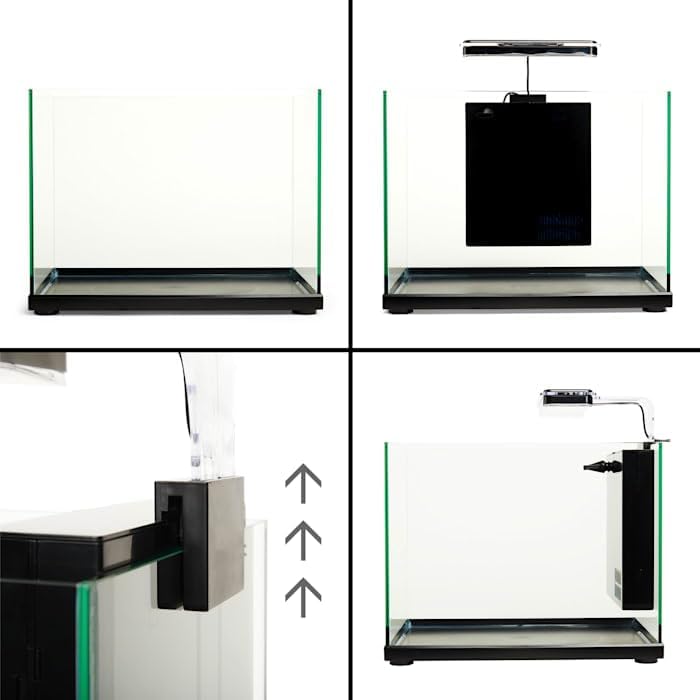
Image: A visual guide demonstrating the steps for attaching the filter box and lighting fixture to the aquarium.
Operating Instructions
LED Lighting System
The integrated LED lighting system offers three modes for day and night viewing:
- Blue Light: Provides a moonlight effect, ideal for nighttime viewing.
- Blue & White Light: Simulates natural daylight, suitable for daytime viewing.
- Off: Turns the lighting system off.
Cycle through these modes using the switch located on the lighting fixture.

Image: The LED light fixture with white lights illuminated.

Image: The LED light fixture with blue lights illuminated.
Adjustable Water Flow Valve
The filter box includes an adjustable water flow valve. This valve allows you to control the intensity of the water flow from the pump. Adjusting the flow can be beneficial when feeding fish or introducing new aquatic inhabitants, as it reduces water turbulence.
Maintenance
Filter Cartridge Replacement
Regular replacement of the filter cartridge is crucial for maintaining water clarity and quality. For the 6.6 Gallon Glass Versa Aquarium, use the "D" replacement Filter Cartridge (SKU 2810980).
- Unplug the aquarium pump and light.
- Carefully remove the old filter cartridge from the filter box.
- Insert a new "D" replacement filter cartridge into the designated slot in the filter box.
- Reconnect power to the pump and light.

Image: Example of filter media components, including a filter pad and sponge.
Cleaning the Filter Box and Pump
Periodically clean the filter box and pump to remove accumulated debris and ensure efficient operation. Disassemble the pump according to its specific instructions (usually involves twisting or unclipping components) and rinse all parts with aquarium water to preserve beneficial bacteria. Do not use tap water directly on filter media or pump parts unless dechlorinated.
Water Changes
Perform regular partial water changes (e.g., 25% weekly or bi-weekly) to remove nitrates and replenish essential minerals. Always use dechlorinated water that is temperature-matched to the aquarium water.
Glass Cleaning
Use an aquarium-safe glass cleaner or algae scraper to remove algae buildup from the interior and exterior surfaces of the tank. Avoid using household cleaners, as they can be toxic to aquatic life.
Troubleshooting
- Cloudy Water:
Possible Causes: New tank syndrome, overfeeding, insufficient filtration, bacterial bloom.
Solutions: Perform a partial water change, reduce feeding, ensure filter cartridge is clean and properly installed, allow time for beneficial bacteria to establish. - Pump Not Operating:
Possible Causes: Power outage, clogged impeller, pump not primed, faulty unit.
Solutions: Check power connection, unplug and clean the impeller, ensure pump is fully submerged and free of air bubbles, contact support if issues persist. - LED Light Not Turning On:
Possible Causes: Power connection issue, faulty switch, damaged LED unit.
Solutions: Check power cord, ensure switch is fully engaged, try cycling through modes, contact support if light remains off. - Excessive Algae Growth:
Possible Causes: Too much light, excess nutrients (overfeeding, infrequent water changes).
Solutions: Reduce lighting duration, perform more frequent water changes, reduce feeding, consider adding algae-eating inhabitants (compatible with your fish).
Specifications
| Feature | Detail |
|---|---|
| Brand | Imagitarium |
| Model | Glass Versa Aquarium 6.6 Gallons |
| Tank Volume | 6.6 Gallons |
| Material | Glass |
| Product Dimensions (L x W x H) | 24.9L x 39.9W x 24.9H Centimetres (approx. 15.7" W x 10.2" D x 15.3" H with filter/light) |
| Item Weight | 7.89 kg (17.4 Pounds) |
| Included Components | Filter Box system, Lighting fixture |
| Filter Cartridge Type | "D" replacement Filter Cartridge (SKU 2810980) |
| Lighting | Energy-efficient LED with 3 modes (Blue, Blue & White, Off) |
| ASIN | B0CBQQGYTF |
| UPC | 800443628706 |
Warranty and Support
For warranty information or technical support, please refer to the documentation included with your purchase or contact Imagitarium customer service directly. Contact details can typically be found on the manufacturer's website or product packaging.