
Voice Bluetooth Remote Control
User Manual for Voice Bluetooth Remote Control
Model: Blaupunkt B-Stream A-Stream 4K Android TV Box Compatible Remote
Introduction
This manual provides essential information for the proper setup, operation, and maintenance of your Voice Bluetooth Remote Control, designed for compatibility with Blaupunkt B-Stream and A-Stream 4K Android TV Boxes. Please read this manual thoroughly before using the remote control.
Product Overview
The remote control is an IR replacement unit with voice and Bluetooth capabilities, specifically designed for certain Blaupunkt Android TV Box models. It features standard navigation, volume, and dedicated app buttons.

Figure 1: Front view of the remote control, showing the power button, Google Assistant button, circular navigation pad, back, home, menu, volume up/down, and dedicated buttons for YouTube, Netflix, and Google Play.
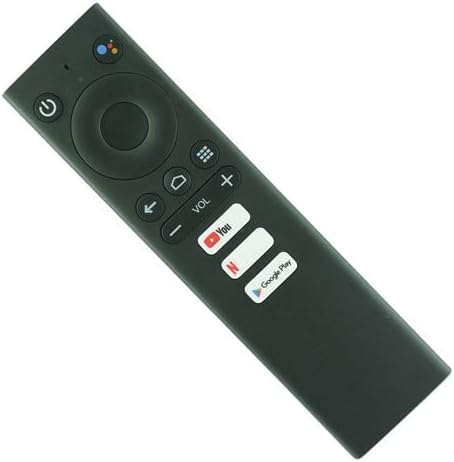
Figure 2: Angled view of the remote control, highlighting its sleek black design and button layout.

Figure 3: Rear view of the remote control with the battery cover detached, revealing the compartment for two AAA batteries.
Setup
Battery Installation
The remote control requires two (2) AAA batteries (not included). Follow these steps to install the batteries:
- Locate the battery compartment on the back of the remote control.
- Press down on the tab and slide the battery cover downwards to remove it.
- Insert two AAA batteries, ensuring the positive (+) and negative (-) terminals align correctly with the markings inside the compartment.
- Slide the battery cover back into place until it clicks securely.
Note: Always use new batteries and dispose of old batteries responsibly.
Operating Instructions
This remote functions as an IR replacement. For voice control and full functionality, Bluetooth pairing with your Blaupunkt Android TV Box may be required. Refer to your TV Box's manual for specific pairing instructions.
Basic Functions
- Power Button (⏻): Press to turn the TV Box on or off.
- Navigation Pad: Use the circular pad to navigate through menus and select items. The center button acts as 'OK' or 'Enter'.
- Back Button (⇚): Returns to the previous screen or menu.
- Home Button (⌂): Returns to the main home screen of the Android TV Box.
- Menu/Options Button (☰): Opens context-sensitive menus or options.
- Volume Buttons (VOL +/-): Adjusts the volume level.
- Voice Assistant Button (🎙): Activates the voice assistant (e.g., Google Assistant). Hold the button and speak your command. Requires Bluetooth pairing.
- Dedicated App Buttons (YouTube, Netflix, Google Play): Provides quick access to these streaming applications.
Bluetooth Pairing (If Applicable)
For voice control and potentially enhanced functionality, you may need to pair the remote control via Bluetooth with your Blaupunkt Android TV Box. The exact pairing procedure can vary by TV Box model. Generally, you will need to:
- Ensure the remote has fresh batteries.
- Go to the Bluetooth settings on your Blaupunkt Android TV Box.
- Put the remote control into pairing mode (often by holding down specific buttons, e.g., Home and Back, or OK and Volume Down, for a few seconds until an indicator light flashes). Consult your TV Box's manual for the precise button combination.
- Select the remote control from the list of available Bluetooth devices on your TV Box screen to complete pairing.
Important: This is a replacement remote. Some advanced functions or specific button mappings may differ from your original remote. It is designed to work with the specified Blaupunkt B-Stream and A-Stream 4K Android TV Box models.
Maintenance
Cleaning
To clean the remote control, use a soft, dry cloth. Do not use abrasive cleaners, waxes, or solvents. Avoid getting moisture into any openings.
Battery Replacement
Replace batteries when the remote control's response becomes sluggish or stops working. Refer to the "Battery Installation" section for instructions. Always replace both batteries at the same time with new ones of the same type (AAA).
Storage
If the remote control will not be used for an extended period, remove the batteries to prevent leakage and potential damage to the device.
Troubleshooting
| Problem | Possible Cause | Solution |
|---|---|---|
| Remote not responding. | Dead or incorrectly installed batteries. Obstruction between remote and TV Box. Remote not paired (for Bluetooth functions). | Replace batteries, ensuring correct polarity. Remove any obstructions. Ensure remote is pointed directly at the TV Box's IR receiver. Attempt Bluetooth pairing if applicable. |
| Voice control not working. | Remote not Bluetooth paired. Microphone obstruction. | Ensure the remote is successfully paired via Bluetooth. Check for any physical obstructions over the microphone hole. |
| Some buttons do not work as expected. | This is a replacement remote; some functions may differ from the original. | Verify compatibility with your specific TV Box model. Understand that not all replacement remotes replicate every original function perfectly. |
Specifications
- Model Compatibility: Blaupunkt B-Stream, A-Stream 4K Android TV Box
- Connectivity Technology: Infrared (IR), Bluetooth (for voice and advanced features)
- Power Source: 2 x AAA Batteries (not included)
- Maximum Range: 8 Meters (Infrared)
- Supported Devices: 1
- Special Note: Replacement remote; functionality may vary slightly from original equipment.
Warranty and Support
Information regarding product warranty and customer support is not provided in the product details. Please refer to the seller's or manufacturer's website for any available warranty information or support contacts.