
Introduction
This document provides essential instructions for the Generic Replacement Remote Control, model Easytry20701. This remote is designed as an infrared (IR) replacement for various television models, including Avtex W320TS, W215TS, W249TS, W279TS; Devanti STV-311W-UHD-75, STV-316W-UHD-65; Norcent N24H-S1; and Soniq W65UV40A 4K Ultra HD UHD Smart HDTV TVs. Please note that as a replacement unit, some advanced or specific functions of your original TV remote may not be fully supported. This manual will guide you through setup, operation, maintenance, and troubleshooting.
Setup
1. Battery Installation
The remote control requires two (2) AAA batteries (not included). Follow these steps to install them:
- Locate the battery compartment on the back of the remote control.
- Slide the battery cover downwards or press the latch and lift to open.
- Insert two AAA batteries, ensuring the positive (+) and negative (-) terminals align correctly with the markings inside the compartment.
- Replace the battery cover by sliding it back into place until it clicks securely.

Image: Back of the remote control with the battery compartment open, illustrating correct battery placement.
2. Initial Use
This is an infrared (IR) replacement remote control and typically does not require any programming or pairing. Once batteries are installed, point the remote directly at your television and begin use. Ensure there are no obstructions between the remote and the TV's IR receiver.
Operating Instructions
The remote control features standard buttons for common television functions. Refer to the image below for a visual guide to the button layout.
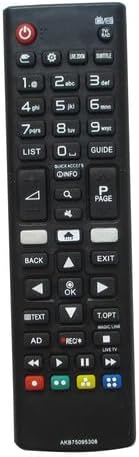
Image: Front view of the remote control, displaying all functional buttons.
- Power Button: Located at the top, typically red, to turn the TV on or off.
- Number Buttons (0-9): For direct channel selection.
- Channel Up/Down: To navigate through channels sequentially.
- Volume Up/Down: To adjust the sound level.
- Mute Button: To instantly silence the TV audio.
- Navigation Pad (Up, Down, Left, Right, OK/Enter): For menu navigation and selection.
- Back/Exit: To return to the previous screen or exit a menu.
- Input/Source: To select different input sources (HDMI, AV, etc.).
- Menu/Settings: To access the TV's main menu or settings.
- Media Playback Controls: Play, Pause, Stop, Fast Forward, Rewind (if applicable).
For specific functions related to your TV model, refer to your television's original user manual.
Maintenance
1. Battery Replacement
Replace batteries when the remote control's response becomes sluggish or stops working. Always replace both batteries at the same time with new AAA batteries. Do not mix old and new batteries, or different types of batteries.
2. Cleaning
To clean the remote control, use a soft, dry cloth. For stubborn dirt, slightly dampen the cloth with water or a mild cleaning solution. Avoid using harsh chemicals, abrasives, or excessive moisture, as these can damage the remote.
3. Storage
Store the remote control in a dry place, away from direct sunlight, extreme temperatures, and high humidity. If the remote will not be used for an extended period, it is advisable to remove the batteries to prevent leakage.
Troubleshooting
- Remote is not working:
- Ensure batteries are installed correctly with the correct polarity (+/-).
- Replace old batteries with new ones.
- Check for any obstructions between the remote's IR emitter and the TV's IR receiver.
- Ensure you are within the effective operating range (up to 8 meters) and pointing the remote directly at the TV.
- Some functions are not working:
- As a replacement remote, it may not support all advanced or smart TV features that were present on your original remote. This is normal for universal or replacement units.
- Verify that your TV model is listed as compatible.
- Limited range or intermittent response:
- Replace batteries.
- Ensure the remote's IR emitter is clean and free from dust or debris.
- Minimize sources of strong light or other IR interference in the room.
Specifications
- Brand: Generic
- Model Number: Easytry20701
- Connectivity Technology: Infrared (IR)
- Compatible Devices: Television (Avtex W320TS, W215TS, W249TS, W279TS; Devanti STV-311W-UHD-75, STV-316W-UHD-65; Norcent N24H-S1; Soniq W65UV40A)
- Maximum Number of Supported Devices: 1
- Controller Type: Button Control
- Maximum Range: 8 Meters (approximately 26 feet)
- Batteries Required: 2 x AAA (not included)
Warranty Information
This Generic Replacement Remote Control comes with a 90-day warranty from the date of purchase. This warranty covers manufacturing defects under normal use. It does not cover damage caused by misuse, accidents, unauthorized modifications, or battery leakage. Please retain your proof of purchase for warranty claims.
Support
For further assistance or if you encounter issues not covered in this manual, please refer to the original user manual of your television for specific TV functions and settings. As this is a generic replacement remote, direct technical support for specific TV model compatibility beyond basic functions may be limited.

