
1. Introduction
This user manual provides detailed instructions for the installation, usage, and maintenance of your Transwon Silicone Kids Case Cover. Designed specifically for the XMobile X8 Pro, X8 Max, and X8 8-inch tablets, this case offers robust protection and enhanced functionality for your device.
2. Product Compatibility
This case is precisely engineered to fit the following tablet models:
- XMobile X8 Pro 8-inch Tablet
- XMobile X8 Max 8-inch Tablet
- XMobile X8 8-inch Tablet
Note: This case is NOT compatible with the XMobile X8A or any other tablet models not listed above.
3. Key Features
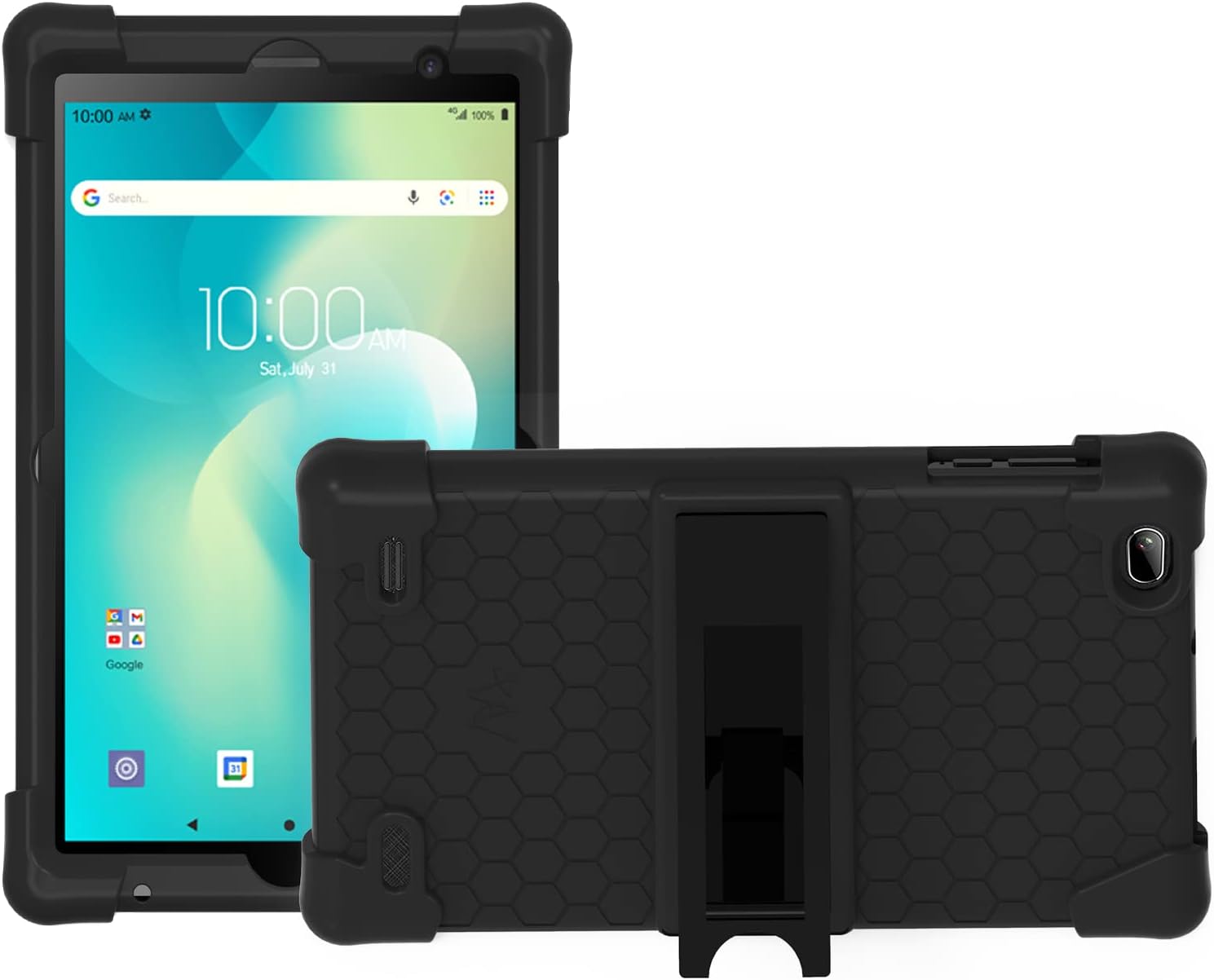
Figure 3.1: Front and back view of the Transwon Tablet Case. The image displays the black silicone case protecting an 8-inch tablet, highlighting the robust corners and the integrated foldable kickstand on the back.
- Premium Silicone Material: Constructed from impact-resistant, rubber-like silicone, providing excellent shock absorption and a comfortable grip. This material is washable for easy cleaning.
- Built-in Foldable Kickstand: Features a removable kickstand that allows for multiple sturdy viewing angles, ideal for watching videos, typing, gaming, or learning.
- Precise Cutouts: Designed with accurate cutouts to ensure full access to all tablet controls, ports, and features without needing to remove the case.
- Enhanced Protection: Includes raised corners and a durable design to safeguard your device against drops, impacts, and daily wear and tear.
4. Installation Guide
Follow these steps to properly install the Transwon Silicone Kids Case Cover onto your XMobile tablet:
- Prepare Your Tablet: Ensure your tablet is clean and free of dust or debris. Power off your tablet for safety.
- Align the Tablet: Gently align your tablet with the case, ensuring that the camera, ports, and buttons on the tablet match the corresponding cutouts on the case.
- Insert One Side: Start by inserting one of the longer sides of the tablet into the case, applying gentle pressure.
- Work Around the Edges: Carefully work your way around the edges of the tablet, stretching the silicone material slightly to fit snugly around the device. Ensure all corners are fully seated within the case's protective bumpers.
- Check Fit: Once the tablet is fully encased, gently press around the edges to ensure a secure and even fit. Verify that all ports, buttons, and the camera are accessible and unobstructed.
5. Usage Instructions
5.1 Using the Foldable Kickstand
The built-in kickstand provides convenient hands-free viewing. To use the kickstand:
- Locate the foldable kickstand on the back of the case.
- Gently pull the kickstand outwards until it clicks into an open position.
- Place your tablet on a flat surface, resting it on the extended kickstand. Adjust the angle as desired for optimal viewing or typing.
- To close the kickstand, push it back into its recessed slot until it lies flat against the case.
The kickstand is designed to be removable. If it detaches, simply re-insert it into its designated slot on the back of the case.
6. Maintenance and Care
To ensure the longevity and cleanliness of your Transwon Silicone Kids Case Cover, follow these simple maintenance guidelines:
- Cleaning: The silicone material is washable. If the case gets dirty, you can remove it from the tablet and wash it directly with mild soap and water. Rinse thoroughly and allow it to air dry completely before re-installing your tablet.
- Avoid Harsh Chemicals: Do not use abrasive cleaners, solvents, or harsh chemicals, as these may damage the silicone material.
- Storage: When not in use, store the case in a cool, dry place away from direct sunlight to prevent material degradation.
7. Troubleshooting
While the Transwon Silicone Kids Case Cover is designed for durability and ease of use, here are some common inquiries and their solutions:
- Case does not fit: Double-check the model number of your tablet. This case is specifically designed for XMobile X8 Pro, X8 Max, and X8 8-inch tablets. It is NOT compatible with X8A or other models. Refer to Section 2 for compatibility details.
- Kickstand feels loose or detached: The kickstand is designed to be removable. Ensure it is properly re-inserted into its designated slot on the back of the case. Apply gentle pressure until it clicks securely into place.
- Buttons are hard to press: Ensure the tablet is correctly seated within the case and that the case's button covers are aligned with the tablet's physical buttons. A slight adjustment of the tablet within the case may resolve this.
8. Product Specifications
| Attribute | Detail |
|---|---|
| Brand | Transwon |
| Model Compatibility | XMobile X8 Pro / X8 Max / X8 Tablet (8 Inch) |
| Material | Impact-resistant Silicone Rubber |
| Color | Black |
| Features | Built-in Foldable Kickstand, Precise Cutouts, Enhanced Corner Protection |
| Item Weight | 5.9 ounces (approx. 167 grams) |
| Package Dimensions | 10.12 x 7.52 x 0.87 inches |
| Manufacturer | Transwon |
9. Support and Warranty Information
For any questions, concerns, or support regarding your Transwon Silicone Kids Case Cover, please contact our customer service team. Refer to the product packaging or the retailer's website for specific contact details and warranty terms.
We are committed to providing high-quality products and support to ensure your satisfaction.