
COOK WITH COLOR WMT07 BLK
COOK WITH COLOR Mini Toaster Oven
User Manual
Important Safeguards
When using electrical appliances, basic safety precautions should always be followed, including the following:
- Read all instructions before operating the toaster oven.
- Do not touch hot surfaces. Use handles or knobs.
- To protect against electrical shock, do not immerse cord, plug, or appliance in water or other liquid.
- Close supervision is necessary when any appliance is used by or near children.
- Unplug from outlet when not in use and before cleaning. Allow to cool before putting on or taking off parts.
- Do not operate any appliance with a damaged cord or plug, or after the appliance malfunctions or has been damaged in any manner.
- The use of accessory attachments not recommended by the appliance manufacturer may cause injuries.
- Do not use outdoors.
- Do not let cord hang over edge of table or counter, or touch hot surfaces.
- Do not place on or near a hot gas or electric burner, or in a heated oven.
- Extreme caution must be used when moving an appliance containing hot oil or other hot liquids.
- Do not use appliance for other than intended use.
- Oversize foods or metal utensils must not be inserted in a toaster oven as they may create a fire or risk of electric shock.
- A fire may occur if the toaster oven is covered or touching flammable material, including curtains, draperies, walls, and the like, when in operation.
- Do not place any materials other than manufacturer's recommended accessories in this oven when not in use.
- Do not place cardboard, plastic, paper, or similar materials in the oven.
- Do not clean with metal scouring pads. Pieces can break off the pad and touch electrical parts, creating a risk of electric shock.
- Extreme caution should be exercised when removing tray or disposing of hot grease.
- Do not store any materials, other than manufacturer's recommended accessories, in this oven when not in use.
Product Overview
The COOK WITH COLOR Mini Toaster Oven is designed for efficient and versatile cooking in a compact form factor. It features a powerful 600W heating element, precision timer, and automatic shut-off for safety and convenience.
Key Features:
- Efficient 600W Power: Cook your favorite meals quickly and efficiently.
- Precision Timer: Easily set the timer for baking, toasting, or broiling, ensuring consistent results.
- Auto Shutoff Feature: Built-in safety feature prevents overcooking and provides peace of mind.
- Generous Interior Capacity: Interior dimensions of 8.25 x 7 x 3.75 inches (approx. 7.0L capacity) offer ample space for various culinary creations.
- Versatile Temperature Control: Adjust temperature up to 450 degrees Fahrenheit for precise cooking.
- Cool Touch Handle: Designed for safe operation.
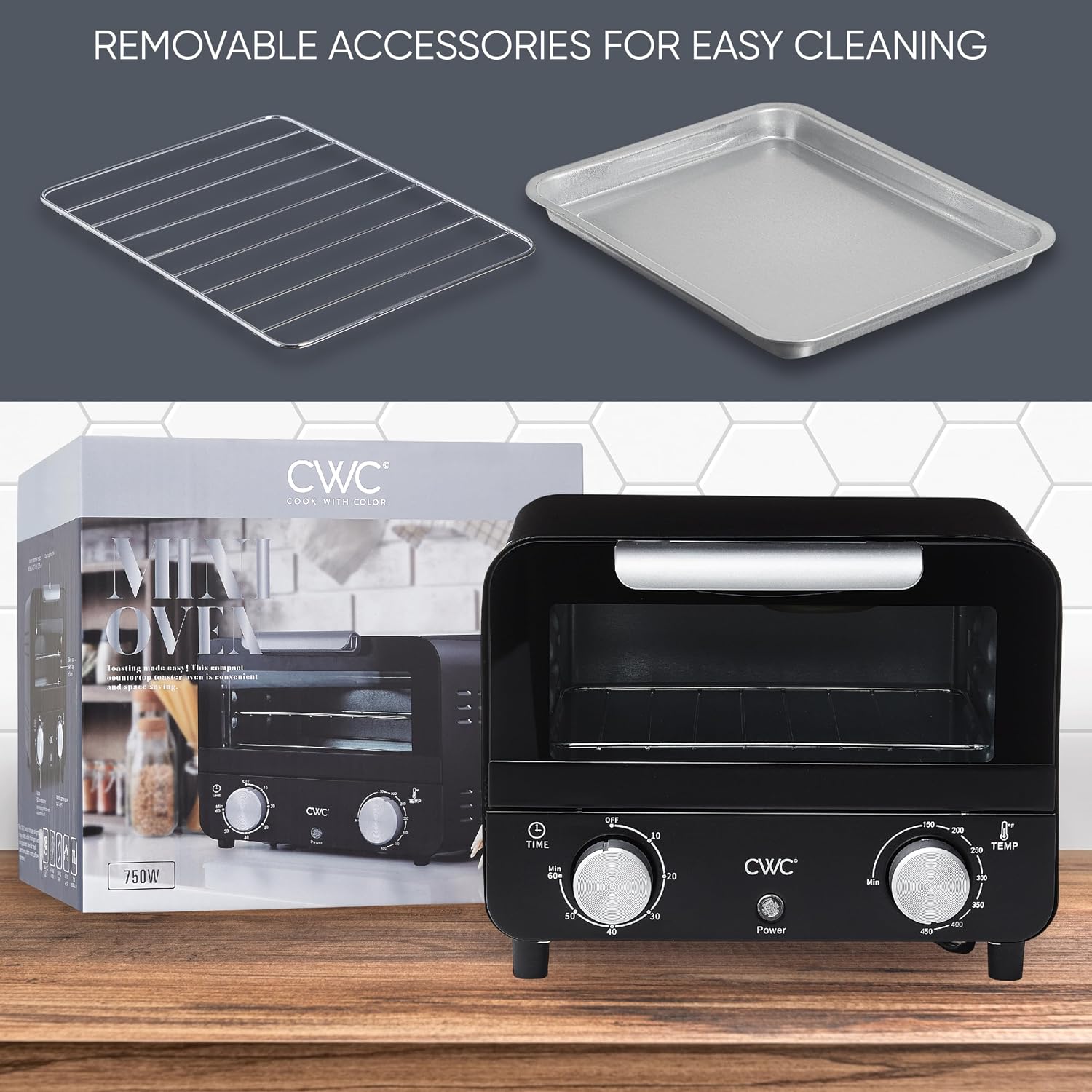
- Removable Accessories: Includes a baking rack and baking tray for easy cleaning and maintenance.
Components Diagram:


Setup
Unpacking:
- Carefully remove the toaster oven and all accessories from the packaging.
- Remove any packing materials, stickers, or protective film from the appliance.
- Inspect the appliance for any damage. Do not use if damaged.
Placement:
- Place the toaster oven on a stable, flat, heat-resistant surface.
- Ensure there is adequate ventilation around the appliance (at least 4 inches of space on all sides and top).
- Do not place the oven directly against a wall or under cabinets during operation.
- Keep the oven away from flammable materials such as curtains, tablecloths, or paper products.
Initial Cleaning:
- Before first use, wipe the exterior of the oven with a damp cloth.
- Wash the baking rack and baking tray in warm, soapy water. Rinse thoroughly and dry completely.
- Insert the baking rack and tray into the oven.
- Plug the oven into a standard electrical outlet.
- It is recommended to run the oven empty for about 15 minutes at the highest temperature setting (450°F) to burn off any manufacturing residues. A slight odor or smoke may be present during this initial use; this is normal. Ensure the area is well-ventilated.
- Allow the oven to cool completely before its first actual use with food.
Operating Instructions
The COOK WITH COLOR Mini Toaster Oven features simple controls for easy operation.
Control Dials:
- Temperature Control Dial: Located on the right, this dial allows you to select the desired cooking temperature from 140°F to 450°F.
- Timer Control Dial: Located on the left, this dial sets the cooking time up to 60 minutes. Turning this dial activates the oven.
General Operation:
- Place food on the baking tray or directly on the baking rack, depending on the recipe. Ensure the food does not touch the heating elements.
- Close the oven door securely.
- Turn the Temperature Control Dial to your desired temperature setting.
- Turn the Timer Control Dial clockwise to the desired cooking time. The oven will begin heating. The power indicator light will illuminate.
- When the set time has elapsed, the oven will automatically shut off and a bell will ring to indicate completion.
- To stop cooking before the timer finishes, turn the Timer Control Dial counter-clockwise to the "OFF" position.
- Carefully open the oven door and remove food using oven mitts.
Tips for Use:
- For best toasting results, preheat the oven for 5-10 minutes before placing bread inside.
- Always use the baking tray for foods that may drip or produce crumbs.
- Monitor food closely, especially during initial uses, as cooking times may vary based on food type and quantity.

Maintenance and Cleaning
Regular cleaning will help maintain the performance and appearance of your toaster oven.
Before Cleaning:
- Always unplug the toaster oven from the power outlet.
- Allow the appliance to cool completely before cleaning any part of it.
Cleaning the Interior:
- Wipe the interior walls with a damp cloth and mild detergent. Do not use abrasive cleaners or metal scouring pads, as they can damage the non-stick coating.
- For stubborn stains, a non-abrasive sponge or cloth can be used.
- Ensure the interior is completely dry before plugging the oven back in.
Cleaning the Exterior:
- Wipe the exterior surfaces with a soft, damp cloth.
- Do not use abrasive cleaners or polishes that could scratch the finish.
Cleaning the Crumb Tray:
- The removable crumb tray is located at the bottom of the oven. Pull it out to remove crumbs.
- Wash the crumb tray in warm, soapy water. Rinse and dry thoroughly.
- Reinsert the crumb tray before using the oven.
Cleaning Accessories:
- The baking rack and baking tray can be washed in warm, soapy water.
- Rinse thoroughly and dry completely before storing or reinserting into the oven.
Troubleshooting
If you encounter issues with your COOK WITH COLOR Mini Toaster Oven, please refer to the following common problems and solutions:
| Problem | Possible Cause | Solution |
|---|---|---|
| Oven does not turn on. | Not plugged in; power outlet issue; timer not set. | Ensure the oven is securely plugged into a working outlet. Turn the Timer Control Dial to the desired cooking time to activate the oven. |
| Food is not cooking evenly. | Food placed too close to heating elements; uneven food distribution; incorrect temperature/time setting. | Ensure food is centered and not touching heating elements. Adjust temperature and time as needed for specific recipes. Rotate food halfway through cooking if necessary. |
| Oven produces smoke or odor during use. | Residue from manufacturing (first use); food spills; excessive grease. | For first use, this is normal; ensure ventilation. For subsequent uses, clean the interior and crumb tray thoroughly to remove food particles and grease. |
| Timer bell does not ring. | Timer mechanism issue. | If the oven still shuts off but the bell does not ring, this may indicate a minor issue with the bell mechanism. The auto-shutoff function should still work. If the oven does not shut off, discontinue use and contact customer support. |
Specifications
| Feature | Detail |
|---|---|
| Brand | COOK WITH COLOR |
| Model Name | WMT07 |
| Model Number | WMT07 BLK |
| Color | Black |
| Power | 600W |
| Product Dimensions | 17"D x 7"W x 13"H (External) |
| Interior Capacity | 8.25"W x 7"D x 3.75"H (approx. 7.0L) |
| Temperature Range | Up to 450°F |
| Timer | 60-Minute with Bell Ring Notification |
| Control Type | Knob |
| Door Style | Dropdown Door |
| Door Material Type | Tempered Glass |
| Included Components | Baking Rack, Baking Tray |
| Item Weight | 4.94 pounds |
| UPC | 192598168375 |

Warranty and Support
COOK WITH COLOR stands behind the quality of its products. For information regarding warranty coverage, product support, or to purchase replacement parts, please contact our customer service team.
Please have your product model number (WMT07 BLK) and purchase date available when contacting support to ensure the quickest service.
For the most up-to-date contact information, please visit the official COOK WITH COLOR website or refer to the contact details provided with your product packaging.
Ask a question about this manual
Ask about setup, troubleshooting, compatibility, parts, safety, or missing instructions. Manuals+ will review the question and use this page’s manual context to help answer it.