
Introduction
Thank you for purchasing the XTRIKE ME MESP-208BT Wireless Speaker. This manual provides essential information for the proper setup, operation, and maintenance of your device. Please read this manual thoroughly before use to ensure optimal performance and to prevent damage.
Product Overview
The XTRIKE ME MESP-208BT is a portable wireless speaker designed for high-quality audio playback from various devices. It features Bluetooth 5.0 connectivity, a 3.5mm auxiliary input, and a USB port for versatile connection options. The speaker also includes an RGB backlight for enhanced ambiance.
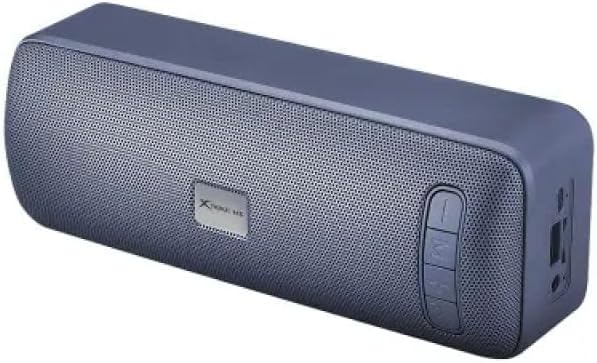
Figure 1: Front view of the XTRIKE ME MESP-208BT Wireless Speaker, showing the speaker grille and control buttons on the side.
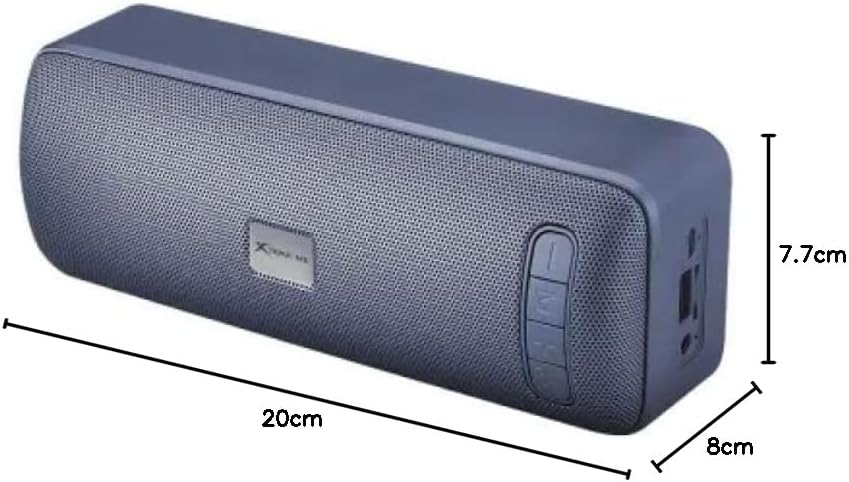
Figure 2: XTRIKE ME MESP-208BT Wireless Speaker illustrating its approximate dimensions: 20 cm (length), 7.7 cm (height), and 8 cm (width).
Setup
1. Charging the Speaker
Before first use, fully charge the speaker. Connect the speaker to a USB power source using a compatible USB cable (not specified if included, assume standard). The charging time is approximately 4 hours. The LED indicator will typically show charging status (e.g., red for charging, off or green for fully charged).
2. Powering On/Off
- To power on: Press and hold the power button (usually marked with Ⓘ or similar icon) for a few seconds until you hear an audible prompt or see an indicator light.
- To power off: Press and hold the power button again for a few seconds.
3. Bluetooth Pairing
- Ensure the speaker is powered on and in Bluetooth pairing mode. The speaker will typically enter pairing mode automatically when powered on for the first time or if no device is connected. An indicator light (often blue) will flash rapidly.
- On your smartphone or tablet, enable Bluetooth and search for available devices.
- Select "MESP-208BT" or a similar name from the list of devices.
- Once paired, the speaker will provide an audible confirmation, and the indicator light will stop flashing and remain solid.
Note: The speaker supports Bluetooth 5.0 for stable and efficient wireless connection.
4. Auxiliary (AUX) Connection
To connect a device via the 3.5mm auxiliary input:
- Connect one end of a 3.5mm audio cable (not specified if included) to the AUX port on the speaker.
- Connect the other end of the cable to the headphone jack or audio output of your device.
- The speaker should automatically switch to AUX mode, or you may need to press a mode button (if available).
Operating Instructions
1. Playing Audio
- After connecting via Bluetooth or AUX, start playing audio from your connected device.
- The speaker will output the audio.
2. Volume Control
- Increase Volume: Press the + button on the speaker.
- Decrease Volume: Press the - button on the speaker.
- You can also adjust the volume directly from your connected device.
3. RGB Backlight
The speaker features an RGB backlight. Specific controls for the backlight (e.g., on/off, mode change) are not detailed in the product information but are typically integrated with a dedicated button or a long press of a volume/play button. Refer to the physical buttons on your speaker for this functionality.
Maintenance
- Cleaning: Use a soft, dry cloth to clean the speaker's exterior. Do not use abrasive cleaners, alcohol, or solvents.
- Water Resistance: The speaker is indicated as waterproof. However, avoid submerging it in water for extended periods or exposing it to high-pressure water jets. Ensure all port covers are securely closed before exposure to water.
- Storage: Store the speaker in a cool, dry place away from direct sunlight and extreme temperatures.
- Battery Care: To prolong battery life, avoid fully discharging the battery frequently. Charge the speaker regularly, even if not in use for extended periods.
Troubleshooting
| Problem | Possible Cause | Solution |
|---|---|---|
| Speaker does not power on. | Low battery. | Charge the speaker for at least 30 minutes. |
| Cannot pair via Bluetooth. | Speaker not in pairing mode; device Bluetooth off; too far from speaker. | Ensure speaker is in pairing mode (flashing LED). Turn Bluetooth off and on on your device. Move device closer to speaker. |
| No sound. | Volume too low; incorrect input mode; device not playing audio. | Increase speaker and device volume. Ensure correct input mode (Bluetooth/AUX) is selected. Check if audio is playing on the source device. |
| Sound distortion. | Volume too high; weak Bluetooth signal. | Lower the volume on both the speaker and the source device. Move the source device closer to the speaker. |
Specifications
| Model Name | SP-208BT |
| Brand | XTRIKE ME |
| Wireless Technology | Bluetooth 5.0 |
| Connectors | 3.5mm Jack, USB |
| Battery Capacity | 1200 mAh |
| Charging Time | 4 hours |
| Operating Time | 2.5 hours |
| Backlight | RGB |
| Color | Black |
| Waterproof | Yes |
| Power Source | Battery Powered |
| Max Speaker Output | 30 Watts |
| Audio Output Mode | Surround |
| Speaker Type | Surround Sound |
| Channel Configuration | 2.0 |
| Mounting Type | Table Mount |
| Recommended Uses | For smartphone or tablet |
| Compatible Devices | Smartphone, Tablet |
| Product Dimensions (L x H x W) | 20 cm x 7.7 cm x 8 cm (approximate, based on image) |
| Weight | 500 grams |
Note: Specifications are subject to change without notice. The dimensions provided are based on visual interpretation from product images.
Safety Information
- Do not expose the speaker to extreme temperatures, direct sunlight, or high humidity.
- Avoid dropping or subjecting the speaker to strong impacts.
- Do not attempt to disassemble, repair, or modify the speaker yourself. This will void the warranty and may cause damage or injury.
- Keep the speaker away from medical devices (e.g., pacemakers) as it contains magnets.
- Dispose of the speaker and its battery responsibly according to local regulations. Do not dispose of in household waste.
- Use only compatible charging cables and power adapters.
- Prolonged listening at high volume levels may cause hearing damage.
Warranty and Support
For warranty information or technical support, please refer to the documentation included with your purchase or contact your retailer. Keep your proof of purchase for warranty claims.