
1. Introduction
This manual provides essential information for the proper use and maintenance of your new Generic replacement remote control. This remote is designed to be compatible with various Panasonic Micro CD DVD Stereo Audio Systems, including models N2QAYB000161, N2QAYB000033, N2QAYB000160, N2QAYB000032, SC-VK650, SA-VK650GCP, SA-VK650, N2QAYB000162, and SC-VK660. Please read these instructions carefully before use.
Important Note: As a replacement unit, some buttons or functions may not operate identically to your original remote control. This remote operates using infrared (IR) technology.
2. Product Overview
The replacement remote control features a standard layout for audio system functions. Familiarize yourself with the button placement for optimal use.

Figure 1: Front view of the replacement remote control. This image displays the primary control surface, including the power button (red), numerical keypad, volume controls, channel/track navigation, and various function buttons for TV, AV, CD, DVD, and Tape modes.
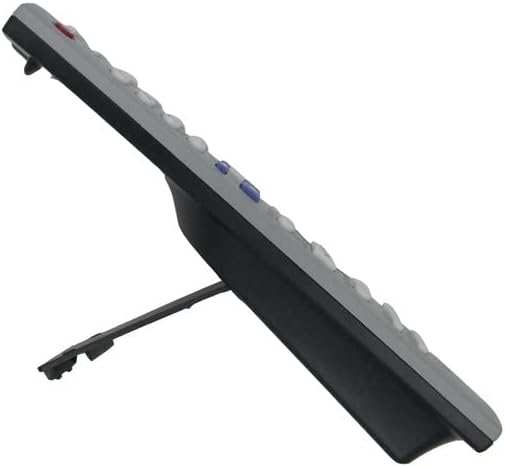
Figure 2: Side view of the replacement remote control. This image highlights the ergonomic design and the slight curvature of the remote, along with a small integrated stand for upright placement.

Figure 3: Alternate side view of the replacement remote control. This perspective further illustrates the remote's profile and the design of its integrated stand.
3. Setup
3.1 Battery Installation
- Locate the battery compartment on the back of the remote control.
- Slide open the battery compartment cover.
- Insert two (2) AA batteries, ensuring the positive (+) and negative (-) terminals align correctly with the markings inside the compartment.
- Close the battery compartment cover securely.
The remote control is now ready for use. No programming is typically required for this infrared replacement remote.
4. Operating Instructions
To operate your audio system, point the remote control directly at the infrared sensor on your Panasonic device. Ensure there are no obstructions between the remote and the audio system.
4.1 Basic Functions
- Power (Red Button): Turns the audio system on or off.
- Volume (+/-): Adjusts the audio output level.
- Muting: Mutes or unmutes the audio.
- Number Buttons (0-9): Used for direct track selection, channel tuning, or inputting numerical values.
- Band/Tuner: Selects radio bands (AM/FM) or switches to tuner mode.
- Tape/CD/DVD: Selects the respective input source.
- Playback Controls (Play, Pause, Stop, Fast Forward, Rewind): Controls media playback.
- Menu/Setup: Accesses the system's menu or setup options.
- Navigation Buttons (Up, Down, Left, Right, Enter): Used to navigate through menus and confirm selections.
Refer to your Panasonic audio system's original manual for specific functions and menu navigation details, as this replacement remote mimics the original's commands.
5. Maintenance
5.1 Cleaning
To clean the remote control, use a soft, dry cloth. For stubborn dirt, lightly dampen the cloth with water. Avoid using harsh chemicals, abrasive cleaners, or excessive moisture, as these can damage the remote's surface or internal components.
5.2 Battery Replacement
Replace batteries when the remote's performance degrades or it stops responding. Always replace both batteries at the same time with new AA batteries. Do not mix old and new batteries, or different types of batteries.
5.3 Storage
If the remote control will not be used for an extended period, remove the batteries to prevent leakage and potential damage to the remote.
6. Troubleshooting
- Remote not responding:
- Check if the batteries are inserted correctly with the correct polarity.
- Replace the batteries with fresh ones.
- Ensure there is a clear line of sight between the remote's IR emitter and the audio system's IR receiver.
- Make sure the remote is pointed directly at the audio system.
- Certain buttons not working:
- As a replacement remote, some advanced or specific functions might not be fully supported or may operate differently than the original. This is a characteristic of universal or replacement remotes.
- Refer to the compatibility list to ensure your audio system model is supported.
7. Specifications
- Brand: Generic
- Model Number: Easytry20629
- Connectivity Technology: Infrared (IR)
- Power Source: 2 x AA Batteries (not included)
- Compatibility: Panasonic N2QAYB000161, N2QAYB000033, N2QAYB000160, N2QAYB000032, SC-VK650, SA-VK650GCP, SA-VK650, N2QAYB000162, SC-VK660 Micro CD DVD Stereo Audio Systems.
8. Warranty and Support
This product comes with a 90-day warranty from the date of purchase. This warranty covers manufacturing defects under normal use. It does not cover damage caused by misuse, accidents, unauthorized modifications, or battery leakage.
For warranty claims or technical assistance, please contact your retailer or the manufacturer with your purchase details. Please note that specific instructions or detailed technical support beyond this manual may not be available for generic replacement products.