
Uandear MTEJ-EP-T25
Uandear LX3 PRO Motorcycle Intercom System
Model: MTEJ-EP-T25
Introduction
Thank you for choosing the Uandear LX3 PRO Motorcycle Intercom System. This manual provides detailed instructions on how to set up, operate, and maintain your device to ensure optimal performance and a safe, enjoyable riding experience. Please read this manual thoroughly before using the product.

Image: The Uandear LX3 PRO motorcycle intercom unit, showcasing its sleek design with red and black accents and illuminated buttons.
Product Overview
Package Contents

Image: A detailed diagram illustrating the various components included in the LX3 PRO package and the functions of each button on the intercom unit.
Upon opening the package, please verify that all the following items are included:
- LX3 PRO Main Unit x1
- Hard Microphone x1
- User Manual x1
- Mounting Base x1
- Round Velcro x4
- Square Velcro x2
- Type-C Charging Cable x1
- Microphone Cover x1
- Speaker x1 pair
Note: Some accessories may vary slightly depending on the specific package.
Key Features
The Uandear LX3 PRO is designed with advanced features to enhance your motorcycle communication and entertainment:

Image: An infographic detailing the eight primary benefits and features of the LX3 PRO intercom system, including dual Bluetooth chip, large battery, and noise cancellation.
- Two-Way Intercom: Equipped with a Qualcomm Bluetooth chip, this intercom offers improved connection distance, stability, and transmission speed. It supports communication between two riders within an 800m range.
- CVC Noise Reduction & Hi-Fi Audio: Features intelligent DSP and 12th generation CVC noise cancellation technology, ensuring clear voice communication up to 120 km/h. The microphone effectively eliminates wind and engine noise. 40mm tuned speaker cones provide high-fidelity stereo sound with immersive audio.
- 1500mAh Large Capacity Battery & IP67 Waterproof: The rechargeable lithium polymer battery fully charges in approximately 2 hours, offering up to 68 hours of music playback, 58 hours of continuous talk time, and a standby time of up to 800 hours. With an IP67 protection rating, the LX3 PRO is suitable for use in harsh environments including rain, snow, mud, and wetlands.
- Multiple Light Modes & Automatic Call Answering: Built-in multiple light modes allow for customizable colors and patterns, enhancing visibility and style during night rides. Supports simultaneous connection to two smartphones and automatically switches between calls and music. Features incoming call announcement and a 10-second automatic answer function, eliminating the need for manual operation while riding and significantly improving driving safety.
- Ergonomic Design: Simple 4-button design for easy operation even while riding. Includes convenient shortcut functions such as voice wake-up, call announcement, automatic answering, and last number redial, making your riding experience simpler and more enjoyable.
Setup
Installation on Helmet

Image: A visual guide demonstrating two installation methods (clip and adhesive) for the intercom unit, compatible with full-face, off-road, modular, open-face, and half helmets.
The LX3 PRO intercom system offers two primary installation methods to accommodate various helmet types:
- Clip-on Method: Ideal for helmets with a suitable edge to attach the clip. This method allows for easy removal and reattachment.
- Adhesive Method: Suitable for helmets where the clip-on method is not feasible or for a more permanent attachment. Ensure the surface is clean and dry before applying the adhesive base.
Ensure the microphone is positioned correctly for clear voice pickup and the speakers are aligned with your ears for optimal audio quality.
Initial Pairing (Intercom Mode)

Image: A visual representation of two riders on motorcycles, with dashed lines indicating the Bluetooth connection between their LX3 PRO intercom units during the pairing process.
To establish an intercom connection between two LX3 PRO units:
- Turn on the first LX3 PRO intercom. Press and hold the "M" button for 5 seconds until the "M" button light flashes red and blue alternately. Release the button.
- Turn on the second LX3 PRO intercom. Press and hold the "M" button for 5 seconds until the "M" button light flashes red and blue alternately. Release the button.
- On the first intercom, press the "M" button once. The "M" button's blue light will flash rapidly, indicating it is in pairing mode. After a few seconds, the "M" button light will turn off, and pairing is complete.
- After pairing is complete, press the "M" button again on either unit to enter intercom mode.
Pairing with Other Devices and Brands

Image: An illustration demonstrating the LX3 PRO's universal connectivity, showing it can pair with other intercom brands (S3, X7, BT8) and general Bluetooth devices like smartphones and GPS units.
The LX3 PRO supports universal pairing with various Bluetooth devices and other intercom brands. For pairing with other Uandear helmet speakers (LX3 Regular, X7, X6), the connection range is approximately 10-20 meters. This function is recommended for front and rear seat communication.
- To pair with a smartphone: Ensure the LX3 PRO is in pairing mode (flashing red/blue). On your smartphone, go to Bluetooth settings and select "LX3 PRO" from the list of available devices.
- To pair with other intercom brands: Follow the pairing instructions for the other intercom device to put it into universal pairing mode, then put the LX3 PRO into its pairing mode.
Operating Instructions
Basic Operations
- Power On/Off: Press and hold the multi-function button (usually the main "M" button) for a few seconds until you hear a voice prompt or see the indicator light change.
- Volume Adjustment: Use the volume up/down buttons (indicated as "Volume Plus" and "Volume Down" in the diagram) to adjust the audio level.
Phone Calls

Image: A smartphone interface demonstrating settings for voice announcements and the 10-second automatic call answering feature, with a visual of the intercom unit on a helmet.
- Answering Calls: The intercom will announce incoming calls. It will automatically answer after 10 seconds. You can also press the multi-function button once to answer immediately.
- Ending Calls: Press the multi-function button once during a call to end it.
- Rejecting Calls: Press and hold the multi-function button for 2 seconds to reject an incoming call.
- Redialing Last Number: Double-press the multi-function button to redial the last dialed number.
Music Playback
- Play/Pause: Press the multi-function button once to play or pause music.
- Next Track: Press the "Volume Plus" button for 2 seconds to skip to the next track.
- Previous Track: Press the "Volume Down" button for 2 seconds to go to the previous track.
Voice Assistant
The LX3 PRO supports voice assistant activation (Siri, Google Assistant).
- Activate Voice Assistant: Double-tap the multi-function button to activate your smartphone's voice assistant.
Light Modes
The LX3 PRO features multiple built-in light modes for enhanced visibility and personalization.
- Change Light Mode: Refer to the specific button combination in the full user manual for changing light modes. (Note: Specific button combination not provided in source data.)
Maintenance
Proper maintenance ensures the longevity and optimal performance of your LX3 PRO intercom system.
- Cleaning: Use a soft, damp cloth to wipe the unit. Do not use harsh chemicals or abrasive cleaners. Ensure the charging port cover is securely closed to maintain water resistance.
- Storage: Store the device in a cool, dry place away from direct sunlight and extreme temperatures.
- Battery Care: For long-term storage, charge the battery to about 50% every three months to prevent deep discharge and prolong battery life.
Troubleshooting
If you encounter any issues with your LX3 PRO, please refer to the following common solutions:
| Problem | Possible Cause | Solution |
|---|---|---|
| Device does not power on. | Low battery. | Charge the device using the provided Type-C cable. |
| Cannot pair with another device. | Device not in pairing mode; too far apart; interference. | Ensure both devices are in pairing mode. Move closer. Reduce interference from other electronic devices. |
| Poor audio quality / Noise. | Microphone not positioned correctly; high wind noise; unit too far from helmet. | Adjust microphone position. Ensure unit is securely mounted. CVC noise reduction works best at speeds up to 120 km/h. |
| Intercom connection drops frequently. | Out of range; obstacles; low battery. | Stay within the 800m range. Avoid large obstacles. Ensure battery is charged. |
If the problem persists after attempting these solutions, please contact customer support for further assistance.
Specifications
| Feature | Detail |
|---|---|
| Model Number | MTEJ-EP-T25 |
| Brand | Uandear |
| Connectivity Technology | Wireless (Bluetooth 5.0) |
| Intercom Range | Up to 800m (2 riders) |
| Battery Capacity | 1500mAh |
| Charging Time | Approx. 2 hours |
| Music Playback Time | Up to 68 hours |
| Talk Time | Up to 58 hours |
| Standby Time | Up to 800 hours |
| Waterproof Rating | IP67 |
| Noise Reduction | Intelligent DSP & 12th Gen CVC |
| Speaker Size | 40mm |
| Product Weight | 0.26 kg (260 g) |
| Package Dimensions | 13.1 x 10 x 5.9 cm |
Warranty and Support
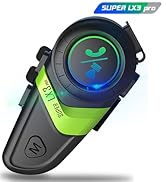
Image: A graphic indicating a maximum 24-month warranty, composed of a 12-month manufacturer's warranty and an additional 12-month extended warranty for registered members.
Uandear is committed to providing high-quality products and excellent customer service. Your LX3 PRO Motorcycle Intercom System comes with a comprehensive warranty.
- Manufacturer's Warranty: The product includes a standard 12-month manufacturer's warranty from the date of purchase.
- Extended Warranty: By registering your product upon receipt, the warranty period can be automatically extended from 12 months to a maximum of 24 months. During the warranty period, if the product malfunctions, it will be repaired or replaced free of charge.
Customer Support:
If you have any questions regarding the operation, setup, or troubleshooting of your Uandear LX3 PRO intercom, please do not hesitate to contact our customer service team. We are dedicated to assisting you and ensuring your satisfaction.
Please refer to the contact information provided on the product packaging or the official Uandear website for the most up-to-date support channels.
Related Documents - MTEJ-EP-T25
 |
AUKEY EP-T25 True Wireless Earbuds User Manual User manual for AUKEY EP-T25 True Wireless Earbuds, detailing setup, pairing, controls, specifications, FAQ, and care instructions. Learn how to use your earbuds effectively. |
 |
User Manual: EP-005 Silicone Earplugs - Waterproof & Noise Reduction Official user manual for the EP-005 Silicone Earplugs. Learn about product information, safety warnings, and instructions for use, cleaning, and storage for waterproof and noise reduction earplugs. |
 |
ENGWE EP-2 PRO Electric Bike Owner's Manual - Specifications & Guide Comprehensive owner's manual for the ENGWE EP-2 PRO electric bike. Includes detailed information on specifications, battery, charging, warranty, and safety guidelines. |
 |
EDUP USB WiFi Adapter Installation Guide and Usage Comprehensive installation guide for EDUP USB WiFi adapters, covering setup for Windows 7, Windows 10, Windows XP, and Mac OS. Includes troubleshooting tips and driver download information. |
 |
Think Tank Photo Hydrophobia Rain Cover Eyepiece Attachments: Installation Guide Instructions for attaching various Think Tank Photo Hydrophobia Rain Cover eyepiece models (EP-S, EP-NSI, EP-N, EP-15, EP-20, EP-NZ, EP-F, EP-SP, EP-NZP) to compatible cameras. |
 |
ENGWE EP-2 PRO Owner's Manual: Safety, Assembly, and Maintenance Guide Comprehensive owner's manual for the ENGWE EP-2 PRO electric bike. Covers safety guidelines, package contents, assembly instructions, troubleshooting, battery care, maintenance, and warranty information to ensure a safe and enjoyable riding experience. |
Ask a question about this manual
Ask about setup, troubleshooting, compatibility, parts, safety, or missing instructions. Manuals+ will review the question and use this page’s manual context to help answer it.