
Introduction
Thank you for choosing the Remotes Remade Replacement Remote Control. This remote is specifically designed to function with Twin Star ClassicFlame and Duraflame fireplace models 36EB110-GRT and 36EB220-GRT. It provides all the essential functions of your original remote without the need for complex setup or programming.
Product Overview
The Remotes Remade replacement remote control is a pre-programmed device that offers immediate functionality for compatible fireplace units. It is designed for ease of use and reliability.
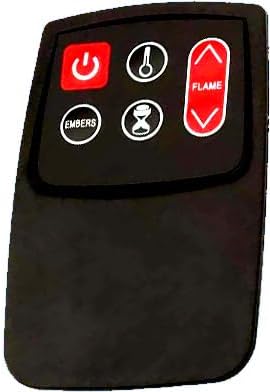
Figure 1: The Remotes Remade replacement remote control. This is the specific remote you will receive, featuring a simplified button layout for essential fireplace functions.

Figure 2: Comparison of the original master remote (left) and the Remotes Remade replacement remote (right). The replacement remote is designed to provide core functionalities for your fireplace.
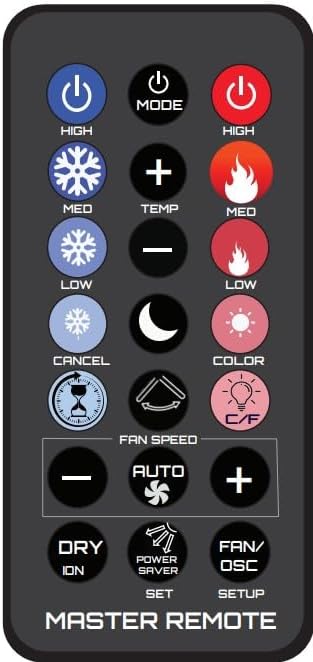
Figure 3: Example of an original master remote control. While the replacement remote may look different, it is engineered to perform the primary functions required for compatible fireplace models.
Key Features:
- Arrives Ready To Use
- No programming required
- Includes a brand new Lithium Metal battery
- Provides all essential functions for compatible fireplace models
- Compatible with Twin Star and Dura Flame Models: 36EB110-GRT, 36EB220-GRT
Setup
The Remotes Remade replacement remote control is designed for immediate use upon arrival. No complex setup or programming is required.
- Unpack the Remote: Carefully remove the remote control from its packaging.
- Battery Installation: The remote comes with a new Lithium Metal battery already installed. If for any reason the battery needs to be checked or re-seated, locate the battery compartment on the back of the remote and ensure the battery is correctly positioned according to the polarity indicators (+/-).
- Test Functionality: Point the remote control towards your compatible Twin Star or Dura Flame fireplace and press any function button (e.g., Power) to confirm operation.
Operating Instructions
This remote control provides the core functions necessary to operate your fireplace. The buttons are clearly labeled for intuitive use.
- Power Button (Red): Press to turn the fireplace ON or OFF.
- Temperature Button (Thermometer Icon): Adjusts the temperature setting of the fireplace heater.
- Flame Control Buttons (Up/Down Arrows with Flame Icon): Adjusts the flame brightness or effect.
- Embers Button (Embers Icon): Controls the ember bed effect.
- Timer Button (Hourglass Icon): Activates or adjusts the fireplace timer function.
For specific details on how each function interacts with your fireplace model, please refer to your fireplace's original user manual.
Maintenance
The remote control requires minimal maintenance. The primary maintenance task is battery replacement.
Battery Replacement:
When the remote's performance diminishes or it stops responding, it is likely time to replace the battery.
- Identify Battery Type: This remote uses 1 Lithium Metal battery.
- Open Battery Compartment: Locate the battery compartment on the back of the remote. Use a small screwdriver or your fingernail to open the cover.
- Remove Old Battery: Carefully remove the old battery, noting its orientation.
- Insert New Battery: Insert a new Lithium Metal battery, ensuring the positive (+) and negative (-) terminals align correctly with the indicators inside the compartment.
- Close Compartment: Securely close the battery compartment cover.
- Test: Test the remote's functionality with your fireplace.
Disposal: Please dispose of used batteries responsibly according to local regulations.
Troubleshooting
If you experience issues with your replacement remote control, please refer to the following common solutions:
- Remote Not Responding:
- Ensure the remote is pointed directly at the fireplace's infrared receiver.
- Check the battery. Even though a new battery is included, ensure it is properly seated and has sufficient charge. Replace if necessary.
- Remove any obstructions between the remote and the fireplace.
- Functions Not Working Correctly:
- Verify that your fireplace model is one of the compatible models: 36EB110-GRT or 36EB220-GRT. This remote is specifically designed for these models.
- Ensure the fireplace itself is powered on and functioning correctly.
- Remote Looks Different Than Original:
- As stated in the product description, the remote you receive (Figure 1) is a replacement and may have a different appearance and fewer buttons than your original master remote (Figure 3). It is designed to provide the essential functions for your compatible fireplace.
If issues persist after following these steps, please contact Remotes Remade customer support for further assistance.
Specifications
| Feature | Detail |
|---|---|
| Model Number | C3 |
| Compatible Devices | Twin Star ClassicFlame, Duraflame Fireplaces (Models: 36EB110-GRT, 36EB220-GRT) |
| Connectivity Technology | Infrared |
| Max Number of Supported Devices | 1 |
| Battery Type | 1 Lithium Metal battery (included) |
| Item Weight | 0.64 ounces |
| Package Dimensions | 1.54 x 0.71 x 0.14 inches |
| Special Feature | Ergonomic |
| Manufacturer | Remotes Remade |
Warranty and Support
For information regarding warranty coverage or to obtain technical support, please contact the manufacturer, Remotes Remade, directly. Specific warranty details are not provided in this manual.
You may find contact information for Remotes Remade through your original purchase platform or by searching online for their official website.


