Introduction
This manual provides essential information for the safe and efficient operation of your JOYROOM Portable 2000mAh Wireless Charger. Please read thoroughly before use to ensure optimal performance and longevity of your device. This compact and versatile charger is designed to keep your Apple Watch powered up wherever you go.
Key features include a robust 2000mAh battery capacity, magnetic auto-alignment for effortless charging, a precise digital battery level display, and a convenient keychain design for ultimate portability.
What's in the Box
Please verify that all items are present in your package:
- 1x JOYROOM Portable Wireless Charger
- 1x 3.3ft USB-C Charging Cable
- 1x User Manual
Product Features
Effortless Magnetic Charging
The charger features a built-in magnetic suction module that ensures your Apple Watch effortlessly auto-aligns and stays stable during charging. It can fully charge Apple Watch Series 10/9/8/7/6/5/4/3/2/SE in approximately 1.5-2 hours, and Apple Watch Ultra 2/Ultra in about 2.5-3 hours, optimizing charging speed without compromising stability.

Image: The portable charger with an Apple Watch attached, illustrating the stable magnetic connection during charging.
True 2000mAh Battery Capacity
Equipped with a 2000mAh battery, this portable wireless charger can fully charge your standard Apple Watch (Series 2-10/SE) 3-4 times, or your Apple Watch Ultra/Ultra 2 up to 2 times. This extended capacity ensures you have power when you need it most, reducing battery anxiety during travel or daily use.

Image: An internal view diagram of the charger highlighting its 2000mAh battery and indicating the number of full charges it provides for different Apple Watch models.
Precise Battery Level Display
Unlike chargers with simple indicator lights, the JOYROOM wireless iWatch charger features a precise digital display that shows the exact remaining battery percentage. This allows for accurate planning of your charging schedule and ensures you are always aware of the charger's power status.

Image: A close-up of the charger's LED screen, clearly showing the digital battery percentage display.
Convenient On-the-Go Charging
Designed for portability, this charger is compact and lightweight, making it an ideal travel companion. The durable double leather and reinforced keychain allow for secure attachment to keys or backpacks, providing emergency charging whenever and wherever you need it.
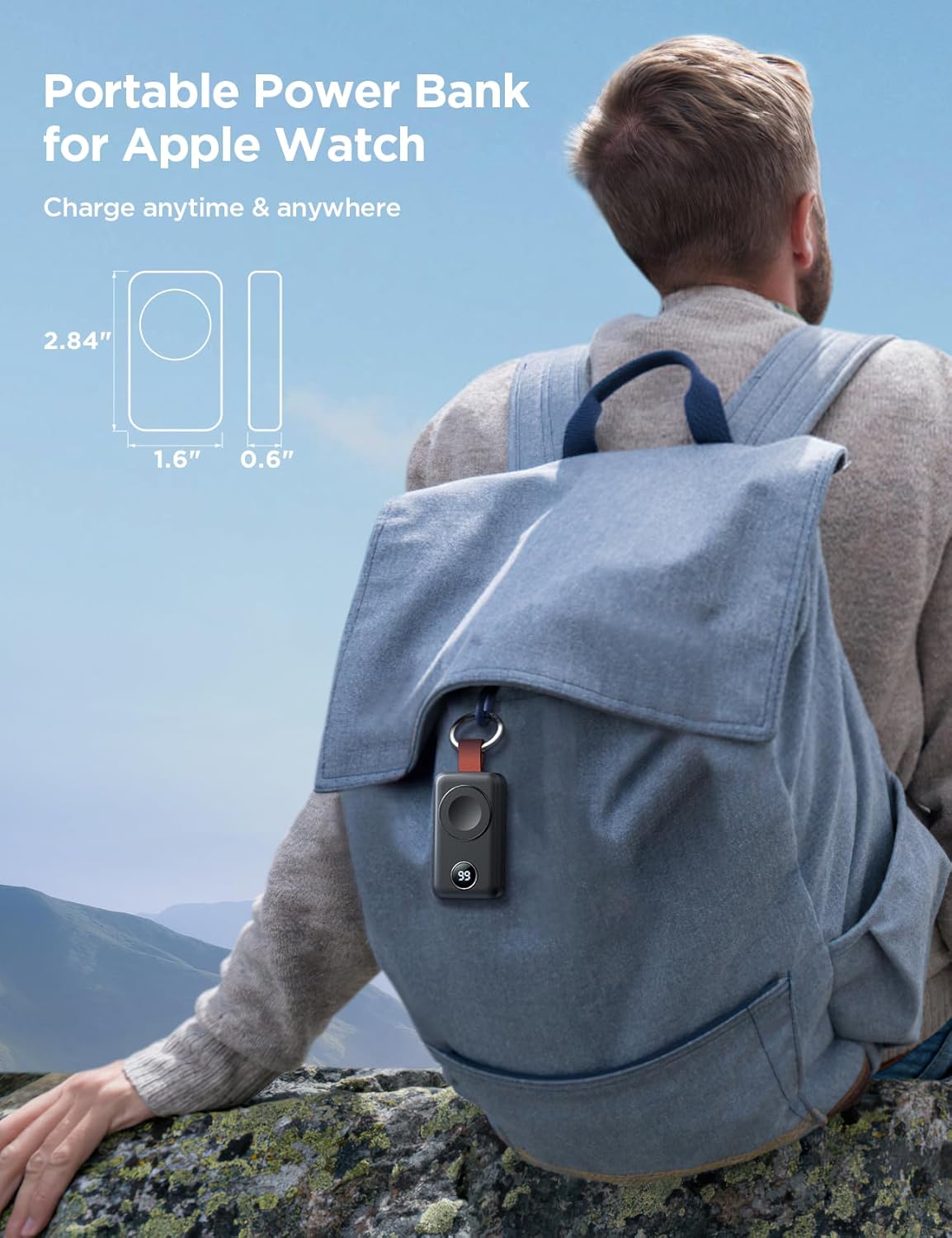
Image: The portable charger attached to a backpack via its keychain, demonstrating its convenience for travel and outdoor use.
Comprehensive Safety Protections
The charger incorporates multiple safety mechanisms to protect both the device and your Apple Watch. These include over-voltage protection, over-current protection, short-circuit protection, and over-temperature protection, ensuring a safe charging experience.

Image: Visual representation of the charger's safety certifications and protective features, including over-voltage, over-current, short-circuit, and over-temperature protection.
Setup
Charging the Portable Charger
- Connect the included 3.3ft USB-C charging cable to the USB-C port on the portable charger.
- Plug the other end of the USB-C cable into a compatible USB power adapter (not included) or a computer's USB port.
- The digital display on the charger will show the charging progress. It is fully charged when the display reads '100'.

Image: A close-up view of the portable charger's USB-C port, demonstrating how to connect the charging cable.
Charging Your Apple Watch
- Ensure the portable charger has sufficient battery charge.
- Place your Apple Watch onto the magnetic charging surface of the portable charger. The watch will automatically align.
- The Apple Watch display will indicate that it is charging. The portable charger's digital display will show its remaining battery percentage.

Image: The JOYROOM portable charger with an Apple Watch placed on its magnetic charging pad, indicating active charging.
Operating Instructions
Power On/Off
- To power on the charger, press the power button once. The digital display will illuminate.
- To power off the charger, press the power button twice.
- The charger is designed with an automatic shutdown feature. If no device is connected for 30 seconds, the charger will automatically power off to conserve battery.

Image: An illustration detailing the power button functionality for turning the charger on and off.
Checking Battery Level
The precise digital LED screen on the charger displays the current battery percentage. Simply press the power button once to activate the display and view the remaining charge.
Compatibility
The JOYROOM Portable Wireless Charger is specifically designed for and compatible with all Apple Watch series, including:
- Apple Watch Series 10
- Apple Watch Series 9
- Apple Watch Series 8
- Apple Watch Series 7
- Apple Watch Series 6
- Apple Watch Series 5
- Apple Watch Series 4
- Apple Watch Series 3
- Apple Watch Series 2
- Apple Watch SE
- Apple Watch Ultra 2
- Apple Watch Ultra

Image: A visual guide showing the wide range of Apple Watch models compatible with the charger.
Maintenance
- Keep the charger clean and dry. Use a soft, dry cloth to wipe the surface.
- Avoid exposing the charger to extreme temperatures, direct sunlight, or high humidity.
- Do not disassemble or attempt to repair the charger yourself. This may void the warranty and cause damage.
- Store the charger in a cool, dry place when not in use.
Troubleshooting
| Problem | Possible Cause | Solution |
|---|---|---|
| Charger not powering on | Low battery; Power button not pressed correctly | Recharge the portable charger; Press the power button once to turn on. |
| Apple Watch not charging | Improper alignment; Charger battery low; Watch not compatible | Ensure Apple Watch is centered on the magnetic surface; Recharge the portable charger; Verify watch model compatibility. |
| Slow charging | Charger battery low; Environmental factors | Ensure charger is fully charged; Charge in a moderate temperature environment. |
| Digital display not working | Device malfunction | Try restarting the charger by pressing the power button twice to turn off and then once to turn on. If issue persists, contact customer support. |
Specifications
- Product Dimensions: 2.84 x 1.61 x 0.61 inches
- Item Weight: 2.2 ounces
- Model Number: JR-WQW01
- Battery: 1 Lithium Polymer battery (included)
- Connectivity Technology: Magnetic
- Connector Type: USB Type C
- Input Voltage: 5 Volts
- Amperage: 3 Amps
- Color: Black
- Manufacturer: Joyroom
- Country of Origin: China
- Special Features: Travel, Magnetic, Short Circuit Protection, Automatic Off, LED screen
Official Product Video
Video: An official overview of the JOYROOM Portable 2000mAh Wireless Charger, demonstrating its features and usage.
Warranty and Support
JOYROOM provides an official professional service team dedicated to offering technical support and assisting you with any product-related inquiries or issues. For further assistance, please refer to the contact information provided on the product packaging or the official JOYROOM website.
For additional safety information, please refer to the Safety Information PDF document available online: Safety Information (PDF)