
VEVOR KLY-7.4K
VEVOR Commercial Coffee Urn Instruction Manual
Model: KLY-7.4K
Brand: VEVOR
Introduction
This manual provides essential information for the safe and efficient operation, maintenance, and troubleshooting of your VEVOR Commercial Coffee Urn. Please read this manual thoroughly before initial use and retain it for future reference.
The VEVOR Commercial Coffee Urn is designed for brewing and dispensing large quantities of coffee, ideal for commercial settings, events, and large gatherings. It features a 50-cup (7.5qt) capacity, 1000W heating element for fast brewing, and a keep-warm function.
Safety Instructions
To ensure safe operation and prevent damage to the appliance or injury to yourself and others, please observe the following safety precautions:
- Always add water to the coffee urn before turning it on to prevent dry burning, which may blow the fuse.
- The anti-scald handle and lid are designed to protect your fingers from burns. Use them properly.
- The faucet is designed with an anti-scalding push cup mechanism. Exercise caution when dispensing hot liquids.
- Do not immerse the appliance, cord, or plug in water or other liquids.
- Ensure the power cord is fully inserted and not damaged. The detachable power cord should be handled with care.
- Keep the appliance out of reach of children.
- Do not operate the appliance if it has been damaged in any way. Contact customer support for assistance.
- Use only original accessories and parts provided by the manufacturer.
Product Components
Familiarize yourself with the main components of your VEVOR Commercial Coffee Urn:
- Main Urn Body: Constructed from food-grade stainless steel.
- Lid: Cool-touch locking lid with anti-scalding features.
- Handles: Cool-touch side handles for safe transport.
- PP Filter Basket: Reusable filter basket for coffee grounds.
- Spout/Faucet: Anti-scalding push cup design with a unique step discharge for complete emptying.
- Indicator Lights: "Heat" (red) and "Keep-warm" (orange) indicator lights.
- Detachable Power Cord: For easy cleaning and storage.

Figure 1: Key components of the VEVOR Commercial Coffee Urn.
Setup
- Unpack and Inspect: Carefully remove all packaging materials. Inspect the coffee urn for any signs of damage.
- Initial Cleaning: Before first use, wash the coffee urn bucket and all accessories (filter basket, lid) with warm soapy water. Rinse thoroughly with warm, clean water.
- Placement: Place the coffee urn on a stable, flat, heat-resistant surface, away from walls and flammable materials. Ensure adequate ventilation around the unit.
- Connect Power: Insert the detachable power cord securely into the designated port on the urn and then plug it into a suitable electrical outlet.

Figure 2: The detachable power cable for easy setup and cleaning.
Operating Instructions
- Add Water: Pour cold, fresh water into the urn. Ensure the water level is between the minimum and maximum fill lines. Always add water before turning on the unit.
- Add Coffee Grounds: Place the PP filter basket into the urn. Add your desired amount of coffee grounds to the filter basket. Paper filters are also supported if preferred.
- Secure Lid: Place the lid securely on top of the urn.
- Start Brewing: Plug in the power cord. The red "heat" indicator light will illuminate, indicating that the brewing process has begun. The urn can brew 50 cups (5oz per cup) of coffee. It takes approximately 1 minute per cup.
- Keep Warm Function: Once brewing is complete, the red light will turn off, and the orange "keep-warm" indicator light will illuminate. The urn will automatically hold the coffee at the perfect serving temperature (90-98°C) for hours.
- Dispensing Coffee: To dispense coffee, place a cup under the faucet and press the push cup mechanism. The unique step discharge design allows for complete emptying without tilting the urn.

Figure 3: Brewing 50 cups at a time.

Figure 4: Keep warm function and scald-proof tap.
Maintenance and Cleaning
Regular cleaning and maintenance will prolong the life of your coffee urn and ensure optimal performance.
- Daily Cleaning: After each use, unplug the urn and allow it to cool completely. Discard used coffee grounds. Wash the filter basket, lid, and interior of the urn with warm soapy water. Rinse thoroughly with clean water. The detachable power cord makes rinsing easier.
- Descaling (Every Two Weeks): The bottom of the coffee urn may accumulate deposits from long-term use. A special cleaning is needed every two weeks to descale the unit.
- Add one quart of water and one quart of white vinegar to the coffee urn.
- Place the coffee basket (empty) into the urn.
- Put on the lid and turn on the switch.
- Allow the unit to complete a brewing cycle with the water and vinegar solution.
- After the cycle, let the solution sit in the urn for 10-15 minutes.
- Drain the water and vinegar solution.
- Rinse the urn thoroughly with clean water multiple times to remove any vinegar residue.
- Exterior Cleaning: Wipe the exterior of the urn with a damp cloth. Do not use abrasive cleaners or scouring pads, as they may damage the stainless steel finish.
Figure 5: Detachable power cable for easy rinsing.
Troubleshooting
If you encounter issues with your VEVOR Commercial Coffee Urn, refer to the following common problems and solutions:
| Problem | Possible Cause | Solution |
|---|---|---|
| Urn does not turn on. | No power, loose power cord, blown fuse (due to dry burning). | Check power outlet. Ensure power cord is securely connected. If fuse is blown, contact customer support. Always add water before turning on. |
| Coffee is not hot enough. | Keep-warm function engaged, insufficient heating time. | Ensure the red "heat" light was on during brewing. Allow full brewing cycle. The orange light indicates optimal serving temperature. |
| Coffee tastes weak or too strong. | Incorrect coffee-to-water ratio, grind size. | Adjust the amount of coffee grounds or water to your preference. Ensure coffee is ground appropriately for drip brewing. |
| Urn leaks from spout. | Faucet not properly closed, internal seal issue. | Ensure the push cup mechanism is fully released. If leaking persists, contact customer support. |
| White powder/deposits in water. | Mineral buildup (limescale). | Perform descaling procedure as described in the Maintenance section. |
If the problem persists after attempting these solutions, please contact VEVOR customer support for further assistance.
Specifications
| Feature | Detail |
|---|---|
| Brand | VEVOR |
| Model Number | KLY-7.4K |
| Coffee Maker Type | Drip Coffee Machine |
| Capacity | 50 Cups / 7.5 Quarts |
| Power | 1000W |
| Filter Type | PP Filter Basket (Paper filter compatible) |
| Included Components | Filter |
| Operation Mode | Fully Automatic |
| Human Interface Input | Buttons |
| Product Dimensions | 19.25 x 10.2 x 10.16 inches |
| Item Weight | 3.5 pounds |
| UPC | 840349984612 |
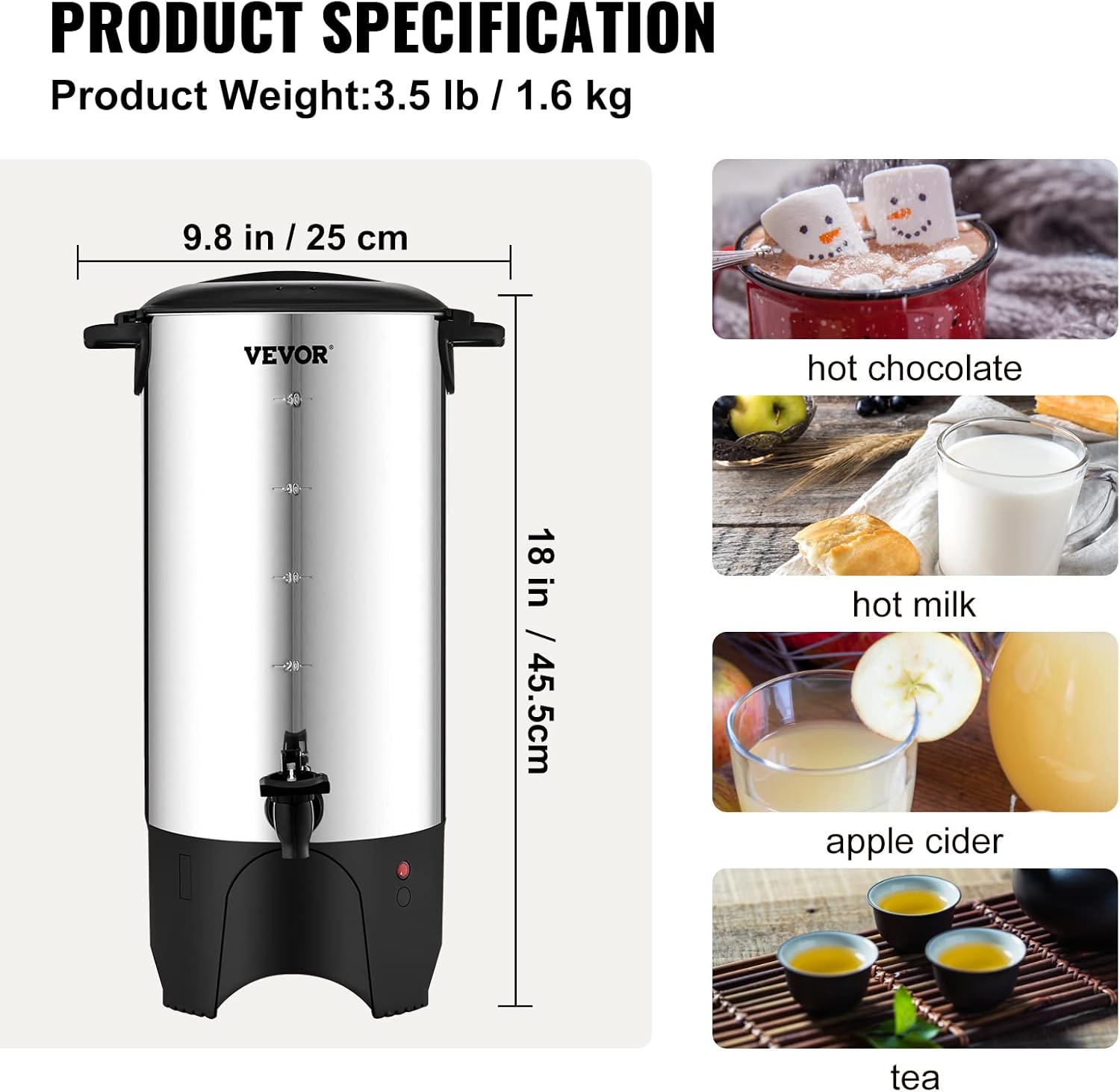
Figure 6: Product dimensions and versatile uses.
Warranty and Support
For warranty information, technical support, or replacement parts, please contact VEVOR customer service. Refer to your purchase documentation for specific warranty terms and contact details.
You can typically find support information on the official VEVOR website or through the retailer where you purchased the product.
Ask a question about this manual
Ask about setup, troubleshooting, compatibility, parts, safety, or missing instructions. Manuals+ will review the question and use this page’s manual context to help answer it.