
Espelho DU5L-WH-JP
Espelho Automatic Pet Feeder User Manual
Model: DU5L-WH-JP
Introduction
Thank you for choosing the Espelho Automatic Pet Feeder. This device is designed to provide convenient and reliable feeding for your pets, ensuring they receive their meals on time and in the correct portions. With advanced features like WiFi connectivity, remote control via a smartphone app, voice recording, and dual power options, this feeder offers peace of mind for pet owners.
Please read this manual thoroughly before using the product to ensure proper operation and maintenance.
Safety Precautions
To ensure safe operation and prevent damage, please observe the following precautions:
- Do not immerse the main unit in water or any other liquid.
- Keep the device away from direct sunlight, heat sources, and flammable materials.
- Use only the specified power adapter (DC5V) or alkaline batteries (3 x D-size, sold separately).
- Ensure the power cord is not damaged or pinched.
- This product is intended for dry pet food only. Do not use wet food, canned food, or treats larger than 13mm.
- Keep out of reach of children and pets when not in use or during assembly.
- Do not attempt to disassemble or repair the device yourself. Contact customer support for assistance.
Package Contents
Please check that all items are present and in good condition:
- Espelho Automatic Pet Feeder Main Unit
- Stainless Steel Food Bowls (x2)
- Adjustable Height Legs (Small x2, Large x2)
- Power Adapter (DC5V)
- User Manual (this document)
- Desiccant Bag
Product Overview
Familiarize yourself with the components of your Espelho Automatic Pet Feeder.
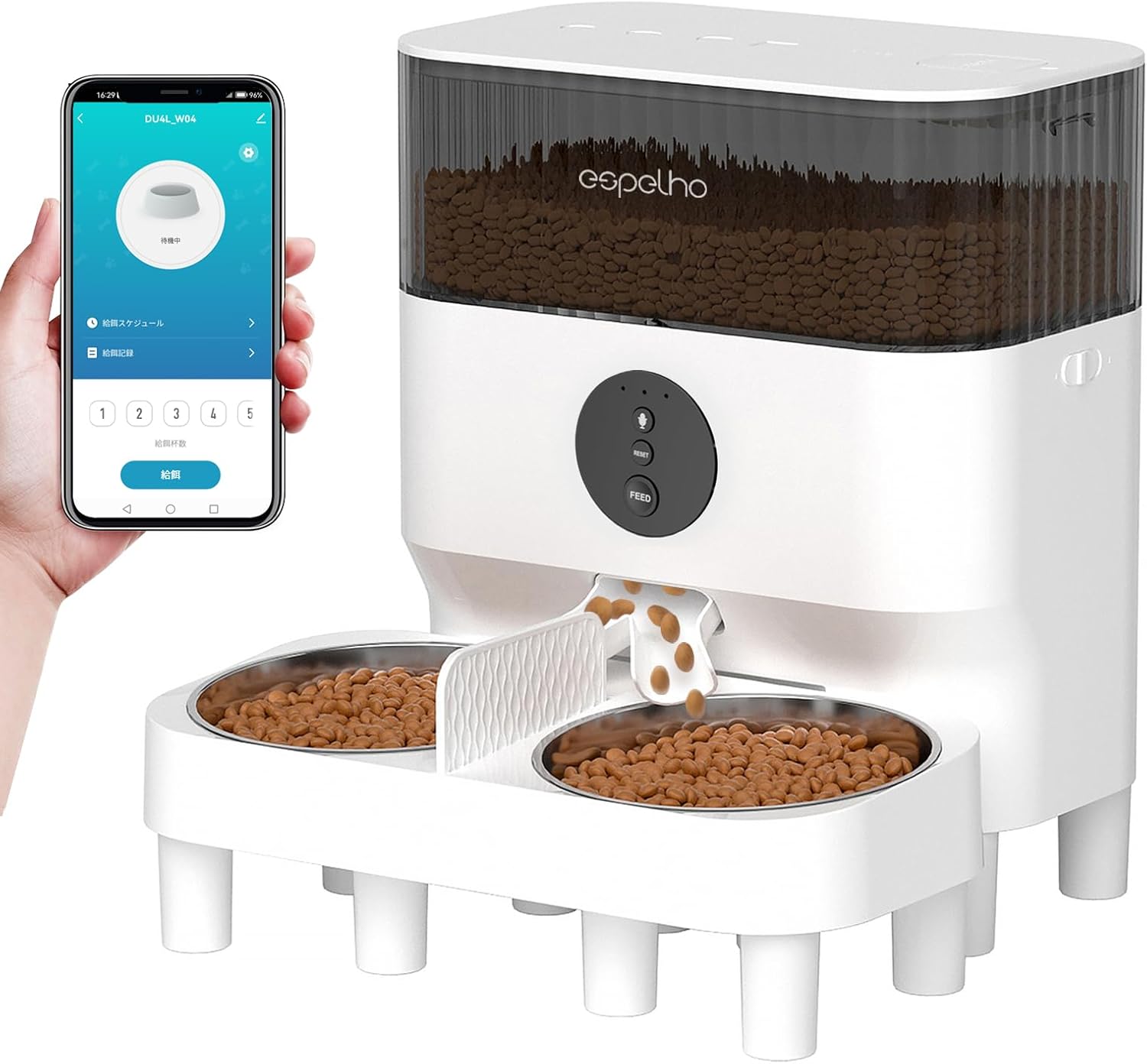
Image: The Espelho Automatic Pet Feeder shown with a smartphone displaying its control app. The feeder features a transparent food tank, control panel, and two stainless steel bowls.
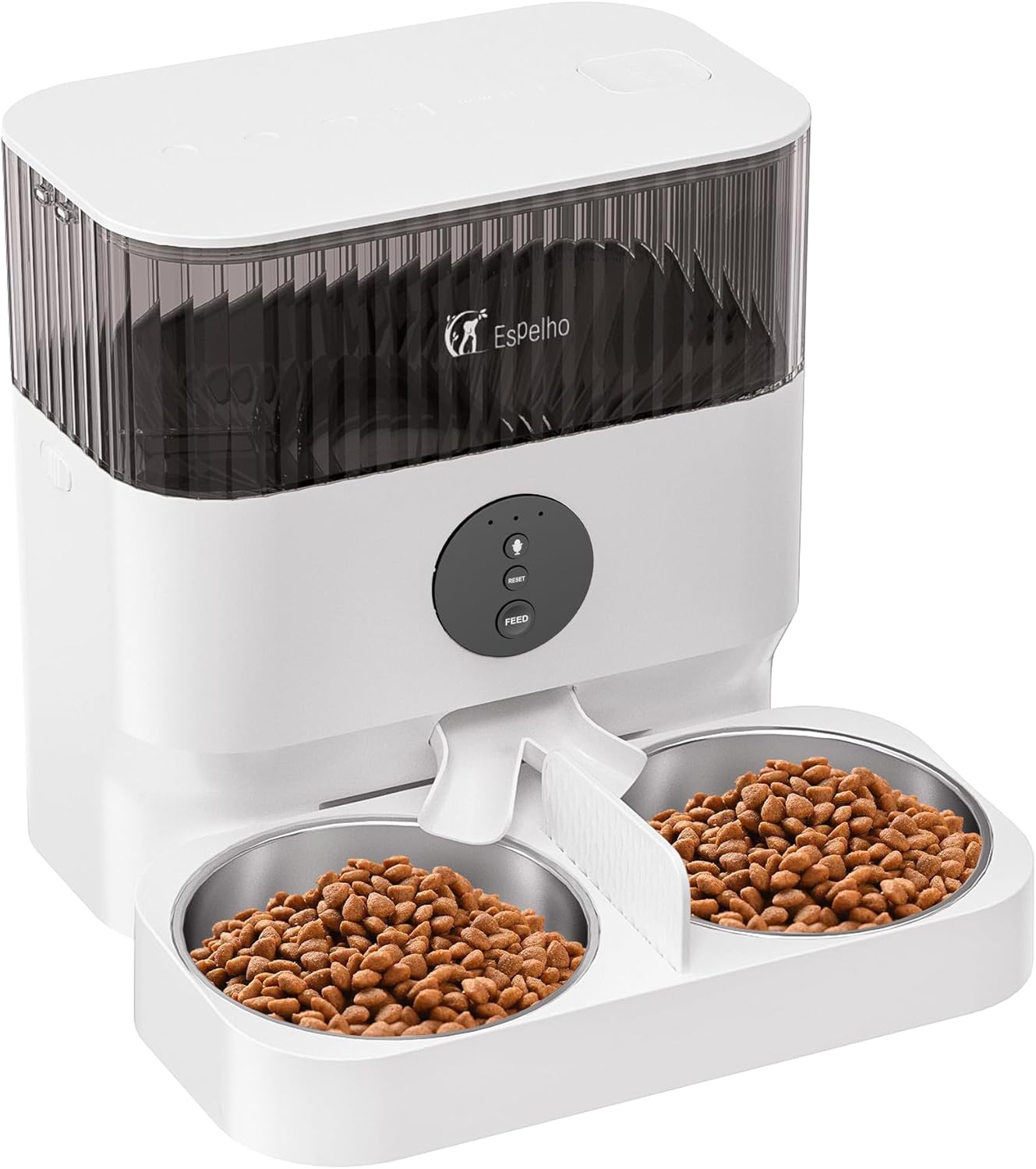
Image: Front view of the Espelho Automatic Pet Feeder, highlighting the food dispensing mechanism and the two stainless steel bowls.

Image: Illustration showing the 5L large capacity tank of the Espelho Automatic Pet Feeder, indicating it can hold enough food for approximately 26 days for a 2kg cat or 6 days for a 10kg dog (based on two pets).

Image: Diagram illustrating the anti-clog design of the feeder, showing the internal mechanism that prevents food from getting stuck during dispensing.

Image: Illustration of the dual power supply feature, showing both the DC5V adapter connection and the battery compartment for backup power.
Setup
1. Assembly
- Unpack all components and remove any packaging materials.
- Attach the stainless steel bowls to the feeder base.
- Insert the desired height legs (small or large) into the designated slots on the bottom of the feeder. There are 3 height adjustment levels (4.8cm to 9.8cm).
- Place the desiccant bag in the designated compartment under the lid to keep food fresh.
2. Power Supply
- Primary Power: Connect the DC5V power adapter to the feeder and plug it into a wall outlet.
- Backup Power: For power outage protection, insert 3 D-size alkaline batteries (not included) into the battery compartment at the bottom of the feeder.
3. App Installation and WiFi Connection
- Download the dedicated Espelho app from the App Store (iOS) or Google Play Store (Android).
- Open the app and create an account or log in.
- Ensure your smartphone's WiFi is set to 2.4GHz.
- Follow the in-app instructions to add your device. This typically involves pressing and holding the reset button on the feeder for 7 seconds until it beeps, then scanning a QR code generated by the app.
- Enter your WiFi password when prompted.
- Once connected, the feeder's WiFi indicator light will turn solid blue.

Image: The Espelho Automatic Pet Feeder with a smartphone displaying the app interface, showing options for scheduling and manual feeding.
Operating Instructions
1. Filling the Food Tank
- Open the top lid of the feeder.
- Pour dry pet food into the transparent tank. The tank has a 5L capacity.
- Ensure the food kibble size is between 2mm and 13mm to prevent clogging.
- Close the lid securely. The lid features a slide lock to prevent pets from accessing the food.

Image: A hand pouring dry pet food into the transparent tank of the Espelho Automatic Pet Feeder, demonstrating the ease of checking food levels.
2. Scheduling Feeds via App
- Open the Espelho app on your smartphone.
- Navigate to the feeding schedule section.
- You can set up to 8 feeding times per day.
- For each feeding time, specify the day(s) of the week, the exact time, and the number of portions (10g to 200g, in 10g increments).
- Save your schedule. The feeder will automatically dispense food according to your settings.

Image: An illustration showing the app interface for setting a feeding plan, including time slots and portion sizes. The feeder can dispense 1-120 portions per meal, with up to 6 meals per day.
3. Manual Feeding
- Press the "FEED" button on the feeder's control panel to dispense one portion of food instantly.
- Alternatively, use the manual feed option within the app for immediate dispensing.
4. Voice Recording and Two-Way Audio
- Record Voice: Use the app to record a 10-second voice message. This message will play automatically during scheduled or manual feeds to call your pet.
- Two-Way Audio: The feeder supports two-way audio communication via the app, allowing you to speak to your pet and hear them in real-time, even when you are away.

Image: A cat looking towards the feeder, with a speech bubble indicating a voice message playing, demonstrating the voice recording feature to call pets for meals.
5. Smart Notifications
- The app will send notifications to your smartphone for various events, including low food levels, low battery power, food jams, WiFi disconnection, and device malfunctions.
Maintenance
1. Cleaning
- Disconnect the power adapter and remove any batteries before cleaning.
- Remove the stainless steel bowls and wash them with mild soap and water. Rinse thoroughly and dry completely.
- Wipe the main unit with a soft, damp cloth. Do not use abrasive cleaners or immerse the unit in water.
- Periodically check the food dispensing mechanism for any food residue and clean as necessary to prevent jams.
2. Desiccant Bag Replacement
- Replace the desiccant bag every 1-2 months, or as needed, to maintain food freshness.
Troubleshooting
| Problem | Possible Cause | Solution |
|---|---|---|
| Feeder not dispensing food. | Food tank empty; food jam; incorrect kibble size; power issue. | Refill food tank. Check for and clear any food jams. Ensure kibble size is 2-13mm. Verify power connection and backup batteries. |
| Cannot connect to WiFi. | Incorrect WiFi password; 5GHz WiFi network; feeder too far from router; incorrect reset procedure. | Double-check WiFi password. Ensure your router supports 2.4GHz and your phone is connected to it. Move feeder closer to router. Perform reset (press and hold reset button for 7 seconds). |
| Voice recording not playing. | No voice recorded; volume too low. | Record a voice message via the app. Check volume settings in the app. |
| Food dispensing unevenly into bowls. | Food distribution mechanism issue. | This can sometimes occur due to the design. Ensure the feeder is on a level surface. If the issue persists and affects pet feeding, contact customer support. |
| Feeder offline in app. | WiFi disconnected; power interruption. | Check WiFi connection. If power was interrupted, the feeder should resume scheduled feeds if backup batteries are installed. Try unplugging and replugging the feeder, or removing and reinserting batteries. If offline for extended periods, try resetting and reconnecting to WiFi. |
Specifications
| Feature | Detail |
|---|---|
| Model Number | DU5L-WH-JP |
| Capacity | 5 Liters |
| Power Supply | DC5V Adapter (included), 3 x D-size Alkaline Batteries (not included) |
| Connectivity | WiFi (2.4GHz only) |
| App Compatibility | iOS, Android |
| Feeding Schedule | Up to 8 meals per day |
| Portion Size | 10g to 200g (20 levels, 10g/level) |
| Voice Recording | Max 10 seconds |
| Two-Way Audio | Supported |
| Kibble Size | 2mm - 13mm recommended |
| Adjustable Height | 4.8cm - 9.8cm (3 levels) |
Warranty and Support
For warranty information and customer support, please refer to the contact details provided with your purchase or visit the official Espelho website. Please have your model number (DU5L-WH-JP) and purchase date ready when contacting support.
For common issues, please refer to the Troubleshooting section of this manual or the FAQ section on our website.
Related documentsDU5L-WH-JP


Ask a question about this manual
Ask about setup, troubleshooting, compatibility, parts, safety, or missing instructions. Manuals+ will review the question and use this page’s manual context to help answer it.