1. Introduction
This manual provides comprehensive instructions for the operation and maintenance of your BUYIO Smartwatch. Please read this manual carefully before using the device to ensure proper function and longevity.

Image: The BUYIO Smartwatch, featuring a pink silicone strap and an additional gold mesh strap. The main watch face displays various application icons, while a smaller inset shows a call interface.
2. Package Contents
Verify that all items are present in the package:
- BUYIO Smartwatch (with one strap attached)
- Additional strap (e.g., gold mesh strap)
- Charging cable (USB)
- User Manual (this document)

Image: An overview of the BUYIO Smartwatch package contents, showing the smartwatch, two interchangeable straps (one silicone, one mesh), and a USB charging cable.
3. Setup
3.1 Charging the Smartwatch
Before initial use, fully charge your smartwatch. Connect the magnetic charging cable to the charging points on the back of the watch and plug the USB end into a power adapter (not included) or a computer's USB port.
- Charging time: Approximately 2 hours for a full charge.
- Battery life: Up to 2 weeks with typical use.
3.2 App Installation and Pairing
To unlock all features, download the companion app to your smartphone.
- Download the App: Scan the QR code in the watch's settings or search for "Smartwatch App" in your smartphone's app store (iOS or Android).
- Enable Bluetooth: Ensure Bluetooth is enabled on your smartphone.
- Open the App: Launch the installed app and follow the on-screen instructions to create an account or log in.
- Pair Device: In the app, navigate to "Add Device" or "Pair Smartwatch" and select your BUYIO Smartwatch from the list of available devices. Confirm the pairing request on both your phone and the smartwatch.
Note: The smartwatch is compatible with iOS 8.0 or later and Android 4.0 or later.
3.3 Strap Replacement
Your smartwatch comes with interchangeable straps. To replace a strap:
- Locate the quick-release pin on the underside of the strap where it connects to the watch body.
- Slide the pin inwards to detach the strap.
- Align the new strap with the watch body and insert one end of the pin into the lug hole.
- Slide the quick-release pin inwards, align the other end with the opposite lug hole, and release the pin to secure the strap. Gently pull on the strap to ensure it is properly attached.
4. Operating Instructions
4.1 Basic Navigation
- Power On/Off: Press and hold the side button to power on or off.
- Wake Screen: Raise your wrist or press the side button.
- Touch Screen: Swipe left/right/up/down to navigate menus and tap to select.
- Side Button: Press to return to the home screen or access the app menu.
4.2 Key Features
- Bluetooth Calling: Once paired, you can make and receive calls directly from your smartwatch.
- Activity Tracker: Monitors steps, distance, and calories burned.
- Heart Rate Monitor: Provides real-time heart rate data.
- Blood Oxygen Monitor: Measures blood oxygen saturation (SpO2).
- Sleep Monitor: Tracks sleep patterns and quality.
- Multiple Sports Modes: Supports various activities like walking, running, cycling, skiing, and more.
- Notifications: Receives alerts for calls, messages, and social media apps.
- Music Control: Control music playback on your connected smartphone.
- Camera Remote: Use the smartwatch as a remote shutter for your phone's camera.
- Alarm Clock: Set alarms directly on the watch or through the app.
- Weather: Displays current weather conditions.
- Find Phone: Helps locate your paired smartphone.

Image: The BUYIO Smartwatch screen showcasing a variety of functions, including phone access, music control, camera remote, pedometer, notifications, and other utilities.
4.3 Health Monitoring
The smartwatch provides health data for reference. It is not intended for medical use.
- Heart Rate: To measure, ensure the watch is snug on your wrist. Navigate to the heart rate icon and wait for the reading.
- Blood Oxygen: Similar to heart rate, ensure proper fit and initiate measurement from the SpO2 icon.
- Sleep Tracking: Wear the watch while sleeping. Data will be synchronized to the app in the morning.
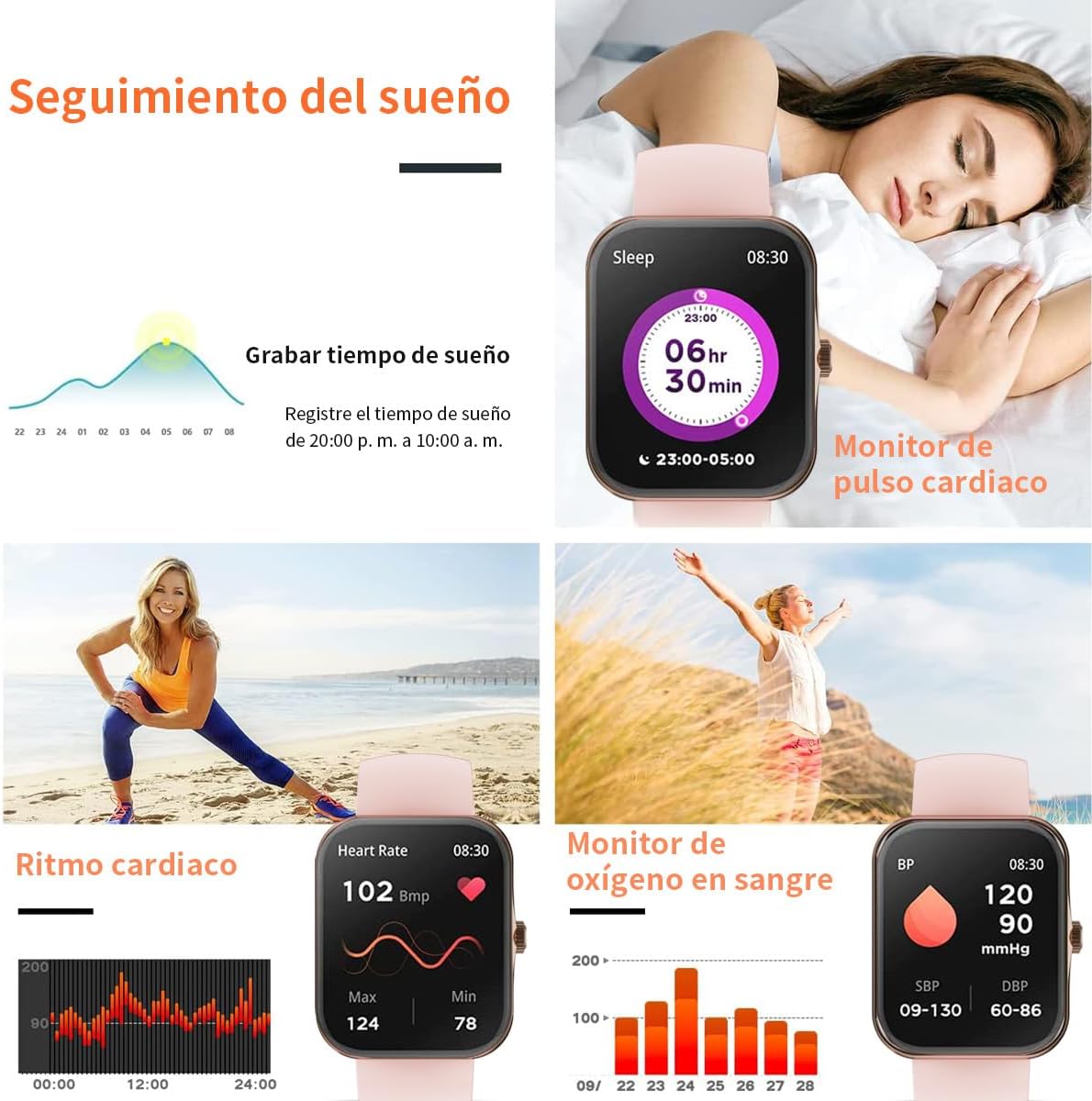
Image: A visual representation of the smartwatch's health monitoring capabilities, including sleep tracking duration, real-time heart rate, and blood oxygen levels.
4.4 Sports Modes
The smartwatch supports various sports modes to track your physical activity. Select the desired mode before starting your workout for accurate data recording.

Image: The BUYIO Smartwatch highlighting its 8 sports modes with various activity icons, alongside an image of a woman running, demonstrating its use for fitness tracking.
4.5 Customizing Watch Faces
You can change the watch face directly on the device or through the companion app.
- On Watch: Long-press the home screen, then swipe left/right to browse and tap to select.
- Via App: Open the app, go to "Watch Faces" or "Dial Settings" to choose from a gallery or upload a custom image.

Image: Two BUYIO Smartwatches displaying different customizable watch faces on their 1.83-inch HD screens, highlighting the personalization options.
5. Maintenance
5.1 Cleaning
- Wipe the watch screen and body with a soft, damp cloth.
- Avoid using harsh chemicals or abrasive materials.
- Clean the charging contacts regularly to ensure efficient charging.
5.2 Water Resistance (IP67)
The smartwatch is IP67 water-resistant, meaning it can withstand splashes, rain, and brief immersion in water up to 1 meter for 30 minutes. It is not suitable for swimming, hot showers, or diving.

Image: The BUYIO Smartwatch being splashed with water, illustrating its IP67 water resistance for daily use.
5.3 Storage
Store the smartwatch in a cool, dry place away from direct sunlight and extreme temperatures.
6. Troubleshooting
| Problem | Possible Solution |
|---|---|
| Watch does not turn on. | Ensure the watch is fully charged. Connect to the charger for at least 10 minutes. |
| Cannot pair with smartphone. |
|
| Inaccurate health data. |
|
| Notifications not received. |
|
| Battery drains quickly. |
|
7. Specifications
| Feature | Detail |
|---|---|
| Brand | BUYIO |
| Display Size | 1.83 inches |
| Display Type | LCD |
| Connectivity | Bluetooth |
| Operating System | Android Wear (Note: This is often a generic classification; actual OS might be proprietary) |
| Memory Storage Capacity | 64 MB |
| Water Resistance Rating | IP67 |
| Compatible Devices | Smartphones (iOS 8.0+ / Android 4.0+) |
| Special Features | Alarm Clock, Activity Tracker, Bluetooth Calling, Heart Rate Monitor, Blood Oxygen Monitor, Sleep Monitor, Music Control, Camera Remote |
| Dimensions | 17.1 x 11.5 x 5.2 cm; 140 g (Package Dimensions) |
8. Warranty and Support
For warranty information and technical support, please refer to the contact details provided with your purchase or visit the official BUYIO website. Keep your proof of purchase for warranty claims.
Note: Specific warranty terms may vary by region and retailer.