
1. Introduction
Thank you for choosing the Yaheetech Under Desk Vertical File Cabinet. This versatile and stylish cabinet is designed to enhance your home or office organization with its thoughtful storage solutions, including two drawers (one lockable) and an open compartment. Its mobile design with lockable wheels offers flexibility and stability. Please read this manual carefully before assembly and use to ensure proper setup and safe operation.
2. Safety Information
- Do not overload the cabinet.
- Be cautious of pinch points when using the lockable wheels.
- Always follow the weight capacity guidelines to prevent injuries or damage.
- Ensure all screws and fasteners are securely tightened during assembly and periodically check for looseness.
- Keep small parts and packaging materials away from children to prevent choking hazards.
3. Package Contents
Before beginning assembly, please ensure all parts listed below are present and undamaged. If any parts are missing or damaged, please contact Yaheetech customer support.
| Component | Description |
|---|---|
| Cabinet Panels | MDF and particle board panels for the main frame, drawers, and shelves. |
| Drawers | Components for one small drawer and one large file drawer. |
| Hardware Kit | Includes screws, dowels, cam locks, drawer slides, and other fasteners. |
| Wheels | Four smooth-rolling casters, two with built-in brakes. |
| Handles | Two metal handles for the drawers. |
| Lock & Keys | Locking mechanism and two keys for the top drawer. |
| File Rods | Adjustable rods for hanging A4 or letter-size file folders in the bottom drawer. |
4. Assembly Instructions
Assembly of the Yaheetech File Cabinet requires patience and attention to detail. While detailed diagrams are provided in the physical instruction manual, the general steps involve:
- Unpack and Identify: Carefully unpack all components and lay them out. Identify each panel and hardware piece using the provided labels and diagrams.
- Assemble Drawers: Construct the small and large drawers by connecting the side, front, and back panels. Install the drawer bottoms and handles. Ensure the locking mechanism is correctly installed on the top drawer.
- Install Drawer Slides: Attach the drawer slides to both the drawers and the main cabinet panels according to the instructions.
- Construct Main Frame: Assemble the main cabinet frame, including the top, bottom, side panels, and the open compartment shelf.
- Attach Wheels: Securely attach the four smooth-rolling wheels to the bottom of the cabinet. Remember to install the two lockable wheels at the front for easy access to the brakes.
- Insert Drawers: Carefully slide the assembled drawers into their respective compartments.
- Final Checks: Ensure all connections are tight and the cabinet is stable. Test the drawer slides, lock, and wheel brakes for smooth operation.
For a visual overview of the assembled product and its features, please refer to the official product video below:
Official Product Video: Yaheetech Vertical File Cabinet with Lockable Drawer. This video demonstrates the key features and functionality of the file cabinet, including its storage compartments, lockable drawer, and mobile wheels.
5. Operating the Cabinet (Features)
- Spacious Tabletop: The top surface of the cabinet (16" L × 16" W) can support up to 55 lbs, ideal for a small printer, decor, or other office essentials.
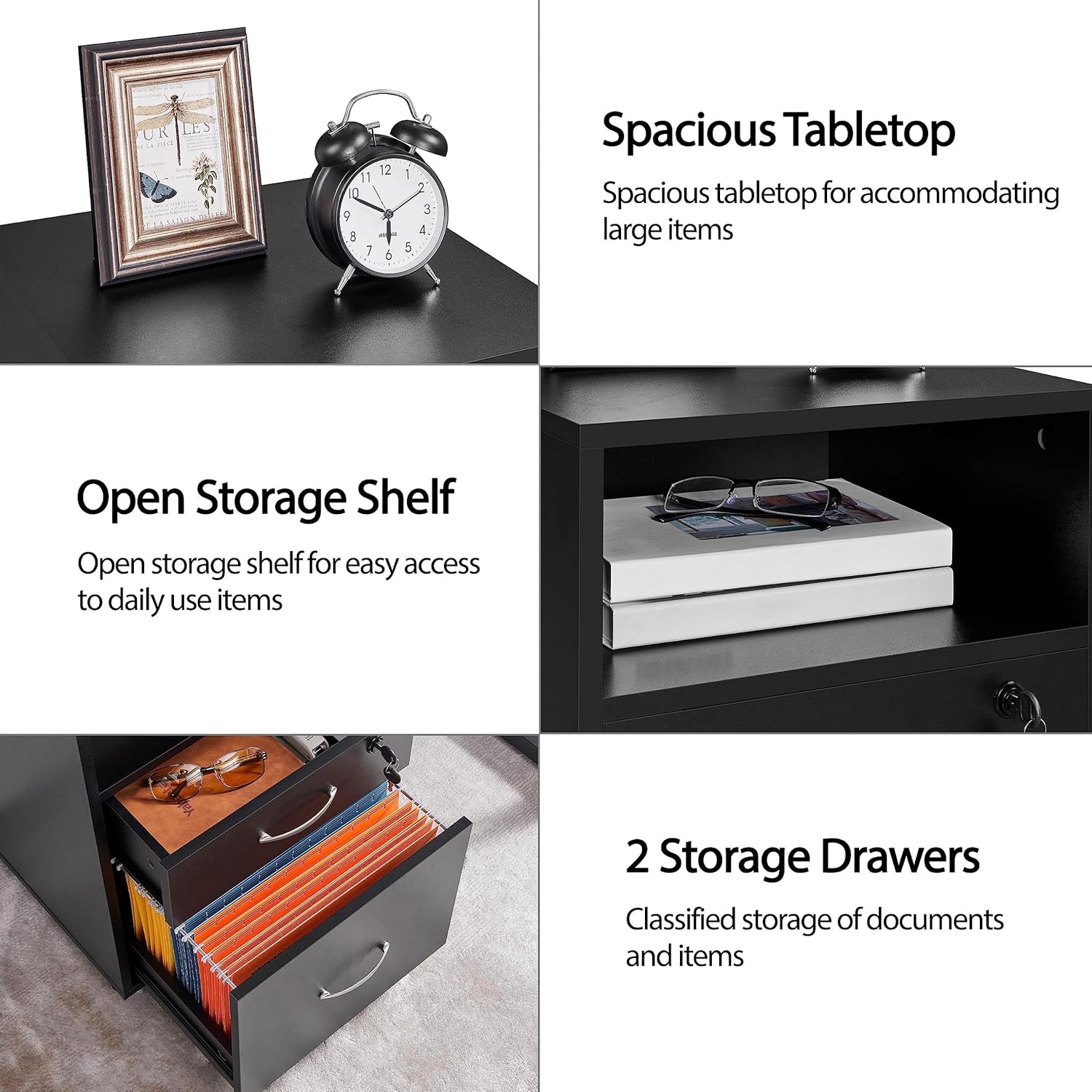
Image: Illustrates the spacious tabletop and open storage shelf.
- Open Storage Shelf: A convenient open compartment (15" W x 6" H) is located below the tabletop, perfect for frequently accessed items like books, notebooks, or small office supplies.
- Lockable Top Drawer: The upper drawer features a lock and comes with two keys, providing a secure space for valuables or confidential documents. This drawer has a weight capacity of 11 lbs.

Image: Detailed view of the lockable drawer and other hardware.
- Large File Drawer: The bottom drawer is designed for letter-size or A4 suspension filing, allowing for 100% drawer extension for easy access. It can hold up to 22 lbs.

Image: Demonstrates the adjustable file rods for different folder sizes.
- Smooth & Lockable Wheels: Equipped with four 360-degree industrial casters, the cabinet offers quiet and flexible mobility. Two front wheels include built-in brakes to keep the cabinet securely in place.

Image: Shows the lockable wheels for stability.
6. Maintenance
- Cleaning: Wipe the cabinet surfaces with a soft, damp cloth. Avoid harsh chemicals or abrasive cleaners that could damage the finish.
- Hardware Check: Periodically check all screws, bolts, and connections to ensure they remain tight. Re-tighten if necessary to maintain stability.
- Drawer Slides: If drawers become stiff, apply a small amount of silicone lubricant to the drawer slides.
- Wheel Care: Keep wheels free of debris to ensure smooth movement.
7. Troubleshooting
- Drawers not sliding smoothly: Check that the drawer slides are correctly installed and aligned. Ensure no debris is obstructing the slides. Lubricate if needed.
- Cabinet wobbles: Verify that all assembly hardware is securely tightened. Ensure the cabinet is placed on a flat, level surface. Use the wheel locks if on an uneven surface.
- Lock not working: Ensure the key is fully inserted and turned correctly. Check for any obstructions preventing the lock mechanism from engaging.
8. Specifications
| Attribute | Detail |
|---|---|
| Color | Black |
| Materials | MDF, Particle Board |
| Overall Dimensions | 16″ L × 16″ W × 26″ H |
| Max Weight Capacity (Total) | 110 lb |
| Max Weight Capacity (Top Board) | 55 lb |
| Max Weight Capacity (Open Shelf) | 22 lb |
| Max Weight Capacity (Top Drawer) | 11 lb |
| Max Weight Capacity (Bottom Drawer) | 22 lb |
| Net Weight | 35 lb |
| Special Features | Lockable, Wheeled |

Image: Detailed dimensions and weight capacities.

Image: Front view of the Yaheetech File Cabinet.
9. Warranty and Support
For warranty information and customer support, please refer to the documentation included with your purchase or visit the official Yaheetech website. You can also contact the seller directly through the platform where you purchased the product.
For additional products and information, visit the Yaheetech Store.

