
SIBBLE B0CBFJFL92
SIBBLE 16-Position DIN Rail Mount Power Distribution Fuse Module with Switch User Manual
Model: B0CBFJFL92
1. Product Overview
The SIBBLE 16-Position DIN Rail Mount Power Distribution Fuse Module with Switch is designed for efficient power distribution and circuit protection in various AC/DC 5~32V applications. This module integrates 16 individual fuse holders, each with a corresponding switch, allowing for independent control and protection of multiple circuits. It is designed for easy mounting on a standard DIN rail, making it suitable for industrial control systems, automation, and other electrical installations.
Key features include:
- 16 independent channels for power distribution.
- Integrated fuse holders for circuit protection.
- Individual switches for each channel, enabling independent control.
- Designed for DIN rail mounting for easy installation.
- Supports AC/DC voltage range of 5V to 32V.
2. Package Contents
Please verify that all components are present before installation:
- 1 x SIBBLE 16-Position DIN Rail Mount Power Distribution Fuse Module with Switch (with Carrier)
- (Fuses may or may not be pre-installed, check product description for specifics)
3. Safety Information
Always observe the following safety precautions:
- Ensure power is disconnected before installation or maintenance.
- Only qualified personnel should perform electrical installations.
- Verify correct voltage and current ratings before connecting to power sources.
- Do not exceed the maximum voltage (32V) or current ratings of the module or individual fuses.
- Use appropriate personal protective equipment (PPE).
4. Setup and Installation
This module is designed for easy mounting on a standard 35mm DIN rail.
- Mounting:
Align the module's DIN rail clip with the DIN rail. Press firmly until it clicks into place. Ensure it is securely fastened.

Figure 4.1: The SIBBLE 16-Position DIN Rail Mount Power Distribution Fuse Module shown mounted on a standard DIN rail. This image provides a general view of the product and its mounting mechanism.
- Wiring Connections:
Identify the input terminals (typically marked '+' and 'GND' or similar) and the 16 output terminals (A1-A16, B1-B16, or similar numbering). Connect your AC/DC 5~32V power source to the input terminals. Connect your loads to the respective output terminals. Ensure all connections are tight and secure.
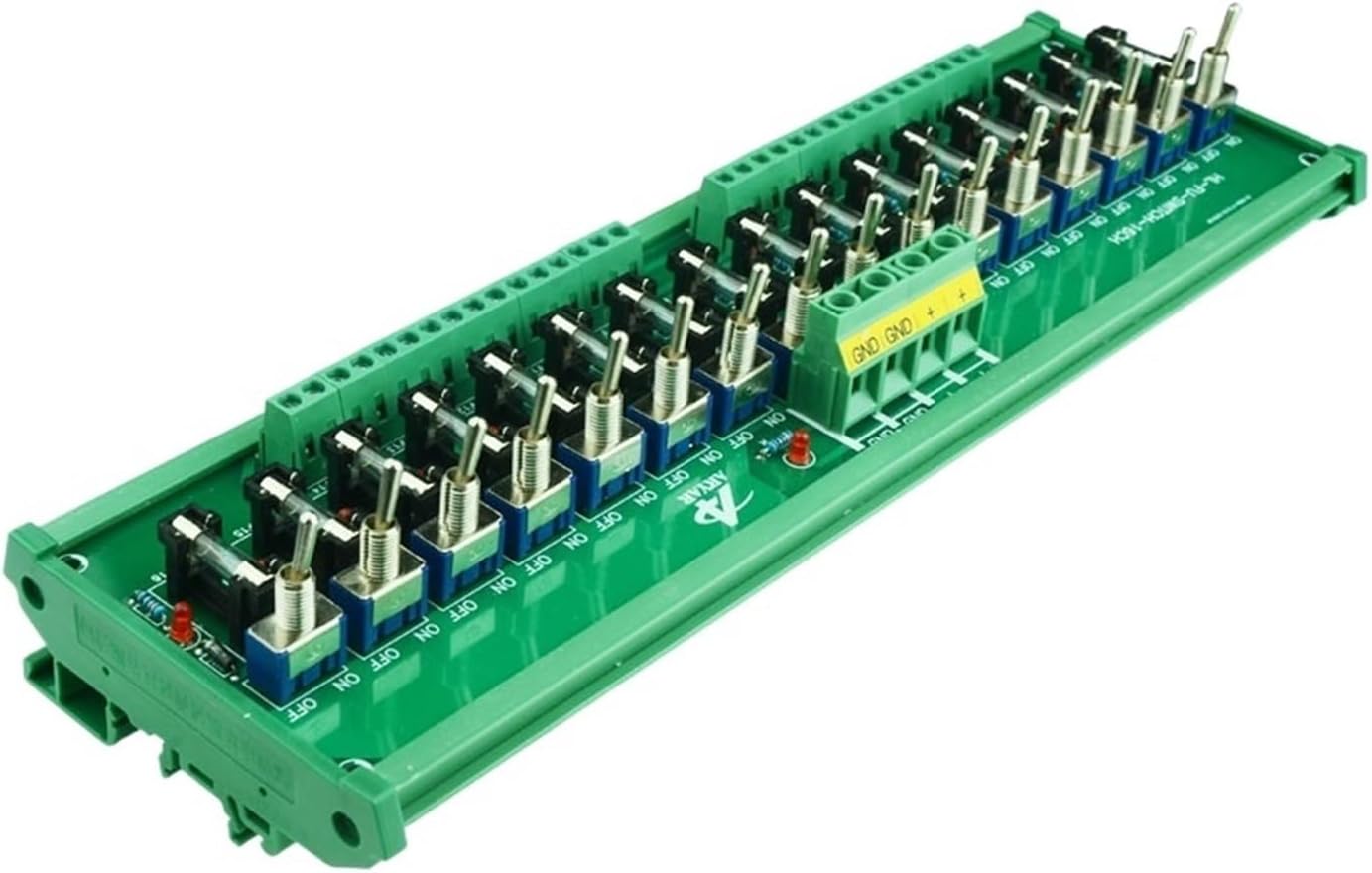
Figure 4.2: A top-down view of the module, highlighting the input terminals (GND, GND, +, +) and the 16 sets of output terminals. Each output channel is clearly labeled.

Figure 4.3: An angled view of the module, providing a clearer look at the individual switches and the transparent fuse holders for each of the 16 channels. The "ON" and "OFF" markings for the switches are visible.
- Fuse Installation (if not pre-installed):
If fuses are not pre-installed, carefully insert the appropriate rated fuses into each fuse holder. Ensure the fuses are compatible with your circuit's current requirements and the module's specifications.
5. Operating Instructions
Once the module is installed and wired, you can begin operation:
- Power On:
Apply power to the input terminals of the module (AC/DC 5~32V).
- Channel Control:
Each of the 16 channels has an independent toggle switch. To activate a circuit, flip the corresponding switch to the "ON" position. To deactivate a circuit, flip the switch to the "OFF" position.

Figure 5.1: A detailed angled view of the module, emphasizing the individual toggle switches and their "ON" and "OFF" markings. This illustrates how to control each channel independently.
- Circuit Protection:
The integrated fuses protect connected circuits from overcurrent conditions. If a fuse blows, the corresponding circuit will lose power. Refer to the Maintenance section for fuse replacement.
6. Maintenance
Regular maintenance ensures the longevity and proper functioning of your module.
- Fuse Replacement:
If a circuit stops functioning due to a blown fuse:
- Disconnect power to the module.
- Identify the blown fuse (often visually indicated by a broken filament or a red indicator if present).
- Carefully remove the old fuse from its holder.
- Insert a new fuse of the exact same type and rating. Using an incorrect fuse can damage the module or connected equipment, or compromise safety.
- Reconnect power and test the circuit.
- Cleaning:
Periodically inspect the module for dust or debris. Use a soft, dry cloth to clean the surface. Do not use liquid cleaners or solvents.
- Connection Check:
Occasionally check all wiring connections to ensure they remain tight and secure. Loose connections can lead to intermittent operation or overheating.
7. Troubleshooting
This section addresses common issues you might encounter.
| Problem | Possible Cause | Solution |
|---|---|---|
| No power to a specific channel. |
|
|
| No power to any channel. |
|
|
| Fuses blow frequently. |
|
|
8. Specifications
| Parameter | Value |
|---|---|
| Model Number | B0CBFJFL92 |
| Brand | SIBBLE |
| Manufacturer | SIBBLE |
| Number of Channels | 16 |
| Operating Voltage | AC/DC 5V ~ 32V |
| Mounting Type | DIN Rail Mount |
| Color | With Carrier |
| Dimensions (Approx.) | 271mm (Length) x 87mm (Width) - Refer to Figure 8.1 |

Figure 8.1: The module with indicated dimensions: approximately 271mm in length and 87mm in width.
9. Warranty and Support
For warranty information or technical support, please refer to the seller's policy on the platform where the product was purchased or contact SIBBLE customer service directly. Please have your model number (B0CBFJFL92) and purchase date ready when contacting support.
Ask a question about this manual
Ask about setup, troubleshooting, compatibility, parts, safety, or missing instructions. Manuals+ will review the question and use this page’s manual context to help answer it.