
WOMELF WOMELF 4-Band EQ Preamp Pickup
Professional Acoustic Guitar Pickup 4 Bands EQ Equalizer Preamp User Manual
Model: WOMELF 4-Band EQ Preamp Pickup
Brand: WOMELF
Introduction
This user manual provides detailed instructions for the installation, operation, and maintenance of your WOMELF Professional Acoustic Guitar Pickup with 4-Band EQ Equalizer and Tuner. This cost-effective pickup system is designed to accurately reproduce the natural tone and details of your acoustic guitar, offering a brighter and clearer sound. It is suitable for both beginners and experienced guitarists seeking enhanced sound control and amplification.
Product Overview
The WOMELF 4-Band EQ Preamp Pickup system includes the main preamp unit, a piezo pickup, a microphone, and necessary wiring for installation. The preamp unit features an integrated digital tuner and comprehensive tone shaping controls.


Key Features:
- 4-Band Equalizer: Independent sliders for Bass, Middle, Treble, and Mic Blend allow for precise tone shaping.
- Volume Control: A master volume knob for overall output level adjustment.
- Integrated Digital Tuner: LCD display for easy and accurate tuning, supporting both auto and manual modes.
- Phase Button: Helps to eliminate feedback, especially in live performance settings.
- Low Battery Indicator: Alerts you when the battery needs replacement.
- Piezo Pickup & Microphone Blend: Combines the clarity of a piezo pickup with the natural ambiance of an internal microphone for a rich, blended sound.
Specifications
| Feature | Detail |
|---|---|
| Compatible Devices | Acoustic Guitar |
| Number of Bands | 4 (Bass, Middle, Treble, Mic Blend) |
| Power Source | 9V Battery (not included, typically) |
| Item Weight | Approximately 14.1 ounces (400 Grams) |
| Package Dimensions | 9.84 x 3.94 x 1.97 inches |
| Manufacturer | WOMELF |
| ASIN | B0CBD9X9PV |
Setup and Installation
Proper installation is crucial for optimal performance. It is recommended that installation be performed by a qualified guitar technician if you are not familiar with guitar modifications.
Tools Required:
- Drill with appropriate bits
- Screwdrivers (Phillips head)
- Measuring tape or ruler
- Pencil or marker
- Soldering iron and solder (if output jack requires soldering)
Installation Steps:
- Prepare the Guitar: Carefully remove the guitar strings. Determine the optimal location for the preamp unit on the side of the guitar body, typically near the upper bout.
- Cut the Opening: Using the provided template (if applicable, or by carefully measuring the preamp unit), mark and cut the opening in the guitar body for the preamp. Ensure a snug fit.
- Install the Preamp Unit: Insert the preamp unit into the cut opening. Secure it with the provided screws.
- Install the Piezo Pickup: The piezo pickup typically installs under the saddle of the bridge. Carefully lift the saddle, place the piezo pickup in the slot, and replace the saddle. Ensure the pickup is flat and evenly seated.
- Install the Microphone: The internal microphone usually attaches inside the guitar body, often near the soundhole, using adhesive or a clip. Position it to capture the guitar's natural resonance.
- Connect Wiring: Connect the piezo pickup and microphone wires to the corresponding inputs on the preamp unit. Connect the output jack wire to the preamp's output. The output jack is usually installed at the bottom strap button location.
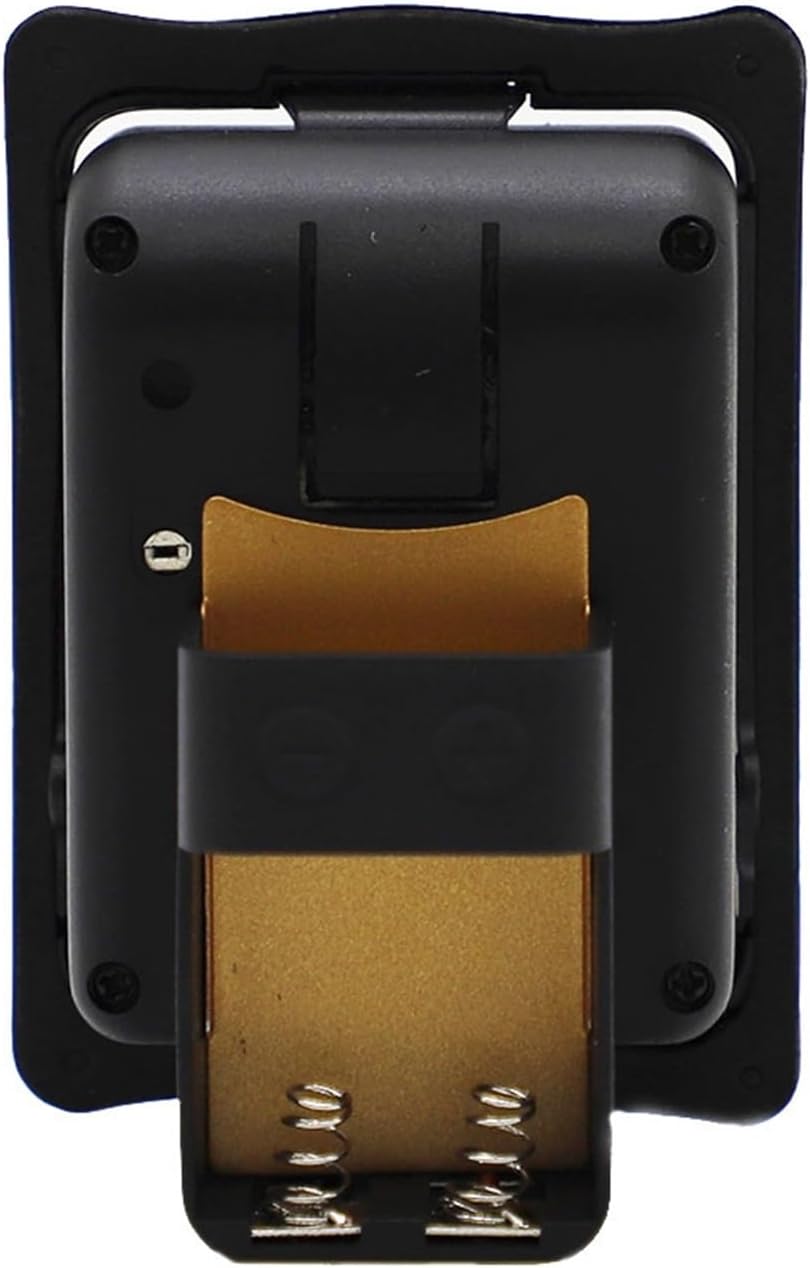
- Install Battery: Open the battery compartment on the back of the preamp unit. Insert a fresh 9V battery, observing polarity.
- Test Functionality: Re-string the guitar. Connect the guitar to an amplifier. Turn on the preamp and test all controls (volume, EQ, tuner, phase).

Operating Instructions
Familiarize yourself with the controls to achieve your desired sound.
Controls and Functions:
- Volume Knob: Adjusts the overall output level of the pickup system. Turn clockwise to increase volume, counter-clockwise to decrease.
- Bass Slider: Controls the low-frequency response. Move up to boost bass, down to cut bass.
- Middle Slider: Controls the mid-range frequency response. Adjust for clarity and presence.
- Treble Slider: Controls the high-frequency response. Adjust for brightness and sparkle.
- Mic Blend Slider: Blends the signal from the internal microphone with the piezo pickup signal. Move up to increase microphone presence, down to rely more on the piezo.
- Tuner Button: Press to activate the built-in digital tuner. The LCD display will show the note and pitch accuracy. Press again to exit tuner mode.
- Phase Button: Press to invert the phase of the output signal. This can help reduce feedback, especially in loud environments or when playing through a PA system.
- Low Battery LED: Illuminates when the 9V battery power is low and needs replacement.
Using the Tuner:
- Press the Tuner button to activate the tuner. The output signal will be muted.
- Play a single string. The LCD display will show the note name and a meter indicating if the note is flat, sharp, or in tune.
- Adjust your guitar string until the meter indicates the note is in tune.
- Repeat for all strings.
- Press the Tuner button again to deactivate the tuner and restore the output signal.
Maintenance
Regular maintenance ensures the longevity and optimal performance of your pickup system.
- Battery Replacement: Replace the 9V battery promptly when the low battery indicator illuminates. A weak battery can affect sound quality and tuner accuracy.
- Cleaning: Use a soft, dry cloth to wipe down the preamp unit. Avoid using abrasive cleaners or solvents, which can damage the finish or electronic components.
- Storage: When not in use for extended periods, consider removing the battery to prevent leakage. Store the guitar in a stable environment, away from extreme temperatures and humidity.
- Cable Connections: Periodically check all internal wiring connections to ensure they are secure. Loose connections can lead to signal loss or intermittent sound.
Troubleshooting
If you encounter issues, refer to the following common problems and solutions:
| Problem | Possible Cause | Solution |
|---|---|---|
| No sound output |
|
|
| Weak or distorted sound |
|
|
| Excessive feedback |
|
|
| Tuner not working |
|
|
Warranty and Support
WOMELF is committed to providing high-quality products and excellent customer service.
If you experience any operational problems or have questions regarding your Professional Acoustic Guitar Pickup, please contact our customer support team. We aim to provide a satisfactory solution to any issues you may encounter.
For support, please refer to the contact information provided with your purchase or visit the official WOMELF website.
Ask a question about this manual
Ask about setup, troubleshooting, compatibility, parts, safety, or missing instructions. Manuals+ will review the question and use this page’s manual context to help answer it.