1. Introduction
This manual provides comprehensive instructions for the hejhncii RG10B(G)/BGEF Universal Remote Control. This remote is designed as a direct replacement for RG10B(K1)/BGEFU1 Air Condition Controllers, offering reliable and convenient control over your air conditioning unit.
Please read this manual thoroughly before using the remote control to ensure proper operation and to maximize its lifespan.

Figure 1: Front view of the RG10B(G)/BGEF Universal Remote Control, showing the display screen and all primary buttons.
2. Setup
2.1 Battery Installation
The remote control requires two AAA batteries (not included). Follow these steps to install them:
- Locate the battery compartment cover on the back of the remote control.
- Slide the cover downwards or press the latch (if present) to open the compartment.
- Insert two AAA batteries, ensuring the positive (+) and negative (-) ends align correctly with the markings inside the compartment. Incorrect installation can damage the remote.
- Slide the battery compartment cover back into place until it clicks securely.
Note: If the remote will not be used for an extended period, remove the batteries to prevent leakage and potential damage.
2.2 First Use
Once batteries are installed, the remote control is ready for use. No pairing or complex setup is typically required for this universal replacement model. Simply point the remote at your air conditioning unit and begin operation.
3. Operating Instructions
This section details the functions of the buttons on your RG10B(G)/BGEF remote control.
- Power Button (): Turns the air conditioner ON or OFF.
- Mode Button (Mode): Cycles through available operating modes:
- Auto: Automatically selects the operating mode based on room temperature.
- Cool: Provides cooling.
- Dry: Dehumidifies the air.
- Fan: Circulates air without heating or cooling.
- Heat: Provides heating (if supported by your AC unit).
- Temperature Adjustment Buttons ( / ): Increases or decreases the set temperature.
- Fan Speed Button (): Adjusts the fan speed (e.g., Auto, Low, Medium, High).
- Swing Button (Swing): Activates or deactivates the automatic swing of the air deflector for even air distribution.
- SET Button (SET): Used for entering or confirming settings, often in conjunction with other buttons for advanced functions like timer setup.
- OK Button (OK): Confirms selections or settings.
- Timer Button (): Used to set the ON/OFF timer for the air conditioner. Refer to your AC unit's manual for specific timer programming steps.
- Sleep Mode Button (): Activates sleep mode, which typically adjusts temperature and fan speed for comfortable sleep and energy saving.
- Turbo Button (Turbo): Activates rapid cooling or heating for quick temperature changes.
- LED Button (LED): Controls the display light on the air conditioner unit (turns it ON/OFF).
- Clean Button (Clean): Initiates a self-cleaning function on compatible air conditioner units.
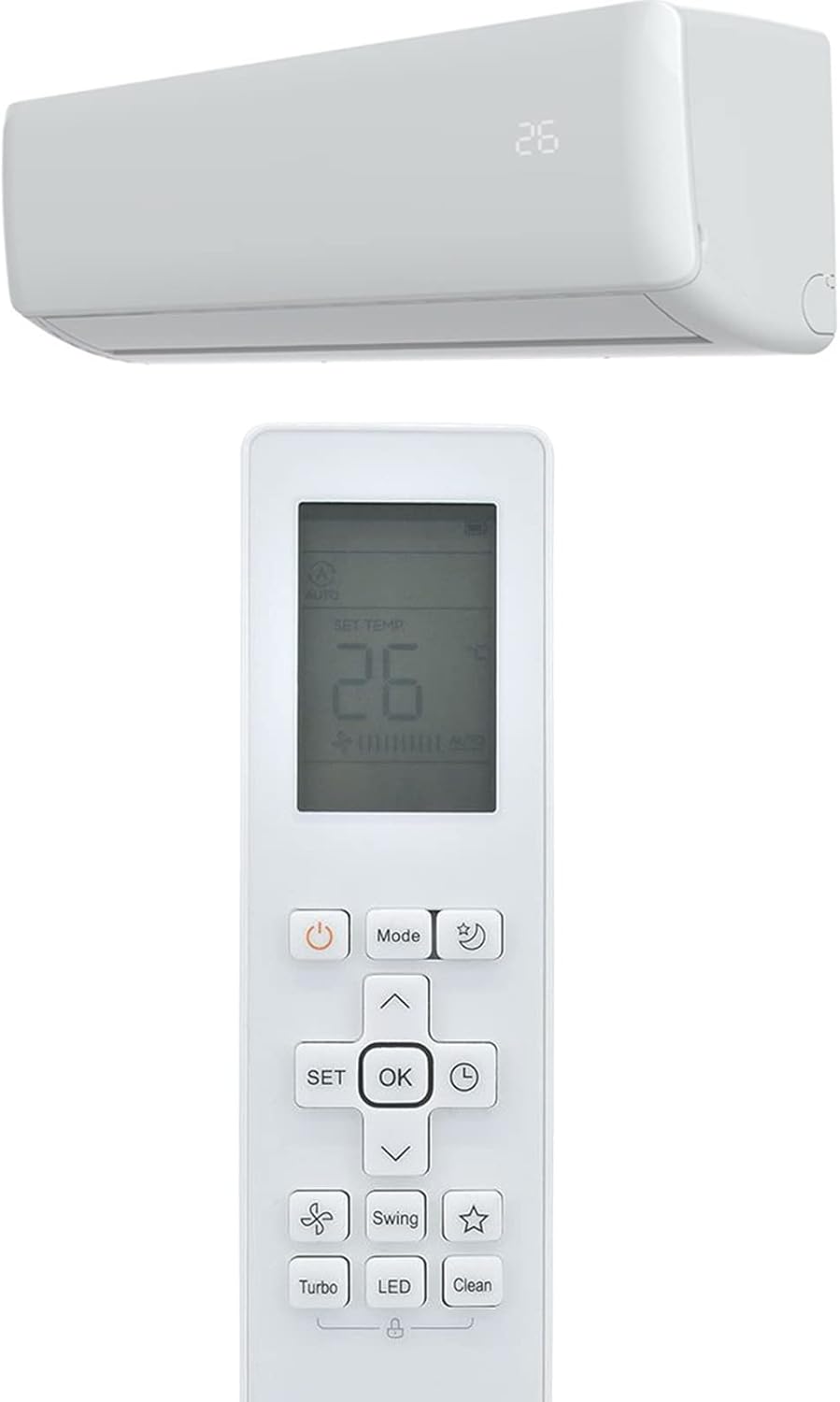
Figure 2: The remote control shown in proximity to an air conditioning indoor unit, illustrating its intended use.
4. Maintenance
4.1 Cleaning the Remote Control
To maintain the remote control's appearance and functionality:
- Wipe the surface with a soft, dry cloth.
- For stubborn dirt, slightly dampen the cloth with water or a mild, non-abrasive cleaner.
- Do not use harsh chemicals, alcohol, or abrasive cleaning agents, as these can damage the surface or internal components.
- Ensure no liquid enters the remote control.
4.2 Battery Replacement
Replace batteries when the remote's range decreases, the display dims, or it stops responding. Always replace both batteries at the same time with new ones of the same type (AAA). Dispose of used batteries responsibly according to local regulations.
4.3 Storage
If the remote control will not be used for an extended period (e.g., several months), remove the batteries to prevent potential battery leakage, which can corrode the battery terminals and damage the remote.
5. Troubleshooting
If you experience issues with your remote control, try the following troubleshooting steps:
- Remote not responding:
- Check if the batteries are inserted correctly with the correct polarity.
- Replace old batteries with new ones.
- Ensure there are no obstructions between the remote control and the air conditioner's receiver.
- Make sure you are within the effective operating range (approximately 10 meters or 32.81 feet).
- Display is dim or blank:
- This usually indicates low battery power. Replace the batteries.
- Specific buttons not working:
- Ensure the remote is pointed directly at the AC unit.
- Check for any physical damage to the button or remote.
If the problem persists after trying these steps, contact the seller or manufacturer for further assistance.
6. Specifications
| Feature | Detail |
|---|---|
| Model Number | RG10B(G)/BGEF |
| Compatible Devices | RG10B(K1)/BGEFU1 Air Condition Controllers |
| Brand | hejhncii |
| Connectivity Technology | Infrared (IR) |
| Controller Type | Button Control |
| Special Feature | Universal Replacement |
| Material | High-quality ABS |
| Transmission Range | Approximately 10 meters (32.81 feet) |
| Rated Voltage | 3V DC |
| Dimensions (Approx.) | 19.3 cm (7.60") Length x 4.8 cm (1.89") Width |

Figure 3: Approximate dimensions of the remote control, indicating its length and width.

Figure 4: Back view of the remote control, showing the model and voltage information label.
7. Warranty and Support
Specific warranty details for this product are not provided within this manual. For information regarding warranty coverage, returns, or technical support, please contact the seller or the manufacturer, hejhncii, directly through the platform where the product was purchased.
Always retain your purchase receipt as proof of purchase for any warranty claims.


