Introduction
This user manual provides detailed instructions for the CHAKEYAKE T3105 4G Flip Phone. Designed with ease of use in mind, this phone features large buttons, a dual display, and essential functions for seniors. Please read this manual thoroughly to ensure proper operation and to maximize your phone's capabilities.
Package Contents
Verify that all items are present in your product package:
- 1 x CHAKEYAKE T3105 4G Flip Phone
- 1 x 1200 mAh Lithium-ion Battery
- 1 x Micro USB Charging Cable
- 1 x Charging Cradle
- 1 x User Manual
Product Overview
The CHAKEYAKE T3105 is a user-friendly flip phone featuring a dual-screen design and large, easy-to-press buttons. The internal 2.8-inch HD display and external 1.77-inch HD color display provide clear visibility for calls, messages, and notifications.

Image: The CHAKEYAKE T3105 4G Flip Phone, shown both open and closed, alongside its charging cradle. The phone features large buttons and a clear display, with 'Ushining' visible on the screen.

Image: The phone's display showing '4G' and 'Ushining', emphasizing its 4G network compatibility and unlocked status for European 4G/3G/2G operators.

Image: A visual comparison of screen sizes, illustrating the T3105's 2.8-inch HD LCD screen compared to smaller 2.4-inch and 1.8-inch displays found on other phones. The T3105 also shows 'Ushining' on its screen.

Image: An infographic displaying the key features of the CHAKEYAKE T3105, including Dual SIM support, SOS Button, Speed Dial, Alarm Clock, Camera, Calendar, Torch, and FM Radio, with 'Ushining' visible on the phone's screen.
Setup
1. Battery Installation
- Open the back cover of the phone.
- Align the gold contacts on the 1200 mAh battery with the contacts in the phone.
- Gently press the battery into place until it is secure.
- Replace the back cover.
2. SIM Card Installation
The phone supports dual Nano SIM cards. Ensure your SIM card is a Nano SIM size.
- With the back cover and battery removed, locate the SIM card slots.
- Insert the Nano SIM card(s) into the designated slot(s) with the gold contacts facing down, following the orientation indicated on the phone.
- Reinstall the battery and back cover.
3. Charging the Phone
Before first use, fully charge the phone's battery.
- Using the Charging Cradle: Place the phone securely into the charging cradle. Connect the Micro USB cable to the cradle and then to a power adapter (not included) or a USB port.
- Direct Charging: Connect the Micro USB cable directly to the phone's charging port and then to a power adapter or USB port.
The charging indicator will show the charging status. A full charge typically takes a few hours.
Operating Instructions
Power On/Off
- To power on, press and hold the Power/End Call button (red button) until the screen lights up.
- To power off, press and hold the Power/End Call button until the power-off options appear, then select "Power off".
Making and Receiving Calls
- To make a call: Enter the phone number using the keypad and press the Call button (green button).
- To answer a call: When the phone rings, press the Call button.
- To end a call: Press the Power/End Call button.
- Adjusting Volume: Use the dedicated volume buttons on the side of the phone during a call or to adjust ringtone volume.
SOS Emergency Button
The SOS button is designed for emergencies, allowing you to quickly contact pre-set numbers.
- Setup: Access the SOS settings in the phone's menu to configure up to 5 emergency contact numbers. You can also customize the emergency text message that will be sent.
- Activation: In an emergency, press and hold the SOS button for 3 seconds. The phone will automatically dial the emergency contacts in sequence and send the pre-set text message.

Image: Illustration of the SOS Emergency Button feature, depicting a person in need of assistance and showing how the phone can contact up to 5 pre-set emergency contacts (e.g., Police, Doctor, Family members). The phone screen displays a contact named 'Doctor' and 'Ushining'.
Speed Dial
Assign frequently called numbers to specific keys for quick dialing.
- M1 and M2 Keys: These dedicated keys can be assigned to important contacts. Configure them in the phone's settings.
- Number Keys (2-9): You can also assign speed dial contacts to number keys 2 through 9.
- To use: Simply press and hold the assigned key (M1, M2, or 2-9) to dial the stored contact.
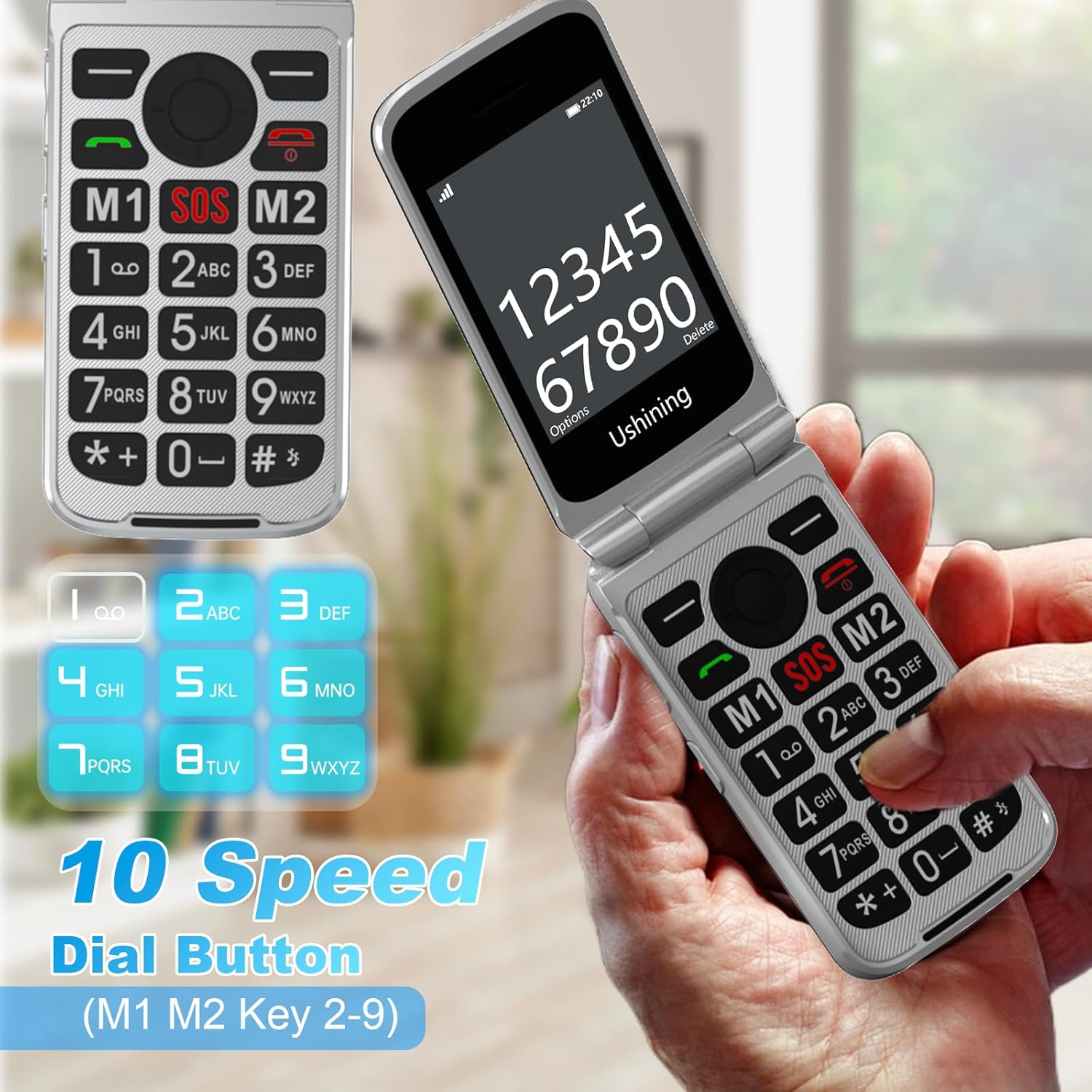
Image: A close-up of the phone's keypad, highlighting the M1, SOS, and M2 buttons, along with the number keys 2-9, which can be configured for speed dialing. The phone screen shows a number being dialed and 'Ushining'.
Messaging (SMS/MMS)
To send and receive text (SMS) and multimedia (MMS) messages, navigate to the "Messages" menu. You can compose new messages, read incoming messages, and manage your message inbox.
Camera
The phone includes a 0.3 Mpx camera for basic photo capture. Access it through the main menu to take pictures.
FM Radio
Enjoy FM radio broadcasts. Plug in headphones (not included) to use as an antenna, then access the FM Radio application from the menu to scan for stations.

Image: The phone's screen showing the FM radio interface, indicating a frequency of 95.1 FM, with a visual representation of sound waves and 'Ushining' branding.
Torch (Flashlight)
Activate the built-in LED torch for illumination in dark environments. This feature can usually be accessed via a dedicated side button or through the phone's menu.

Image: The phone's integrated LED torch shining a bright beam, illustrating its effectiveness in illuminating a dark path up to 30 meters.
Other Features
The CHAKEYAKE T3105 also includes:
- Bluetooth: For connecting to wireless headsets or other Bluetooth devices.
- MP3 Player: Play audio files stored on a Micro SD card (up to 32GB, not included).
- Calculator: A basic calculator for simple arithmetic.
- Alarm Clock: Set multiple alarms.
- Calendar: Keep track of dates and events.
Maintenance
- Battery Care: To prolong battery life, avoid extreme temperatures. Charge the phone regularly, but do not leave it on charge for excessively long periods after it's full.
- Cleaning: Use a soft, dry cloth to clean the phone's screen and body. Avoid using liquid cleaners or abrasive materials.
- Storage: If storing the phone for an extended period, ensure it is partially charged (around 50%) and stored in a cool, dry place.
Troubleshooting
| Problem | Possible Solution |
|---|---|
| Phone does not power on | Ensure the battery is correctly installed and fully charged. Try charging the phone for at least 30 minutes. |
| Cannot make or receive calls | Check if the SIM card is properly inserted. Verify that you have network signal. Contact your service provider to ensure your SIM card is active. |
| Poor call quality | Move to an area with better network coverage. Ensure the speaker/microphone is not obstructed. |
| SOS button not working | Ensure emergency contacts are correctly set up in the SOS settings. Check if the phone has sufficient battery and network signal. |
| Screen frozen or unresponsive | Remove the battery, wait a few seconds, then reinsert it and power on the phone. |
Specifications
| Brand | CHAKEYAKE |
| Model Number | T3105 |
| Cellular Technology | 4G LTE, 3G WCDMA, 2G GSM |
| Screen Size | Internal: 2.8 inches HD; External: 1.77 inches HD |
| Camera | 0.3 Mpx |
| Battery Capacity | 1200 mAh Lithium-ion |
| Talk Time | Up to 8-10 hours |
| Standby Time | Up to 120 hours (5 days) |
| SIM Slot | Dual Nano SIM |
| Expandable Memory | Micro SD card up to 32GB (not included) |
| Operating System | KaiOS |
| Special Features | Large buttons, SOS emergency button, Charging cradle, FM Radio, Torch, Bluetooth, MP3 Player, Calculator, Alarm Clock, Calendar |
| Supported Languages | English, French, German, Italian, Spanish, Portuguese, Dutch, etc. |
Warranty and Support
For warranty information and customer support, please refer to the documentation provided with your purchase or contact CHAKEYAKE customer service. We are committed to providing assistance for any questions or issues you may encounter with your T3105 flip phone.