
1. Introduction
Thank you for choosing the Mefine F299 Ceiling Fan with LED Light. This product combines efficient air circulation with versatile lighting, designed for comfort and convenience. It features a silent DC motor, 6 adjustable speeds, a reversible function for year-round use, and an integrated LED light with dimming and color temperature options, all controllable via a remote. Please read this manual thoroughly before installation and operation to ensure safe and optimal performance.

Image 1.1: The Mefine F299 Ceiling Fan with LED Light in a bedroom setting, demonstrating its cooling effect and remote control functionality.
2. Safety Instructions
To reduce the risk of electric shock, fire, or injury to persons, read and follow all instructions carefully.
- Ensure the main power supply is disconnected before installation, maintenance, or cleaning.
- All electrical connections must be made by a qualified electrician and conform to local codes and ordinances.
- The mounting structure must be capable of supporting the weight of the fan (approximately 3.87 kg).
- Do not insert objects into the path of the fan blades while the fan is operating.
- Keep children away from the fan during operation.
- Use only the remote control provided with the fan.
3. Package Contents
Verify that all components are present and undamaged before proceeding with installation.
- Ceiling Fan Unit (Motor, Blades, Downrod, Canopy)
- LED Light Kit with Frosted Glass Lampshade
- Remote Control (Batteries not included: 2x AAA required)
- Mounting Bracket and Hardware (Screws, wire nuts)
- User Manual
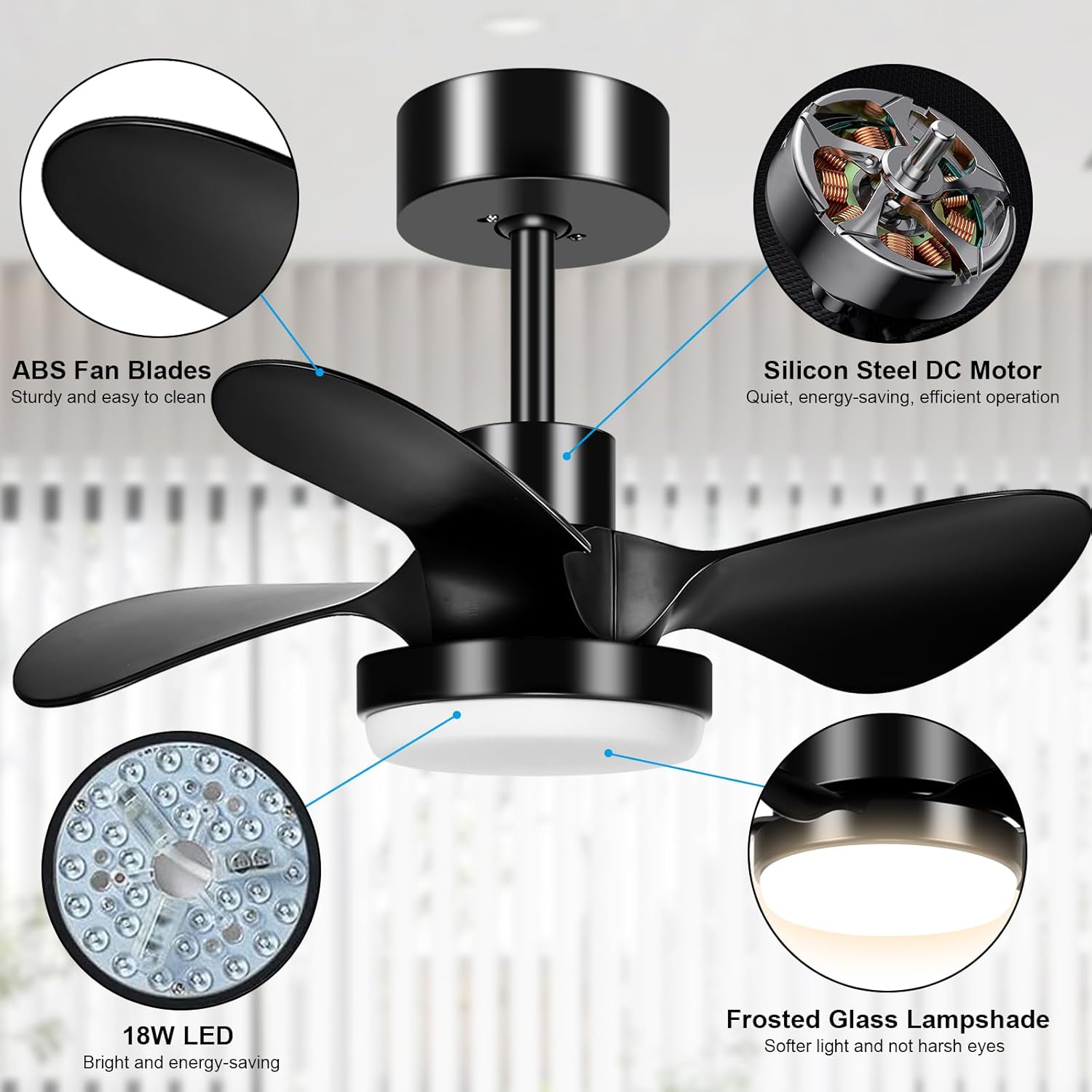
Image 3.1: Key components of the Mefine F299 Ceiling Fan, highlighting the quality materials and design.
4. Installation Guide
Professional installation is recommended. Ensure power is OFF at the circuit breaker before beginning.
4.1 Mounting the Bracket
- Locate a suitable mounting location on the ceiling, ensuring it can support the fan's weight.
- Secure the mounting bracket to the ceiling junction box using the provided screws and washers. Ensure it is firmly attached.
4.2 Wiring the Fan
- Connect the household supply wires to the fan wires according to the wiring diagram in the manual (typically black to black, white to white, and ground to ground). Use wire nuts to secure connections.
- Carefully tuck the wires into the junction box.
4.3 Attaching the Fan Body
- Lift the fan assembly and hang it onto the mounting bracket hook (if applicable) or align the downrod with the bracket.
- Secure the fan body to the mounting bracket using the provided screws.
4.4 Installing the Lampshade
- Carefully attach the frosted glass lampshade to the fan body, twisting or securing it as per the design.
- Restore power at the circuit breaker and test the fan and light functions.
5. Operating Instructions
The Mefine F299 Ceiling Fan is operated using the included remote control.
5.1 Remote Control Functions

Image 5.1: The remote control for the Mefine F299 Ceiling Fan, illustrating its various functions.
- Power ON/OFF: Turns the fan and light on or off.
- Fan Speed: Buttons to select one of 6 fan speeds.
- Light Control: Buttons to cycle through color temperatures (Warm, Natural, Cool White) and dimming.
- Timer: Sets the fan to turn off automatically after a specified duration (e.g., 2 hours).
- Reversible Function: Changes the direction of fan blade rotation.
5.2 Fan Speed Settings
The fan offers 6 speed settings to suit various needs:

Image 5.2: Recommended uses for the 6 fan speed settings.
- Speeds 1-2 (Low): Ideal for sleeping or quiet activities like reading, providing a gentle breeze.
- Speeds 3-4 (Medium): Suitable for general comfort during family gatherings or daily activities.
- Speeds 5-6 (High): Provides maximum airflow for cooling during exercise or in warmer conditions.
5.3 Light Control
The integrated LED light offers adjustable brightness and three color temperature modes:

Image 5.3: The adjustable light features of the Mefine F299 Ceiling Fan.
- 3000K Warm Light: Creates a cozy and inviting atmosphere.
- 4000K Natural Light: Provides balanced illumination suitable for most daily tasks.
- 6000K Cool White Light: Offers bright, crisp lighting for focused work or activities.
- Stepless Dimming: Adjust brightness from 10% to 100% to suit your preference.
5.4 Reversible Function
The reversible motor allows for year-round comfort by changing the direction of airflow.
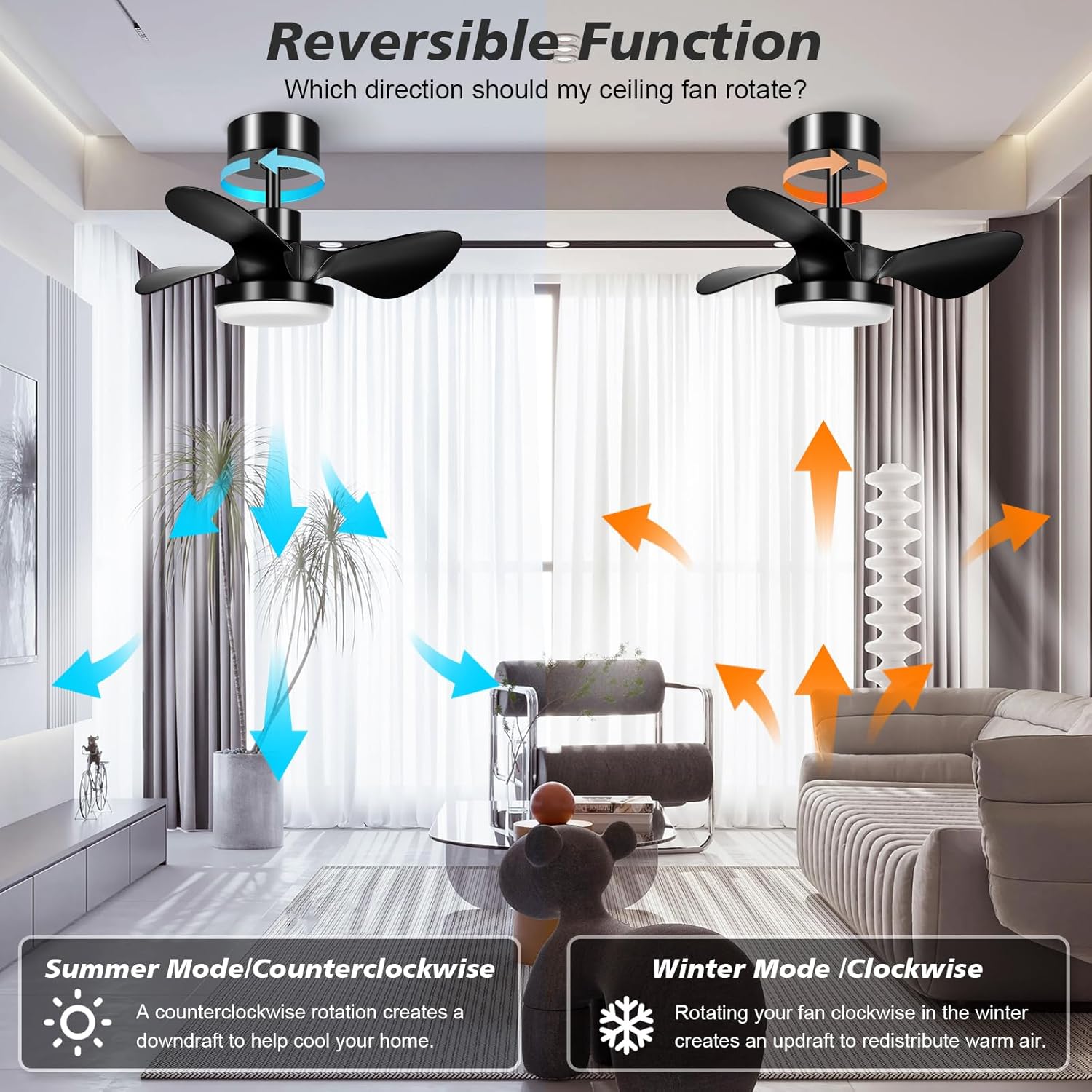
Image 5.4: Illustration of the fan's reversible function for seasonal use.
- Summer Mode (Counter-clockwise): Creates a downward airflow, producing a cooling breeze.
- Winter Mode (Clockwise): Creates an upward airflow, circulating warm air trapped near the ceiling throughout the room.
5.5 Timer Function
The fan includes a timer function, allowing you to set it to turn off automatically.

Image 5.5: The Mefine F299 Ceiling Fan's timer and quiet operation features.
- Press the timer button on the remote control to activate the automatic shut-off feature. The available timer setting is 2 hours.
6. Maintenance
Regular maintenance ensures the longevity and optimal performance of your ceiling fan.
- Cleaning: Before cleaning, ensure the power is turned off at the circuit breaker. Use a soft, damp cloth to wipe down the fan blades and motor housing. Do not use abrasive cleaners or solvents.
- Light Kit: The LED light source is integrated and generally maintenance-free. If the glass lampshade needs cleaning, remove it carefully and wash with mild soap and water, then dry thoroughly before reattaching.
- Tightness: Periodically check all screws and connections to ensure they are secure.
7. Troubleshooting
If you encounter any issues, refer to the following common problems and solutions.
| Problem | Possible Cause | Solution |
|---|---|---|
| Fan does not start | No power supply; Loose wiring; Remote control battery low. | Check circuit breaker; Verify wiring connections; Replace remote control batteries (2x AAA). |
| Light does not turn on | No power supply; Loose wiring; LED driver issue. | Check circuit breaker; Verify wiring connections; Contact customer support if LED is faulty. |
| Fan makes noise | Loose screws; Unbalanced blades; Motor issue. | Tighten all mounting screws; Ensure blades are securely attached; Contact customer support if motor noise persists. |
| Remote control not working | Batteries dead; Remote not paired; Obstruction. | Replace batteries (2x AAA); Refer to remote pairing instructions (if applicable, not detailed in product info); Ensure clear line of sight to fan receiver. |
8. Specifications
Technical details for the Mefine F299 Ceiling Fan.
| Feature | Detail |
|---|---|
| Brand | Mefine |
| Model Number | F299 |
| Color | Black |
| Product Dimensions (L x W x H) | 36 x 29 x 16.5 cm (14.2 x 11.4 x 6.5 inches) |
| Item Weight | 3.87 Kilograms (8.53 lbs) |
| Voltage | 24 Volts (DC) |
| Material | Plastic (ABS Fan Blades) |
| Number of Speeds | 6 |
| Noise Level | 30 dB |
| Special Feature | Dimmable LED Light, Reversible Function |
| Light Type | Integrated 18W LED (3000K-4000K-6000K) |
| Power Source | DC power supply |
| Mounting Type | Ceiling Mount |
9. Warranty and Support
Mefine products are manufactured to high-quality standards. For specific warranty information, please refer to the documentation included with your purchase or contact Mefine customer support.
For technical assistance, troubleshooting beyond this manual, or to inquire about replacement parts, please visit the official Mefine website or contact their customer service department. Keep your purchase receipt as proof of purchase for warranty claims.