
Introduction
Thank you for choosing the La Crosse Technology WS6283W-MAC Color Weather Station. This device provides accurate indoor and outdoor temperature and humidity readings, weather forecasts, and a radio-controlled clock with alarm functions. Please read this manual carefully to ensure proper setup and operation.
Key Features
- Radio-controlled time and date (12/24 hour format).
- Day of the week display in 7 languages.
- Two alarms with snooze function.
- Indoor and outdoor temperature and humidity display in °C or °F.
- Min/Max record for temperature and humidity.
- Outdoor temperature alert and trend arrow.
- Weather forecast with atmospheric pressure display.
- Comfort indicator and frost alert.
- Color LCD display with adjustable backlight.
- Supports up to 3 external sensors (one included).
- Low battery indicator.
- 433 MHz transmission frequency.
- Genuine FSC certified wood frame.
Package Contents
- 1 x WS6283W-MAC Color Weather Station
- 1 x Wireless Outdoor Sensor
- 1 x AC Power Adapter
- 1 x User Manual

Image: La Crosse Technology WS6283W-MAC Weather Station with its accompanying wireless outdoor sensor.
Setup
1. Powering the Weather Station
- Insert 3 "AAA" batteries (not included) into the battery compartment of the weather station for backup power. Observe polarity.
- Connect the AC power adapter to the weather station and then plug it into a wall outlet. The display will light up.
2. Powering the Outdoor Sensor
- Remove the battery cover from the outdoor sensor.
- Insert 2 "AA" batteries (not included) into the battery compartment. Observe polarity.
- Close the battery cover. The sensor will begin transmitting data.
3. Initial Synchronization
Once both units are powered, the weather station will automatically search for the outdoor sensor signal and the radio-controlled time signal. This process may take several minutes. Place the sensor within 10 feet of the station during initial setup.
4. Sensor Placement
For accurate readings, place the outdoor sensor in a shaded, dry location, protected from direct sunlight and precipitation. Ensure it is within the 100-meter (330-foot) transmission range of the main unit.
Operating Instructions
1. Display Overview

Image: Front view of the WS6283W-MAC display, showing indoor/outdoor temperature, humidity, time, date, and weather forecast icons.
The color LCD display shows various information zones:
- Indoor Section: Displays indoor temperature and humidity.
- Outdoor Section: Displays outdoor temperature and humidity from the connected sensor.
- Forecast Section: Shows weather forecast icons and atmospheric pressure.
- Time/Date Section: Displays radio-controlled time, date, and day of the week.
2. Setting Time and Date Manually (if radio signal is unavailable)
- Press and hold the SET button for 3 seconds to enter time setting mode.
- Use the + or - buttons to adjust values.
- Press SET to confirm and move to the next setting (Time Zone, 12/24h format, Hour, Minute, Year, Month, Day, Language for Day of Week).
- Press SET repeatedly to exit or wait 15 seconds for automatic exit.
3. Alarm Settings
- Press the ALARM button to view Alarm 1 time. Press again for Alarm 2.
- Press and hold ALARM to enter alarm setting mode.
- Use + or - to adjust hour and minute.
- Press ALARM to confirm.
- To activate/deactivate an alarm, press the ALARM button repeatedly until the alarm icon appears/disappears.
- When an alarm sounds, press the SNOOZE/LIGHT button for snooze function (5 minutes). Press any other button to stop the alarm for 24 hours.
4. Backlight Adjustment
Press the SNOOZE/LIGHT button to adjust the backlight brightness (High, Low, Off). When operating on batteries only, the backlight will only illuminate briefly when the button is pressed.
5. Min/Max Temperature and Humidity
Press the MIN/MAX button to view the maximum indoor/outdoor temperature and humidity. Press again to view the minimum. Press and hold MIN/MAX to clear the recorded values.
6. Connecting Additional Sensors
The weather station can support up to 3 outdoor sensors. To add an additional sensor, install batteries in the new sensor, then press the CHANNEL button on the main unit to cycle through channels. Press and hold CHANNEL to initiate a search for new sensors on the selected channel.
Maintenance
- Battery Replacement: Replace batteries in the main unit (3 "AAA") and outdoor sensor (2 "AA") when the low battery indicator appears on the display. Always replace all batteries at the same time.
- Cleaning: Clean the display and casing with a soft, damp cloth. Do not use abrasive cleaners or solvents.
- Storage: If storing the unit for an extended period, remove all batteries.
Troubleshooting
| Problem | Solution |
|---|---|
| No outdoor temperature/humidity reading. |
|
| Incorrect time display. |
|
| Weather forecast is inaccurate. |
|
| Display is dim or blank. |
|
Specifications
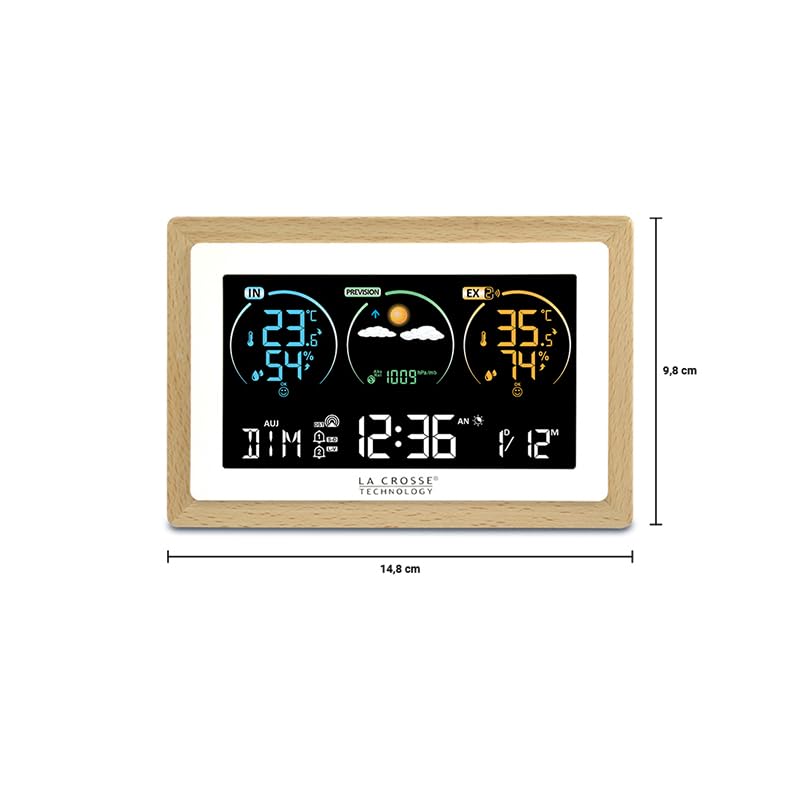
Image: Diagram showing the dimensions of the WS6283W-MAC Weather Station: 14.8 cm width and 9.8 cm height.
- Model: WS6283W-MAC
- Dimensions (L x W x H): 15 x 3 x 10 cm (approx. 5.9 x 1.2 x 3.9 inches)
- Weight: 390 grams (approx. 0.86 lbs)
- Material: Plastic with FSC certified wood frame
- Power Source: AC Power Adapter (included), 3 x "AAA" batteries (backup, not included)
- Outdoor Sensor Power: 2 x "AA" batteries (not included)
- Temperature Measurement Range (Indoor): 0°C to 50°C (32°F to 122°F)
- Temperature Measurement Range (Outdoor): -40°C to 60°C (-40°F to 140°F)
- Temperature Accuracy: +/- 1°C
- Humidity Measurement Range: 10% to 99% RH
- Transmission Frequency: 433 MHz
- Transmission Range: Up to 100 meters (330 feet) in open air
- Display Style: Color LCD
- Special Features: Large display, adjustable backlight, frost alert, comfort indicator.
Warranty Information
La Crosse Technology products are manufactured to strict quality standards. This product is covered by a limited warranty against manufacturing defects. Please refer to the warranty card included in your package or visit the official La Crosse Technology website for detailed warranty terms and conditions specific to your region.
Support
For technical assistance, troubleshooting, or to purchase replacement parts and additional sensors, please contact La Crosse Technology customer support. Contact information can typically be found on the product packaging, the official website, or the warranty card.
Online Resources: Visit the La Crosse Technology website for FAQs, product registration, and additional support materials.