
1. Product Overview
The Weytoll ANENG ST180 is a compact, high-precision digital clamp multimeter designed for a wide range of electrical measurements. It features an auto-ranging function and a 4000-count display, making it suitable for both professional and home use. This device can measure AC/DC voltage, AC current, resistance, capacitance, frequency, and perform diode tests and Non-Contact Voltage (NCV) detection.

Figure 1: Weytoll ANENG ST180 Digital Clamp Multimeter
Key features include:
- AC current / AC DC voltage measurement
- Resistor / capacitor / diode testing
- Non-contact induction (NCV)
- On-off buzzer / Hz measurement
- Live detection
- Backlit bright screen for clear reading
- Integrated flashlight for low-light conditions

Figure 2: Overview of ANENG ST180 functions
2. Setup
2.1 Package Contents
Before use, ensure all items are present in the package:
- 1 x Clamp Meter
- 1 x Pair of Test Leads
- 1 x User Manual (English)
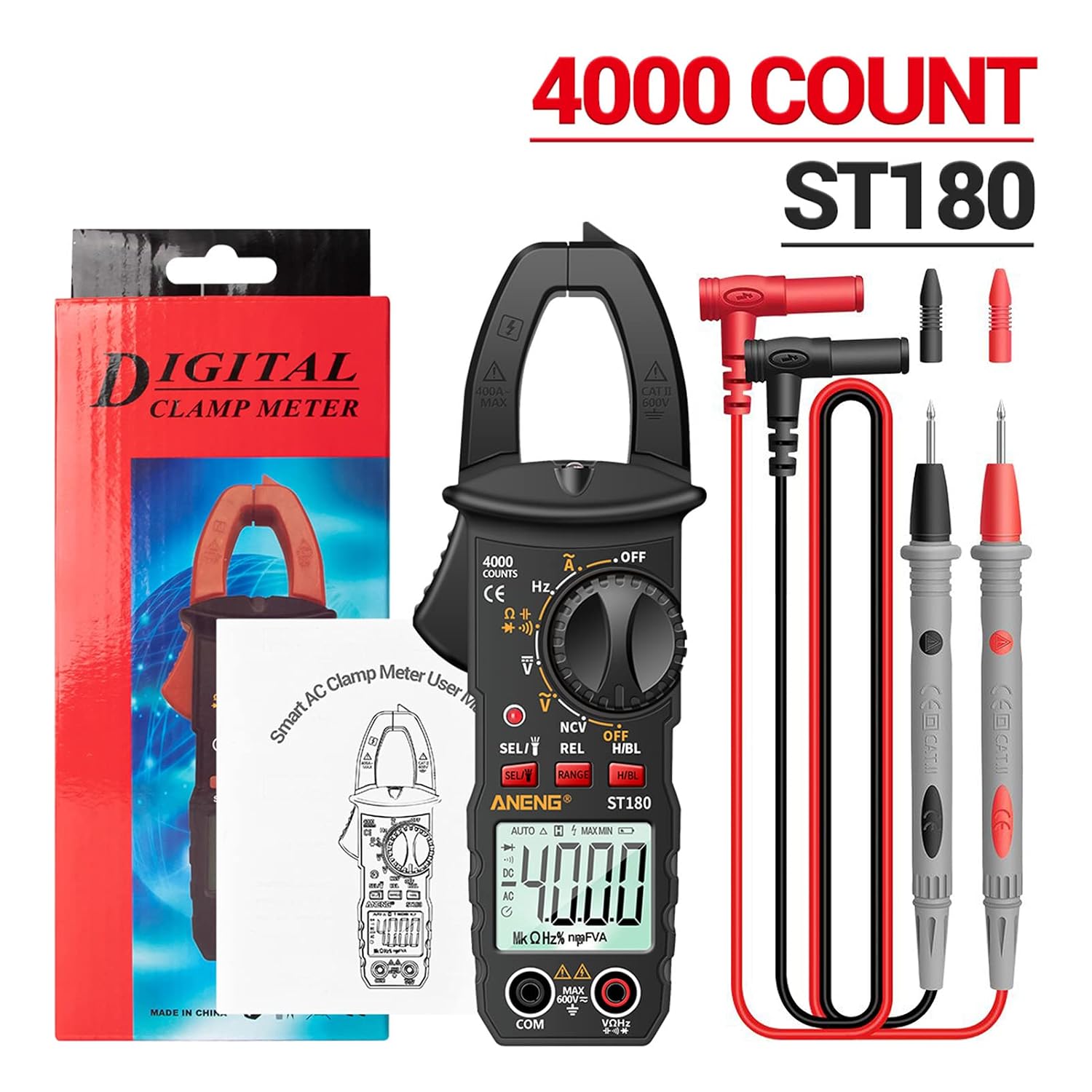
Figure 3: Package contents
2.2 Battery Installation
The device requires 2 x 1.5V AAA batteries (not included). To install:
- Locate the battery compartment cover on the back of the meter.
- Use a screwdriver to open the cover.
- Insert two AAA batteries, observing the correct polarity (+/-).
- Replace the battery compartment cover and secure it with the screw.
2.3 Connecting Test Leads
Connect the test leads to the meter as follows:
- Insert the red test lead into the "VΩHz" input jack.
- Insert the black test lead into the "COM" input jack.

Figure 4: Test leads and accessories
3. Operating Instructions
3.1 Power On/Off
Rotate the function dial from "OFF" to any desired measurement function to power on the meter. To power off, rotate the dial back to "OFF".
3.2 Backlit Screen and Flashlight
The meter features a backlit screen for improved visibility in dim lighting. It also includes a flashlight function.

Figure 5: Backlit screen for clear readings

Figure 6: Flashlight function
3.3 AC Current Measurement (Clamp Function)
To measure AC current without breaking the circuit:
- Rotate the function dial to the 'A~' (AC Current) position.
- Press the clamp trigger to open the jaws.
- Enclose a single conductor (not a bundle of wires) within the jaws.
- Release the trigger to close the jaws around the conductor.
- Read the AC current value on the display.
3.4 AC/DC Voltage Measurement
To measure voltage:
- Rotate the function dial to the 'V~' (AC Voltage) or 'V=' (DC Voltage) position.
- Connect the red test lead to the positive (+) point and the black test lead to the negative (-) point or ground of the circuit.
- Read the voltage value on the display.
3.5 Resistance, Capacitance, Frequency, and Diode Test
For these measurements, rotate the function dial to the corresponding symbol (Ω for resistance, F for capacitance, Hz for frequency, or diode symbol). Connect the test leads to the component being measured and read the value on the display.
3.6 Non-Contact Voltage (NCV) Detection
The NCV function allows for detection of AC voltage without direct contact, enhancing safety.
- Rotate the function dial to the 'NCV' position.
- Bring the NCV sensor (located at the top of the clamp jaw) close to the conductor or outlet.
- The meter will emit an audible alarm and the display will show '---' or 'EF' with increasing segments as it detects voltage. The closer the meter is to the voltage source, the faster the alarm sounds.

Figure 7: NCV induction detection in progress
3.7 Live Detection
The live detection feature helps identify live wires.
- Rotate the function dial to the 'Live' position.
- Insert the red test lead into the live wire socket or touch the live conductor.
- The meter will indicate the presence of a live wire with an alarm and display changes.
3.8 Video Demonstrations
For visual guidance on various functions, refer to the following instructional videos:
Video 1: Digital Clamp Multimeter, 4000 Count. This video demonstrates various measurement functions of a digital clamp multimeter.
Video 2: Clamp Multimeter. This video provides a general overview and demonstration of a clamp multimeter's capabilities.
4. Maintenance
4.1 Cleaning
To clean the meter, wipe the case with a damp cloth and a mild detergent. Do not use abrasives or solvents. Ensure the meter is powered off and disconnected from any circuits before cleaning.
4.2 Battery Replacement
When the low battery indicator appears on the display, replace the batteries promptly to ensure accurate readings. Refer to section 2.2 for battery installation instructions.
4.3 Storage
If the meter is not to be used for an extended period, remove the batteries to prevent leakage and store the device in a cool, dry place away from direct sunlight.
5. Troubleshooting
5.1 No Display or Faint Display
- Check battery installation and polarity.
- Replace batteries if they are low or depleted.
5.2 Incorrect Readings
- Ensure the correct function is selected on the dial.
- Verify test lead connections are secure and correct for the measurement type.
- Check if the batteries are low.
- For AC current, ensure only a single conductor is within the clamp jaws.
6. Specifications
The following table details the technical specifications of the Weytoll ANENG ST180 Digital Clamp Multimeter:

Figure 8: Function parameters
| Parameter | Value |
|---|---|
| Brand | Weytoll |
| Model | ANENG ST180 |
| Max Display | 4000 Counts |
| AC Voltage Range | 0 ~ 600 V |
| DC Voltage Range | 0 ~ 600 V |
| AC Current Range | 0 ~ 400 A |
| Capacitance Range | 0 ~ 4 mF |
| Resistance Range | 0 ~ 40 MΩ |
| Frequency Range | 0 ~ 400 Hz |
| Power Source | 2 x 1.5V AAA Batteries (not included) |
| Item Size | 140 * 38 * 11 mm (5.51 * 1.50 * 0.43 in) |
| Item Weight | 124 g (4.37 oz) |
| Color | Black (also available in Red/Yellow) |
| Certifications | CE Marked, RoHS Compliant |
7. Warranty and Support
Information regarding product warranty and customer support was not provided in the product details. Please refer to the seller or manufacturer's official website for warranty terms and contact information for support inquiries.