Introduction
This manual provides essential information for the setup, operation, and maintenance of your new Generic replacement remote control. This remote is designed to be compatible with various Panasonic DVD Home Theater Sound Systems, as listed above. Please note that as a replacement unit, some functions may differ or not be fully supported compared to the original remote control.
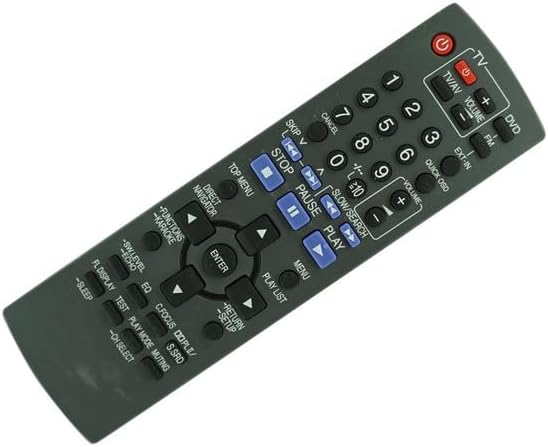
Figure 1: Front view of the replacement remote control. This image displays the full layout of the remote control, including all buttons for TV, DVD, volume, channel, navigation, and playback controls.
Setup
Battery Installation
The remote control requires two (2) AA batteries for operation. Batteries are not included with the remote control and must be purchased separately.
- Locate the battery compartment on the back of the remote control.
- Slide the battery compartment cover downwards or outwards to open it.
- Insert two AA batteries, ensuring the positive (+) and negative (-) terminals align correctly with the markings inside the compartment.
- Replace the battery compartment cover by sliding it back into place until it clicks securely.

Figure 2: Side view of the remote control, illustrating the battery compartment. This image shows the remote from the side, with the battery cover slightly ajar, indicating where batteries are inserted.
Compatibility Check
This remote control is specifically designed for the Panasonic DVD Home Theater Sound System models listed in the title. Please ensure your model number is among those listed for proper functionality. If your model number is not listed, this replacement remote may not be compatible.
Operating Instructions
This remote control operates using infrared (IR) technology. Ensure there is a clear line of sight between the remote control and the IR receiver on your Panasonic DVD Home Theater Sound System.
Basic Functions
- Power Button: Located at the top, typically red, to turn the system on or off.
- TV/AV Button: Switches between TV and AV input modes.
- Volume +/-: Adjusts the audio volume.
- Channel +/-: Changes TV channels (if applicable to your system setup).
- Number Buttons (0-9): For direct channel selection or inputting numerical values.
- Playback Controls: Includes Play, Pause, Stop, Skip, and Fast Forward/Rewind buttons for DVD playback.
- Navigation Buttons: Up, Down, Left, Right arrows and an Enter button for menu navigation.
- Menu/Return/Setup: Accesses system menus, returns to previous screens, or enters setup configurations.
Note: As a replacement remote, some advanced or specific functions present on your original remote may not be replicated or may operate differently. Refer to your Panasonic system's original manual for detailed function descriptions.
Maintenance
Battery Replacement
Replace batteries when the remote control's response becomes sluggish or stops working. Always replace both batteries at the same time with new AA batteries. Do not mix old and new batteries, or different types of batteries.
Cleaning
To clean the remote control, gently wipe its surface with a soft, dry cloth. For stubborn dirt, slightly dampen the cloth with water or a mild, non-abrasive cleaner. Avoid using harsh chemicals or abrasive materials, as these can damage the remote's finish or internal components.
Troubleshooting
- Remote not responding:
- Check if the batteries are inserted correctly with the correct polarity.
- Replace old batteries with new ones.
- Ensure there is a clear line of sight between the remote control and the system's IR receiver. Remove any obstructions.
- Make sure you are within the effective operating range of the remote control.
- Certain functions not working:
- As a replacement remote, it may not support all functions of the original remote. This is normal for some replacement units.
- Verify that your Panasonic system model is explicitly listed as compatible.
Specifications
| Feature | Detail |
|---|---|
| Brand | Generic |
| Manufacturer | SZHKHXD |
| Country of Origin | China |
| Connectivity Technology | Infrared (IR) |
| Compatible Devices | Panasonic DVD Home Theater Sound Systems (SA-PT150, SA-PT160, SA-PT165, SA-PT250, SA-PT550, SA-PT350, SA-PT450, SC-PT550, SC-PT350, SC-PT450) |
| Batteries Required | 2 AA batteries (not included) |
| Max Number of Supported Devices | 10 (as per general specification, actual usage is for one system) |
Important Notes
This remote control is a replacement unit. It may not offer all the exact same functions or button layouts as your original equipment manufacturer (OEM) remote. Please refer to the product images provided to ensure the remote's appearance and button layout meet your expectations before use.