1. Introduction
The Generic AK-T02 is an intelligent wireless remote control switch designed for AC220V motors, commonly used with tubular motors for applications such as automated curtains, projector screens, electric doors, and other devices requiring UP, DOWN, and STOP control. This manual provides essential information for the safe installation, operation, and maintenance of your AK-T02 system.
2. Safety Information
WARNING: Risk of Electric Shock. Always disconnect power before installation or servicing.
- Ensure all wiring is performed by a qualified electrician in accordance with local electrical codes.
- Do not expose the device to moisture or extreme temperatures.
- Verify the input voltage (AC220V) matches your power supply before connecting.
- Keep the remote control out of reach of children.
3. Product Components
The AK-T02 system typically includes the following components:
- Wireless Remote Control (Transmitter)
- Receiver Module (Controller)
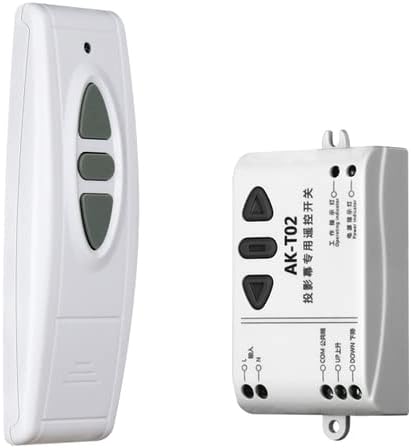
Image 3.1: The AK-T02 wireless remote control and its corresponding receiver module. The remote features three buttons for UP, DOWN, and STOP functions, while the receiver module includes wiring terminals and indicator lights.
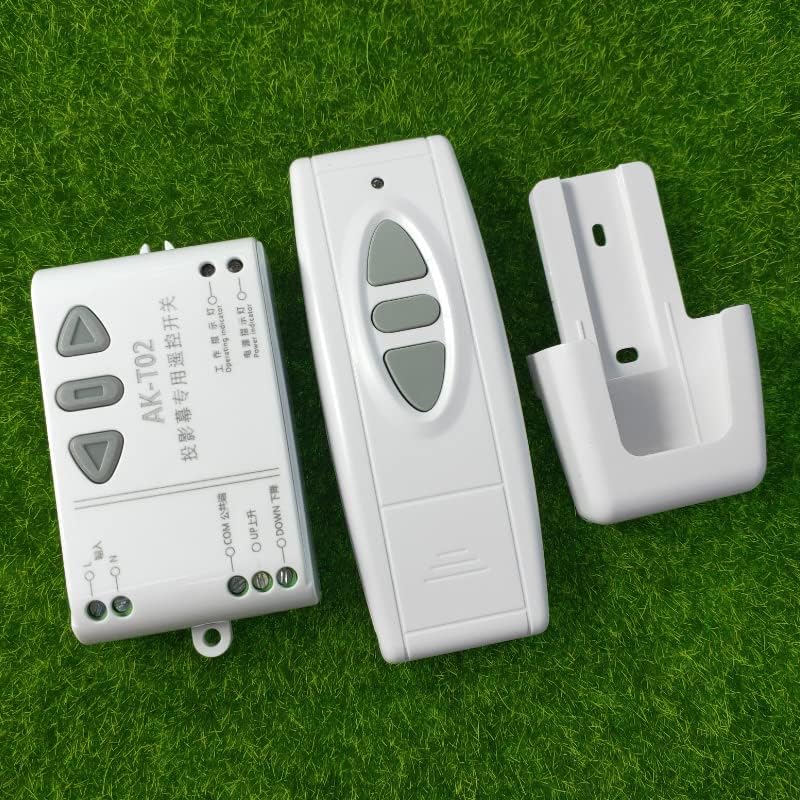
Image 3.2: A complete view of the AK-T02 system, showing the wireless remote control, the receiver module, and a wall-mount bracket for the remote. The receiver module's internal circuit board is also partially visible, indicating its electronic components.
4. Specifications
| Feature | Specification |
|---|---|
| Model Number | AK-T02 |
| Input Voltage | AC220V |
| Wireless Communication | RF (Radio Frequency) |
| Frequency | 315MHz / 433MHz (Specific frequency may vary by region/model) |
| Channel | 2 |
| Control Functions | UP, DOWN, STOP (Motor Forward, Reverse, Stop) |
| Certifications | CE, FCC |
| Typical Applications | Universal, Projectors, Lighting, Electric Door, Automated Curtains |
5. Setup and Installation
Before proceeding, ensure the main power supply is disconnected to prevent electric shock.
- Wiring the Receiver Module:
- Identify the input terminals for AC220V power (L for Live, N for Neutral). Connect your main power supply to these terminals.
- Identify the output terminals for the motor: UP, COM (Common), and DOWN. Connect your motor's corresponding wires to these terminals. Typically, the motor will have three wires: one for UP/Forward, one for DOWN/Reverse, and a common wire.
- Ensure all connections are secure and insulated.
- Mounting the Receiver:
Mount the receiver module in a secure, dry location, away from direct heat or moisture. Ensure it is accessible for future maintenance but protected from accidental contact.
- Power On:
Once all wiring is complete and verified, restore power to the circuit.
- Remote Control Pairing (if necessary):
Most AK-T02 units are pre-paired. If your remote does not control the motor, refer to specific pairing instructions that may be provided with your unit. A common method involves pressing a learning button on the receiver module and then a button on the remote control within a short timeframe.

Image 5.1: An internal view of the AK-T02 receiver module, showing the circuit board with relays and wiring terminals. This image provides context for understanding the connection points for power input and motor output.
6. Operating Instructions
Using the wireless remote control is straightforward:
- UP Button: Press this button to initiate the motor's upward or forward movement.
- DOWN Button: Press this button to initiate the motor's downward or reverse movement.
- STOP Button: Press this button to halt the motor's current movement.
7. Maintenance
- Cleaning: Keep the remote control and receiver module clean and free from dust. Use a soft, dry cloth for cleaning.
- Battery Replacement: If the remote control's range decreases or it becomes unresponsive, replace the battery. Refer to the remote's casing for battery type and replacement instructions.
- Environmental Conditions: Ensure the receiver module is not exposed to excessive heat, cold, or humidity, which can affect its performance and lifespan.
8. Troubleshooting
- Motor Not Responding:
- Check if the receiver module is receiving power (indicator light, if present, should be on).
- Verify the remote control's battery is functional.
- Ensure the remote control is within range and there are no significant obstructions.
- Re-check motor wiring connections to the receiver module.
- Intermittent Operation:
- This could be due to signal interference from other RF devices. Try to relocate the receiver or the interfering device.
- Weak remote control battery.
- Motor Moves in Wrong Direction:
- Swap the UP and DOWN motor wires connected to the receiver module.
9. Warranty and Support
Warranty: This product comes with a 12-month warranty for all products, offering a full refund or replacement for quality issues.
Customer Support: If you encounter any issues with the product, such as damage or incorrect items, please contact us directly through the Amazon platform. We are committed to providing the best solution and ensuring 100% customer satisfaction.


