
Skechers SR2138
Skechers Women's Alta Digital Chronograph Watch SR2138 User Manual
Model: SR2138 | Brand: Skechers
Introduction
This manual provides detailed instructions for the setup, operation, and maintenance of your Skechers Women's Alta Digital Chronograph Watch, Model SR2138. Please read this manual thoroughly to ensure proper use and to maximize the lifespan of your watch.
Product Overview
The Skechers Alta Digital Chronograph Watch is designed for everyday wear, featuring a digital display with multiple functions. Its durable construction and user-friendly interface make it a reliable timepiece.

Figure 1: Front view of the Skechers Alta Digital Chronograph Watch SR2138, showcasing its black case, black silicone band, and clear digital display.
Watch Components and Functions

Figure 2: Labeled diagram of the watch, indicating the 'MODE', 'LIGHT', 'ST/STP', and 'RESET' buttons, along with display features like EL Backlight, 12/24 Hour Selectable Format, Alarm & Hourly Chime, Chronograph Stopwatch, and Calendar.
- MODE Button: Used to cycle through different watch modes (Time, Alarm, Stopwatch).
- LIGHT Button: Activates the EL backlight for improved visibility in low light conditions.
- ST/STP Button: Used for starting/stopping the stopwatch and adjusting settings.
- RESET Button: Used for resetting the stopwatch and confirming settings adjustments.
- Digital Display: Shows time, date, day of the week, and other mode-specific information.
Initial Setup
Setting Time and Date
- From the normal time display, press the MODE button three times to enter the time setting mode. The seconds digits will begin to flash.
- Press the RESET button to advance to the next setting (minutes, hours, date, month, day of the week).
- While a digit is flashing, press the ST/STP button to adjust the value. Hold the button to change values faster.
- Continue pressing RESET and ST/STP until all desired settings (seconds, minutes, hours, 12/24 hour format, month, date, day of the week) are correctly set.
- Once all settings are adjusted, press the MODE button once to exit the setting mode and return to the normal time display.
Selecting 12/24 Hour Format
While in the time setting mode (seconds flashing), press the ST/STP button when the hour digits are flashing to toggle between 12-hour (with AM/PM indicator) and 24-hour formats.
Operating Instructions
Using the Stopwatch (Chronograph)
- From the normal time display, press the MODE button once to enter Stopwatch mode. The display will show 00:00:00.
- Press the ST/STP button to start the stopwatch.
- Press the ST/STP button again to pause the stopwatch.
- To resume, press ST/STP again.
- To reset the stopwatch to zero, ensure it is paused, then press the RESET button.
- Press the MODE button to return to the normal time display.
Setting the Alarm
- From the normal time display, press the MODE button twice to enter Alarm mode. The alarm time will be displayed.
- Press the RESET button to select the hour or minute digits. The selected digits will flash.
- Press the ST/STP button to adjust the flashing digits to your desired alarm time.
- Press the MODE button to exit Alarm setting mode.
- To turn the alarm ON/OFF, press the ST/STP button while in Alarm mode (without flashing digits). An alarm icon will appear/disappear on the display.
Hourly Chime Function
While in Alarm mode (after pressing MODE twice), press the RESET button to toggle the hourly chime ON/OFF. A chime icon will indicate when it is active.
Using the EL Backlight
Press the LIGHT button at any time to illuminate the display for a few seconds, enhancing visibility in dark environments.
Care and Maintenance
Water Resistance
Your Skechers Alta Digital Watch is water resistant to 30 meters (100 feet), rated at 3ATM. This means it can withstand splashes or brief immersion in water. It is not suitable for swimming, showering, or diving. Avoid pressing buttons while the watch is wet to prevent water ingress.
Cleaning Your Watch
To clean your watch, wipe it gently with a soft, damp cloth. Do not use harsh chemicals, soaps, or abrasive materials, as these can damage the watch's finish or seals.
Battery Replacement
The watch is powered by one Lithium Ion battery (included). When the display dims or functions become erratic, it may be time to replace the battery. Battery replacement should ideally be performed by a qualified watch technician to ensure water resistance is maintained.
Troubleshooting
| Problem | Possible Cause / Solution |
|---|---|
| Display is blank or dim. | Low battery. Replace the battery. |
| Time is incorrect. | Time needs to be reset. Follow the 'Setting Time and Date' instructions. |
| Buttons are unresponsive. | Ensure the watch is not in a locked mode (if applicable, though this model typically does not have one). Try a soft reset by holding all buttons for a few seconds (if applicable, consult a technician if persistent). |
| Water appears inside the display. | Water resistance may be compromised. Avoid further contact with water and seek professional service immediately. |
Specifications
- Model Number: SR2138
- Brand: Skechers
- Case Material: Polycarbonate
- Band Material: Silicone
- Case Size: 27mm
- Band Size: 12mm
- Movement: Digital
- Display Type: Digital
- Water Resistance: 30m (100ft / 3ATM)
- Battery: 1 Lithium Ion (included)
- Functions: Time, Date, Day, Chronograph (Stopwatch), Alarm, Hourly Chime, EL Backlight, 12/24 Hour Format
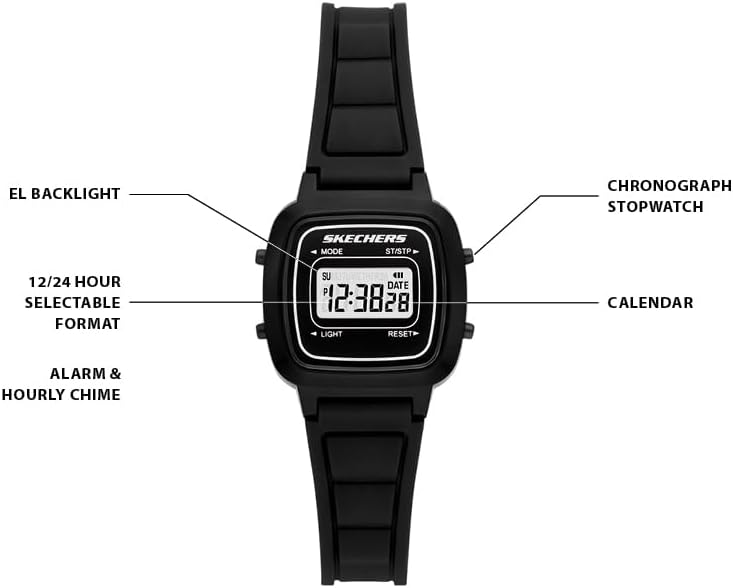
Figure 3: General watch case size guide, illustrating different watch dimensions for reference.
Warranty and Support
Your Skechers Alta Digital Chronograph Watch is covered by a manufacturer's warranty. For specific warranty details, please refer to the warranty card included with your purchase or visit the official Skechers website. For technical support or service inquiries, please contact Skechers customer service.
You can find more information and contact details on the official Skechers website: www.skechers.com
Ask a question about this manual
Ask about setup, troubleshooting, compatibility, parts, safety, or missing instructions. Manuals+ will review the question and use this page’s manual context to help answer it.