
BM31
TROTEC BM31 Moisture Meter
User Manual
1. Product Overview
The TROTEC BM31 is a compact and user-friendly electronic moisture meter designed for quick, non-destructive indication of moisture distributions in near-surface areas of various materials. It utilizes a dielectric humidity sensor to provide indicative measurements, making it ideal for preliminary checks of building materials before more precise CM measurements.
Key Features
- Quick and non-destructive moisture indication.
- Suitable for various building materials.
- Max/Min function for measurement assessment.
- Selectable display illumination for improved readability.
- Automatic switch-off function to conserve battery life.

2. Getting Started
Battery Installation
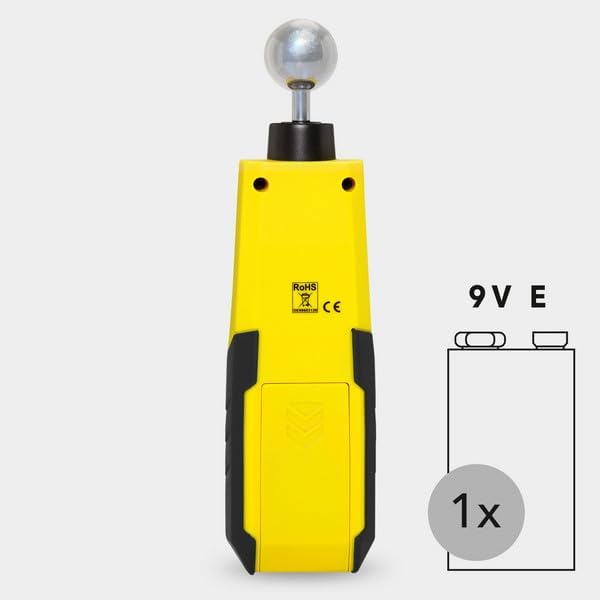
The TROTEC BM31 requires one 9V alkaline battery (included). To install or replace the battery:
- Locate the battery compartment cover on the rear of the device.
- Slide or unclip the cover to open the compartment.
- Insert the 9V battery, ensuring correct polarity (+/-).
- Close the battery compartment cover securely.
3. Operation
Basic Measurement
The BM31 provides a quick and non-destructive indication of moisture. To perform a measurement:
- Press the power button (⏻) to turn on the device.
- Place the spherical sensor firmly against the surface of the material you wish to measure. Ensure full contact for accurate readings.
- The measurement value will be displayed on the LCD screen.
- To hold the current reading, press the HOLD button (if available, or indicated by the manual).
- To assess maximum or minimum values during a measurement series, use the MAX/MIN button.


Understanding the Display and Controls
The device features a clear LCD display and intuitive buttons for operation.

Based on the manual image, the key operating elements and display indications are:
| No. | Designation | Description |
|---|---|---|
| 5 | Lamp button | Activates display illumination. |
| 6 | MEAS button | Initiates a measurement. |
| 7 | MAX/MIN button | Toggles between maximum and minimum measured values. |
| 8 | On/off button | Powers the device on or off. |
| 9 | MAX indication | Indicates that the displayed value is the maximum recorded. |
| 10 | MIN indication | Indicates that the displayed value is the minimum recorded. |
| 11 | HOLD indication | Indicates that the displayed value is held. |
| 12 | Battery indication | Shows the current battery level. |
| 13 | Measurement value indication | Displays the current moisture measurement. |
Advanced Measurement Considerations
- Influence of Metallic Materials: If the material contains metal (e.g., nails, screws, pipes), the measured value may be significantly higher than the actual moisture content due to electrical reflections. Visual inspection is recommended to identify such interferences.
- Static Charge: Avoid static charge of the material to be measured, as it can falsify the measurement result. Ensure proper grounding or discharge if necessary.
- Wood Moisture: For wood with less than 10% relative humidity, electrostatic forces may affect the measurement. This can lead to false readings.
- Surface Condition: Before measuring, ensure the measuring point is clean and free of impurities (e.g., paint residues, dust). Rough surfaces can also result in lower measured values.
- Measurement Depth: The device's penetration depth is approximately 5-40 mm, depending on the material's bulk density and degree of moisture. Readings beyond this depth may not be accurate.
- Material Characteristics: Increased occurrences of soluble salts in the material can distort the measurement. Material aggregates (e.g., in screed or concrete) can also influence the height of the measured value. The material should ideally be homogeneous and free of air pockets.
- Electrically Conducting Materials: If a construction material contains electrically conducting substances, the dielectric constant is increased, leading to higher displayed moisture values.
- Moisture Distribution: With material thicknesses of less than 2 cm, there is a danger of humidity values from adjacent material layers affecting the measured value. Ideally, the moisture should be evenly distributed within the material.
4. Care and Maintenance
Cleaning
To ensure the longevity and accuracy of your TROTEC BM31, keep it clean. Wipe the device with a soft, damp cloth. Do not use abrasive cleaners or solvents, as these can damage the casing or internal components. Ensure the spherical sensor is clean before each use.
Battery Replacement
When the battery indicator on the display shows low power, replace the 9V battery as described in the "Battery Installation" section. Remove the battery if the device will not be used for an extended period to prevent leakage.
5. Troubleshooting
This section addresses common issues you might encounter with your TROTEC BM31.
- Device does not turn on:
- Check if the battery is correctly installed and has sufficient charge. Replace the battery if necessary.
- Inaccurate or fluctuating readings:
- Ensure the spherical sensor is in full contact with the material surface.
- Verify that the material does not contain metallic objects or highly conductive substances near the measurement area.
- Check for static charge on the material or device.
- Ensure the surface is clean and free of debris.
- Consider the measurement depth and material homogeneity as described in the "Advanced Measurement Considerations" section.
- Display is dim or unreadable:
- Activate the display illumination using the lamp button.
- Check battery level; a low battery can affect display brightness.
6. Technical Specifications
| Specification | Detail |
|---|---|
| Manufacturer | trotec |
| Model Number | BM31 |
| Item Weight | 6.2 ounces |
| Package Dimensions | 7 x 1.77 x 1.37 inches |
| Country of Origin | Germany |
| Power Source | Battery Powered |
| Batteries Required | 1 9V battery (included) |
| Battery Cell Type | Alkaline |
| Included Components | Moisture meter, batteries, extra pins |
7. Warranty Information
For detailed warranty information regarding your TROTEC BM31 Moisture Meter, please refer to the warranty card included with your product or visit the official website of the manufacturer, Trotec. Warranty terms and conditions may vary by region and purchase date.
8. Customer Support
Should you require further assistance, technical support, or have questions not covered in this manual, please contact the manufacturer's customer service department. Contact details can typically be found on the product packaging, the manufacturer's official website, or through your point of purchase.
Related documentsBM31


Ask a question about this manual
Ask about setup, troubleshooting, compatibility, parts, safety, or missing instructions. Manuals+ will review the question and use this page’s manual context to help answer it.