
Olimpia Splendid ARYAL S2-02
OLIMPIA SPLENDID ARYAL S2 Dual Inverter Air Conditioner
User Manual
1. Product Overview
The OLIMPIA SPLENDID ARYAL S2 Dual Inverter Air Conditioner is an advanced climate control system designed for efficient cooling, heating, dehumidification, and ventilation. This model features high energy efficiency (A++), uses R32 refrigerant, and includes smart functions like Wi-Fi connectivity, Follow Me temperature sensing, and an automatic Swing function. Its modular design allows for climate control in multiple rooms with a single outdoor unit.

Image 1: Overview of the OLIMPIA SPLENDID ARYAL S2 Dual Inverter Air Conditioner system, showing two indoor units and one outdoor unit.
2. Safety Information
Please read all safety instructions carefully before installation and operation. Failure to follow these instructions may result in electric shock, fire, injury, or property damage.
- Installation must be performed by qualified and authorized personnel in accordance with local and national electrical codes.
- Do not attempt to repair or modify the unit yourself. Contact qualified service personnel for all repairs.
- Ensure the power supply matches the unit's specifications.
- The unit contains R32 refrigerant. Handle with care and ensure proper ventilation during installation and servicing.
- Keep children and pets away from the unit during operation.
3. Package Contents
Verify that all components are present and undamaged upon unpacking:
- 1 x OS-CAAMH14EI Aryal S2 Dual Inverter Outdoor Unit
- 1 x OS-SECYH09EI Alyas Inverter 9 Internal Split Unit
- 1 x OS-SAALH12EI Alyas S1 Inverter 12 Internal Split Unit
- 1 x Remote Control (with batteries)
- 1 x Wi-Fi USB Stick
- User Manual and Installation Guide
4. Setup
4.1 Professional Installation
The OLIMPIA SPLENDID ARYAL S2 is a split air conditioning system requiring professional installation. This involves mounting the indoor and outdoor units, connecting refrigerant lines, electrical wiring, and ensuring proper drainage. Refer to the separate Installation Guide provided with the product for detailed instructions, which should only be followed by certified technicians.
4.2 Wi-Fi Setup
- Locate the USB port on the indoor unit.
- Carefully insert the provided Wi-Fi USB stick into the port.
- Download the "OS Comfort" app from your smartphone's app store (available for iOS and Android).
- Follow the in-app instructions to connect your air conditioner to your home Wi-Fi network. This typically involves creating an account, adding the device, and entering your Wi-Fi credentials.
5. Operating Instructions
The air conditioner is primarily operated via the included remote control. Ensure the remote control has working batteries.

Image 2: Front view of the indoor unit, displaying the current temperature setting.
5.1 Basic Functions
- Cooling: Reduces room temperature.
- Heating: Increases room temperature.
- Dehumidification: Removes excess moisture from the air.
- Ventilation: Circulates air without cooling or heating.
5.2 Operating Modes
- Timer: Set a specific time for the unit to turn on or off.
- Auto: The unit automatically selects the operating mode (cooling, heating, or fan) based on the room temperature.
- Eco: Optimizes operation for energy saving.
- Sleep: Adjusts temperature and fan speed for comfortable sleep, gradually increasing/decreasing temperature.
- Silent: Operates at the lowest possible fan speed for quiet performance.
- Turbo: Provides maximum cooling or heating power for rapid temperature change.
5.3 Special Features
- Follow Me Function: The remote control acts as a thermostat, sensing the temperature at its location and adjusting the unit's operation to achieve the desired temperature precisely where you are.
- Swing Function: Automatically adjusts the horizontal and vertical airflow direction for even air distribution.
- Auto-Restart Function: In case of a power outage, the unit will automatically restart with the last set function once power is restored.
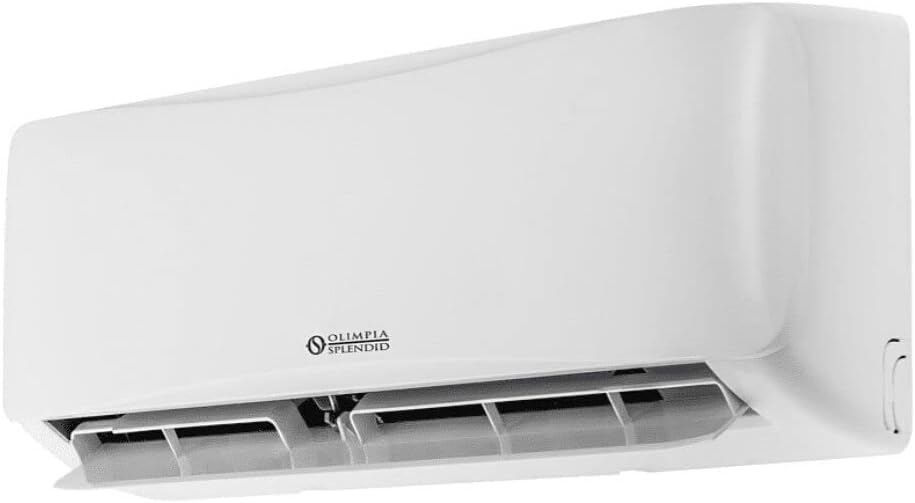
Image 3: Side view of the indoor unit, illustrating its compact design.
6. Maintenance
Regular maintenance ensures optimal performance and longevity of your air conditioner.
6.1 PURE SYSTEM Multi-Filter Cleaning
The unit is equipped with an electrostatic filter (anti-dust) and an activated carbon filter (anti-odor). These filters should be cleaned regularly, typically every 2-4 weeks depending on usage and air quality.
- Turn off the unit and disconnect it from the power supply.
- Open the front panel of the indoor unit.
- Carefully remove the filters.
- Clean the electrostatic filter with a vacuum cleaner or by rinsing with water. Allow it to dry completely before reinstallation.
- The activated carbon filter may require replacement periodically, refer to the detailed manual for replacement intervals.
- Reinstall the dry filters and close the front panel.

Image 4: Internal view of the indoor unit, showing the removable air filters for cleaning and maintenance.
6.2 SELF CLEAN Function
The Self Clean function automatically cleans and dries the evaporator, preventing the buildup of dust, mold, and grease. Activate this function periodically as per the detailed manual's instructions to ensure clean air output.
6.3 Outdoor Unit Maintenance
The outdoor unit features a Golden Fin treatment on its battery to prevent corrosive weather influences and improve performance. Periodically inspect the outdoor unit for any debris, leaves, or obstructions that might block airflow. Clean the exterior with a soft cloth and mild detergent if necessary. Do not spray water directly onto electrical components.
7. Troubleshooting
If you encounter issues with your air conditioner, refer to the following common problems and solutions. For complex issues, contact qualified service personnel.
7.1 Auto-Diagnosis Function
In case of a malfunction, the unit's display will show an error code. Refer to the comprehensive troubleshooting section in the full user manual for a list of error codes and their corresponding solutions.
7.2 Common Issues
- Unit does not turn on: Check power supply, circuit breaker, and ensure the remote control batteries are not depleted.
- Insufficient cooling/heating: Check if filters are clean, ensure no obstructions to airflow, verify temperature settings, and check for open windows/doors.
- Unusual noise: Ensure the unit is installed on a stable surface. If noise persists or is excessive, contact service.
- Water leakage: Check drainage hose for kinks or blockages. Ensure proper installation angle for drainage.
8. Specifications
| Feature | Specification |
|---|---|
| Model Number | ARYAL S2-02 |
| Manufacturer | Olimpia Splendid |
| Energy Efficiency Class | A++ |
| Refrigerant | R32 |
| Voltage | 5 Volt |
| Wattage | 3412 Watt |
| Indoor Unit Dimensions (approx.) | 18.9 x 80.2 x 29.7 cm |
| Filter Type | Electrostatic Filter, Activated Carbon Filter |
| Installation Type | Split System |
| Special Features | Dehumidifier, Remote Controlled, Wi-Fi Enabled, Follow Me, Swing Function, Self Clean |
9. Warranty and Support
This product comes with a limited warranty. For specific warranty terms and conditions, please refer to the warranty card included with your product or visit the official Olimpia Splendid website. For technical support, service requests, or spare parts, please contact Olimpia Splendid customer service or your authorized dealer.
Olimpia Splendid Official Website: www.olimpiasplendid.it
Related Documents - ARYAL S2-02
 |
Manuel d'installation et d'utilisation du kit Wi-Fi MAESTRO B1018 par Olimpia Splendid Ce manuel fournit des instructions détaillées pour l'installation, l'utilisation et l'entretien du kit Wi-Fi MAESTRO B1018 d'Olimpia Splendid, permettant le contrôle à distance de votre climatiseur. |
 |
Olimpia Splendid Unico Inverter Klimagerät: Installations-, Gebrauchs- und Wartungsanleitung Umfassende Anleitung zur Installation, Bedienung und Wartung des Olimpia Splendid Unico Inverter Klimageräts. Enthält Sicherheitshinweise, Installationsschritte, Bedienungsanleitungen für die Fernbedienung und Fehlerbehebung. |
 |
Olimpia Splendid MAESTRO PRO INVERTER 12 HP (Model 01925) B1018 Wi-Fi Kit Installation Guide Installation guide for the Olimpia Splendid B1018 Wi-Fi kit for the MAESTRO PRO INVERTER 12 HP air conditioning unit (Model 01925). Learn how to install the Wi-Fi board and connect it. |
 |
Manuale di Installazione Olimpia Splendid Sherpa Monobloc Guida completa all'installazione delle pompe di calore Olimpia Splendid Sherpa Monobloc, modelli S2 E. Copre installazione, sicurezza, specifiche tecniche e risoluzione problemi per un funzionamento efficiente. |
 |
Manuale Utente Kit Wi-Fi Olimpia Splendid B1020 Guida completa all'installazione e all'uso del Kit Wi-Fi B1020 di Olimpia Splendid per climatizzatori Hiwall. Include configurazione, app Os Comfort e funzioni smart. |
 |
PAC9000 Portable Air Conditioner Wi-Fi Setup Instructions Step-by-step guide for setting up Wi-Fi connectivity for the Olimpia Splendid PAC9000 portable air conditioner using the SmartLife-SmartHome app. |