
1. Introduction
This manual provides essential information for the proper setup, operation, and maintenance of your HAYEAR HY-900B USB3.0 Digital Microscope Camera. This 8-megapixel camera is designed for various applications including industrial vision, visual inspection, and integration with microscopes and astronomical telescopes. It offers high-speed video transmission and compatibility with multiple operating systems.
2. Package Contents
Verify that all items listed below are included in your package:
- 1 x HAYEAR HY-900B USB3.0 Digital Microscope Camera
- 1 x USB3.0 Cable
- 1 x Software Disk
3. Product Overview
The HAYEAR HY-900B is a compact and versatile digital microscope camera. Familiarize yourself with its components:
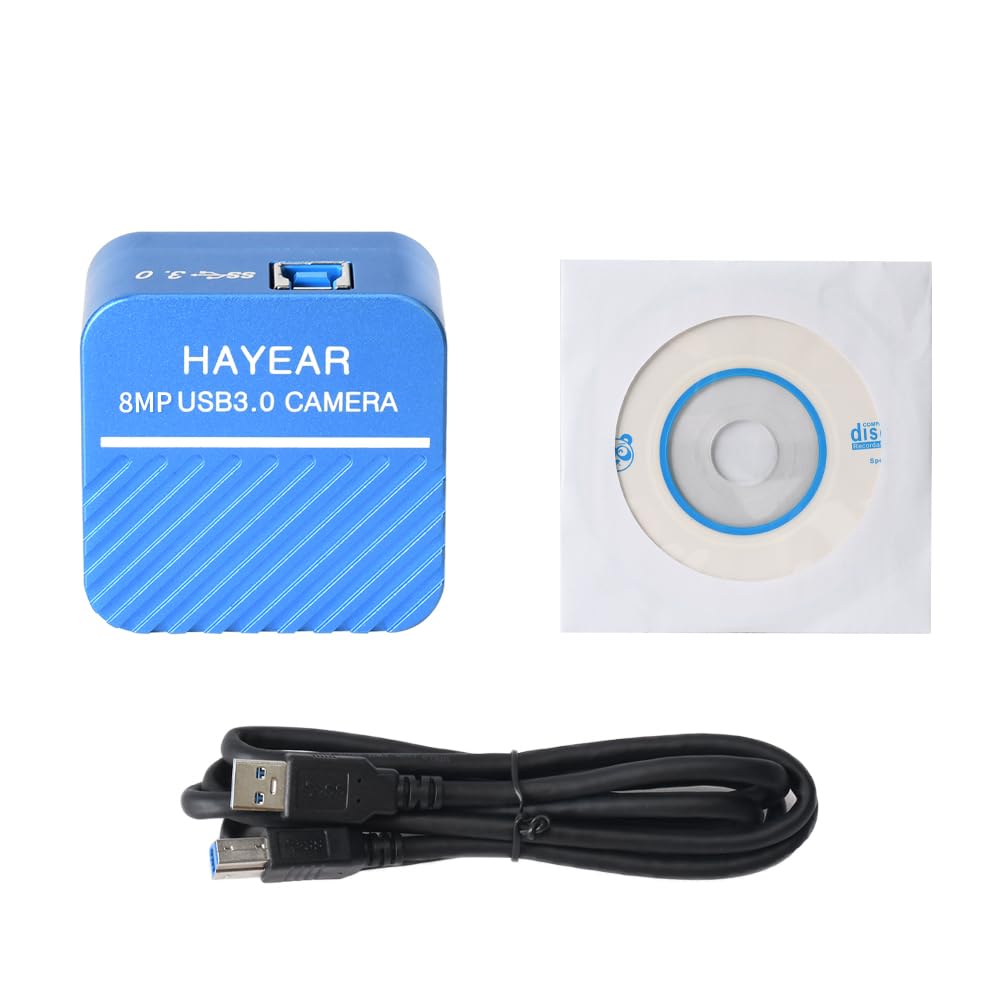
Figure 3.1: Front view of the HAYEAR HY-900B camera, showing the brand and 8MP USB3.0 Camera label.
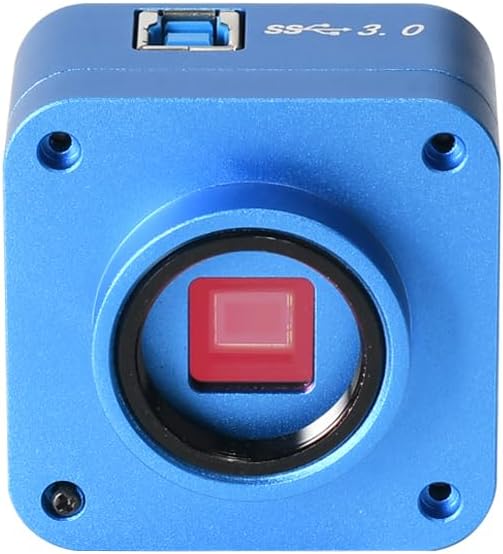
Figure 3.2: Front view of the camera, highlighting the C-mount lens interface and the sensor.

Figure 3.3: Top view of the camera, showing the USB 3.0 port for high-speed data transfer.

Figure 3.4: Angled view of the camera with the USB 3.0 cable connected, demonstrating its compact form factor.
4. Setup Instructions
Follow these steps to set up your HAYEAR HY-900B camera:
- Connect the Camera: Connect the HAYEAR HY-900B camera to your computer using the provided USB3.0 cable. Ensure it is connected to a USB3.0 port on your PC or laptop for optimal performance and to prevent low power issues.
- Install Software: Insert the included software disk into your computer's optical drive. Follow the on-screen instructions to install the HAYEAR measurement software. This software is compatible with Windows, Linux, and Mac OS (UVC compatible).
- Driver Installation: The camera supports USB Video Class (UVC) protocols, meaning it is generally plug-and-play and does not require separate driver installation on most modern operating systems (WinXP/Win7/Win10/Win11, Linux, Android, MAC-OS X10.4.8 or later).
- Mounting (Optional): The camera features a standard C-mount. It can be directly attached to compatible monocular zoom lenses or, with a CS ring adapter, to stereo trinocular microscopes, FA machine vision lenses, or other 2D/3D monocular lenses.
5. Operating the Camera
Once the camera is connected and software is installed, you can begin operation:
- Launch Software: Open the HAYEAR measurement software on your computer. The camera's live feed should appear in the software interface.
- Adjust Settings: The software provides controls for various image parameters, including Exposure, Gamma, Color, Gain, Contrast, and Brightness. Adjust these settings to achieve optimal image quality for your specific application.
- Focusing: If using with a microscope or lens, adjust the focus mechanism of your optical equipment to bring the specimen into sharp view.
- Applications: The HY-900B camera is suitable for a wide range of applications, including detailed visual inspection of circuit boards, biological samples, and other microscopic subjects.
Video 5.1: Demonstration of the HAYEAR 4K Microscope Camera (HY-900B) in use, showcasing its capabilities for inspecting circuit boards and biological samples under magnification.
6. Maintenance
To ensure the longevity and optimal performance of your camera:
- Cleaning: Use a soft, dry cloth to clean the camera body. For the lens and sensor, use specialized optical cleaning solutions and cloths to avoid scratches or damage.
- Storage: Store the camera in a cool, dry place away from direct sunlight and extreme temperatures.
- Handling: Avoid dropping or subjecting the camera to strong impacts.
7. Troubleshooting
If you encounter issues with your HAYEAR HY-900B camera, refer to the following common solutions:
- Camera Not Detected/Low Power: Ensure the camera is connected to a USB3.0 port on your PC or laptop. USB2.0 ports may not provide sufficient power or data bandwidth, leading to detection issues or poor performance.
- No Image/Black Screen: Verify that the software is correctly installed and launched. Check all cable connections. Ensure the lens cap (if applicable) is removed and any connected microscope or lens is properly configured.
- Poor Image Quality: Adjust the focus of your optical equipment. Use the software's image settings (Exposure, Gain, Brightness, Contrast) to optimize the image. Ensure adequate lighting for your specimen.
- Software Not Responding: Close and restart the software. If the issue persists, restart your computer.
8. Specifications
Technical specifications for the HAYEAR HY-900B USB3.0 Digital Microscope Camera:
| Feature | Detail |
|---|---|
| Model | HY-900B USB3.0 Color CMOS USB camera |
| Sensor | 1/2.5" Color CMOS IMX317 |
| Sensor Size | 8.365mm(H) x 6.615mm(V) |
| Pixel Size | 1.62µm(H) x 1.62µm(V) |
| Spectral Response | 400nm~700nm |
| Resolution | 3840x2160; 2560x1440; 1920x1080 |
| Image Format | MJPEG / YUV422 |
| Video Resolution | 3840x2160 @30fps; 2560x1440 @30fps; 1920x1080 @30fps; 1280x720 @30fps; 1024x576 @30fps; 640x480 @30fps; 640x360 @30fps |
| Dynamic Range | dB (Linear) - dB (HDR) |
| White Balance | Auto/Manual |
| Image Output | USB3.0, 5Gbit/s |
| Functions | Exposure, Gamma, Color, Gain, Contrast, Brightness |
| Protocols | USB Video Class (UVC) |
| System Support | WinXP/Win7/Win10/Win11; Linux / Android (compatible UVC), MAC-OS X10.4.8 or latest (compatible UVC) |
| Shooting Modes | Automatic |
| Exposure Control Type | Manual, Automatic |
| Video Capture Resolution | 2160p |
| Media Type | USB |
| Water Resistance Level | Not Water Resistant |
| Video Capture Format | MJPEG |
| Effective Still Resolution | 8294400 Pixels |
| Viewfinder Type | LCD screen (via connected device) |
| Compatible Devices | Laptop, Personal Computer |
| ISO Range | 100-3200 |
| Audio Recording | No |
| Aspect Ratio | 16:9 |
| Focus Type | Autofocus or Manual Focus (depending on connected lens) |
| Autofocus | Yes (depending on connected lens) |
| Flash Type | Internal (if applicable, typically for illumination) |
| Manufacturer | HAYEAR |
| Item Weight | 1 Kilogram |
9. Warranty and Support
Warranty: The HAYEAR HY-900B USB3.0 Digital Microscope Camera comes with a 1-year manufacturer's warranty.
Support: For any questions, feedback, or technical assistance, please contact HAYEAR customer support. Your inquiries are welcome.
