
Introduction
This manual provides detailed instructions for the operation and maintenance of your TEKMAGIC W64-NCA-BK Digital Sports Watch. Designed for durability and functionality, this watch features 10 ATM (100m) water resistance, a chronograph, stopwatch, timer, countdown, calendar, dual time zone display, and an alarm clock. Please read this manual thoroughly to ensure proper use and to maximize the lifespan of your watch.
Watch Overview and Button Functions
Your TEKMAGIC W64-NCA-BK watch features four primary buttons for navigation and function control. Refer to the diagram below for button identification.
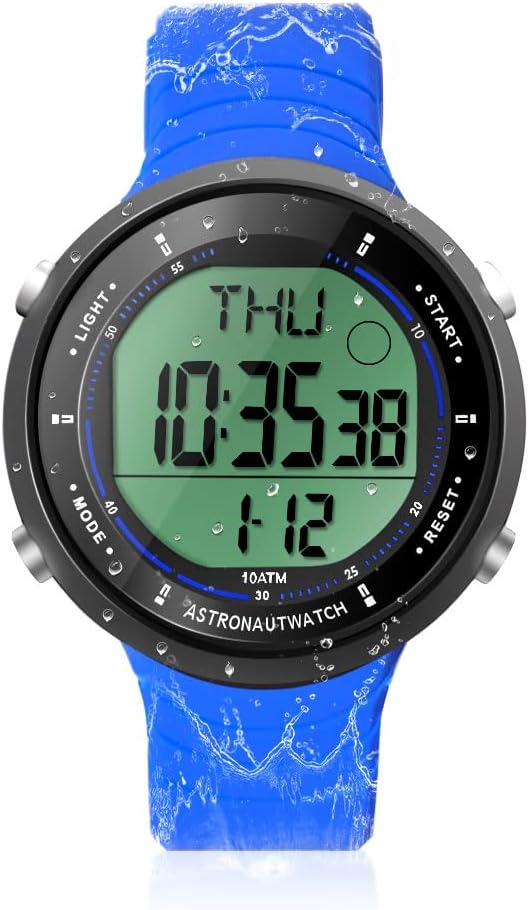
Image Description: A front view of the TEKMAGIC W64-NCA-BK Digital Sports Watch. The watch has a blue silicone strap and a black case with a digital display showing "THU 10:35:38 1-12". Four buttons are visible on the sides, labeled "LIGHT", "MODE", "START", and "RESET".
- LIGHT Button (Top Left): Activates the backlight for visibility in low-light conditions.
- MODE Button (Bottom Left): Cycles through different modes: Time, Chronograph, Timer, Countdown, Alarm, Dual Time.
- START Button (Top Right): Starts/stops functions in Chronograph, Timer, and Countdown modes. Adjusts values in setting modes.
- RESET Button (Bottom Right): Resets functions in Chronograph, Timer, and Countdown modes. Cycles through digits in setting modes.
Setup and Basic Operation
1. Initial Power On
The watch typically comes pre-installed with a battery. If the display is blank, the battery may need replacement (refer to Maintenance section).
2. Setting Time and Date
- From the Time mode, press and hold the MODE button until the seconds begin to flash. This indicates setting mode.
- Press the RESET button to cycle through the setting options: Seconds → Hour → Minute → Year → Month → Day → 12/24 Hour Format.
- Use the START button to adjust the flashing value.
- Once all settings are complete, press the MODE button to exit the setting mode.
3. 12/24 Hour Format Switch
During time setting, you can switch between 12-hour (with AM/PM indicator) and 24-hour formats using the START button when the hour format option is flashing.
Operating Functions
1. Chronograph (Stopwatch)
The chronograph function allows for precise timing of events.

Image Description: A close-up of the TEKMAGIC W64-NCA-BK watch face showing the stopwatch function. The display reads "ST 0:00543" with "CHIME" indicated. The image also shows a person swimming with the watch.
- Press the MODE button repeatedly until "ST" (Stopwatch) appears on the display.
- Press START to begin timing.
- Press START again to pause timing.
- Press RESET to clear the stopwatch to zero.
- To resume timing after pausing, press START.
2. Countdown Timer
Set a specific time for the watch to count down from.
Image Description: A close-up of the TEKMAGIC W64-NCA-BK watch face showing the countdown timer function. The display reads "TR 0:0621". The image also shows a person surfing with the watch.
- Press the MODE button repeatedly until "TR" (Timer) appears on the display.
- Press and hold the RESET button until the hours begin to flash.
- Press START to adjust the flashing hour value.
- Press RESET to move to minutes, then START to adjust. Repeat for seconds.
- Once the desired countdown time is set, press MODE to exit setting mode.
- Press START to begin the countdown.
- Press START again to pause the countdown. Press RESET to reset to the set time.
- An alarm will sound when the countdown reaches zero.
3. Alarm Clock
Set a daily alarm to sound at a specific time.

Image Description: A composite image showing various watch functions. One quadrant specifically shows the watch face with "AL 12:00" indicating the alarm setting mode.
- Press the MODE button repeatedly until "AL" (Alarm) appears on the display.
- Press and hold the RESET button until the hour digits begin to flash.
- Press START to adjust the flashing hour value.
- Press RESET to move to minutes, then START to adjust.
- Press MODE to exit alarm setting mode.
- To turn the alarm ON/OFF, press START while in Alarm mode (not setting mode). An alarm icon will appear/disappear.
4. Hourly Chime
The hourly chime provides an audible alert at the top of every hour.
Image Description: A composite image showing various watch functions. One quadrant specifically shows the watch face with "CHIME" indicated, signifying the hourly chime is active.
- While in Alarm mode ("AL"), press the RESET button to toggle the hourly chime ON/OFF. A chime icon will appear/disappear.
5. Dual Time Zone
Display a second time zone for convenience when traveling or communicating across different regions.

Image Description: A composite image showing two TEKMAGIC W64-NCA-BK watches side-by-side, one displaying "THU 4:52:23" and the other "T2 16:52:23", illustrating the dual time zone feature. The image also shows people wearing the watch while hiking.
- Press the MODE button repeatedly until "T2" (Dual Time) appears on the display.
- Press and hold the RESET button until the hour digits begin to flash.
- Press START to adjust the flashing hour value.
- Press RESET to move to minutes, then START to adjust.
- Press MODE to exit dual time setting mode.
6. Backlight
To illuminate the display, press the LIGHT button (top left). The backlight will remain on for a few seconds.
Maintenance
1. Water Resistance (10 ATM / 100m)
This watch is rated for 10 ATM (100 meters / 330 feet) water resistance, making it suitable for swimming, diving, snorkeling, and other water activities. Ensure all buttons are not pressed while underwater to maintain water resistance integrity.

Image Description: A composite image demonstrating the watch's 10 ATM waterproof capability. The top shows a diver underwater wearing the watch. The bottom left shows a person's arm with the watch in a swimming pool. The bottom right shows the watch submerged in water with splashes.
2. Battery Replacement
The watch uses a CR2025 battery. If the display becomes dim or the watch stops functioning, it's time to replace the battery. It is recommended to have battery replacement performed by a qualified watch technician to ensure proper sealing and maintain water resistance.
- Carefully remove the back cover of the watch using a suitable tool.
- Remove the old CR2025 battery.
- Insert a new CR2025 battery with the positive (+) side facing up.
- Replace the back cover, ensuring it is securely fastened to maintain water resistance.
3. Cleaning
Clean the watch regularly with a soft, damp cloth. For stubborn dirt, a mild soap solution can be used, followed by rinsing with fresh water and drying thoroughly. Avoid using harsh chemicals or abrasive materials.
Troubleshooting
| Problem | Possible Cause | Solution |
|---|---|---|
| Display is blank or dim. | Low or dead battery. | Replace the CR2025 battery. |
| Watch loses time or functions incorrectly. | Low battery; internal malfunction. | Replace battery. If problem persists, contact customer support. |
| Water inside the watch. | Buttons pressed underwater; back cover not sealed properly after battery change. | Immediately take to a watch repair specialist. Avoid pressing buttons underwater. Ensure proper sealing after maintenance. |
| Alarm or chime not sounding. | Alarm/chime function is turned off. | Ensure alarm/chime is activated in the respective mode. |
Specifications
| Feature | Detail |
|---|---|
| Model Number | W64-NCA-BK |
| Water Resistance | 10 ATM (100m / 330ft) |
| Movement Type | Japanese Quartz |
| Battery Type | CR2025 |
| Operating Battery Life | 1.5 to 2 years |
| Time Accuracy | ±30 seconds per month |
| Countdown Range | 23:59'59'' to 0:0'0'' |
| Case Material | ABS |
| Strap Material | Silicone |
| Case Diameter | 45mm (1.8 inch) |
| Case Thickness | 12mm (0.47 inch) |
| Strap Width | 22mm (0.9 inch) |
| Max Wrist Circumference | 230mm (9.1 inch) |
| Min Wrist Circumference | 160mm (6.3 inch) |
| Product Weight | 53g (0.12lb) |

Image Description: A diagram illustrating the dimensions of the TEKMAGIC W64-NCA-BK Digital Sports Watch. It shows the watch with measurements for case diameter (45mm), case thickness (12mm), strap width (22mm), and minimum/maximum wrist circumference (160mm/230mm).
Customer Support
For further assistance or inquiries, please refer to the product's official support channels or contact your retailer. Keep your purchase receipt for warranty purposes.