
Introduction
Welcome to your new CAYNEL Evaporative Air Cooler. This manual provides essential information for the safe operation, maintenance, and troubleshooting of your appliance. Please read it thoroughly before use and retain it for future reference.
Important Safety Instructions
- Read all instructions before using this appliance.
- Do not operate any appliance with a damaged cord or plug.
- Do not immerse the unit, plug, or cord in water or other liquids.
- Supervise children when the appliance is in use.
- Unplug the unit before cleaning or performing any maintenance.
- Ensure the unit is placed on a stable, level surface.
- Do not block air inlets or outlets.
- Use only with the specified voltage (110 Volts).
Product Components
Familiarize yourself with the main parts of your evaporative air cooler.

Image: Close-up views highlighting key features: honeycomb filter design, two reusable ice packs, swivel wheels for portability, and the 5-liter water tank.

Image: An exploded view diagram showing the internal components of the evaporative air cooler, including the honeycomb filter, water tank, and fan blades. This illustrates the innovative cooling technology.
- Control Panel: Located on the top of the unit for manual operation.
- Air Outlet: Front louvers for air distribution.
- Water Tank: Located at the bottom, capacity of 5 liters.
- Honeycomb Filter: Internal component for evaporative cooling.
- Swivel Wheels: For easy movement of the unit.
- Remote Control: For convenient operation from a distance.
- Ice Packs: Two reusable ice packs included for enhanced cooling.
Setup and First Use
- Unpacking: Carefully remove the cooler from its packaging. Retain packaging for storage if needed.
- Positioning: Place the unit on a firm, level surface. Ensure there is adequate space around the unit for proper airflow.
- Adding Water: Open the upper water tank cover. Pour clean, cool water into the tank. Do not exceed the "MAX" fill line.
- Using Ice Packs (Optional for enhanced cooling): For colder air, place the included ice packs in the freezer until frozen. Once frozen, place them into the water tank along with the water.
- Connecting Power: Plug the power cord into a standard 110-Volt electrical outlet.

Image: A hand pouring water into the upper water tank of the evaporative air cooler, demonstrating the water filling process.

Image: A visual guide showing the steps for usage: 1. Placing ice packs into the top compartment. 2. Pouring water over the ice packs. 3. Manually adjusting the front fan blades. 4. Pressing the "COOL" button on the control panel.
Operating Instructions
Your CAYNEL Evaporative Air Cooler offers multiple modes and settings for personalized comfort.
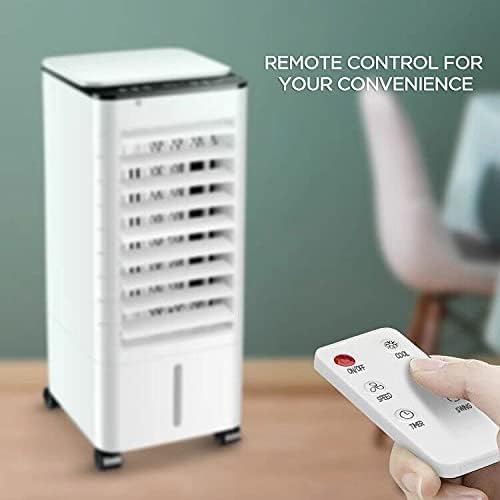
Image: A close-up of the remote control for the air cooler, showing buttons for power, speed, timer, mode, and swing functions.
Control Panel and Remote Control Functions
- Power Button: Turns the unit ON or OFF.
- Speed Button: Cycles through Low, Mid, and High fan speeds.
- Mode Button: Selects operating modes: Normal, Natural, or Sleep.
- Cool Button: Activates the evaporative cooling function. This requires water in the tank.
- Swing Button: Activates the 65° oscillation feature for wider air distribution.
- Timer Button: Sets the auto-off timer for up to 12 hours.
Operating Modes
- Fan Mode: Operates as a standard fan, circulating air without humidification or cooling.
- Humidification Mode: Activated by adding water to the tank and selecting a fan speed. The unit will add moisture to the air.
- Cooling Mode: Activated by adding water (and ice packs for enhanced cooling) and pressing the "Cool" button. The unit will provide evaporative cooling.
Oscillation Feature
Press the "Swing" button to activate the 65° horizontal oscillation. This distributes cool air across a wider area. Press again to stop oscillation.
Timer Function
Use the "Timer" button to set the desired operating duration. The unit will automatically turn off after the set time (up to 12 hours).
Maintenance and Care
Regular maintenance ensures optimal performance and longevity of your evaporative air cooler.
Cleaning the Exterior
- Always unplug the unit before cleaning.
- Wipe the exterior surfaces with a soft, damp cloth. Do not use abrasive cleaners or solvents.
Water Tank Cleaning
- The water tank should be cleaned regularly to prevent mold and mildew growth.
- Drain any remaining water from the tank.
- Remove the water tank (if detachable) and clean it with mild soap and water. Rinse thoroughly.
- For fixed tanks, wipe the interior with a damp cloth.
Honeycomb Filter Maintenance
- The honeycomb filter should be cleaned periodically, depending on usage and air quality.
- Carefully remove the filter from the unit.
- Rinse the filter under running water to remove dust and debris. For stubborn dirt, use a soft brush and mild soap.
- Allow the filter to air dry completely before reinserting it into the unit.
Storage
- If storing the unit for an extended period, ensure the water tank is empty and clean, and the honeycomb filter is dry.
- Store the unit in a cool, dry place, away from direct sunlight.
Troubleshooting Guide
Before contacting customer support, please refer to the following common issues and solutions.
| Problem | Possible Cause | Solution |
|---|---|---|
| Unit does not turn on. | No power supply; Power cord not plugged in; Power button not pressed. | Check power outlet; Ensure power cord is securely plugged in; Press the power button. |
| No cool air. | Water tank is empty; "Cool" function not activated; Honeycomb filter is dirty. | Fill water tank; Press the "Cool" button; Clean the honeycomb filter. |
| Unit is leaking water. | Water tank overfilled; Unit is not on a level surface; Damaged water tank. | Do not exceed "MAX" fill line; Place unit on a level surface; Contact customer support if tank is damaged. |
| Weak airflow. | Air inlets/outlets blocked; Fan speed set too low; Honeycomb filter dirty. | Ensure clear path for airflow; Increase fan speed; Clean honeycomb filter. |
| Unusual noise. | Unit not on a level surface; Obstruction in fan blades; Low water level (beeping sound). | Place unit on a level surface; Check for obstructions (unplug first); Refill water tank. |
Product Specifications
| Feature | Detail |
|---|---|
| Model Name | Portable air conditioner |
| Model Number | CQ63201 |
| Brand | CAYNEL |
| Functions | Fan, Humidification, Cooling (3-in-1) |
| Color | Pearl White |
| Mounting Type | Freestanding |
| Special Features | 65° Oscillation, Portable, Remote Controlled, 12-Hour Timer |
| Controls Type | Touch, Remote |
| Number of Speeds | 3 |
| Noise Level | 50 Decibels |
| Product Dimensions (D x W x H) | 9.3"D x 22.4"W x 10.2"H |
| Item Weight | 10.53 pounds |
| Voltage | 110 Volts |
| Amperage | 0.73 Amps |
| Included Components | Ice Pack, Remote Control |

Image: A diagram showing the dimensions of the evaporative air cooler: 22.4 inches in height, 10.2 inches in depth, and 9.25 inches in width.
Warranty and Support
Your CAYNEL Evaporative Air Cooler (Model CQ63201) comes with a 1-year warranty from the date of purchase. This warranty covers manufacturing defects under normal use.
For warranty claims, technical support, or any questions regarding your product, please contact CAYNEL customer service.
Manufacturer: CAYNEL
Seller: MyCAYNEL (via Amazon)
Please retain your proof of purchase for warranty validation.