
Hyper Tough AQ76018G
HYPER TOUGH 3/8-in Keyless Chuck 20V Max Lithium-Ion Cordless Drill Instruction Manual
Model: AQ76018G
Product Overview
The HYPER TOUGH 3/8-inch Keyless Chuck 20V Max Lithium-Ion Cordless Drill is designed for various drilling and driving tasks. This model is sold as a bare tool, meaning the battery and charger are not included and must be purchased separately. It features a keyless chuck for easy bit changes, variable speed control, and multiple torque settings for versatile use around the home.
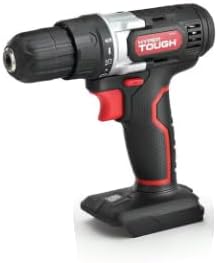
Image: HYPER TOUGH 20V Max Lithium-Ion Cordless Drill (tool only).
Setup
Battery Installation and Removal
This drill requires a 20V Max Lithium-Ion battery (not included). Ensure the battery is fully charged before first use.
- To Install Battery: Align the battery with the base of the drill handle. Slide the battery into the handle until it clicks securely into place.
- To Remove Battery: Press the battery release button (usually located on the front or sides of the battery pack) and slide the battery out of the handle.
Drill Bit Installation and Removal (Keyless Chuck)
The keyless chuck allows for quick and easy bit changes without a chuck key.
- To Install Bit: Rotate the chuck collar counter-clockwise until the jaws are open wide enough to insert the drill bit. Insert the bit fully into the chuck. Rotate the chuck collar clockwise to tighten the jaws firmly around the bit. Ensure the bit is centered and secure.
- To Remove Bit: Rotate the chuck collar counter-clockwise to loosen the jaws and remove the bit.
Video: Demonstrates the ease of battery and drill bit installation/removal for the Hyper Tough drill. Note: This video is from an influencer, but it clearly shows the setup process.
Operating Instructions
Powering On/Off and Variable Speed Trigger
The drill is activated by pressing the trigger switch. The speed of the drill is controlled by how far the trigger is depressed. Pressing lightly results in slower speed, while pressing fully results in maximum speed.
Forward/Reverse Switch
A toggle switch located above the trigger controls the direction of rotation. Push the switch to the left for forward rotation (for drilling and driving screws). Push the switch to the right for reverse rotation (for removing screws or backing out drill bits). Center position locks the trigger for safety.
Torque Settings
The drill features multiple torque settings (e.g., 18+1) which can be adjusted by rotating the collar behind the chuck. Lower settings are for driving small screws into soft materials, while higher settings are for driving larger screws into harder materials or for drilling. The "drill" icon setting provides maximum torque for drilling applications.
Video: Overview of the Hyper Tough Cordless Drill's features, including variable speed, forward/reverse, and torque settings. Note: This video is from an influencer, but it clearly shows the operating features.
Maintenance
- Cleaning: Keep the tool clean and free of dust and debris. Use a soft, damp cloth for cleaning. Do not use harsh chemicals or abrasive cleaners.
- Storage: Store the drill in a dry, secure location away from direct sunlight and extreme temperatures. Remove the battery when storing for extended periods.
- Battery Care: Always charge the battery in a well-ventilated area. Do not store batteries in discharged condition.
Troubleshooting
| Problem | Possible Cause | Solution |
|---|---|---|
| Drill does not operate. | Battery not installed correctly or discharged. Trigger lock engaged. | Ensure battery is fully inserted and charged. Disengage trigger lock by pushing the forward/reverse switch to either side. |
| Reduced power or speed. | Low battery charge. Incorrect torque setting for the task. | Recharge battery. Adjust torque setting to a higher number or the drill icon. |
| Drill bit slips in chuck. | Chuck not tightened sufficiently. | Ensure drill bit is fully inserted and chuck is tightened firmly by hand. |
Specifications
- Brand: Hyper Tough
- Model Number: AQ76018G
- Power Source: Battery Powered
- Voltage: 20 Volts
- Maximum Rotational Speed: 600 RPM
- Maximum Chuck Size: 10 Millimeters (3/8-inch)
- Material: Metal
- Item Weight: 2 Pounds
- Product Dimensions: 9.06"L x 8.46"W x 3.15"H
- Included Components: Drill (bare tool)
Warranty and Support
For warranty information and customer support, please refer to the documentation included with your product or visit the official Hyper Tough website. Keep your purchase receipt as proof of purchase for any warranty claims.
For technical assistance or questions regarding your Hyper Tough drill, please contact Hyper Tough customer service.
Ask a question about this manual
Ask about setup, troubleshooting, compatibility, parts, safety, or missing instructions. Manuals+ will review the question and use this page’s manual context to help answer it.