
1. Product Overview
The SOFTSEA Twin Size Loft Bed with Desk and Stairs is a versatile furniture piece designed to maximize space in a child's or teen's room. It features a comfortable sleeping area, an integrated desk for study or work, and a functional staircase with built-in storage compartments.

Image 1.1: Full view of the SOFTSEA Twin Size Loft Bed with Desk and Stairs, showcasing its design and functionality.
Key Features:
- Loft Bed with Storage Stairs: Features a wide platform staircase with three integrated storage compartments for clothes or toys.
- Multifunctional Loft Bed with Desk: Includes a spacious built-in desk, ideal for study or play, increasing storage space in limited areas.
- Sturdy and Durable Construction: Crafted from high-quality pine wood and MDF, secured with heavy-duty screws for stability.
- Designed for Kids Safety: Equipped with a full-length guardrail, dense slats, and a sturdy 4-step staircase with handrails for safe access.
2. Specifications
Refer to the table below for detailed product specifications and dimensions.

Image 2.1: Detailed dimensions of the loft bed, desk, and stairs.
| Attribute | Detail |
|---|---|
| Overall Dimensions | 95"L x 41.8"W x 72"H |
| Bed Inner Size | 76.8"L x 39.3"W |
| Desk Size | 78.5"L x 13.8"W x 26.1"H |
| Guardrail Height | 11"H |
| Recommended Mattress Thickness | 6" |
| Color | Espresso |
| Bed Weight Capacity | 300 LBS |
| Overall Product Weight | 195 LBS |
| Material | Pine Wood + MDF |
| Assembly Level | Full Assembly Needed |
| Suggested Number of People for Assembly | 2 |
| Additional Tools Required | All Tools Included |
| Number of Packages | 2 |
3. Setup and Assembly
Carefully follow these instructions for proper assembly. It is recommended that two people work together to complete the assembly.
3.1 Before You Begin:
- Unpack all components and verify that all parts are present according to the packing list.
- Clear a spacious area for assembly.
- Keep all hardware (screws, bolts, etc.) organized and within reach.
- Do not overtighten screws during initial assembly; tighten fully once the structure is stable.
3.2 Assembly Steps:
- Assemble the Bed Frame: Begin by connecting the main bed frame components. Ensure all pre-drilled holes align correctly.
- Attach the Desk: Secure the desk surface to the bed frame. Pay close attention to the alignment of the desk supports.
- Construct the Stairs with Storage: Assemble the staircase unit, ensuring the storage compartments are correctly integrated. This section may require careful attention to detail for proper alignment.
- Connect Stairs to Bed Frame: Securely attach the assembled staircase to the main bed frame.
- Install Slats and Guardrails: Place the bed slats evenly across the bed frame to support the mattress. Ensure the full-length guardrails are firmly attached for safety.
- Final Tightening: Once all components are in place and aligned, fully tighten all screws and bolts.

Image 3.1: Bed frame structure with slats.

Image 3.2: Side view showing the desk.

Image 3.3: Angled view of the storage stairs.

Image 3.4: Loft bed with desk and stairs from an alternate angle.
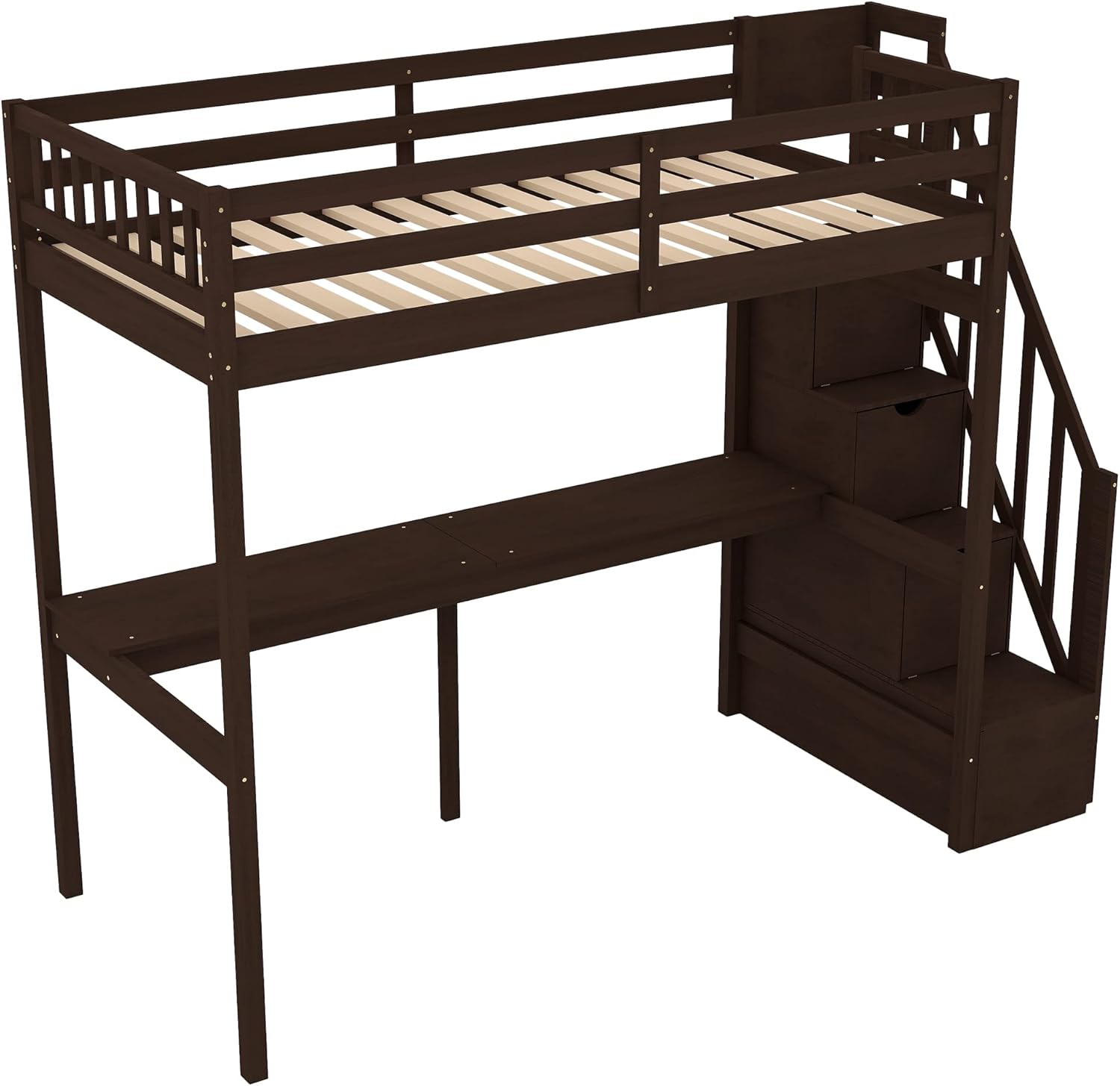
Image 3.5: Bed frame with slats.
Note: Some pre-drilled holes may require slight adjustment for perfect alignment. Avoid over-drilling to prevent wood fracture.
4. Operating Instructions
This loft bed is designed for safe and efficient use. Please adhere to the following guidelines:
4.1 Bed Usage:
- Ensure the mattress thickness does not exceed 6 inches to maintain adequate guardrail height for safety.
- The bed has a maximum weight capacity of 300 LBS. Do not exceed this limit.
- Always use the staircase for entering and exiting the bed. Do not jump on or off the bed.
4.2 Desk and Storage Usage:
- The integrated desk provides a stable surface for studying, working, or creative activities.
- Utilize the storage compartments within the stairs for organizing books, toys, or clothing. Ensure items are stored securely to prevent them from falling.

Image 4.1: Loft bed in use, demonstrating the desk and storage features.
5. Maintenance
Regular maintenance will help preserve the quality and longevity of your SOFTSEA loft bed.
- Cleaning: Wipe surfaces with a damp cloth. Avoid using harsh chemicals or abrasive cleaners that could damage the finish.
- Fasteners: Periodically check all screws, bolts, and connections to ensure they remain tight. Retighten as necessary to maintain structural integrity and prevent wobbling.
- Wood Care: Protect the wood from extreme temperature changes and direct sunlight to prevent warping or fading.
6. Troubleshooting
If you encounter any issues with your loft bed, refer to the following common problems and solutions:
| Problem | Possible Cause | Solution |
|---|---|---|
| Bed feels wobbly after assembly. | Loose fasteners. | Ensure all screws and bolts are fully tightened. Recheck connections. |
| Parts do not align during assembly. | Incorrect orientation of parts; minor manufacturing deviation. | Double-check the instruction diagrams for part orientation. Apply gentle pressure to align holes if slightly off. Do not force. |
| Staircase storage doors come loose. | Screws holding magnets/hinges are too short or loose. | Tighten existing screws. If problem persists, consider replacing with slightly longer screws (ensure they do not penetrate through the other side of the wood). |
| Cosmetic defects (e.g., paint inconsistencies, minor chips). | Manufacturing variations. | These are typically minor and do not affect structural integrity. For significant issues, contact customer support. |
If you encounter a problem not listed here or require further assistance, please contact customer support.
7. Warranty and Support
7.1 Warranty Information:
The SOFTSEA Twin Size Loft Bed is covered by a One Year Warranty against manufacture defects from the date of purchase.
7.2 Customer Support:
For any missing or broken parts, assembly questions, or other product-related inquiries, please feel free to contact SOFTSEA customer service. They are available to provide professional and prompt assistance.
Please have your model number (x903) and purchase information ready when contacting support.