
Introduction
Thank you for purchasing the Furologee End Table with Charging Station. This versatile piece of furniture is designed to enhance your living space with convenient storage and integrated power solutions. Featuring two built-in outlets, two USB ports, fabric drawers, and storage shelves, this end table is ideal for bedrooms, living rooms, and other areas where compact organization and charging capabilities are desired.
Important Safety Information
WARNING:
- To avoid electric shock, keep liquids away from the electrical outlets.
- Always assemble the table according to the instructions provided.
- Do not exceed the maximum weight recommendation of 7 pounds for the drawers to maintain stability.
- Ensure all connections are secure before use.
Package Contents
Please verify that all components are present before beginning assembly. If any parts are missing or damaged, please contact customer support.
- Tabletop Panel (1)
- Middle Shelf Panel (1)
- Bottom Shelf Panel (1)
- Metal Frame Components (Various)
- Fabric Drawers (2)
- Charging Station Unit (1) with 4.9-foot power cord
- S-shaped Metal Hooks (2)
- Adjustable Feet (4)
- Assembly Hardware (Screws, Allen Wrench, etc.)
- Instruction Manual (This document)

This image illustrates the individual parts of the end table, including the wooden panels, metal frame, fabric drawers, and the charging station. Key dimensions are also indicated.
Setup and Assembly
Assembly is designed to be straightforward. It is recommended that one person assembles the unit. A screwdriver is recommended for assembly, though basic tools are included.
- Unpack Components: Carefully remove all parts from the packaging and lay them out on a clean, soft surface to prevent scratches.
- Assemble Frame: Connect the metal frame components using the provided screws and Allen wrench. Ensure all connections are finger-tight before fully tightening.
- Attach Panels: Secure the tabletop, middle shelf, and bottom shelf panels to the assembled metal frame. Pay attention to the orientation of the middle shelf to ensure the charging station cutout is correctly positioned.
- Install Charging Station: Insert the charging station unit into the designated slot on the backboard of the middle shelf. Route the power cord as desired.
- Insert Drawers: Fold and assemble the fabric drawers according to their individual instructions, then slide them into the designated slots.
- Attach Hooks: Place the S-shaped metal hooks onto the side bar of the table as desired.
- Adjust Feet: Adjust the four adjustable feet at the bottom of the table to ensure stability and prevent scratching your floor.
- Final Tightening: Once all components are in place, carefully tighten all screws to secure the structure.
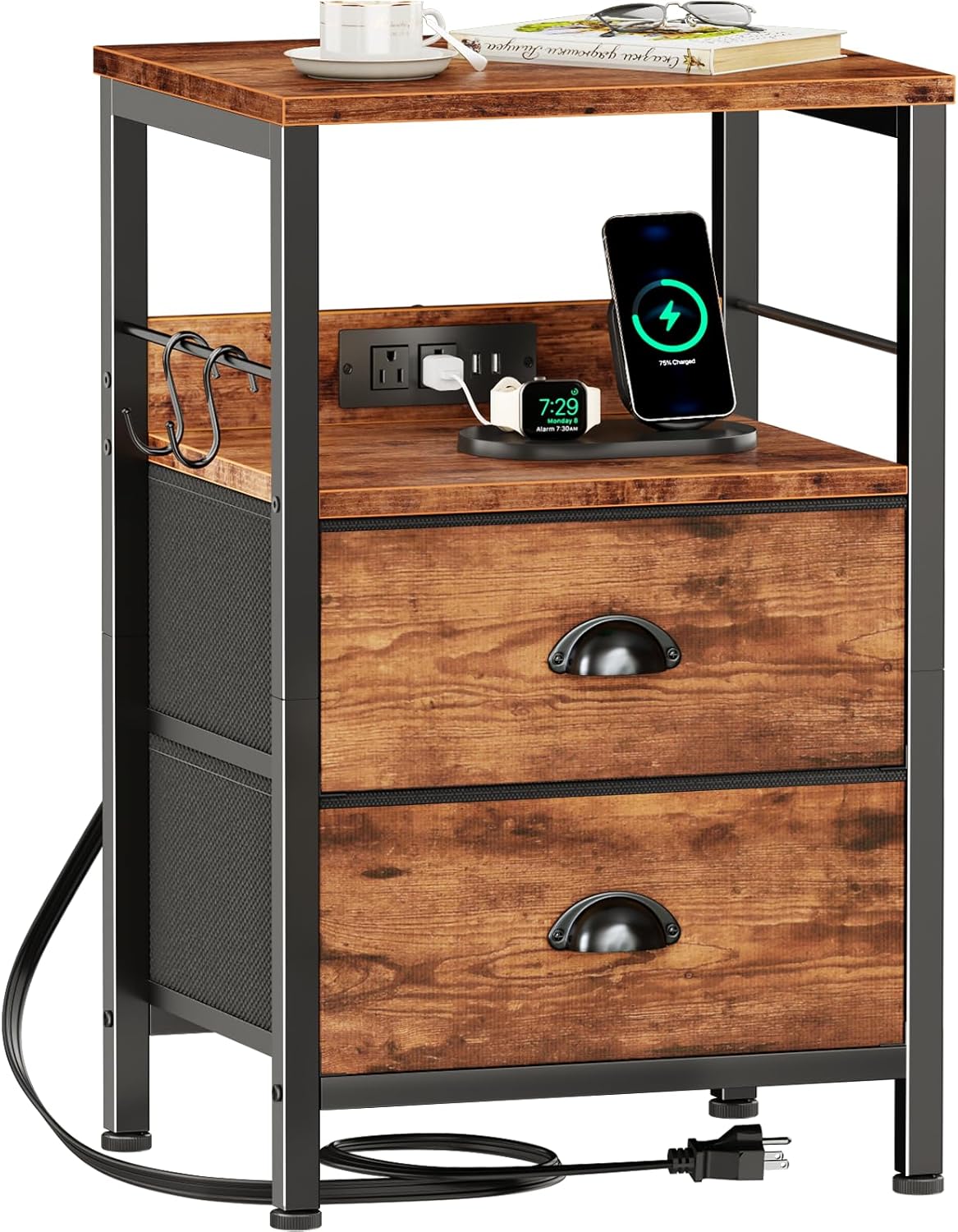
This image displays the end table fully assembled, showcasing its rustic brown finish, metal frame, and the integrated charging station with devices connected.
Operating Instructions
Charging Station
The integrated charging station provides convenient power access for your electronic devices.
- Power Connection: Plug the 4.9-foot power cord from the charging station into a standard 120V/12A wall outlet.
- AC Outlets: Use the two standard AC outlets (120V/12A) to power lamps, laptops, or other small appliances.
- USB Ports: Use the two USB ports (5V/2A) to charge mobile phones, Bluetooth earphones, smartwatches, and other USB-powered devices.
- Safety Placement: The charging station is strategically placed on the backboard to minimize the risk of liquid spills affecting the electrical components and to maximize tabletop space.

This image highlights the charging station, showing the two AC outlets, two USB ports, and the power cord, emphasizing its convenient and safe placement.
Fabric Drawers
The two fabric drawers offer breathable and dust-preventing storage for various items.
- Storage: Ideal for storing snacks, toys, personal items, books, or small electronics.
- Weight Capacity: Each drawer can hold up to 7 lbs. Do not exceed this weight to ensure smooth operation and longevity.
- Maintenance: The fabric material is lightweight and easy to clean.

This image shows the two fabric drawers partially open, demonstrating their storage capacity for various household items.
Storage Shelf and Hooks
- Open Shelves: The two-tier open shelves provide additional space for photos, books, lamps, alarm clocks, or decorative items.
- S-shaped Hooks: Utilize the two S-shaped metal hooks to hang headphones, file folders, keys, small backpacks, or hats. These hooks are removable and can be placed on the side table or other suitable locations.

This image illustrates the versatility of the end table, showing a printer on the top surface and the S-shaped hooks in use for hanging items.
Maintenance and Care
- Cleaning: Wipe gently with a damp cloth to clean the surfaces. Avoid harsh chemicals or abrasive cleaners.
- Dusting: Regularly dust the table to maintain its appearance.
- Drawer Care: The fabric drawers can be spot cleaned as needed. Ensure they are completely dry before returning them to the table.
- Stability Check: Periodically check all screws and connections to ensure they remain tight and the table is stable.
Troubleshooting
| Problem | Possible Cause | Solution |
|---|---|---|
| Charging station not working. | Not plugged in; power outlet issue; device cable issue. | Ensure the power cord is securely plugged into a functional wall outlet. Test the outlet with another device. Try a different charging cable for your device. |
| Table feels wobbly. | Uneven floor; loose screws. | Adjust the four adjustable feet at the bottom of the table to level it. Tighten all assembly screws. |
| Drawers are difficult to slide. | Overloaded; misaligned; debris in track. | Reduce the weight in the drawers (do not exceed 7 lbs). Ensure drawers are inserted correctly and not misaligned. Check for any obstructions in the drawer slots. |
Specifications
| Feature | Detail |
|---|---|
| Product Dimensions (D x W x H) | 14.96"D x 11"W x 23.6"H |
| Maximum Drawer Weight Recommendation | 7 Pounds |
| Color | Rustic Brown |
| Frame Material Type | Engineered Wood, Metal |
| Top Material Type | Engineered Wood |
| Number of Drawers | 2 |
| Number of Shelves | 1 (open shelf) |
| Charging Station | 2 AC Outlets (120V/12A), 2 USB Ports (5V/2A) |
| Power Cord Length | 4.9 feet |
| Assembly Recommendation | 1 person |
| Tools Recommended for Assembly | Screwdriver (basic tools included) |
Warranty and Support
Furologee is committed to providing high-quality products and excellent customer service. This product comes with a worry-free service guarantee.
If you have any questions regarding assembly, operation, missing parts, or any other concerns, please do not hesitate to contact our customer support team. We are dedicated to ensuring your satisfaction.
For support, please refer to the contact information provided with your purchase or visit the official Furologee website.