
Introduction
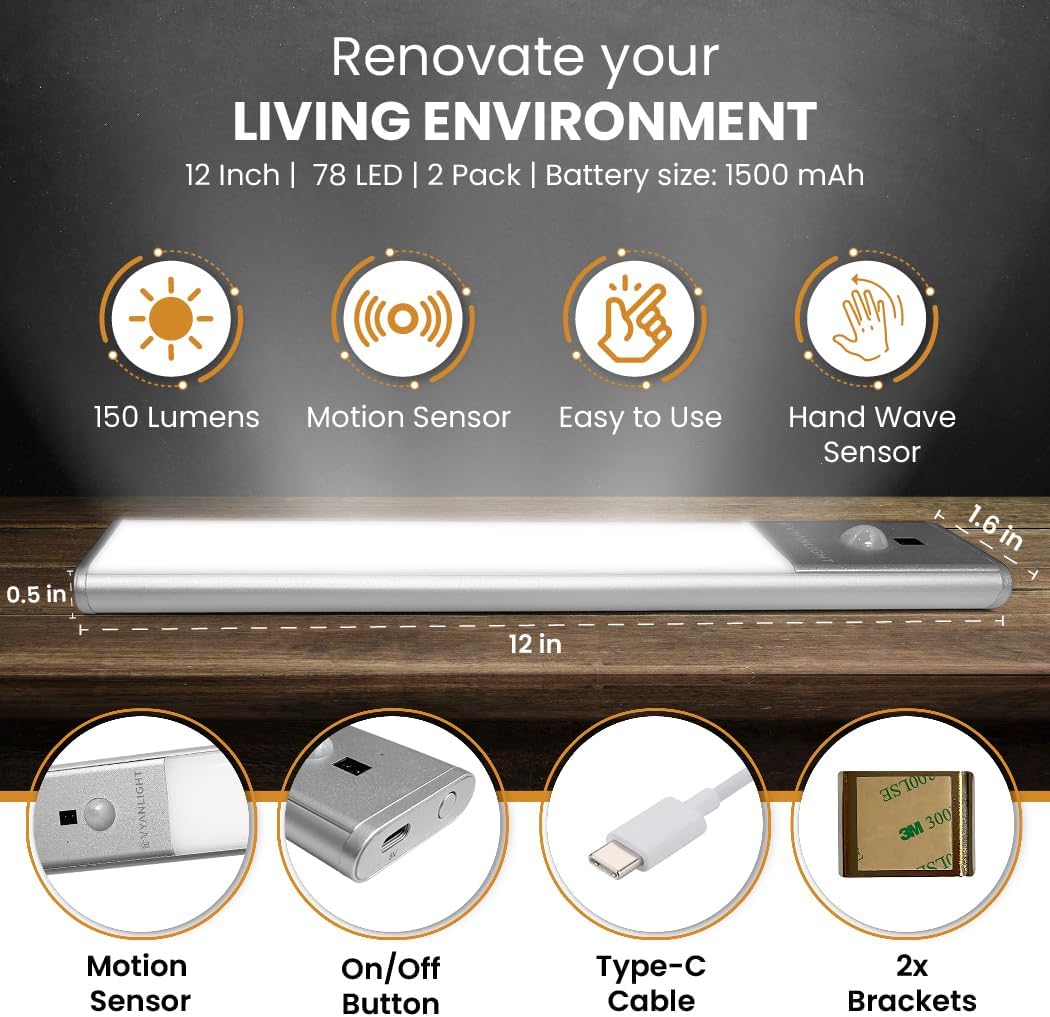
Thank you for choosing the VYANLIGHT VL310-12 Wireless Motion Sensor LED Under Cabinet Lights. This product is designed to provide convenient and efficient lighting for various indoor spaces such as kitchens, pantries, closets, bathrooms, and hallways. Featuring a sleek, ultra-thin design, a rechargeable battery, and multiple operating modes including motion and hand wave sensing, these lights offer a versatile and user-friendly lighting solution.
Package Contents
- VYANLIGHT VL310-12 LED Light Bar (2 units)
- USB Charging Cable (1 unit)
- Metal Mounting Plates with Adhesive Backing (4 units)
Setup and Installation
The VYANLIGHT LED lights are designed for easy, wireless installation without the need for drilling or complex wiring. Follow these steps for proper setup:
- Prepare the Surface: Ensure the installation surface is clean, dry, and smooth. Wipe away any dust or debris for optimal adhesive performance.
- Attach Mounting Plates: Peel off the protective film from the adhesive backing of the metal mounting plates. Firmly press the plates onto the desired location under your cabinet, inside a closet, or on any other suitable surface. Apply pressure for a few seconds to ensure a strong bond.
- Mount the Light Bar: The LED light bar has built-in magnets. Align the light bar with the installed metal plates and allow the magnets to securely attach the light. This magnetic attachment allows for easy removal for charging or repositioning.

Operating Instructions
The VYANLIGHT LED light bar offers multiple operating modes and light settings for customized illumination.
Power Button Functions
- First Press: Activates the light in Hand Wave Sensor Mode.
- Second Press: Activates Night Sensor Mode (sensor dome flashes green). In this mode, the light will only activate in dark conditions when motion is detected.
- Third Press: Activates Daylight Sensor Mode (sensor dome flashes red). In this mode, the light will activate in both bright and dark conditions when motion is detected.
- Fourth Press: Turns the light OFF.
- Press and Hold: Changes the light color temperature (3000K Warm White, 4500K Natural White, 6000K Cool White).
Hand Wave Sensor
When in Hand Wave Sensor Mode, wave your hand in front of the sensor to turn the light ON or OFF. Hold your hand in front of the sensor to adjust the brightness (stepless dimming).
Motion Sensor
In Night Sensor Mode or Daylight Sensor Mode, the light will automatically turn on when motion is detected within a 9-foot sensing distance and a 120-degree angle. The light will automatically turn off after 15 seconds of no motion detection.

Maintenance
Charging the Battery
The VYANLIGHT LED light bar is equipped with a 1500mAh rechargeable Lithium Ion battery. When the battery is low, the indicator light will turn red during charging and blue when fully charged. Use the provided USB charging cable to connect the light bar to a 5V DC power source.
Cleaning
To clean the light bar, gently wipe it with a soft, dry cloth. Do not use abrasive cleaners or immerse the device in water, as it is not water-resistant.
Troubleshooting
- Light does not turn on:
- Ensure the battery is charged. Connect the light to the USB charging cable.
- Check the operating mode. Press the power button to cycle through modes (Hand Wave, Night Sensor, Daylight Sensor, OFF).
- In Night Sensor Mode, ensure the environment is dark enough for activation.
- Motion sensor is not detecting movement:
- Verify the light is in either Night Sensor Mode (green indicator) or Daylight Sensor Mode (red indicator).
- Ensure there are no obstructions blocking the sensor.
- Confirm movement is within the 9-foot sensing range and 120-degree angle.
- Battery life is shorter than expected:
- Frequent activation, especially in high-traffic areas, will consume battery power more quickly.
- Ensure the light is fully charged before use.
- Consider using Night Sensor Mode in areas where light is only needed in complete darkness to conserve battery.
Specifications
| Model Number | VL310-12 |
| Dimensions | 12"L x 1.6"W x 0.5"H |
| Number of LEDs | 80 |
| Battery Capacity | 1500mAh Lithium Ion |
| Voltage | 5 Volts (DC) |
| Wattage | 2 watts |
| Brightness | 150 Lumen (Max) |
| Color Temperature | 3000K (Warm), 4500K (Natural), 6000K (Cool) |
| Control Methods | Touch, Motion Sensor, Hand Wave Sensor |
| Installation Type | Magnetic Mount, Adhesive Metal Brackets |
| Included Components | USB Charging Cable |
| Indoor/Outdoor Usage | Indoor use only |
Warranty Information
This VYANLIGHT product comes with a Limited Warranty. For specific details regarding the warranty period, coverage, and terms, please refer to the documentation included with your product packaging or visit the official VYANLIGHT website. Keep your proof of purchase for warranty claims.
Customer Support
Should you encounter any issues or have questions regarding your VYANLIGHT VL310-12 LED Under Cabinet Lights, please contact VYANLIGHT customer support. Refer to the contact information provided in your product packaging or on the official VYANLIGHT website for assistance.