
1. Introduction
The Amailtom TRIRE10 Triangle Light Panels are smart RGB LED wall lights designed to enhance your indoor environment with dynamic lighting effects. Featuring Smart IC chip technology, each panel can display multiple colors simultaneously, offering extensive customization options for gaming setups, bedrooms, and streaming environments. This manual provides detailed instructions for setup, operation, and maintenance to ensure optimal performance and enjoyment of your light panels.
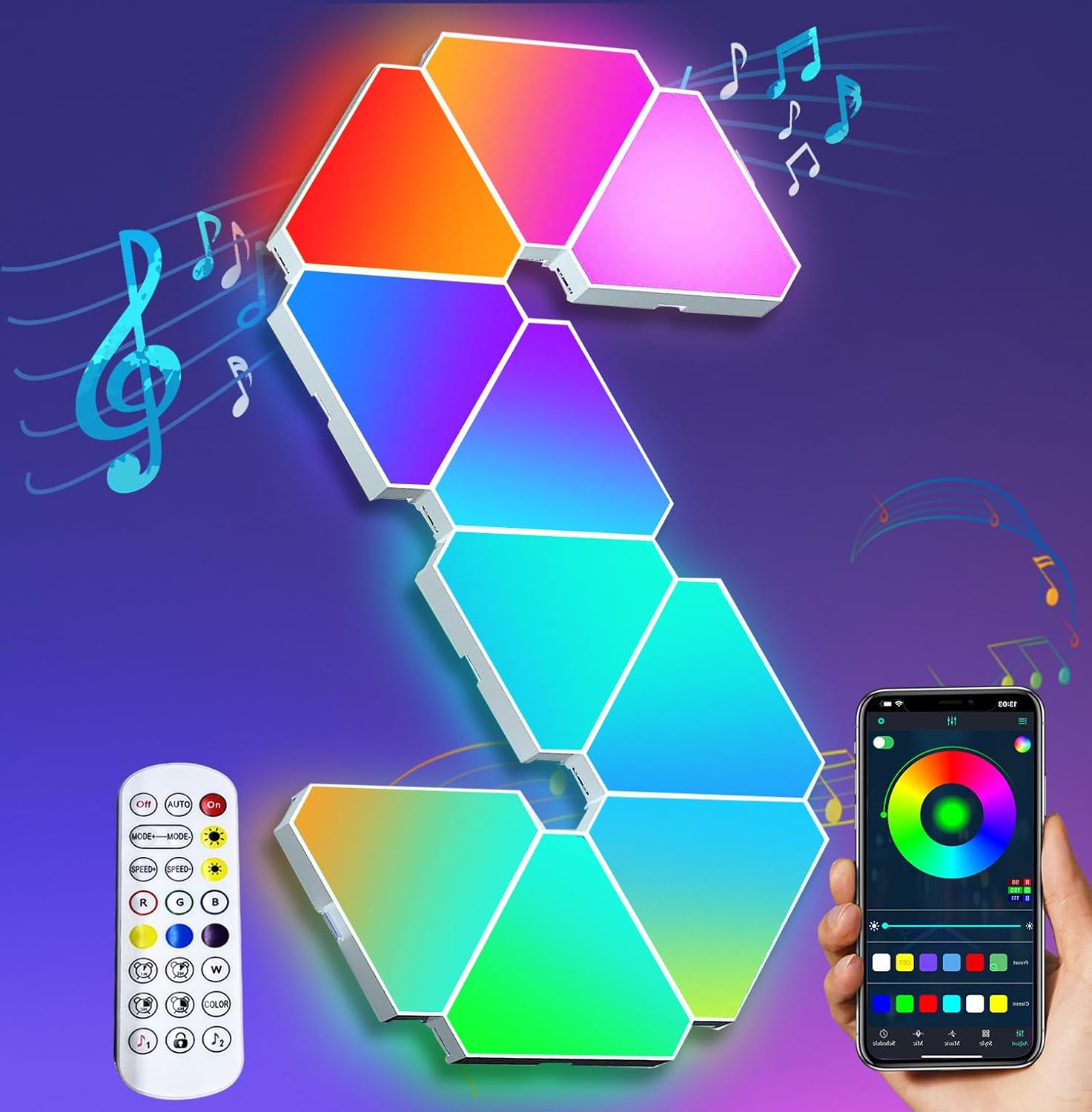
Image: Amailtom TRIRE10 Triangle Light Panels, showcasing the panels, remote control, and smartphone application interface.
2. Package Contents
Please verify that all items listed below are included in your package:
- 10 x Triangle Light Panels
- Connection Ports (sufficient for 10 panels)
- Power Adapter
- Remote Control
- Mounting Accessories (e.g., adhesive pads)
- User Manual (this document)

Image: A power adapter, a key component for the light panels.
3. Product Features
- Smart IC Chip Technology: Each panel can display multiple colors simultaneously for dynamic effects.
- 6 Connection Ports: Allows for diverse pattern creation and expanded layouts.
- APP & Remote Control: Control lighting effects, colors, and modes via a smartphone application or the included remote.
- 16 Million Colors: Access a wide spectrum of colors to match any mood or environment.
- 210+ Preset Scene Modes: Explore a vast library of animated lighting scenes.
- Music Sync Mode: Lights react to music, entertainment, or gaming audio.
- Mic Mode: Uses the microphone on your smartphone or the controller to pick up sounds and translate them into dynamic light patterns.
- Timing Function: Set schedules for automatic power on/off.
4. Safety Information
Please read and follow these safety guidelines to prevent damage to the product or personal injury:
- Ensure the power adapter is compatible with your local voltage before use.
- Do not expose the panels to water or high humidity. This product is for indoor use only.
- Avoid placing panels near heat sources or in direct sunlight for extended periods.
- Do not attempt to disassemble or modify the panels. This will void the warranty.
- Keep out of reach of children and pets.
- Use only the provided power adapter and connection ports.
- When mounting, ensure the surface is clean, dry, and capable of supporting the weight of the panels.
5. Setup Instructions
Follow these steps to set up your Amailtom TRIRE10 Triangle Light Panels:
- Plan Your Design: Before attaching, arrange the panels on a flat surface to visualize your desired pattern. Each panel has 6 connection ports, allowing for various configurations.
- Connect Panels: Use the provided connection ports to link the panels together. Ensure a secure fit between each panel.
- Connect Power Adapter: Attach the power adapter to one of the panels.
- Mounting:
- Clean the wall surface thoroughly.
- Peel the protective film from the adhesive pads on the back of each panel.
- Carefully press each panel onto the wall in your desired pattern. Apply firm pressure for several seconds to ensure strong adhesion.
- Note: The adhesive is strong. Consider using alternative mounting methods like command strips if you anticipate needing to remove the panels without damaging the wall.
- Power On: Plug the power adapter into a wall outlet. The panels should illuminate.

Image: Detail of the triangle light panels highlighting the multiple connection ports for flexible design.

Image: Triangle light panels installed on a wall, demonstrating a possible geometric arrangement.
6. Operation
Your Amailtom TRIRE10 Triangle Light Panels can be controlled via the included remote or a smartphone application.
6.1 Remote Control
The remote control allows for basic functions:
- Power On/Off: Turn the lights on or off.
- Color Selection: Choose from a range of static colors.
- Brightness Adjustment: Increase or decrease light intensity.
- Mode Selection: Cycle through various preset lighting effects.
- Music Mode: Activate music synchronization.

Image: The remote control for the light panels, showing various buttons for color and mode selection.
6.2 Smartphone Application Control
For advanced features and full customization, download the "Magic Lantern" app (or similar app specified in the product packaging) from your device's app store. Follow the in-app instructions to connect your light panels via Bluetooth.
- Full Color Palette: Access over 16 million colors.
- Dynamic RGBIC Effects: Create custom multi-color effects on individual panels.
- 210+ Scene Modes: Explore a vast library of animated lighting scenes.
- Music Mode & Mic Mode: Advanced audio synchronization options.
- Timer Function: Set schedules for automatic power on/off.

Image: A smartphone displaying the control application for the light panels, showing color selection and mode options.
7. Customization & Design
The TRIRE10 panels offer extensive customization. Experiment with different layouts and color combinations to create unique wall art. The 6 connection ports per panel provide flexibility for various shapes and patterns.

Image: Examples of diverse patterns that can be created using the triangle light panels.
8. Music Sync Function
Enhance your audio experience with the music sync feature. The panels will react to sounds, creating an immersive light show. This is ideal for gaming, parties, or movie nights.
- Music Mode: Synchronizes lights with music played through your device or ambient sounds.
- Mic Mode: Uses the microphone on your smartphone or the controller to pick up sounds and translate them into dynamic light patterns.

Image: Light panels reacting to music in a living space, creating an immersive atmosphere.
Video: Demonstration of the Amailtom Triangle Gaming Lights for Gaming Setup, showcasing dynamic color changes and effects.
9. Maintenance
To ensure the longevity and optimal performance of your light panels, follow these maintenance tips:
- Cleaning: Gently wipe the surface of the panels with a soft, dry cloth. Avoid abrasive cleaners or solvents.
- Storage: If storing the panels, disconnect them from power and store them in a cool, dry place.
- Handling: Handle panels with care to avoid damage to the connectors or the panel surface.
10. Troubleshooting
If you encounter issues with your Amailtom TRIRE10 Triangle Light Panels, refer to the following common problems and solutions:
| Problem | Possible Cause | Solution |
|---|---|---|
| Panels do not light up. | No power, loose connection, faulty adapter. | Check power outlet. Ensure all panel connections are secure. Verify power adapter is functioning. |
| Remote control not working. | Dead battery, remote out of range, interference. | Replace remote battery. Ensure remote is pointed at the receiver and within range. Remove obstacles. |
| App cannot connect to panels. | Bluetooth off, panels not in pairing mode, app issue. | Ensure Bluetooth is enabled on your device. Restart the app and panels. Re-attempt pairing. |
| Inconsistent lighting or flickering. | Loose panel connections, power fluctuations. | Check all physical connections between panels. Try a different power outlet. |
11. Specifications
| Feature | Detail |
|---|---|
| Brand | Amailtom |
| Model Name | TRIRE10 |
| Material | Acrylonitrile Butadiene Styrene |
| Light Source Type | LED |
| Light Color | Multicolor (RGBIC) |
| Number of Light Sources | 10 |
| Wattage | 5 watts |
| Brightness | 300 Lumen |
| Control Method | Remote, App (Bluetooth) |
| Connectivity Protocol | Bluetooth |
| Product Dimensions | 5"L x 1"W x 4.3"H (per panel) |
| Item Weight | 2.29 pounds (total for 10 panels) |
| Indoor/Outdoor Usage | Indoor |

Image: Dimensions of a single triangle light panel.
12. Warranty & Support
Amailtom offers a lifetime warranty for the TRIRE10 Triangle Light Panels. For any questions, concerns, or technical support, please contact Amailtom customer service. Refer to the contact information provided in your product packaging or visit the official Amailtom store on Amazon for assistance.
"Our dedicated team is available 24/7, ensuring you're never left in the dark, no matter the hour."
For further assistance, you may visit the Amailtom Store on Amazon.