
APORO T4
Occus APORO T4 Wired Teaching Amplifier User Manual
Model: APORO T4 | Brand: Generic
Introduction
Thank you for choosing the Occus APORO T4 Wired Teaching Amplifier. This portable amplifier is designed to provide clear and powerful sound for teaching, presentations, and other public speaking engagements. Please read this manual thoroughly before using the device to ensure proper operation and maintenance.
Safety Information
- Do not expose the device to water or excessive moisture.
- Avoid dropping or subjecting the device to strong impacts.
- Do not attempt to disassemble or repair the device yourself. Contact qualified service personnel.
- Keep out of reach of children.
- Use only the specified charging voltage (110V input).
Product Overview
The APORO T4 is a compact and powerful teaching amplifier. Familiarize yourself with its components and controls.
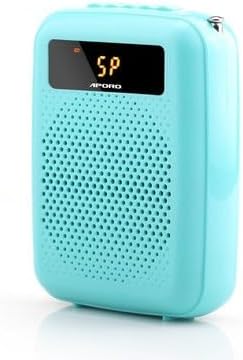
Figure 1: Front view of the APORO T4 Teaching Amplifier (Blue model).
This image shows the compact blue amplifier with its front speaker grille and a small display screen at the top.
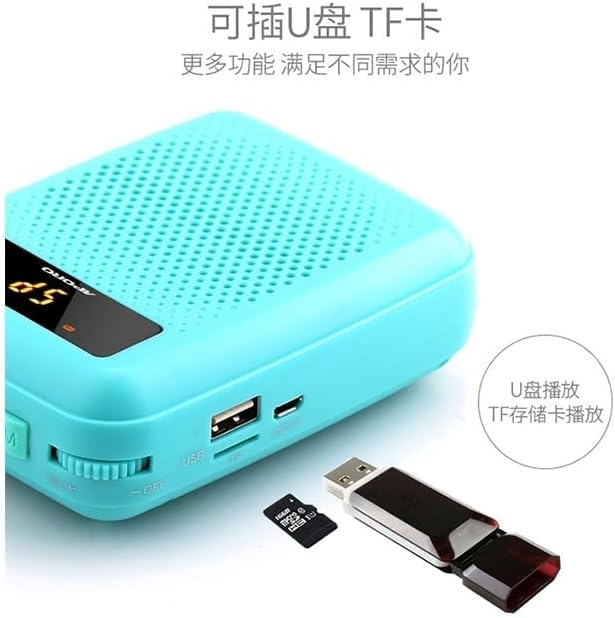
Figure 2: Top panel controls and ports of the APORO T4 Amplifier.
This image details the top side of the amplifier, showing the antenna, microphone input (MIC), REC button for recording, previous track button, play/pause button, next track button, mode button (M), and the power/volume rotary knob (ON+).
Components:
- Main Unit: The amplifier body with integrated speaker.
- Microphone Input (MIC): For connecting the wired microphone.
- Antenna: For wireless signal reception (if applicable to specific models).
- Control Buttons: REC, Previous, Play/Pause, Next, Mode (M).
- Power/Volume Knob: Rotary knob for turning the device on/off and adjusting volume.
- USB Port: For USB drive playback.
- TF Card Slot: For TF (microSD) card playback.
Setup
1. Unboxing and Initial Inspection:
Carefully remove all components from the packaging. Check for any visible damage. Ensure all accessories are present.
2. Charging the Amplifier:
Before first use, fully charge the amplifier. Connect the charging cable to the device's charging port and the other end to a 110V power source. The charging indicator will show the charging status. A full charge typically takes 3-4 hours.
3. Wearing/Placement:
The APORO T4 is designed for waist hanging. Attach the included strap to the amplifier and wear it comfortably around your waist. Ensure the speaker faces forward for optimal sound projection.
4. Connecting the Microphone:
Insert the microphone's 3.5mm jack into the "MIC" port on the top of the amplifier (refer to Figure 2). Ensure it is securely connected.
Operating Instructions
1. Power On/Off and Volume Control:
To power on the amplifier, rotate the Power/Volume knob clockwise until you hear a click and the display illuminates. Continue rotating clockwise to increase the volume. Rotate counter-clockwise to decrease volume. To power off, rotate the knob counter-clockwise until it clicks off.
2. Mode Selection:
Press the "M" (Mode) button to cycle through available modes, such as Microphone Amplification, USB Playback, or TF Card Playback. The current mode will be indicated on the display.
3. USB/TF Card Playback:

Figure 3: USB and TF card slots on the APORO T4 Amplifier.
This image shows the side of the amplifier with a USB port and a TF (microSD) card slot, along with a USB drive and a TF card for illustration.
- Insert a USB flash drive or a TF (microSD) card with audio files into the respective slot.
- Switch to USB or TF Card mode using the "M" button.
- Use the Previous (|<<) and Next (>>|) buttons to navigate tracks.
- Press the Play/Pause (>||) button to play or pause audio.
4. Recording Function:
To record audio (e.g., your voice through the microphone), ensure a USB drive or TF card is inserted. Press the "REC" button to start recording. Press "REC" again to stop recording. Recordings are saved to the inserted storage device.
5. Wireless Functionality (UHF/Bluetooth):

Figure 4: Comparison of wired and wireless versions of the APORO T4 Amplifier.
This image illustrates the difference between a wired version (left, 12W power, large coverage) and a UHF wireless Bluetooth version (right, 30m wireless range, more freedom of movement). Note that the specific model may vary in wireless capabilities.
Some versions of the APORO T4 amplifier may include UHF wireless or Bluetooth connectivity. If your model supports this, activate the respective mode via the "M" button. Follow the pairing instructions for your wireless microphone or Bluetooth device. The UHF wireless version offers a range of up to 30 meters.
Maintenance
1. Cleaning:
Wipe the amplifier with a soft, dry cloth. Do not use liquid cleaners or abrasive materials.
2. Storage:
Store the device in a cool, dry place away from direct sunlight and extreme temperatures. If storing for a long period, charge the battery every 3 months to maintain its lifespan.
Troubleshooting
| Problem | Possible Cause | Solution |
|---|---|---|
| No sound from speaker. | Device is off; Volume is too low; Microphone not connected properly; Battery is low. | Turn on the device; Increase volume; Reconnect microphone; Charge the battery. |
| Sound is distorted or unclear. | Microphone too close to speaker (feedback); Volume too high; Microphone faulty. | Increase distance between microphone and speaker; Reduce volume; Try another microphone if available. |
| Device not charging. | Charging cable faulty; Power source issue; Charging port damaged. | Check charging cable and power source; Try a different cable/adapter; Contact support if port is damaged. |
| USB/TF card not recognized. | Card/drive not inserted correctly; Incompatible file format; Corrupted media. | Reinsert card/drive; Ensure files are in a compatible format (e.g., MP3); Try a different card/drive. |
Specifications
- Type: Hand Tool Parts (as per product description, though functionally an amplifier)
- Built-in Battery Capacity: 2000 mAh - 4000 mAh
- Input Voltage: 110V
- Power Output: 12W (for wired version, as per image)
- Wireless Range: Up to 30 meters (for UHF wireless version, as per image)
- Color: Blue (as per current product variant)
- Model Number: OCS-40DB9853777418A7511F9524BD8B69FC
- Manufacturer: Generic
Warranty and Support
This product comes with a standard manufacturer's warranty. For warranty claims, technical support, or service inquiries, please refer to the contact information provided with your purchase or contact the seller directly. Keep your purchase receipt as proof of purchase.
For further assistance, you may visit the product page on Amazon.ca: Occus APORO T4 Amplifier Product Page
Ask a question about this manual
Ask about setup, troubleshooting, compatibility, parts, safety, or missing instructions. Manuals+ will review the question and use this page’s manual context to help answer it.