1. Introduction
This manual provides instructions for the installation, operation, and maintenance of your Luminus Smart B11 LED Bulbs. These bulbs feature an E12 base, provide 300 lumens of brightness, are equivalent to a 40-watt incandescent bulb while consuming only 4 watts, and offer tunable white light from 2200K to 6500K. They are dimmable, connect via WiFi, and are compatible with Alexa and Hey Google for convenient smart home integration.

The product packaging displays key features of the Luminus Smart B11 LED bulb, including 300 lumens brightness, 40W equivalent (4W actual), dimmable functionality, WiFi connectivity, and tunable white light (2200K-6500K). It also highlights compatibility with Alexa and Hey Google.
2. Product Features
- Tunable White Color: Customize your lighting with a wide range of color temperature options, from 2200K (warm, cozy) to 6500K (cool, bright), to suit various moods and tasks.
- Voice Control: Compatible with Hey Google and Alexa, offering hands-free voice control options for seamless integration into your smart home system. Use simple voice commands to turn lights on or off, brighten or dim.
- Automated Schedules: Create routines to have your lights turn on or off at specific times, enhancing daily convenience.
- Personalized Scenes: Tailor your lighting to match activities with preset light modes.
- High Color Rendering Index (CRI): With a CRI greater than 80, these bulbs provide accurate and vibrant color representation.
- Energy Efficient: Consumes only 4 watts while providing brightness equivalent to a 40-watt incandescent bulb.

This image illustrates the core functionalities of Luminus Smart Lighting, such as no hub requirement, remote control, app and voice control, dimmable brightness, scheduling, timer functions, offline mode, and tunable white light, all integrated into a modern living space.

This image visually compares the effect of different Color Rendering Index (CRI) values on color perception. It highlights that a CRI of 80 or higher provides more accurate and vibrant color representation, as seen in the raspberries, compared to a lower CRI of 70.
3. Specifications
| Specification | Value |
|---|---|
| Model Number | PLFS610TW |
| Bulb Shape Size | B11 |
| Bulb Base | E12 |
| Wattage | 4 watts |
| Incandescent Equivalent | 40 Watts |
| Brightness | 300 Lumens |
| Tunable White Range | 2200K to 6500K |
| Lifespan | 15,000 Hours |
| Connectivity | WiFi |
| Compatibility | Alexa, Hey Google |
| Product Dimensions | 3.56 x 3.56 x 9.65 cm |
| Item Weight | 4.54 g |
| Material | Glass |
| Manufacturer | Conglom Inc. |
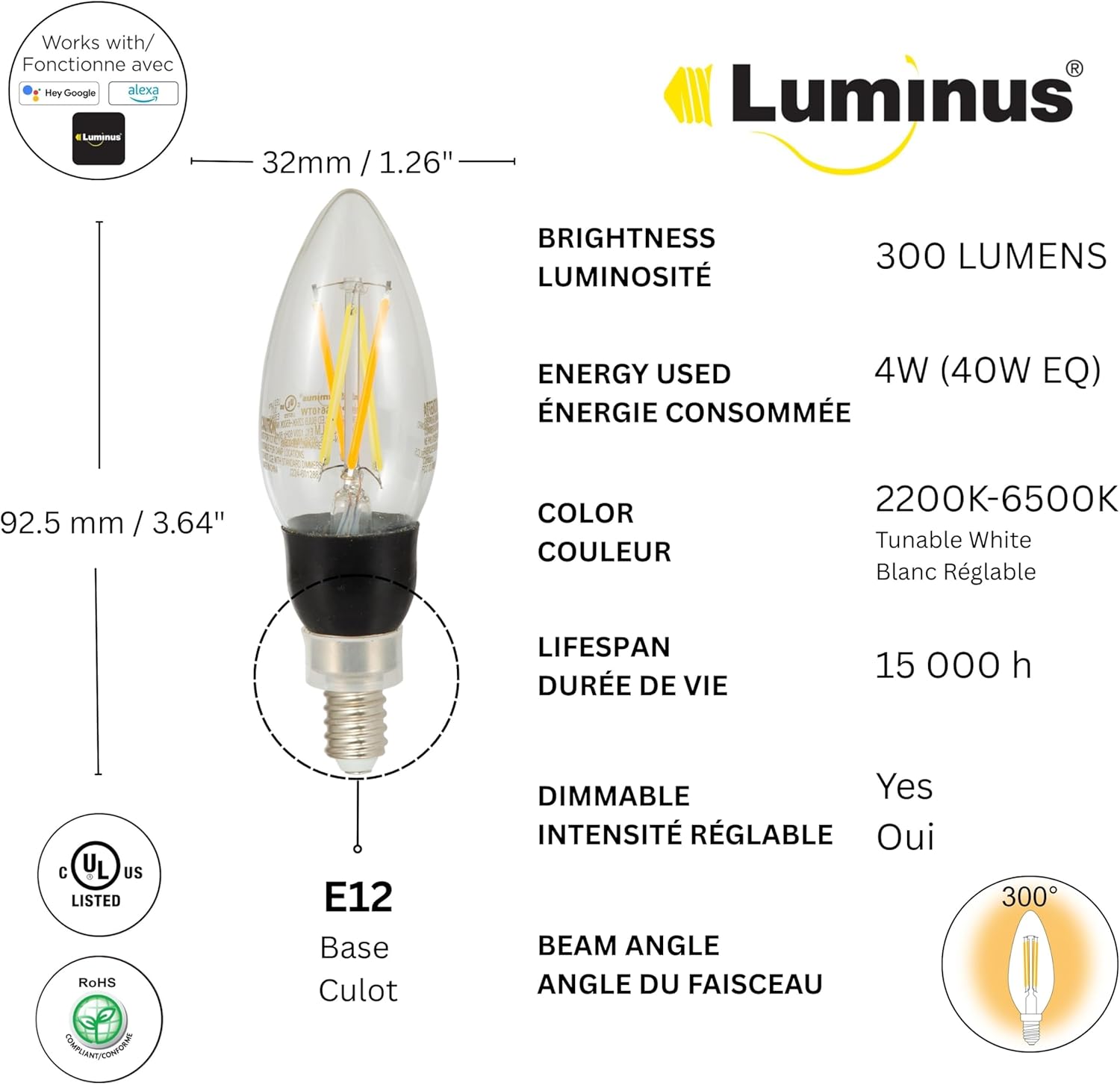
Detailed technical specifications for the Luminus Smart B11 LED bulb, including its dimensions (32mm width, 92.5mm length), E12 base type, 300 lumens brightness, 4W energy consumption (40W equivalent), 2200K-6500K tunable white color, 15,000-hour lifespan, and dimmable capability. UL and RoHS certifications are also indicated.

This image illustrates the brightness range of Luminus Smart B11 LED bulbs, indicating various lumen outputs from 150 to 2200, demonstrating their versatility in lighting intensity.
4. Setup Instructions
4.1. Physical Installation
- Ensure the power to the light fixture is turned off at the switch before installation.
- Carefully screw the Luminus Smart B11 LED bulb into an E12 base socket. Do not overtighten.
- Turn the power back on at the switch. The bulb should illuminate.
4.2. App Download and Pairing
To utilize the smart features, you will need to download a compatible smart home application. The Luminus Smart B11 bulbs work with common smart home platforms like Alexa and Hey Google. Refer to your preferred smart home app's instructions for adding new devices.
- Download the appropriate smart home app (e.g., Amazon Alexa app, Google Home app, or a dedicated Luminus app if available) from your device's app store.
- Create an account or log in to your existing account.
- Follow the in-app instructions to add a new device. This typically involves selecting 'Add Device' or a similar option, choosing 'Light' or 'Bulb', and then following the prompts to connect the bulb to your home WiFi network.
- Ensure your WiFi network is 2.4GHz, as most smart bulbs are not compatible with 5GHz networks during initial setup.
- The bulb may flash to indicate it is in pairing mode. Once successfully paired, the bulb will stop flashing and appear in your app.
5. Operating Instructions
5.1. Tunable White Control
Adjust the color temperature of your Luminus Smart B11 LED bulbs to create the desired ambiance. Within your smart home app, navigate to the bulb's settings or control interface. You will find a slider or preset options to change the white light from a warm 2200K to a cool 6500K.
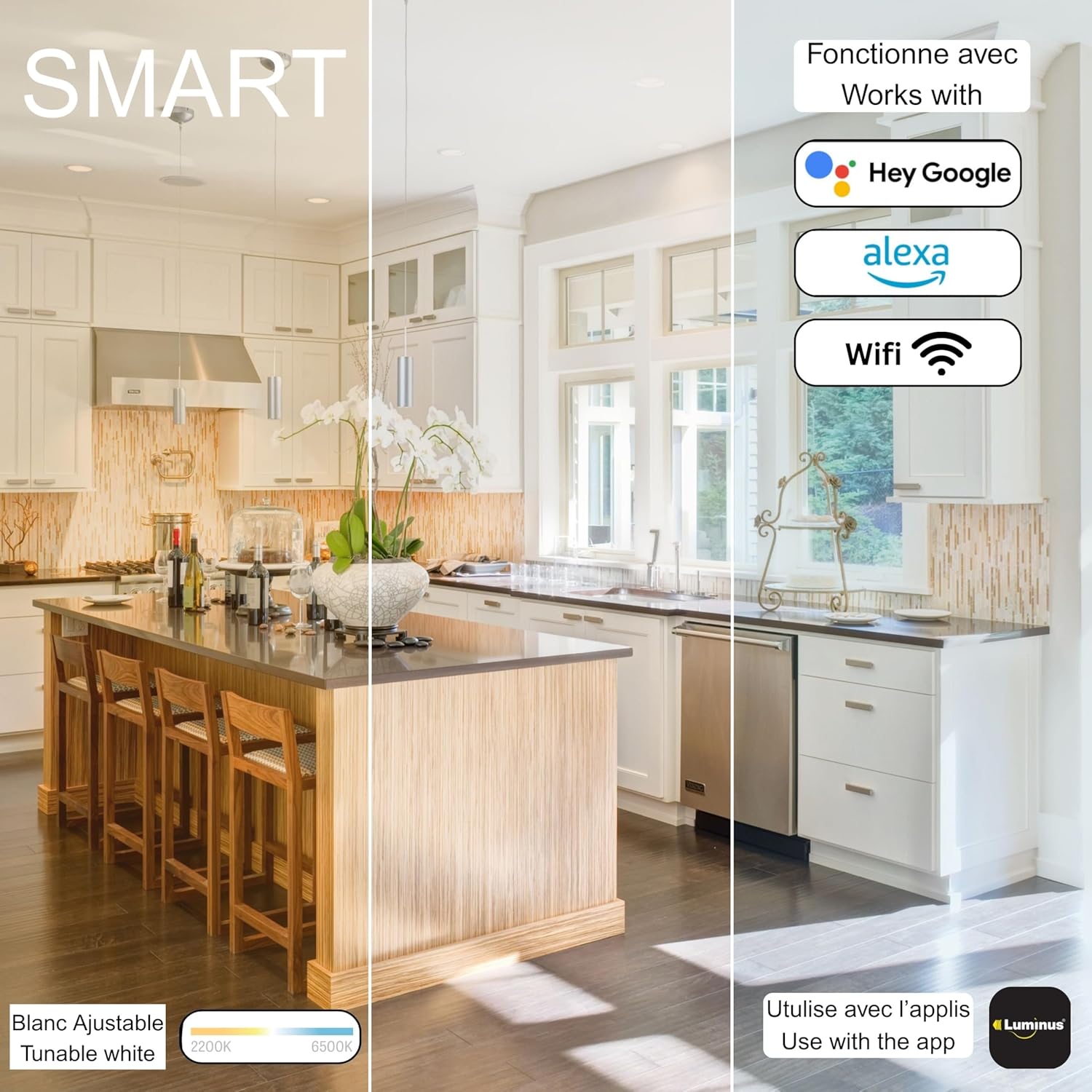
This visual demonstrates the tunable white feature of the Luminus Smart B11 LED bulbs, showcasing how the light color can be adjusted from a warm 2200K to a cool 6500K, adapting the ambiance of a kitchen space.
5.2. Dimming Functionality
The Luminus Smart B11 LED bulbs are dimmable exclusively through the smart home app or voice commands. Note: These bulbs are not compatible with traditional wired dimmer switches. Attempting to use them with a wired dimmer may cause damage or malfunction.

An illustration of the dimming capabilities of the Luminus Smart B11 LED bulbs, displaying various brightness levels at 5%, 25%, 50%, and 100% to demonstrate the range of light intensity achievable.
5.3. Voice Control with Alexa and Hey Google
Once paired with your smart home system, you can control your bulbs using voice commands:
- For Alexa: Say, "Alexa, turn on [Light Name]", "Alexa, dim [Light Name] to 50%", or "Alexa, set [Light Name] to warm white."
- For Hey Google: Say, "Hey Google, turn off [Light Name]", "Hey Google, brighten [Light Name]", or "Hey Google, change [Light Name] to cool white."
Ensure your bulbs are named clearly in your smart home app for easier voice control.
5.4. Setting Schedules and Scenes
Use your smart home app to create automated schedules and personalized scenes:
- Schedules: Set specific times for your lights to turn on or off, or adjust brightness/color temperature automatically throughout the day.
- Scenes: Create custom lighting presets for different activities or moods, such as "Movie Night" (dim, warm light) or "Reading" (bright, cool light).
6. Maintenance
Luminus Smart B11 LED bulbs require minimal maintenance. Follow these guidelines to ensure optimal performance and longevity:
- Cleaning: Ensure the bulb is cool and the power is off before cleaning. Wipe the bulb with a soft, dry cloth. Do not use liquid cleaners or abrasive materials.
- Environment: Use the bulbs in dry indoor environments. Avoid exposure to water or high humidity unless the fixture is specifically rated for such conditions.
- Handling: Handle bulbs by the base to avoid touching the glass, which can leave residues.
7. Troubleshooting
7.1. Bulb Not Responding
- Check Power: Ensure the light switch is in the ON position and the bulb is receiving power.
- WiFi Connection: Verify your home WiFi network is active and the bulb is within range of your router.
- App Status: Check the smart home app to see if the bulb is listed as offline.
- Router Band: Confirm your router is broadcasting a 2.4GHz signal, as 5GHz is typically not supported for initial setup.
7.2. Difficulty Pairing
- Reset Bulb: To reset the bulb, turn it ON for 10 seconds, then OFF for 2 seconds, repeat this cycle 3-5 times until the bulb flashes rapidly. This indicates it is in pairing mode.
- Proximity: Try pairing the bulb closer to your WiFi router.
- App Permissions: Ensure the smart home app has necessary permissions (e.g., location services) enabled on your mobile device.
7.3. Inconsistent Performance
- Network Congestion: Too many devices on your WiFi network can affect performance. Consider reducing network load or upgrading your router.
- Firmware Update: Check your smart home app for any available firmware updates for the bulb.
8. Warranty and Support
Luminus Smart B11 LED Bulbs come with a 3-year warranty from the date of purchase, covering defects in materials and workmanship under normal use. Please retain your proof of purchase for warranty claims.
For technical support or warranty inquiries, please contact the manufacturer:
Manufacturer: Conglom Inc.
Contact: T: 1-877-333-0098