
1. Introduction
This manual provides essential instructions for the proper setup, operation, and maintenance of your new Generic Remote Car Key. This product is designed as a replacement or spare key for compatible Toyota vehicles, offering remote locking/unlocking functionality and vehicle ignition. Please read this manual thoroughly before use to ensure correct handling and to maximize the lifespan of your key.
2. Product Overview and Components
The remote car key consists of an outer casing, a key blade, and an internal circuit board with a transponder chip and remote control electronics. Variations in button configuration may exist (e.g., 2-button or 4-button models).
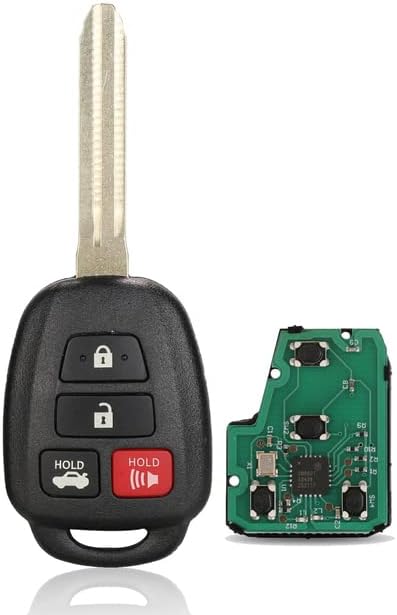
Figure 2.1: This image displays a 4-button remote car key fob alongside its internal circuit board. The key fob features buttons for lock, unlock, trunk release, and a panic alarm. The separate circuit board illustrates the electronic components responsible for the remote functions.

Figure 2.2: A 2-button remote car key fob with its key blade extended. The buttons are for locking and unlocking the vehicle.

Figure 2.3: The reverse side of a remote car key fob with the key blade extended, displaying regulatory markings such as "CE0123Q CLBTIC/245/2002 DENSO 1512V", which indicate compliance and manufacturer details.

Figure 2.4: A close-up view of the internal rubber button pad, which sits beneath the key fob's outer shell and activates the electronic switches on the circuit board.
3. Setup and Installation
This remote car key requires professional services for both key blade cutting and electronic programming to function with your vehicle. It is not a user-programmable device.
3.1 Key Blade Cutting
- Locate a certified automotive locksmith or your local Toyota dealership.
- Provide them with your new key and your existing, working vehicle key.
- The locksmith or dealer will cut the new key blade to match your vehicle's ignition and door locks.
3.2 Remote and Transponder Programming
The internal electronics of this key, including the remote functions and the immobilizer transponder chip (ID-H-8A), must be programmed to your vehicle's system.
- Take your vehicle and the newly cut key to a certified automotive locksmith or your local Toyota dealership.
- They possess the specialized diagnostic equipment required to program the key's remote functions and synchronize the transponder chip with your vehicle's immobilizer system.
- Ensure all functions (remote lock/unlock, engine start) are tested before leaving the service provider.
Important: Attempting to program the key yourself without proper equipment may result in damage to the key or your vehicle's electronic system, and may void any implied warranty.
4. Operating Instructions
Once the key blade is cut and the key is successfully programmed to your vehicle, you can use its functions as follows:
4.1 Remote Functions
- Lock Button (✅): Press once to lock all vehicle doors.
- Unlock Button (✆): Press once to unlock the driver's door, or twice to unlock all doors (may vary by vehicle model).
- Trunk Release Button (if applicable): Press and hold to open the vehicle's trunk or tailgate.
- Panic Button (if applicable): Press and hold to activate the vehicle's alarm system. Press again to deactivate.
4.2 Vehicle Ignition
Insert the cut key blade into the vehicle's ignition cylinder. Turn the key clockwise to the 'ACC' position, then to 'ON', and finally to 'START' to engage the engine. Release the key once the engine starts; it will spring back to the 'ON' position.
5. Maintenance
5.1 Battery Replacement
The remote control functions are powered by a small coin-cell battery (typically CR2032 or similar, refer to your original key's specifications). If the remote range decreases or stops working, the battery may need replacement.
- Carefully open the key fob casing using a small flat-head screwdriver or a specialized key opening tool.
- Note the orientation of the existing battery.
- Remove the old battery and insert a new, identical battery with the positive (+) side facing up.
- Carefully snap the key fob casing back together, ensuring a secure fit.
5.2 General Care
- Avoid exposing the key to extreme temperatures, direct sunlight for prolonged periods, or moisture.
- Do not drop the key or subject it to strong impacts.
- Keep the key away from strong magnetic fields.
- Clean the exterior with a soft, dry cloth if necessary. Do not use harsh chemicals.
6. Troubleshooting
- Remote Not Working:
- Check the battery. Replace if necessary (refer to Section 5.1).
- Ensure the key was correctly programmed by a professional. If issues persist, contact your locksmith or dealer.
- Verify there are no strong radio interference sources nearby.
- Key Blade Not Turning in Ignition/Door:
- Ensure the key blade was cut accurately by a professional.
- Check for any obstructions in the ignition or door lock cylinder.
- Engine Not Starting (Key Turns, But No Start):
- This indicates an issue with the transponder chip programming. The vehicle's immobilizer system is not recognizing the key.
- Return to the professional who programmed the key for re-programming or diagnosis.
7. Specifications
| Feature | Detail |
|---|---|
| Product Type | Remote Car Key |
| Brand | Generic |
| Model Number | EP-1005004327812022-001 |
| Part Number | 89070-52D70 |
| Remote Frequency | 314.z (TOKAI RIKA B51TE/B71TH) |
| Transponder Chip | ID-H-8A |
| Material Type | ABS + Metal |
| R/C Function | With |
| Customization | No (Requires professional programming) |
| Compatible Vehicles | Toyota CHR, VITZ, Yariss, CAMRYs, Corollas, AQUA |
| Country of Manufacture | China |
| Date First Available | 19 July 2023 |
8. Support
For any issues or inquiries regarding this product, please contact the seller. We are committed to providing assistance and will respond to your concerns within 24 hours.


