
1. Introduction
This manual provides essential instructions for the safe and effective operation of your AWT MMA-155 Mini Welder. This versatile machine supports both MMA/Stick and Lift TIG welding processes, operating on 110V or 220V power supplies. Please read this manual thoroughly before use to ensure proper setup, operation, and maintenance.

Figure 1.1: AWT MMA-155 Mini Welder and included accessories.

Figure 1.2: Examples of common welding applications for the MMA-155.
2. Safety Information
Welding operations involve inherent risks. Always prioritize safety by following these guidelines and local safety regulations.
- Personal Protective Equipment (PPE): Always wear a welding helmet with appropriate shade, flame-resistant clothing, welding gloves, and safety shoes.
- Ventilation: Ensure adequate ventilation to remove welding fumes. Work in a well-ventilated area or use fume extraction equipment.
- Fire Hazards: Keep flammable materials away from the welding area. Have a fire extinguisher readily available.
- Electrical Safety:
- Do not operate the welder in wet conditions.
- Ensure proper grounding of the equipment.
- Inspect cables and connections for damage before each use.
- The AWT MMA-155 is equipped with VRD (Voltage Reduction Device) to automatically decrease open-circuit voltage, reducing the risk of electric shock.
- Machine Protections: The welder includes built-in over-current, overload, and thermal protection systems to prevent damage to the unit and enhance user safety.
- Arc Rays: Welding arcs produce intense visible and invisible (UV and IR) rays that can burn eyes and skin. Protect yourself and bystanders.

Figure 2.1: VRD (Voltage Reduction Device) feature for enhanced safety during operation.

Figure 2.2: Overview of the AWT MMA-155's safety and protection systems.
3. Package Contents
Upon unpacking, verify that all items listed below are present and undamaged. If any parts are missing or damaged, contact customer support.
- AWT MMA-155 Stick Welding Machine
- 10ft Electrode Holder
- 10ft Earth Clamp
- Brush/Hammer
- Electrode rods Φ2.5mm x 5
- 110V-220V Adapter Cord
- Strap
- Welding Glove
- Welding Mask
- User's Manual (this document)

Figure 3.1: Visual representation of the AWT MMA-155 and its standard accessories.
4. Product Features
The AWT MMA-155 Mini Welder is designed with advanced features for efficient and reliable welding.
- 2-in-1 Multiprocess Welding: Supports both MMA/Stick welding and Lift TIG welding processes, offering versatility for various applications.
- Dual Voltage Capability: Operates on both 110V and 220V power supplies, adapting to different work environments.
- Advanced IGBT Inverter Technology: Provides stable arc performance, precise current control, and energy efficiency. This technology contributes to spatter-free, smooth arc, and deep penetration welds.
- Welding Assist Functions:
- Hot Start: Facilitates easier arc ignition.
- Arc Force: Helps prevent the electrode from sticking and maintains arc stability.
- Anti-Stick: Reduces the chance of the electrode sticking to the workpiece, making it easier to remove if it does.
- Compact and Portable Design: Weighing only 4.3 lbs (1.95 kg) with dimensions of 4" x 6.8" x 10.8", it features an easy-carry handle and includes a shoulder strap for convenient transport.
- Efficient Heat Dissipation: Equipped with a high-speed cooling fan and a fan-on-demand system to prevent overheating and ensure prolonged operation.
- Digital Display: Provides clear readout of welding parameters.

Figure 4.1: The MMA-155 supports both MMA/Stick and Lift TIG welding processes.

Figure 4.2: Visual demonstration of the 2-in-1 multi-process welding capability.

Figure 4.3: Key features like Anti-Stick, Arc Force, Hot Start, and IGBT Technology for optimal welding performance.

Figure 4.4: Advanced IGBT Inverter technology ensures stable and efficient welding.

Figure 4.5: The lightweight and portable design with handle and shoulder strap for easy transport.

Figure 4.6: The efficient heat dissipation system with a high-speed cooling fan.
5. Setup
Before operating the welder, ensure proper setup and connections.
5.1 Power Connection
- The AWT MMA-155 supports both 110V and 220V power inputs. Use the provided adapter cord if switching between voltages.
- Connect the power cord to a suitable grounded electrical outlet. Ensure the circuit breaker can handle the welder's current draw (e.g., a 20A or 30A breaker for 110V operation, as noted in customer feedback).
5.2 Welding Cable Connections
The welder features "+" and "-" output terminals for connecting the electrode holder and earth clamp.

Figure 5.1: Connection diagrams for MMA/Stick and Lift TIG welding.
- MMA/Stick Welding:
- Connect the electrode holder cable to the appropriate terminal (typically "+" for most electrodes, but check electrode manufacturer specifications).
- Connect the earth clamp cable to the remaining terminal (typically "-" if electrode holder is "+").
- Securely attach the earth clamp to the workpiece or a clean, bare metal part of the welding table.
- Lift TIG Welding:
- Connect the TIG torch (not included) to the appropriate terminal (typically "-" for DC TIG).
- Connect the earth clamp cable to the remaining terminal (typically "+" for DC TIG).
- Ensure a gas supply (Argon) is connected to the TIG torch if using shielded TIG.
6. Operating Instructions
Familiarize yourself with the control panel before beginning welding operations.

Figure 6.1: Control panel layout and button functions.
- Power Indicator LED: Illuminates when the machine is powered on.
- Overheat Protection LED: Illuminates if the machine overheats. Allow the unit to cool down before resuming operation.
- 110V Voltage Indicator: Indicates operation on 110V power.
- MMA Welding Indicator: Illuminates when MMA/Stick welding mode is selected.
- MMA Welding With VRD Indicator: Illuminates when MMA/Stick welding mode with VRD is active.
- LIFT TIG Indicator: Illuminates when Lift TIG welding mode is selected.
- Digital Display: Shows the current welding amperage.
- Mode Choose Button: Press to cycle through MMA, MMA with VRD, and Lift TIG modes.
- Current Knob: Adjusts the welding amperage. Turn clockwise to increase, counter-clockwise to decrease. Note that this dial can be sensitive, requiring fine adjustments for optimal results.
- "+" Output Terminal: Positive output connection.
- "-" Output Terminal: Negative output connection.
6.1 MMA/Stick Welding
- Select MMA mode using the Mode Choose Button.
- Insert the appropriate electrode (e.g., E6013, E6011, E7018) into the electrode holder. The welder performs well with 1/16" - 1/8" (1.6mm - 3.2mm) electrodes.
- Adjust the current knob to the desired amperage based on the electrode type and material thickness.
- Initiate the arc using a scratching or tapping motion. The Hot Start, Arc Force, and Anti-Stick features will assist in arc ignition and stability.
- Maintain a consistent arc length and travel speed for optimal weld quality.
6.2 Lift TIG Welding
- Select LIFT TIG mode using the Mode Choose Button.
- Ensure a TIG torch with a tungsten electrode and gas supply (Argon) is properly connected.
- Adjust the current knob to the desired amperage.
- To initiate the arc, gently touch the tungsten electrode to the workpiece and then lift it slightly. The arc will ignite.
- Maintain a short arc length and feed filler rod (if required) into the weld puddle.
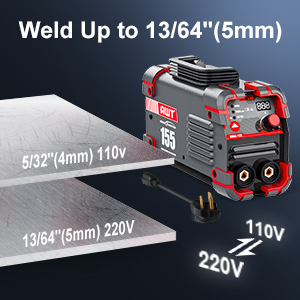
Figure 6.2: Welding capacity based on input voltage.

Figure 6.3: Applicable electrode rod sizes and types for the MMA-155.
7. Maintenance
Regular maintenance ensures the longevity and optimal performance of your welding machine.
- Cleaning: Periodically clean the exterior of the welder with a dry cloth. Use compressed air to clear dust from ventilation openings. Ensure the machine is unplugged before cleaning.
- Cable Inspection: Regularly inspect all welding cables, electrode holder, and earth clamp for cuts, fraying, or loose connections. Replace damaged components immediately.
- Storage: Store the welder in a dry, clean environment, away from excessive dust and moisture.
- Fan Operation: Ensure the cooling fan operates freely and is not obstructed.
8. Troubleshooting
This section addresses common issues you might encounter. For problems not listed here, contact customer support.
| Problem | Possible Cause | Solution |
|---|---|---|
| Welder does not power on. | No power supply; faulty power cord; internal fault. | Check power outlet and circuit breaker. Inspect power cord for damage. If problem persists, contact support. |
| No arc or weak arc. | Improper current setting; poor earth clamp connection; incorrect electrode; power supply issue. | Adjust amperage. Ensure earth clamp has good contact. Use correct electrode type and size. Verify adequate power supply (e.g., sufficient breaker capacity for 110V). |
| Overheat Protection LED illuminates. | Extended use; insufficient ventilation; blocked fan. | Allow the machine to cool down. Ensure proper ventilation around the welder. Clear any obstructions from the fan. |
| Circuit breaker trips frequently. | Overloaded circuit; insufficient breaker capacity for welder. | Ensure the welder is on a dedicated circuit or one with sufficient capacity (e.g., 20A or 30A for 110V). Reduce other loads on the circuit. |
| Electrode sticks to workpiece. | Low amperage; improper technique; Anti-Stick feature not active. | Increase amperage. Improve welding technique. Ensure Anti-Stick feature is functioning. |
9. Specifications
Technical specifications for the AWT MMA-155 Mini Welder.
| Feature | Detail |
|---|---|
| Model Number | MMA-155 |
| Manufacturer | AWT |
| Input Voltage | 110V / 220V (Dual Voltage) |
| Output Current | Up to 155A |
| Welding Processes | MMA/Stick, Lift TIG |
| Max Welding Thickness | 13/64" (5.0mm) mild steel |
| Applicable Electrodes | E6013, E6011, E7018 (1/16" - 1/8" / 1.6mm - 3.2mm) |
| Item Weight | 4.3 pounds (1.95 kg) |
| Dimensions (L x W x H) | 10.8" x 6.8" x 4" (27.4cm x 17.3cm x 10.2cm) |
| Material | Metal & Plastic |
| Protection Features | VRD, Over-current, Overload, Thermal Protection |
| IP Rating | IP21S |
10. Warranty and Support
AWT is committed to providing high-quality products and customer satisfaction. For any questions, technical assistance, or warranty claims, please contact AWT customer service.
AWT offers 24-hour service to address your inquiries and provide support. Your satisfaction is our top priority.
Refer to your purchase documentation or the AWT official website for specific warranty terms and contact information.


