
1. Introduction
This manual provides comprehensive instructions for the installation, operation, and maintenance of the Occus DIY WIFI Module, model 300018000012. This module is designed to enable Wi-Fi connectivity for compatible Gree Air Conditioning units, including models CS532AX, 30110144, and 30018060014, allowing for remote control and smart features via a dedicated application.
2. Safety Guidelines
Please read and understand all safety instructions before installing or operating the module. Failure to follow these guidelines may result in electric shock, fire, or damage to the product or air conditioning unit.
- Power Disconnection: Always disconnect the power supply to the air conditioning unit before attempting any installation or maintenance.
- Qualified Personnel: Installation should ideally be performed by a qualified technician. If performing a DIY installation, ensure you have a clear understanding of the process.
- Correct Connection: Ensure the module is connected to the correct port on the air conditioning unit. Incorrect connections can cause damage.
- Environmental Conditions: Do not expose the module to water, excessive humidity, or extreme temperatures.
- Original Parts: Use only the module and cable provided. Do not attempt to modify the module or its components.
3. Product Components
The package typically includes the following items:
- Occus DIY WIFI Module (Model: 300018000012)
- Integrated connecting cable with blue multi-pin connector
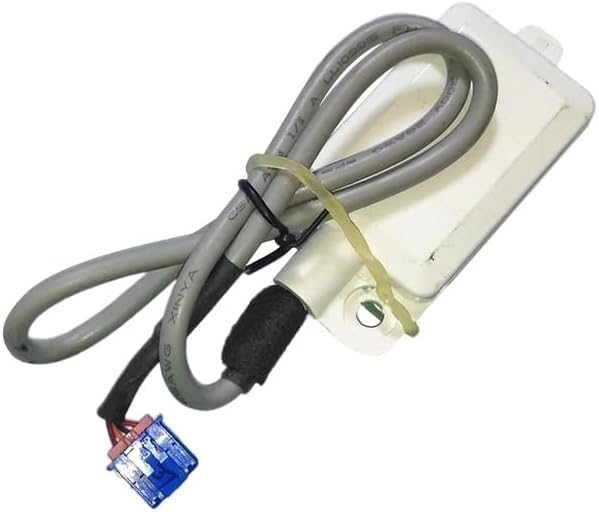
Figure 3.1: This image displays the complete Occus DIY WIFI Module. It consists of a white rectangular module, a gray connecting cable, and a blue multi-pin connector at the end of the cable. The module is designed to integrate with compatible Gree air conditioning units to enable Wi-Fi functionality.
4. Installation Instructions
4.1. Preparation
- Power Off: Ensure the Gree air conditioning unit is completely powered off and unplugged from the main power supply.
- Locate Port: Refer to your Gree air conditioning unit's manual to locate the designated Wi-Fi module port. This port is typically found within the indoor unit's casing.
- Access Panel: Carefully open the access panel or cover on your AC unit to expose the Wi-Fi module port.
4.2. Physical Installation
- Connect Module: Align the blue multi-pin connector of the Occus WIFI Module with the corresponding port on your Gree AC unit. Gently push the connector firmly into place until it is securely seated. Do not force the connection.

Figure 4.1: A detailed view of the blue multi-pin connector, which is essential for establishing the electrical and data connection between the Wi-Fi module and the Gree air conditioning unit. Observe the specific pin arrangement to ensure correct orientation during installation.

Figure 4.2: This image provides another perspective of the Occus WIFI Module, clearly showing the 'WIFI' marking on its casing. The gray cable is securely attached, leading to the blue connector, which plugs into the designated port on the air conditioning unit.

Figure 4.3: This close-up highlights the robust construction of the cable where it enters the module, along with the blue connector. Proper connection and insulation are critical for reliable operation of the Wi-Fi module.
- Secure Module: Position the module within the AC unit's casing, ensuring it does not obstruct any moving parts or airflow. Some units may have a designated slot or clip for the module.
- Close Panel: Carefully close the access panel or cover of the AC unit.
- Restore Power: Plug the air conditioning unit back into the power supply and turn it on.
4.3. App Configuration
After physical installation, you will need to configure the module using a smartphone application.
- Download App: Download the official Gree+ app (or the recommended app for your specific Gree AC model) from your device's app store (Google Play Store for Android, Apple App Store for iOS).
- Create Account: Open the app and follow the on-screen instructions to create a user account or log in if you already have one.
- Add Device: Select the option to 'Add Device' or 'Add Air Conditioner'. The app will guide you through the process of connecting to your Wi-Fi network and pairing with the newly installed module. This typically involves putting the AC unit into a pairing mode (refer to your AC unit's manual for specific instructions) and entering your Wi-Fi credentials.
- Test Connection: Once paired, test the connection by attempting to control your AC unit through the app.
5. Operation
Once the Occus DIY WIFI Module is successfully installed and configured, the operation of your Gree air conditioning unit will primarily be managed through the dedicated smartphone application. The app allows you to:
- Turn the AC unit On/Off.
- Adjust temperature settings.
- Change operating modes (Cool, Heat, Fan, Dry, Auto).
- Set fan speed.
- Schedule operations.
- Monitor unit status.
Refer to the Gree+ app's help section or user interface for detailed instructions on using its various features.
6. Maintenance
The Occus DIY WIFI Module requires minimal maintenance. Follow these guidelines to ensure optimal performance:
- Cleaning: If the module becomes dusty, gently wipe its exterior with a soft, dry cloth. Do not use liquid cleaners or abrasive materials.
- Connection Check: Periodically ensure the module's connector remains firmly seated in the AC unit's port.
- Software Updates: Keep the Gree+ app updated to the latest version to benefit from new features and bug fixes.
7. Troubleshooting
If you encounter issues with your Occus DIY WIFI Module, refer to the following troubleshooting table:
| Problem | Possible Cause | Solution |
|---|---|---|
| Module not detected by AC unit or app. | Loose connection, incorrect port, AC unit not powered on. | Ensure AC unit is powered off, check module connection, then power on AC. Verify module is plugged into the correct port. |
| Cannot connect to Wi-Fi network. | Incorrect Wi-Fi password, weak signal, router issues, AC unit not in pairing mode. | Verify Wi-Fi password. Move router closer or use a Wi-Fi extender. Restart router. Ensure AC unit is in Wi-Fi pairing mode as per its manual. |
| App shows offline status. | Internet outage, module disconnected from Wi-Fi, AC unit powered off. | Check home internet connection. Verify AC unit is powered on. Re-pair module with Wi-Fi if necessary. |
| Remote control commands are not working. | App not updated, module firmware outdated, network latency. | Update the Gree+ app. Check if there are firmware updates for the module via the app. Ensure stable internet connection. |
If problems persist, consult the Gree+ app's support section or contact the original seller for further assistance.
8. Product Specifications
- Model: 300018000012
- Compatible Gree AC Models: CS532AX, 30110144, 30018060014
- Material: Plastic
- Usage: Home DIY
- Connectivity: Wi-Fi
- Origin: Mainland China
9. Warranty and Support
For information regarding warranty coverage, returns, or technical support, please refer to the documentation provided by your original seller or contact the manufacturer directly. Keep your purchase receipt as proof of purchase.