
Rtauys M5
Rtauys M5 Sonic Electric Toothbrush User Manual
Model: M5
1. Product Overview
The Rtauys M5 Sonic Electric Toothbrush is designed to provide a superior oral cleaning experience for both adults and kids. It features advanced sonic technology, multiple brushing modes, and a long-lasting battery, ensuring effective plaque removal and improved oral hygiene.

Figure 1.1: Rtauys M5 Sonic Electric Toothbrush and included accessories.
Key Features:
- Superior Cleaning Power: Delivers 41,000 high-frequency vibrations per minute, removing up to 5 times more plaque and surface stains than low-frequency electric toothbrushes.
- 5 Brushing Modes: Offers Cleaning, Whitening, Sensitive, Polish, and Massage modes to cater to various oral care needs.
- Long Battery Life: A full 3-hour charge provides up to 120 days of use.
- 8 Brush Heads Included: Comes with 8 premium replacement brush heads, including 2 sensitive heads, designed for up to 24 months of usage.
- Smart Timer: Built-in 2-minute timer with 30-second interval reminders for scientifically recommended brushing.
- Travel-Friendly: Includes an exquisite and portable travel case for convenience on the go.
- IPX7 Waterproof: Fully washable design allows for safe use in the shower.

Figure 1.2: The sonic motor effectively removes up to 5X more plaque.

Figure 1.3: Advanced whitening technology helps achieve a brighter smile.
2. Setup
Before first use, ensure your Rtauys M5 Sonic Electric Toothbrush is fully charged. Follow these steps to set up your new toothbrush:
2.1 Charging the Toothbrush
- Connect the provided USB charging cable to the charging port at the bottom of the toothbrush handle.
- Plug the USB end of the cable into a compatible USB power adapter (not included) or a USB port.
- The battery indicator light on the handle will illuminate to show charging status. A full charge typically takes 3 hours.
- Once fully charged, the indicator light will turn green. Disconnect the toothbrush from the charger.

Figure 2.1: The toothbrush charges via USB and can be placed on a wall-mounted holder.
2.2 Attaching a Brush Head
- Select a desired brush head from the included replacements.
- Align the brush head with the metal shaft on the toothbrush handle.
- Push the brush head down firmly until it clicks into place. Ensure it is securely attached.
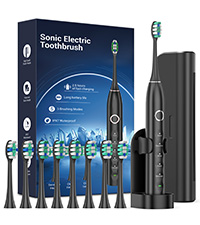
Figure 2.2: The toothbrush comes with 8 premium brush heads for extended use.
2.3 Installing the Wall-Mounted Holder
- Choose a clean, dry, and smooth surface in your bathroom for installation.
- Peel off the protective film from the adhesive backing of the toothbrush holder.
- Press the holder firmly onto the chosen surface and hold for a few seconds to ensure strong adhesion.
- Allow the adhesive to set for at least 24 hours before placing the toothbrush in the holder.
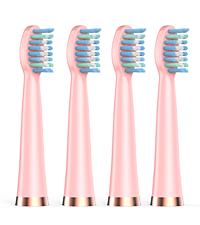
Figure 2.3: The toothbrush holder can be mounted on a wall for convenient storage.
3. Operating Instructions
Familiarize yourself with the toothbrush's functions for optimal cleaning.
3.1 Powering On/Off and Changing Modes
- To turn the toothbrush ON, press the power button once. It will start in the default Cleaning mode.
- To cycle through the 5 brushing modes (Cleaning, Whitening, Sensitive, Polish, Massage), press the power button repeatedly while the toothbrush is on.
- To turn the toothbrush OFF from any mode, press and hold the power button for 2 seconds.

Figure 3.1: The toothbrush offers 5 distinct cleaning modes for personalized dental care.
3.2 Smart Timer and Quadpacer
- The toothbrush features a built-in 2-minute smart timer, which is the dentist-recommended brushing time.
- Every 30 seconds, the toothbrush will pause briefly to remind you to move to the next quadrant of your mouth (upper-right, upper-left, lower-left, lower-right).
- The toothbrush will automatically turn off after 2 minutes of continuous brushing.
4. Maintenance
Proper maintenance ensures the longevity and effectiveness of your Rtauys M5 Sonic Electric Toothbrush.
4.1 Cleaning the Toothbrush
- After each use, rinse the brush head thoroughly under running water.
- Wipe the toothbrush handle with a damp cloth. Do not immerse the entire handle in water for extended periods, although it is IPX7 waterproof.
- Ensure the charging port is dry before charging.

Figure 4.1: The IPX7 waterproof design allows for easy cleaning and use in wet environments.
4.2 Replacing Brush Heads
- It is recommended to replace your brush head every 3 months, or sooner if the bristles become frayed or worn.
- To remove a brush head, gently pull it straight off the handle.
- To attach a new brush head, align it with the metal shaft and push down firmly until it clicks into place.
5. Troubleshooting
If you encounter any issues with your Rtauys M5 Sonic Electric Toothbrush, refer to the following common solutions:
| Problem | Possible Cause | Solution |
|---|---|---|
| Toothbrush does not turn on. | Low battery or no charge. | Charge the toothbrush for at least 3 hours. Ensure the charging cable is properly connected. |
| Weak vibration or reduced performance. | Low battery or worn-out brush head. | Recharge the toothbrush. Replace the brush head if it has been used for more than 3 months. |
| Toothbrush turns off unexpectedly. | Low battery or automatic 2-minute timer activation. | Recharge the toothbrush. Note that the toothbrush automatically turns off after 2 minutes of brushing. |
| Brush head feels too hard or too soft. | Incorrect brush head type selected. | Ensure you are using the appropriate brush head (standard or sensitive) for your needs. |
6. Specifications
- Model Number: HK01518
- Product Dimensions: 8.2 x 4.6 x 1.7 inches
- Item Weight: 10.86 ounces
- Power Source: Battery Powered (1 AA battery included)
- Battery Life: Up to 120 days on a single 3-hour charge
- Vibrations: 41,000 VPM (Vibrations Per Minute)
- Waterproof Rating: IPX7
- Brush Head Firmness: Soft
- Manufacturer: Rtauys
- Country of Origin: China
7. Warranty and Support
Rtauys is committed to providing high-quality oral care products. Your Rtauys M5 Sonic Electric Toothbrush comes with a 1-year assurance.
For further assistance, detailed instructions, or warranty claims, please refer to the official Instructions for Use (IFU) PDF document or contact Rtauys customer support.
Official Instructions for Use (IFU) (PDF): Click Here
Rtauys has been dedicated to advancing oral care for years, with an expert team including leading dentists developing professionally certified electric toothbrushes recommended worldwide.
Related Documents - M5
 |
Rtauys Electric Toothbrush FAQ Frequently asked questions about the Rtauys Electric Toothbrush, covering returns, replacement brush heads, modes, charging, and bracket installation. |
Ask a question about this manual
Ask about setup, troubleshooting, compatibility, parts, safety, or missing instructions. Manuals+ will review the question and use this page’s manual context to help answer it.