
1. Introduction
This manual provides detailed instructions for the installation, configuration, operation, and maintenance of the HEXEH DM542T Digital Stepper Motor Driver. The DM542T is a high-performance, 2-phase digital stepper motor driver designed for use with Nema 17 and Nema 23 stepper motors, offering precise control, high speed, and high torque capabilities. Please read this manual thoroughly before operating the device to ensure proper function and safety.
2. Product Overview
The HEXEH DM542T is a versatile digital stepper motor driver featuring advanced control algorithms for smooth and accurate motor movement. It is suitable for a wide range of applications requiring precise motion control.
Key Features:
- High Performance: Delivers high speed, high torque, and high precision with no loss of step.
- Precision Winding Technology: Enhances motor power output.
- Wide Application: Ideal for 3D printers, medical equipment, industrial machinery, laser engravers, CNC machines, and various automatic devices.
- Robust Construction: Good toughness and impact resistance for improved durability and service life.

Figure 2.1: Front view of the HEXEH DM542T Stepper Motor Driver, showing input/output terminals and DIP switches.
3. Specifications
| Parameter | Value |
|---|---|
| Brand | HEXEH |
| Model | DM542T |
| Input Voltage | 20-50 VDC |
| Output Current | 1.0-4.2 A (Peak) |
| Phase | 2-Phase |
| Compatible Motors | Nema 17, Nema 23 Stepper Motors |
| Material | Copper (internal components) |
| Item Weight | 1000 Grams |
4. Setup and Wiring
Proper wiring and configuration are essential for the safe and effective operation of the DM542T driver. Ensure all power is disconnected before making any connections.
4.1. Wiring Connections
Connect the stepper motor, power supply, and control signals to the driver as shown in the diagram below. Pay close attention to polarity for power and signal connections.

Figure 4.1: Angled view of the DM542T driver, highlighting the wiring terminals for motor, power, and control signals.
- Motor Connections (A+, A-, B+, B-): Connect the two phases of your 2-phase stepper motor to these terminals. Ensure correct phase matching.
- Power Supply (VDC, GND): Connect a DC power supply within the 20-50VDC range. Observe correct polarity: VDC to positive, GND to negative.
- Control Signals (PUL+, PUL-, DIR+, DIR-, ENA+, ENA-): These are opto-isolated inputs. Connect your controller's pulse, direction, and enable signals here.
- PUL+ / PUL-: Pulse signal input. The motor advances one step per pulse.
- DIR+ / DIR-: Direction signal input. Determines the rotation direction of the motor.
- ENA+ / ENA-: Enable signal input. When enabled, the motor is powered; when disabled, the motor is free-spinning.
4.2. DIP Switch Configuration
The DM542T features DIP switches for setting the output current and microstep resolution. Refer to the tables below and the image for correct configuration.
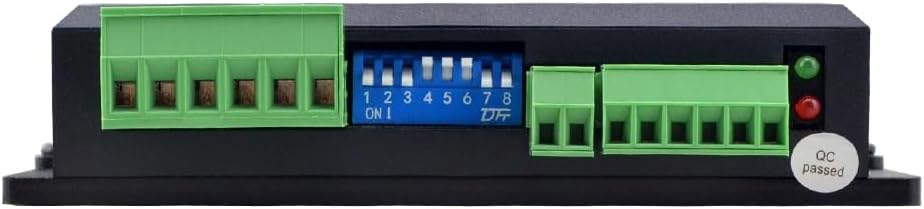
Figure 4.2: Top view of the DM542T driver, showing the DIP switches for current and microstep settings.
4.2.1. Current Setting (SW1, SW2, SW3)
Use switches SW1, SW2, and SW3 to set the peak output current for the motor. The current values are typically peak values. "ON" usually means the switch is down, "OFF" means up, but always verify with the device's markings.
| Peak Current (A) | SW1 | SW2 | SW3 |
|---|---|---|---|
| 1.00 | ON | ON | ON |
| 1.46 | OFF | ON | ON |
| 1.91 | ON | OFF | ON |
| 2.37 | OFF | OFF | ON |
| 2.82 | ON | ON | OFF |
| 3.28 | OFF | ON | OFF |
| 3.73 | ON | OFF | OFF |
| 4.20 | OFF | OFF | OFF |
4.2.2. Microstep Resolution Setting (SW5, SW6, SW7, SW8)
Use switches SW5, SW6, SW7, and SW8 to set the desired microstep resolution. Higher microstep values result in smoother motor movement but may require a higher pulse rate from the controller.
| Microsteps/Rev (for 1.8° motor) | SW5 | SW6 | SW7 | SW8 |
|---|---|---|---|---|
| 400 (2x) | ON | ON | ON | ON |
| 800 (4x) | OFF | ON | ON | ON |
| 1600 (8x) | ON | OFF | ON | ON |
| 3200 (16x) | OFF | OFF | ON | ON |
| 6400 (32x) | ON | ON | OFF | ON |
| 12800 (64x) | OFF | ON | OFF | ON |
| 25600 (128x) | ON | OFF | OFF | ON |
| 51200 (256x) | OFF | OFF | OFF | ON |
4.2.3. Half/Full Current Setting (SW4)
Switch SW4 controls the idle current reduction. When set to "ON", the driver will reduce the motor current to approximately 50% of the set value after a period of inactivity, reducing heat and power consumption. When set to "OFF", the motor will maintain full current at all times.
| SW4 Setting | Function |
|---|---|
| ON | Half Current (Idle Current Reduction) |
| OFF | Full Current (No Idle Current Reduction) |
5. Operating Instructions
- Power On: After ensuring all connections are secure and DIP switches are set, apply power to the DM542T driver. The power indicator LED should illuminate.
- Enable Motor: Ensure the ENA signal is active (typically low for enable, check your controller's specifications). The motor should become energized and hold its position.
- Send Pulse Signals: Provide pulse signals to the PUL input from your motion controller. The motor will rotate one step for each pulse received.
- Control Direction: Change the state of the DIR signal to reverse the motor's rotation direction.
- Monitor Performance: Observe motor behavior for smooth operation. Adjust current and microstep settings if necessary to optimize performance for your specific application.
6. Troubleshooting
| Problem | Possible Cause | Solution |
|---|---|---|
| Motor does not move. |
|
|
| Motor moves erratically or loses steps. |
|
|
| Driver overheats. |
|
|
7. Maintenance
The HEXEH DM542T Stepper Motor Driver is designed for reliable operation with minimal maintenance. Follow these guidelines to ensure its longevity:
- Keep Clean: Periodically clean the driver's exterior to prevent dust and debris buildup, which can impede heat dissipation. Use a soft, dry cloth.
- Check Connections: Regularly inspect all wiring connections for tightness and signs of wear or corrosion. Loose connections can lead to intermittent operation or damage.
- Ensure Ventilation: Verify that the driver has adequate ventilation and is not obstructed, especially if operating in an enclosed space.
- Environmental Conditions: Operate the driver within its specified temperature and humidity ranges to prevent premature failure.
8. Warranty and Support
HEXEH is committed to providing high-quality products and customer satisfaction. While specific warranty details are not provided in this document, we offer comprehensive customer support.
For any product questions, technical assistance, or support inquiries, please contact us. We aim to respond to all inquiries within 24 hours and appreciate your trust in our products.
Please refer to your purchase documentation or the retailer's website for specific warranty terms and conditions applicable to your region.