
1. Introduction
This manual provides detailed instructions for the installation, operation, adjustment, and maintenance of the SOPHIA DK4000 Commercial Heavy Duty Door Closer. Please read these instructions carefully before installation and use to ensure proper function and safety. The DK4000 is designed for high-traffic commercial and residential applications, offering adjustable closing force (Size 1-6) and suitable for doors up to 150kg (330 lbs).
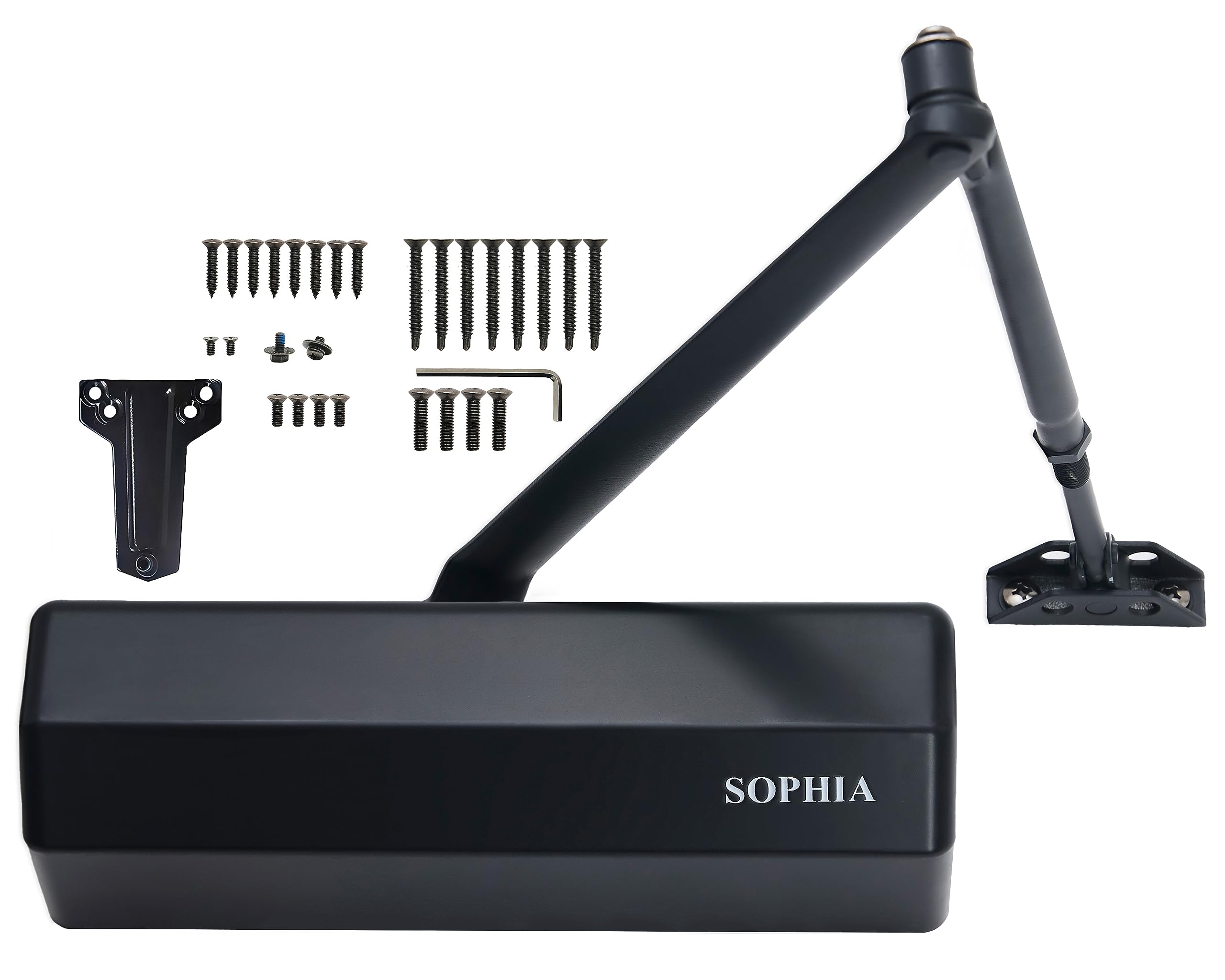
Figure 1.1: SOPHIA DK4000 Commercial Heavy Duty Door Closer (Matte Black)
2. Product Features
- Adjustable Closing Force: Size 1-6, suitable for doors weighing up to 150kg (330 lbs) and widths from 800-1500mm (31-60 inches).
- Durable Construction: US26D satin chrome plated precision cast aluminum body and forged steel arm, with heat-treated pistons and powder-coated finish for corrosion resistance.
- Three Adjustable Valves: Controls for closing speed, latching speed, and backcheck.
- Non-Handed Design: Works on both left and right-handed doors.
- Certifications: UL228-listed, ANSI/BHMA A156.4 certified (Grade 1), UL-certified three-hour Fire rating, and ADA compliant.
- Smooth Operation: Ensures consistent and secure door closure, preventing slamming.
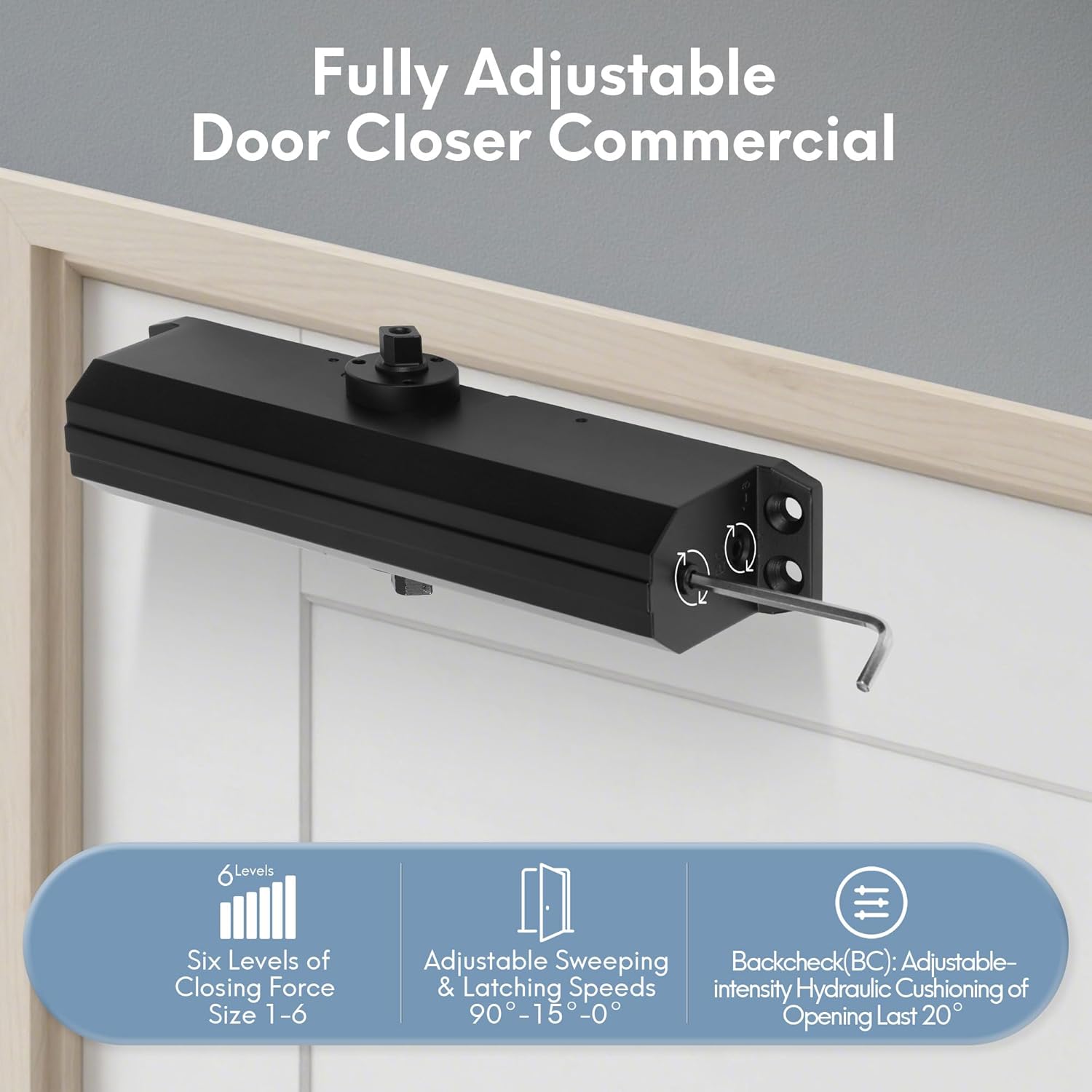
Figure 2.1: Key adjustable features of the DK4000 door closer.
3. Package Contents
Verify that all components are present before beginning installation:
- Door Closer Body
- Connecting Arm Assembly
- Decorative Cover
- Parallel Mounting Bracket
- Fireproof Cover (if applicable)
- Screws for Metal Door
- Screws for Wood Door
- Allen Wrench
- Installation Template

Figure 3.1: Included components for the DK4000 door closer.
4. Specifications
| Feature | Specification |
|---|---|
| Material | Aluminum |
| Color | Matte Black |
| Product Dimensions (L x W x H) | 9.65" x 1.77" x 2.76" |
| Item Weight | 2.81 kg |
| Adjustable Size | 1-6 |
| Max Door Weight | 150kg (330 lbs) |
| Recommended Uses | Fire Door, Residential/Commercial |
| Certifications | ADA, ANSI/BHMA A156.4 Grade 1, UL228, ISO 9001, CE |
| Installation Type | Screw-In |

Figure 4.1: Certifications for the DK4000 door closer.
5. Safety Information
- Always wear appropriate safety gear, including eye protection, during installation.
- Ensure the door is securely supported during installation to prevent accidental movement.
- Do not over-tighten screws, as this can damage the door or the closer.
- Keep children and pets away from the installation area.
- Improper installation or adjustment can lead to injury or damage to the door closer or door. If unsure, consult a qualified professional.
6. Installation
The SOPHIA DK4000 door closer supports three main mounting types: Regular Arm, Top Jamb, and Parallel Arm. Refer to the included installation template for precise hole placement.

Figure 6.1: Overview of mounting options.
6.1 General Installation Steps
- Prepare the Door: Ensure the door and frame are clean and free of obstructions.
- Position Template: Tape the provided installation template to the door and frame according to your chosen mounting type.
- Drill Pilot Holes: Mark and drill pilot holes for the closer body and arm brackets as indicated on the template.
- Mount Closer Body: Attach the door closer body to the door or frame using the appropriate screws.
- Assemble Arm: Connect the main arm to the closer spindle and the forearm to the arm bracket.
- Secure Arm: Tighten all arm connections.
- Install Decorative Cover: Place the decorative cover over the closer body and secure it with screws.
6.2 Mounting Types

Figure 6.2: Regular Arm Mounting (Mounted on the pull side of the door).

Figure 6.3: Top Jamb Mounting (Mounted on the push side of the door, closer on the frame).

Figure 6.4: Parallel Arm Mounting (Mounted on the push side of the door, uses a parallel arm bracket).
6.3 Installation Video
Video 6.1: Installation instructions for the DK4000 door closer. This video demonstrates the steps for mounting and initial setup.
7. Adjustment (Operating)
The DK4000 features multiple adjustment points to fine-tune door operation. Use the provided Allen wrench for all adjustments.
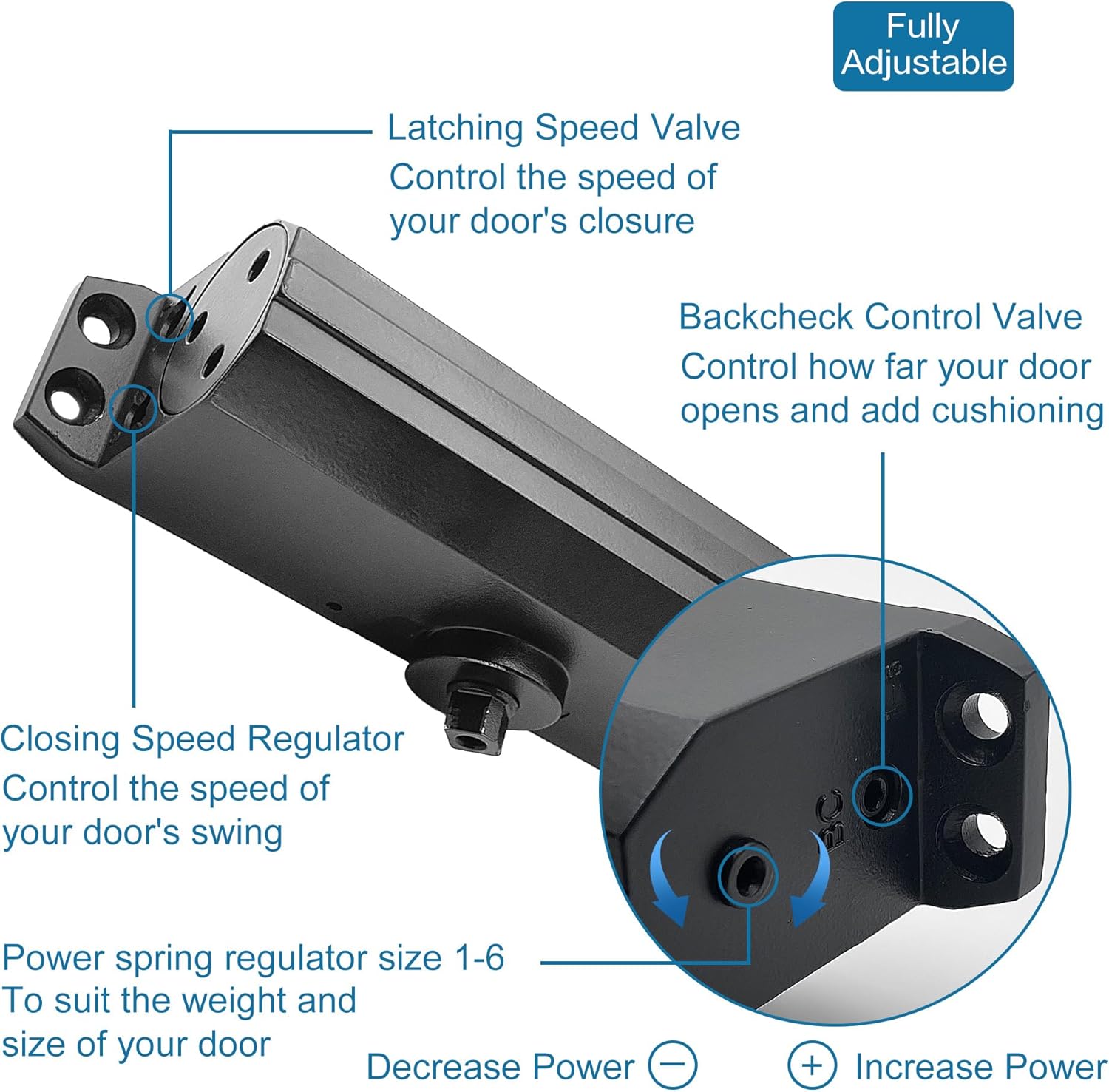
Figure 7.1: Location of adjustment valves on the DK4000.
7.1 Spring Power Adjustment (Closing Force)
The spring power determines the closing force and is adjustable from Size 1 to 6. To adjust, locate the spring power regulator screw on the end of the closer body. Turn clockwise to increase power (for heavier doors or higher traffic) and counter-clockwise to decrease power (for lighter doors or easier opening, e.g., ADA compliance).

Figure 7.2: Spring power adjustment mechanism.
7.2 Closing Speed Adjustment
The closing speed valve (often marked 'S' or '1') controls the speed at which the door closes from its fully open position until approximately 15 degrees from the frame. Turn clockwise to decrease speed (slower closing) and counter-clockwise to increase speed (faster closing).
7.3 Latching Speed Adjustment
The latching speed valve (often marked 'L' or '2') controls the speed of the final 15 degrees of door closure, ensuring the door latches securely without slamming. Turn clockwise to decrease speed (slower latching) and counter-clockwise to increase speed (faster latching).
7.4 Backcheck Adjustment
The backcheck valve (often marked 'BC' or '3') provides hydraulic cushioning when the door is opened forcefully beyond a certain point (typically 70-85 degrees). This prevents the door from slamming into adjacent walls or objects. Turn clockwise to increase backcheck intensity and counter-clockwise to decrease it.
7.5 Adjustment Video
Video 7.1: Demonstration of adjustment procedures for the DK4000 door closer, including speed and backcheck.
8. Maintenance
- Regular Inspection: Periodically check all screws and connections for tightness. Tighten as necessary.
- Cleanliness: Keep the door closer body and arm free from dust and debris. Wipe with a soft, damp cloth.
- Lubrication: The internal hydraulic system is sealed and does not require lubrication. Do not attempt to open the closer body.
- Arm Condition: Inspect the arm for any signs of bending or damage. Replace if compromised.
- Seasonal Adjustments: Extreme temperature changes may affect the hydraulic fluid viscosity, potentially requiring minor speed adjustments.
9. Troubleshooting
| Problem | Possible Cause | Solution |
|---|---|---|
| Door slams shut | Latching speed too fast. | Turn latching speed valve (L/2) clockwise to decrease speed. |
| Door closes too slowly | Closing speed too slow. | Turn closing speed valve (S/1) counter-clockwise to increase speed. |
| Door is difficult to open | Spring power too high. | Turn spring power regulator counter-clockwise to decrease power. |
| Door does not close fully | Spring power too low; arm not properly adjusted. | Increase spring power; ensure arm is correctly positioned and tightened. |
| Door swings open too far/hits wall | Backcheck not engaged or too weak. | Turn backcheck valve (BC/3) clockwise to increase intensity. |
| Oil leakage | Damaged seal; improper installation. | Contact customer support. Do not attempt to repair. |
10. Warranty and Support
The SOPHIA DK4000 Commercial Heavy Duty Door Closer comes with a 5-year manufacturer's warranty. This warranty covers defects in materials and workmanship under normal use.
For warranty claims, technical support, or any questions regarding your product, please contact SOPHIA customer service through the retailer where the product was purchased or visit the official SOPHIA website. Please have your model number (DK4000) and purchase date available when contacting support.