
HOMCOM 835-945V80WT
HOMCOM 71" Kitchen Pantry Cabinet Instruction Manual
Model: 835-945V80WT
Product Overview
The HOMCOM 71" Kitchen Pantry Cabinet is a freestanding farmhouse-style storage solution designed to enhance kitchen organization. It features a wide 2-tier microwave stand countertop, three drawers, six soft-closing doors, and adjustable shelves, providing versatile storage for various kitchen items. Integrated cable management ensures a tidy appliance station.

Figure 1: Front view of the HOMCOM 71" Kitchen Pantry Cabinet, showcasing its white finish and black handles.
Setup and Assembly
Assembly of the HOMCOM Kitchen Pantry Cabinet requires careful attention to detail and is best performed with two people. Ensure all components are present before beginning. Basic tools such as a screwdriver (Phillips head) and a hammer may be required.
Unpacking and Component Check
- Carefully unpack all boxes and lay out components on a clean, soft surface to prevent scratches.
- Verify all parts against the included parts list in your assembly manual. Contact customer support immediately if any parts are missing or damaged.
Assembly Steps
- Begin by assembling the base frame according to the provided diagrams. Ensure all connections are secure.
- Attach the side panels and back panels, paying close attention to orientation to ensure proper alignment for doors and drawers.
- Install the drawer slides onto the designated panels. Ensure they are level and securely fastened.
- Assemble the drawers and insert them into their respective slots. Test for smooth operation.
- Attach the countertop section to the lower cabinet.
- Assemble the upper hutch section, including shelves. Note that the center shelf is removable for larger appliances.
- Carefully lift and secure the hutch section onto the lower cabinet. This step requires two people for safety and proper alignment.
- Install the soft-closing hinges onto the cabinet doors.
- Attach the doors to the cabinet frame. Refer to the hinge adjustment instructions to ensure doors are flush and properly aligned.
- Install the black metal handles on all doors and drawers.
Safety Installation: Anti-Tipping Hardware
For safety, it is crucial to install the anti-tipping hardware provided. This prevents the cabinet from accidentally tipping over, especially in households with children or pets.
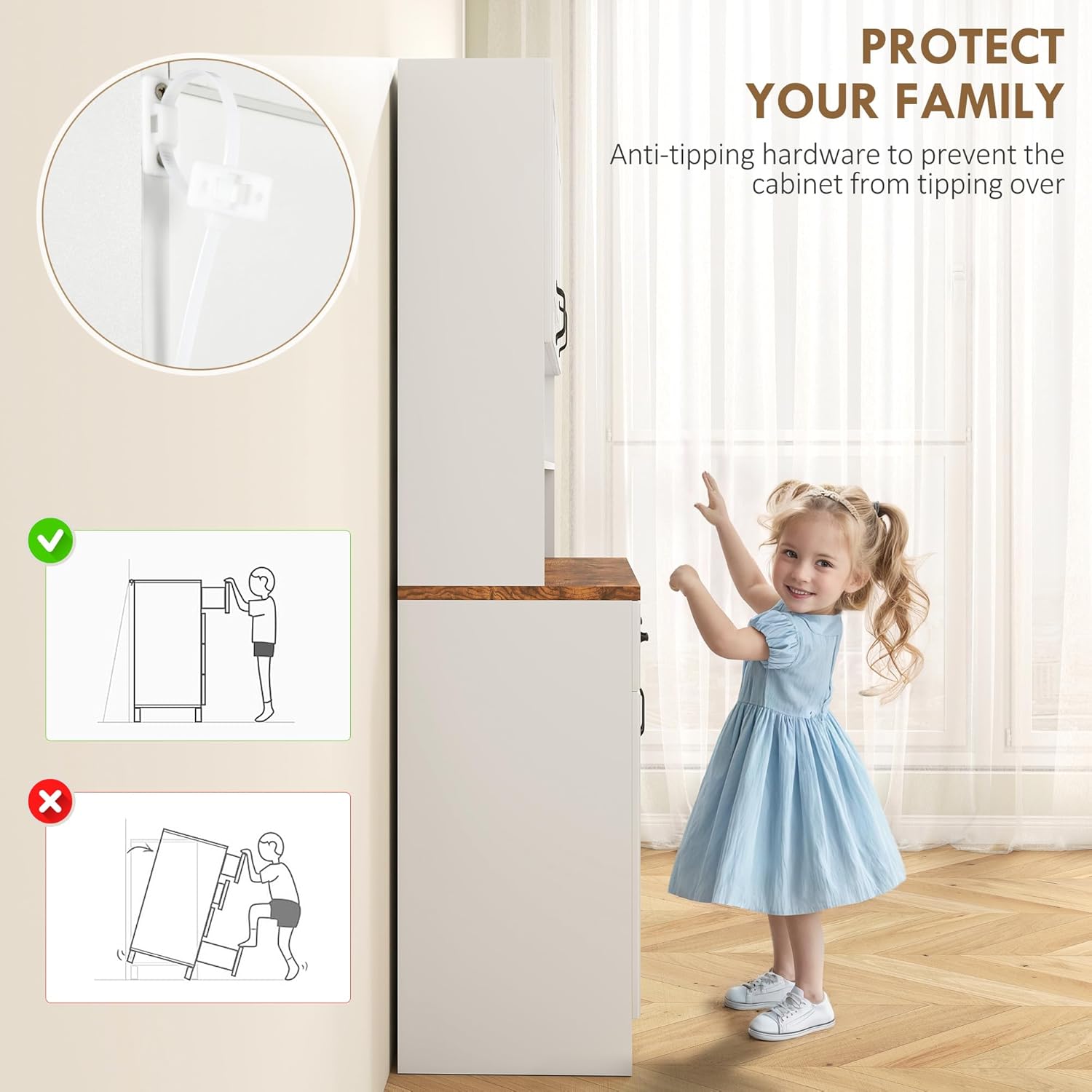
Figure 2: Diagram illustrating the correct installation of anti-tipping hardware to secure the cabinet to the wall.
- Locate the anti-tipping strap and hardware.
- Secure one end of the strap to the top rear of the cabinet using the provided screws.
- Mark the corresponding position on the wall, ensuring it aligns with a wall stud if possible.
- Drill a pilot hole in the wall and secure the other end of the strap to the wall using the appropriate anchor and screw.
- Ensure the strap is taut and the cabinet is stable.
Operating Instructions
The HOMCOM Kitchen Pantry Cabinet is designed for intuitive use, offering flexible storage solutions.
Storage and Organization
- Doors: The six soft-closing doors provide enclosed storage for dishes, snacks, and other kitchen essentials. The soft-close feature ensures quiet operation and extends the lifespan of the hinges.
- Drawers: Utilize the three smooth-glide drawers for utensils, linens, or smaller kitchen gadgets.
- Adjustable Shelves: The cabinet features adjustable shelves within the upper and lower sections. These shelves can be moved to different heights to accommodate items of varying sizes.
- Removable Center Shelf & Countertop: The open shelf in the hutch section can be removed to create a larger space, ideal for accommodating taller kitchen appliances like air fryers or coffee makers. The countertop provides a spacious area for food preparation or appliance placement.
- Cable Management: A built-in cable hole in the back panel of the countertop section allows for neat routing of power cords, keeping your appliance station organized.

Figure 3: Illustration of adjustable shelves, demonstrating their flexibility for custom storage.

Figure 4: Close-up view of the removable shelf and the integrated cable management hole, suitable for kitchen appliances.
Maintenance
Regular maintenance will help preserve the appearance and functionality of your HOMCOM Kitchen Pantry Cabinet.
- Cleaning: Wipe surfaces with a soft, damp cloth. Avoid abrasive cleaners or harsh chemicals that could damage the PVC coated finish. For stubborn marks, a mild soap solution can be used, followed by drying with a clean cloth.
- Hardware: Periodically check all screws and fasteners to ensure they remain tight. Retighten if necessary to maintain structural integrity.
- Hinges and Drawer Slides: The soft-closing hinges and metal drawer slides are designed for durability. If any squeaking or stiffness occurs, a small amount of silicone-based lubricant can be applied.
- Environmental Conditions: Avoid placing the cabinet in direct sunlight or near heat sources, as this can cause discoloration or warping over time. Maintain a stable room temperature and humidity level.
Troubleshooting
This section addresses common issues you might encounter with your kitchen pantry cabinet.
Door Alignment Issues
If doors appear misaligned or do not close flush, adjustments can be made using the hinges.

Figure 5: Detailed diagram illustrating how to adjust cabinet hinges for proper door alignment.
- Up and Down Adjustment: Loosen the screws on the hinge plate that attach to the cabinet frame. Adjust the door vertically, then retighten the screws.
- Front and Back Adjustment: Use the screw located closer to the cabinet door to adjust how far the door sits from the cabinet frame.
- Left and Right Adjustment: Use the screw located further from the cabinet door to adjust the horizontal position of the door, allowing you to close gaps between doors.
Drawers Not Sliding Smoothly
- Ensure the drawer slides are properly aligned and securely fastened to both the drawer and the cabinet frame.
- Check for any obstructions within the drawer slides.
- Apply a silicone-based lubricant to the drawer slides if friction is present.
Cabinet Instability
- Verify that all assembly screws are tightened.
- Confirm that the anti-tipping hardware is correctly installed and securely anchored to the wall.
- Ensure the cabinet is placed on a level surface. Use shims if necessary to stabilize.
Specifications
| Feature | Detail |
|---|---|
| Brand | HOMCOM |
| Model Name | Kitchen Pantry |
| Model Number | 835-945V80WT |
| Color | White |
| Product Dimensions | 17"D x 47.25"W x 43.5"H |
| Item Weight | 195 Pounds |
| Weight Limit | 220 Pounds |
| Material | Engineered Wood (P2-grade boards), PVC Blister Finish |
| Number of Shelves | 9 (Adjustable) |
| Number of Drawers | 3 |
| Number of Doors | 6 (Soft-Closing) |
| Special Features | Adjustable Shelf, Anti-Tipping, Cable Management |
| Assembly Required | Yes |
| UPC | 196393151112 |

Figure 6: Detailed dimensions of the HOMCOM Kitchen Pantry Cabinet.
Warranty and Support
For information regarding product warranty, please refer to the documentation included with your purchase or contact HOMCOM customer service directly. HOMCOM products are typically covered by a limited warranty against manufacturing defects.
Customer Support
Should you require assistance with assembly, missing parts, or any other product-related inquiries, please contact the seller, Aosom Direct, or HOMCOM customer support. Keep your purchase receipt and model number (835-945V80WT) readily available for faster service.
For general inquiries or to explore more products, visit the official HOMCOM store: HOMCOM Store on Amazon.
Ask a question about this manual
Ask about setup, troubleshooting, compatibility, parts, safety, or missing instructions. Manuals+ will review the question and use this page’s manual context to help answer it.