
PerfectPro RH4-18V
PerfectPro ROCKHART 18V AMPShare Jobsite Radio User Manual
Model: RH4-18V
1. Introduction
Thank you for choosing the PerfectPro ROCKHART 18V AMPShare Jobsite Radio. This robust and versatile radio is designed for professional use in demanding environments, offering high-quality audio and multiple connectivity options. It is compatible with Bosch Professional 18V AMPShare batteries, providing flexible power solutions.
This manual provides essential information for the safe and efficient operation of your ROCKHART radio. Please read it thoroughly before use and keep it for future reference.
2. Safety Information
Always observe the following safety precautions to prevent electric shock, injury, or damage to the device:
- Do not expose the radio to extreme temperatures, direct sunlight, or excessive humidity.
- Ensure the battery compartment is securely closed to maintain water and dust resistance.
- Use only compatible Bosch Professional 18V AMPShare batteries or the provided AC power adapter.
- Do not attempt to open or repair the unit yourself. Refer all servicing to qualified personnel.
- Keep the radio away from flammable materials when operating, especially when charging.
- Clean the radio with a soft, damp cloth. Do not use abrasive cleaners or solvents.
3. Product Overview
3.1 Front Panel and Controls

The image above displays the front of the PerfectPro ROCKHART radio, highlighting its robust design and user interface. Key controls include the power button, source selection, EQ, info, loudness, DAB/FM tuning knobs, and preset buttons (1-6).
3.2 Top Panel and Connections

This image shows the top panel of the radio, featuring the USB port for media playback and device charging, the AUX input for connecting external audio sources, and a MIC input (if applicable to your model). These ports are protected by a cover to maintain water and dust resistance.
3.3 Battery Compartment
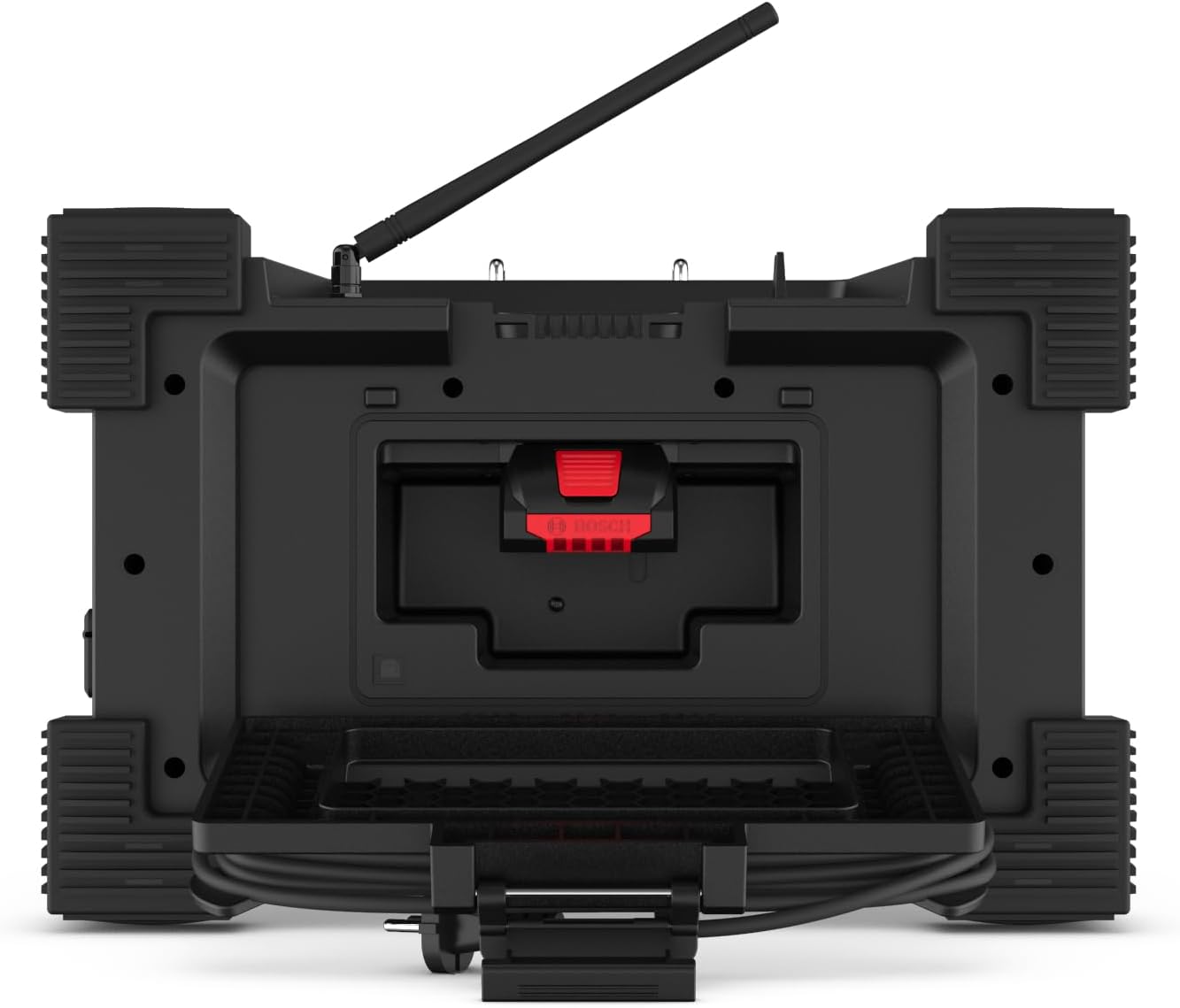
The image illustrates the open battery compartment, located on the side of the radio. This compartment is designed to securely house a Bosch Professional 18V AMPShare battery (sold separately), ensuring protection from jobsite elements.
3.4 Power Cord Storage

This view from the bottom of the radio shows the integrated storage for the AC power cord. This feature allows for convenient and secure storage of the power cable when not in use or during transport.
4. Setup
4.1 Unpacking
- Carefully remove the radio and all accessories from the packaging.
- Inspect the radio for any signs of damage. Do not use if damaged.
- Retain packaging for future transport or storage.
4.2 Powering the Radio
The ROCKHART radio can be powered by an AC adapter or a compatible 18V AMPShare battery.
4.2.1 AC Power Connection
- Locate the integrated power cord storage on the bottom of the radio.
- Unwind the power cord and plug it into a suitable AC outlet.
4.2.2 Battery Installation (Battery Sold Separately)
- Open the battery compartment cover on the side of the radio.
- Insert a charged Bosch Professional 18V AMPShare battery into the slot, ensuring it clicks into place.
- Close the battery compartment cover securely to ensure water and dust resistance.
4.3 Antenna Adjustment
Extend the telescopic antenna for optimal DAB+ and FM radio reception. Adjust its position for the best signal quality.
5. Operating Instructions
5.1 Power On/Off
- Press the POWER button to turn the radio on or off.
5.2 Source Selection
- Press the SOURCE button repeatedly to cycle through available modes: DAB+, FM, Bluetooth, AUX, USB.
5.3 DAB+ Radio Operation
- Select DAB+ mode using the SOURCE button.
- The radio will automatically scan for available DAB+ stations upon first use.
- Use the TUNE/SELECT knob to navigate through the station list. Press the knob to select a station.
- To save a preset: Tune to the desired station, then press and hold one of the PRESET (1-6) buttons until the display confirms it is saved.
- To recall a preset: Briefly press the corresponding PRESET (1-6) button.
5.4 FM Radio Operation
- Select FM mode using the SOURCE button.
- Use the TUNE/SELECT knob to manually tune to a frequency.
- Press and hold the TUNE/SELECT knob for automatic scanning to the next available station.
- To save a preset: Tune to the desired station, then press and hold one of the PRESET (1-6) buttons until the display confirms it is saved.
- To recall a preset: Briefly press the corresponding PRESET (1-6) button.
5.5 Bluetooth Connectivity
- Select Bluetooth mode using the SOURCE button. The display will show "Pairing" or similar.
- On your mobile device, enable Bluetooth and search for available devices.
- Select "ROCKHART" from the list of devices.
- Once paired, the radio will confirm the connection, and you can play audio from your device.
5.6 AUX Input
- Select AUX mode using the SOURCE button.
- Connect your external audio device (e.g., MP3 player) to the AUX input port using a 3.5mm audio cable.
- Control playback and volume from your connected device.
5.7 USB Playback and Charging
- Insert a USB flash drive containing audio files into the USB port.
- Select USB mode using the SOURCE button. The radio will automatically begin playing compatible audio files.
- The USB port can also be used to charge external devices (power bank function) when the radio is powered on.
5.8 Sound Settings
- Press the EQ button to cycle through equalizer presets or adjust bass/treble settings.
- Press the LOUDNESS button to enhance bass and treble at low volumes.
6. Maintenance
6.1 Cleaning
- Ensure the radio is powered off and unplugged before cleaning.
- Wipe the exterior with a soft, slightly damp cloth.
- Do not use harsh chemicals, solvents, or abrasive cleaners.
- Keep ports and openings free of dust and debris.
6.2 Storage
- Store the radio in a cool, dry place away from direct sunlight.
- If storing for an extended period, remove the battery.
7. Troubleshooting
If you encounter issues with your ROCKHART radio, refer to the following common problems and solutions:
| Problem | Possible Cause | Solution |
|---|---|---|
| Radio does not power on. | No power, discharged battery, faulty power cord. | Check AC connection or ensure battery is charged and correctly inserted. |
| Poor radio reception. | Antenna not extended, weak signal, interference. | Extend and adjust the antenna. Move the radio to a different location. |
| No sound. | Volume too low, incorrect source selected, faulty audio cable. | Increase volume. Verify correct source. Check audio cable for AUX connection. |
| Bluetooth not connecting. | Not in pairing mode, device too far, previously paired device connected. | Ensure radio is in Bluetooth pairing mode. Move device closer. Disconnect from other Bluetooth devices. |
| USB playback not working. | Unsupported file format, USB drive not properly inserted, corrupted files. | Ensure files are compatible. Reinsert USB drive. Try a different USB drive. |
If the problem persists after trying these solutions, please contact PerfectPro customer support.
8. Specifications
| Feature | Detail |
|---|---|
| Brand | PerfectPro |
| Model Number | RH4-18V |
| Color | Black |
| Connectivity Technology | Bluetooth |
| Special Feature | Shock resistant, Rain, Dirt, and Dust resistant |
| Compatible Devices | MP3 player |
| Product Dimensions | 31L x 47W x 31H centimeters |
| Tuning Technology | DAB+, FM |
| Supported Radio Bands | DAB+, FM |
| Power Source | Battery powered (compatible with Bosch Professional 18V AMPShare batteries), AC adapter |
| Audio Output | High Power 2-way speaker system (2 x 30W woofers, 2 tweeters) |
| Included Components | Bluetooth, Speaker (Battery sold separately) |
9. Warranty and Support
For warranty information, product registration, or technical support, please refer to the official PerfectPro website or contact your local PerfectPro dealer. Keep your proof of purchase for warranty claims.