
Introduction
The Konnected Alarm Panel Pro is a 12-zone wired smart alarm panel designed to integrate existing wired alarm systems with modern smart home platforms. This device allows users to convert traditional wired sensors into smart sensors, enabling control and monitoring through various smart home applications and voice assistants. This manual provides instructions for the installation, operation, and maintenance of the Konnected Alarm Panel Pro (Board Only).
This product is the board only and does not include additional accessories. It offers connectivity via Wi-Fi, Ethernet, and Power over Ethernet (PoE), eliminating the need for batteries or monthly subscriptions for basic functionality.

Image: Konnected logo indicating the product's purpose to make wired alarm systems smart.
Product Overview
The Konnected Alarm Panel Pro is a compact circuit board designed for integration into existing alarm system enclosures. It features 12 zones for connecting various wired sensors and outputs for sirens or strobes. The board supports multiple connectivity options for flexible installation.
- 12 Zones: Connect up to 12 wired sensors such as door/window contacts, motion sensors, glass break detectors, and leak sensors.
- Siren/Strobe Outputs: Integrate existing wired sirens or strobes for audible and visual alerts.
- Connectivity: Supports Wi-Fi, Ethernet, and Power over Ethernet (PoE) for network and power supply.
- Compatibility: Designed to work with leading smart home platforms including SmartThings, Alexa, Home Assistant, and Hubitat.
- Expandable: Multiple Konnected Alarm Panels can be added for larger installations.

Image: The Konnected Alarm Panel Pro circuit board, highlighting its various connection points.

Image: Visual representation of the Alarm Panel Pro's key features and benefits.
Setup
1. Safety Precautions
- Before beginning installation, ensure that power to your existing alarm system and any associated components is completely disconnected.
- Verify all wiring connections are secure to prevent electrical hazards or damage to the device.
2. Wiring the Konnected Board
The Konnected Alarm Panel Pro is designed to replace the main control board of a traditional wired alarm system. Identify the wires from your existing sensors (door/window contacts, motion detectors, glass break sensors, leak sensors) and connect them to the corresponding zone terminals on the Konnected board. Refer to the wiring diagram provided with your original alarm system for sensor identification.
- Connect sensor wires to the designated zone terminals (labeled 1-12).
- Connect siren or strobe wires to the ALARM 1 or ALARM 2 output terminals.
- Ensure proper polarity for powered sensors and outputs.
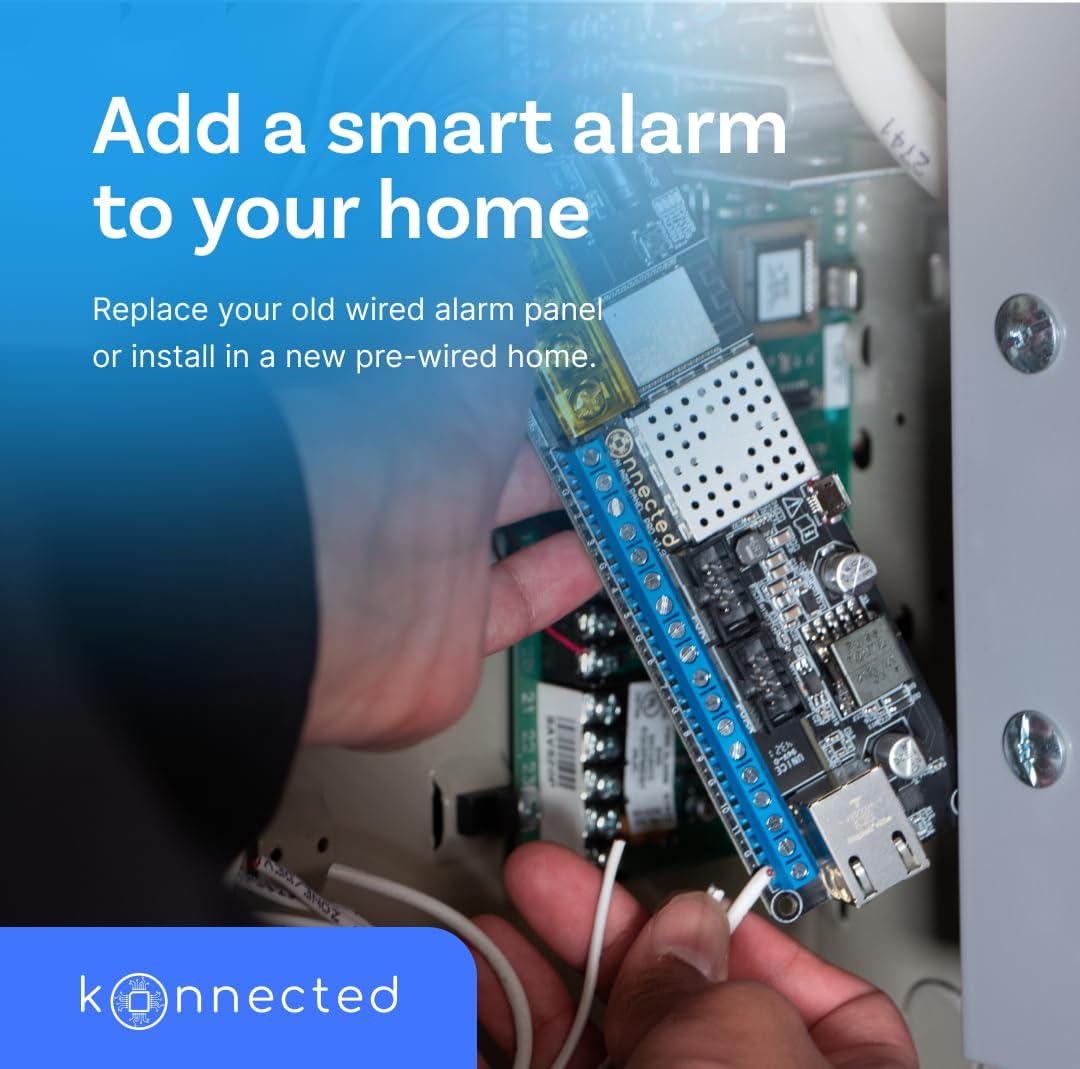
Image: Installation of the Konnected board into an alarm panel, showing wiring connections.
3. Power and Network Connection
The Konnected Alarm Panel Pro can be powered via a 12V DC power adapter (not included with the board-only version) or Power over Ethernet (PoE) if connected to a PoE-enabled network switch or injector.
- DC Power: Connect a 12V DC power adapter to the DC input jack.
- PoE: Connect an Ethernet cable from a PoE-enabled port to the RJ45 Ethernet port on the board.
- Wi-Fi: If using Wi-Fi, ensure the board is within range of your wireless network. Configuration for Wi-Fi is typically done during the initial setup process through the Konnected app or web interface.
4. Initial Configuration and Smart Home Integration
Once powered and connected to your network, follow the Konnected official documentation or app instructions to discover and configure the device. This process typically involves:
- Accessing the Konnected device via a web browser or dedicated mobile application.
- Connecting the device to your Wi-Fi network (if not using Ethernet/PoE).
- Integrating the Konnected device with your preferred smart home platform (e.g., SmartThings, Home Assistant, Hubitat, Amazon Alexa).
- Mapping your wired sensors to zones within the smart home platform.

Image: The Konnected app interface demonstrating compatibility with various smart home platforms.
Operating
After successful setup and integration, the Konnected Alarm Panel Pro allows for comprehensive control and monitoring of your wired sensors through your chosen smart home platform.
Remote Control and Monitoring
Access the status of your wired sensors (e.g., open/closed, motion detected) and control your alarm system (arm/disarm) from anywhere using your smartphone or tablet via the smart home app. Voice assistants like Amazon Alexa can also be used for convenient control.

Image: Remote monitoring of the home security system via a smartphone.
Custom Automations and Routines
Leverage the capabilities of your smart home platform to create custom automations based on sensor activity. Examples include:
- Automatically arming the system when the last person leaves home.
- Turning on smart lights when a motion sensor is triggered.
- Adjusting smart thermostats based on door/window open status.
- Receiving push notifications for specific sensor events.

Image: Users interacting with a smartphone to set up home automations.
Maintenance
The Konnected Alarm Panel Pro requires minimal maintenance. Key considerations include:
- Firmware Updates: Periodically check the official Konnected website or your smart home platform for available firmware updates to ensure optimal performance and access to new features. Updates are typically performed via the web interface or app.
- Power Supply: Ensure a stable 12V DC power supply or reliable PoE connection. Fluctuations in power can affect device stability.
- Network Stability: Maintain a stable Wi-Fi or Ethernet connection for consistent operation and communication with your smart home platform.
- Physical Inspection: Occasionally inspect wiring connections to ensure they remain secure and free from corrosion.
Troubleshooting
If you encounter issues with your Konnected Alarm Panel Pro, consider the following troubleshooting steps:
- No Power/Device Not Responding: Verify the 12V DC power adapter is correctly connected and supplying power, or that the PoE connection is active and functional. Check power indicator lights on the board.
- Network Connectivity Issues: If using Wi-Fi, ensure the device is within range of your router and that your Wi-Fi credentials are correct. For Ethernet/PoE, check the cable connection and router/switch status. Try restarting your router and the Konnected board.
- Sensors Not Registering: Double-check all sensor wiring connections to the Konnected board. Ensure the sensors are correctly configured within your smart home platform and that their type (e.g., Normally Open/Normally Closed) matches the configuration. Note that some specialized sensors, such as certain inertia shock sensors, may not be fully compatible or require specific configuration adjustments.
- Smart Home Platform Integration Problems: Review the integration steps for your specific smart home platform. Ensure the Konnected device is properly discovered and authorized.
- Unexpected Behavior: Perform a factory reset if recommended by Konnected support, but be aware this will erase all configurations. Consult the official Konnected support resources for detailed troubleshooting guides and community forums.
Specifications
| Feature | Detail |
|---|---|
| Brand | Konnected |
| Model Number | Board only |
| Capacity | 12 Zones |
| Connectivity Technology | Wi-Fi, Ethernet |
| Power Source | DC (12 Volts), PoE |
| Compatible Devices | Smartphone (via smart home platforms) |
| Control Method | App |
| Installation Type | Wall mount (within existing alarm panel enclosure) |
| Product Dimensions (L x W x H) | 5.71 x 1.81 x 0.79 inches |
| Item Weight | 2.89 ounces (0.08 Kilograms) |
| Batteries Included/Required | No |
| UPC | 681378187205 |
Warranty and Support
The Konnected Alarm Panel Pro comes with a 1 Year Warranty Against Manufacturer Defects. For warranty claims, technical support, or further assistance, please refer to the official Konnected website or contact their customer service directly.
Additional resources, including detailed wiring diagrams, setup guides, and community forums, are available on the Konnected support portal.


